ModelLineup

Every answer on this page was written by an AI model, named on the answer. Answers can be wrong, out of date or made up, even when they sound sure. Check anything that matters before you rely on it.

Models Fable 5.2

Claude Fable 5.2

Released
Tested
Settings
Low effort and Max effort

In short

Ranked 2nd of 9 at max effort, level with Sonnet 5.5 and Opus 5.

Fable 5.2 answered all 24 prompts at both efforts, scoring 93 at low effort and 91 at max. At max effort it met every check on every code prompt, but its kanban board ran out of room while it was still thinking, before any page was written, and that answer is most of the gap between the scores.

At max effort Fable 5.2 scored behind Fable 5.1 and scored level with Opus 5.5, with a median max effort answer of 3 minutes 41 seconds and $0.688; at low effort it scored 93, with a median answer of 20.2 seconds and $0.097.

Written by an AI model from these results; every figure in it is filled in by a program. How it was made.

Fable 5.2

24 prompts, every check counted

Low effort

93

  • Floor47/49, 96% passed
  • Middle54/58, 93% passed
  • Top61/65, 94% passed

Median answer 20 s, 9.7¢.

Max effort

91

  • Floor46/49, 94% passed
  • Middle52/58, 90% passed
  • Top59/65, 91% passed

Median answer 3 min 41 s, 69¢.

Max passed 5 fewer checks, cost 8.5 times as much and took 9.6 times as long. Costs are at Anthropic’s API prices on the day it was tested, .

What the results show

Written by an AI model from these results; every figure in it is filled in by a program. How it was made.

Best at

  • Code at max effort: it met every check on every code prompt, the pull request review included. F01 F02 F03 F04 F05 F06 F07
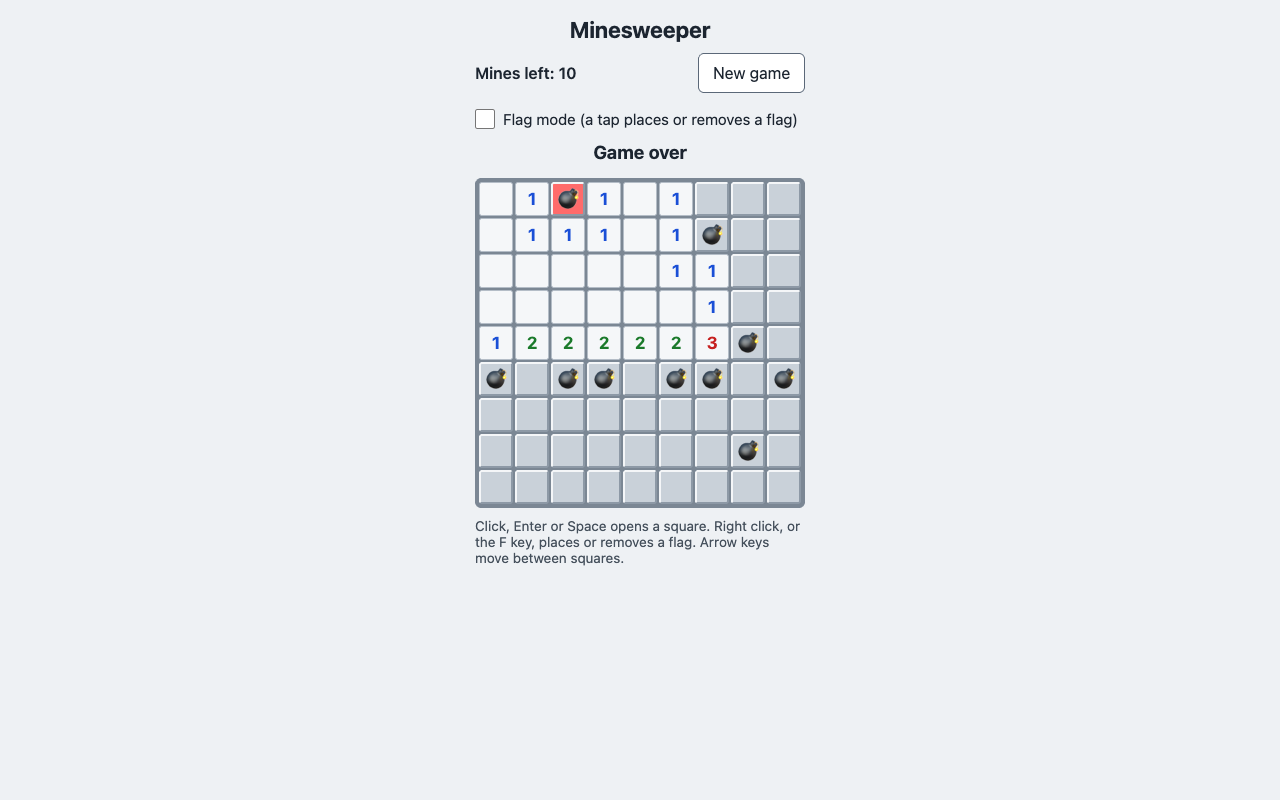
  • Web pages at both efforts: the landing page, the dashboard from the mockup, the Minesweeper game and the garden page fixes passed every page test and every look check. B01 B02 B04 B05
  • Careful reading at both efforts: it found the wrong line on the market receipt, said it did not know the invented novel, and kept its bread maker answers to what the manual says. I01 H02 K02
  • The text to the plumber, the update from a messy thread and the volunteer rota met every check at both efforts. W01 W02 P02

Stumbled on

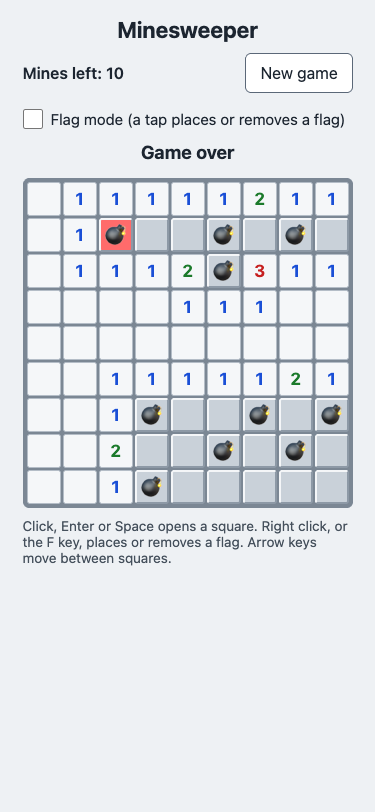
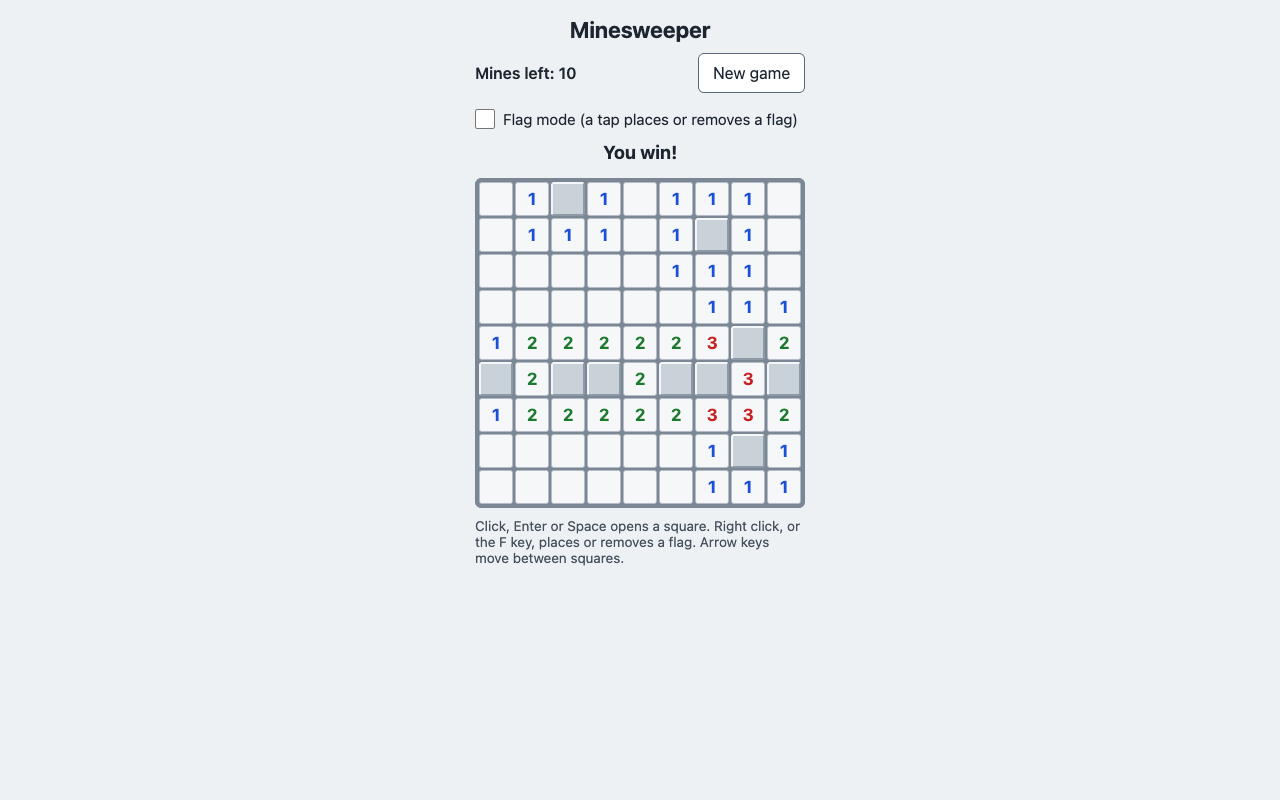
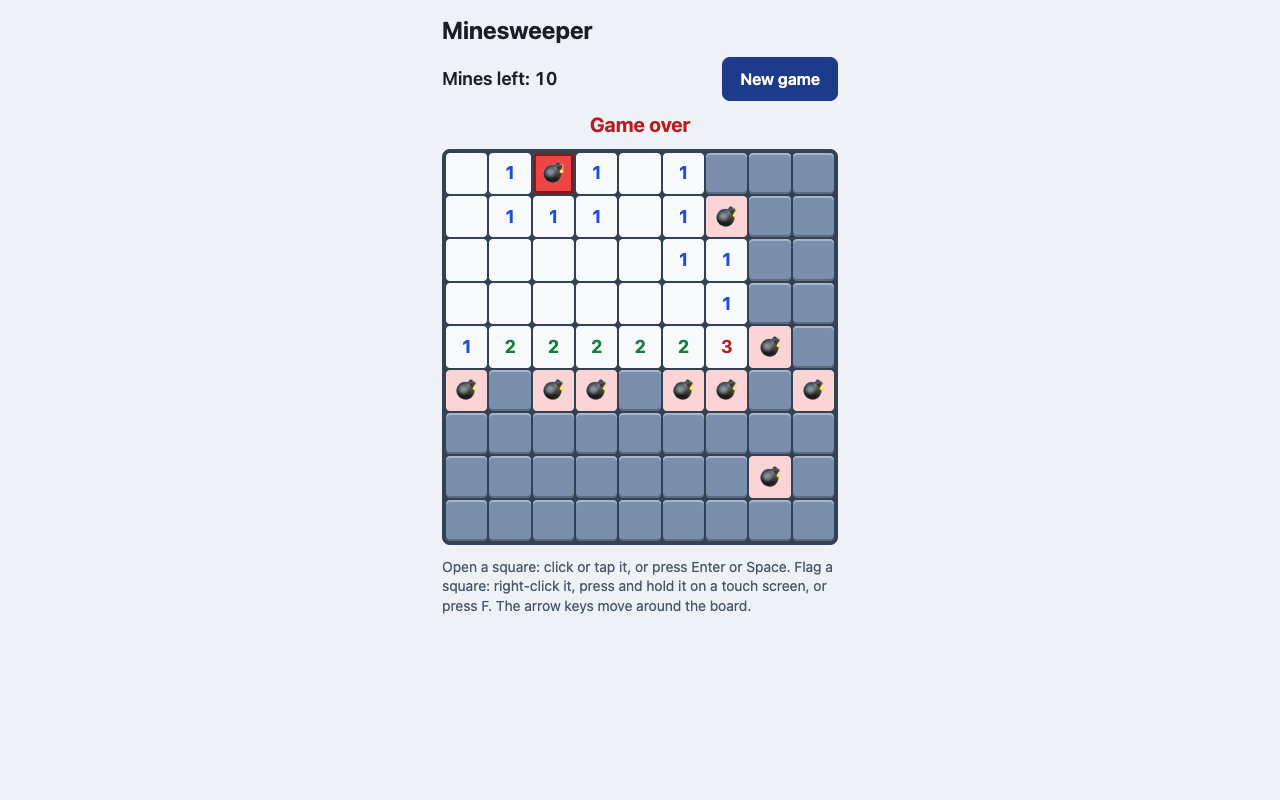
  • At max effort the kanban board ran out of room before any page was written, so every check on it failed; at low effort it missed only the check on dragging, reordering and keeping cards after a reload. B03
  • The booking plan left a working booking flow out of its first phase at both efforts, and the column rename plan did not drop the old column as its last step. A01 A03
  • The feature spec did not point out that the brief contradicts itself on how long invites last or on who may send them, at either effort. A04
  • At low effort the cycling paragraph took the printed total on trust and used a figure not in the sources, and the review and microservices answers went over their word limits; at max the microservices answer gave no middle path. R02 F04 A02

What max effort changed

  • Overall it scored level at both efforts: 3 prompts gained at max effort, 2 lost ground and 19 stayed the same, for about 8.5 times the cost and 9.6 times the time.
  • Max effort gained on the cycling paragraph, from 4 of 6 checks to 6 of 6, the pull request review, from 6 of 7 to 7 of 7, and the feature spec, from 5 of 8 to 6 of 8. R02 F04 A04
  • It lost the kanban board, from 8 of 9 checks to 0 of 9, and a little on the exact-length story, from 6 of 6 to 5 of 6; thinking used 769,967 tokens at max, 43,127 at low. B03 S02

Worth knowing

  • Each prompt was answered once at each effort, so a single answer can move a prompt's score, and small gaps between scores are treated as level.
  • Each model gets its own standard output allowance. An answer that runs out of room is scored on whatever it did write, so an unfinished page or program usually fails its tests.
  • Its answers were collected with a newer release of the same program than the other models, because earlier releases do not offer it; the instruction, the prompts and the checks were the same.
  • Costs are what the same tokens would cost at the published API prices, not what anyone paid.

Score by kind of work

Building web pages

  • Low effort
    98
  • Max effort
    80

Code

  • Low effort
    98
  • Max effort
    100

Planning and architecture

  • Low effort
    82
  • Max effort
    85

Everyday

  • Low effort
    96
  • Max effort
    98

Every answer

Each row opens to the low and max answers side by side. Each prompt is described on the prompts page.

Building web pages

B01A landing page for a small invoicing appLow 9/9Max 9/9Same

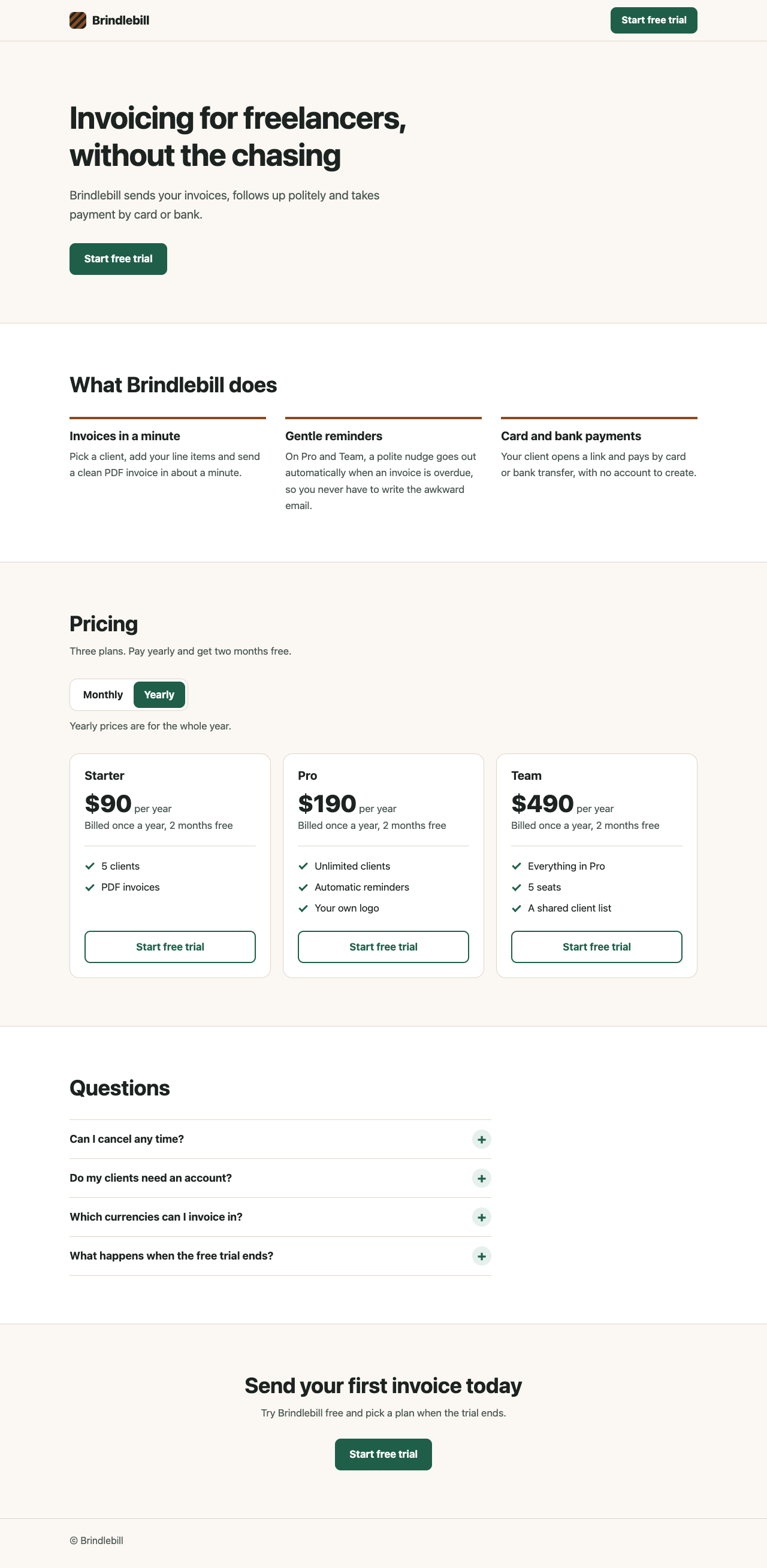
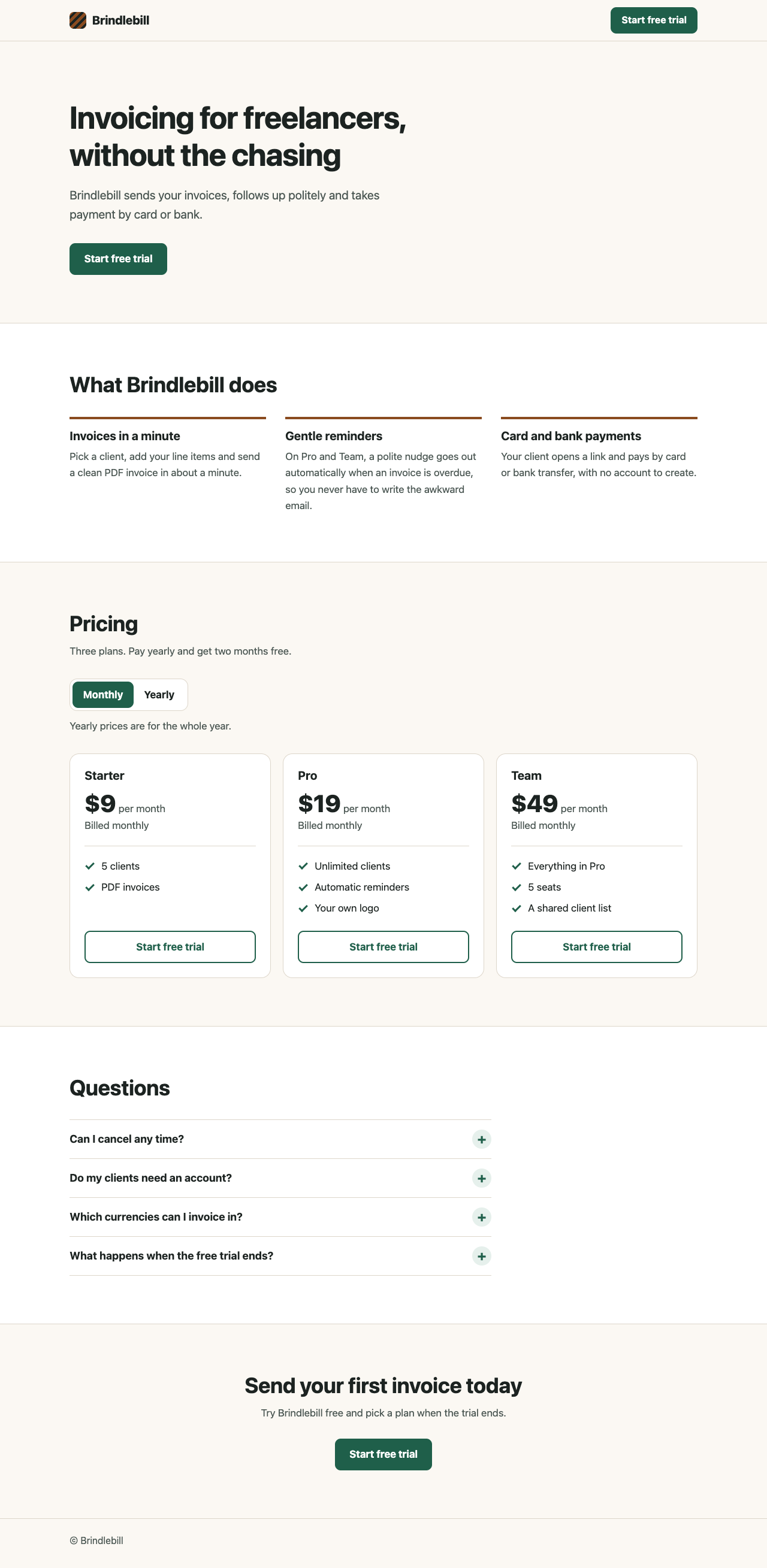
What it asks for. Asks for a one-page landing site for a small invoicing app for freelancers, as a single HTML file with no libraries and nothing loaded from outside. The page needs a headline, three named features, three price plans with a monthly and yearly switch (yearly gives two months free and is quoted as one total for the year), a four-question FAQ that opens and closes, and a sign-up button. It has to read well on a phone.

Both settings passed 9 of 9 checks.

AI answer from Fable 5.2 · low effort · 10 Nov 2026

9 of 9
Screenshot of the page built in this answer, at a desktop width of 1280 pixels
Our screenshot, 1280 by 800. Open it for the full length.
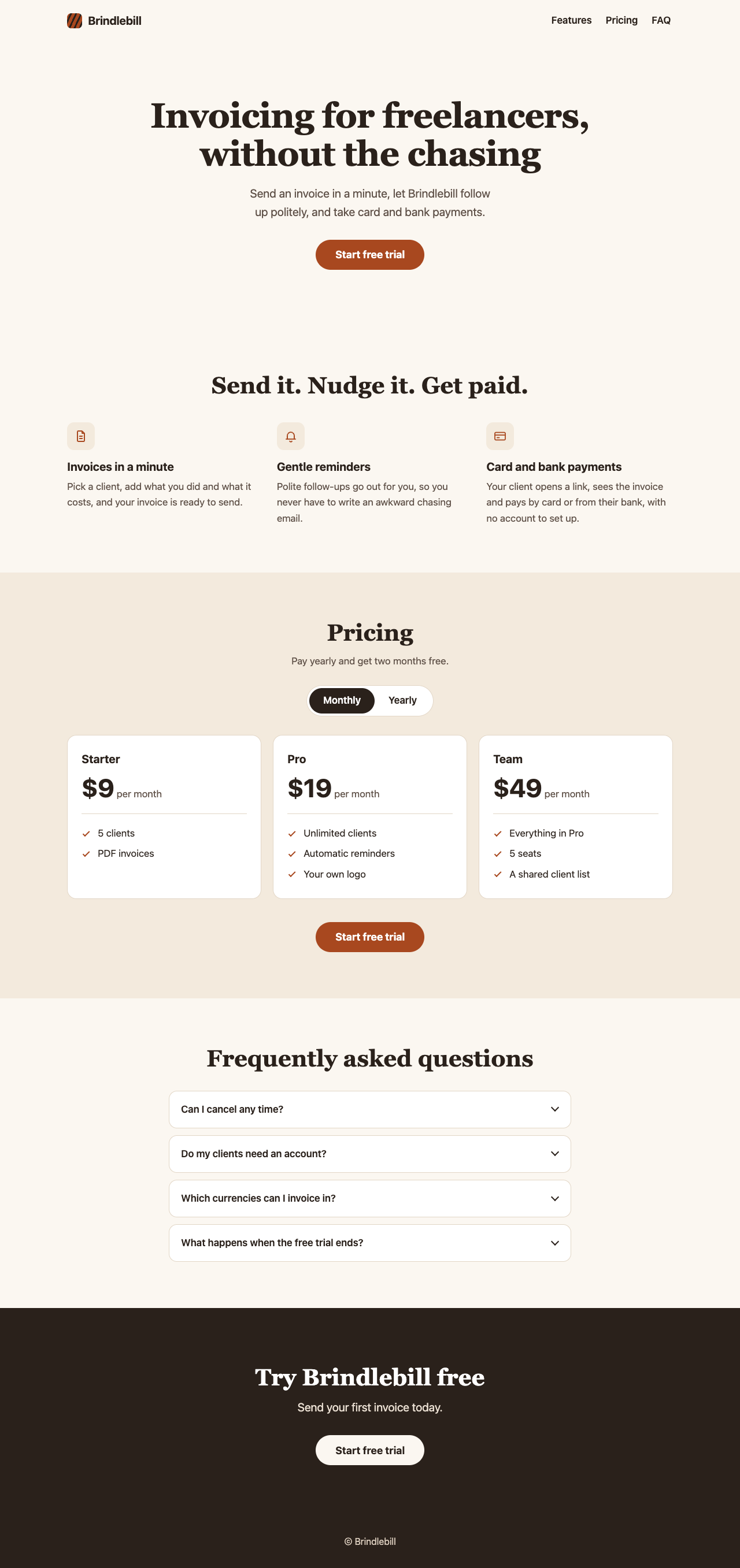
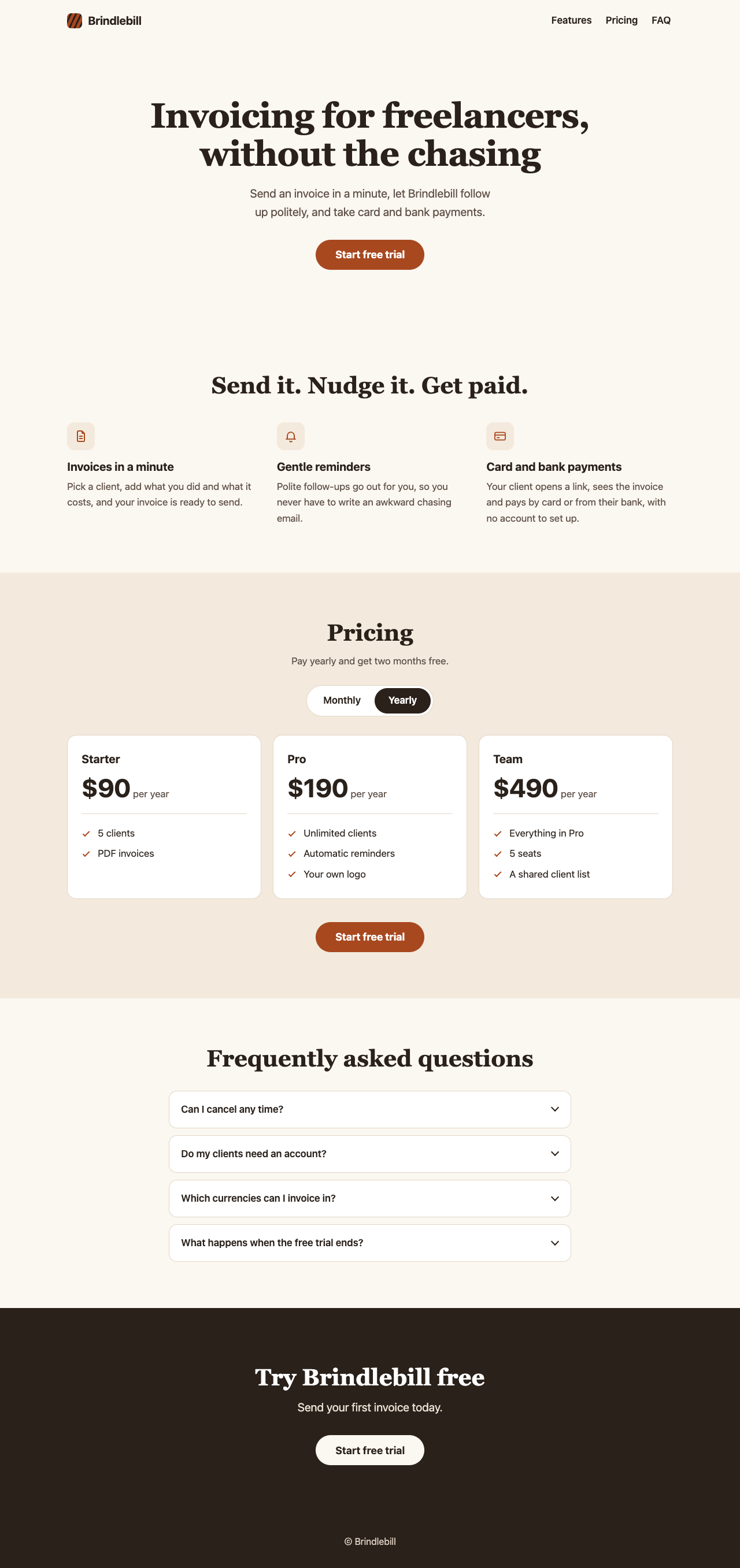
Screenshot of the page built in this answer, at a phone width of 375 pixels
Phone, 375 by 812.
More screenshots (2).
Screenshot of the page built in this answer, at a desktop width of 1280 pixelsScreenshot of the page built in this answer, at a phone width of 375 pixels
Show the code and the answer.

Here is the whole page as one file: save it as index.html and it runs with no libraries, outside fonts or images. I have not opened it in a browser, so give it a quick check on your phone before launch.

<!DOCTYPE html>
<html lang="en">
<head>
<meta charset="utf-8">
<meta name="viewport" content="width=device-width, initial-scale=1">
<title>Brindlebill: invoicing for freelancers</title>
<meta name="description" content="Brindlebill is a small invoicing app for freelancers. Send an invoice in a minute, let reminders do the chasing, and get paid by card or bank.">
<style>
  :root {
    --bg: #fbf8f3;
    --surface: #ffffff;
    --ink: #1c2321;
    --muted: #4b5753;
    --line: #ddd6ca;
    --accent: #1f5f4a;
    --accent-dark: #174838;
    --accent-soft: #e6f0ec;
    --brindle: #8a4b1f;
    color-scheme: light;
  }

  *, *::before, *::after { box-sizing: border-box; }

  html { -webkit-text-size-adjust: 100%; text-size-adjust: 100%; }

  body {
    margin: 0;
    background: var(--bg);
    color: var(--ink);
    font-family: system-ui, -apple-system, "Segoe UI", Roboto, Helvetica, Arial, sans-serif;
    font-size: 1.0625rem; /* 17px */
    line-height: 1.6;
  }

  h1, h2, h3, p, ul { margin: 0; }

  h1, h2, h3 { line-height: 1.2; }

  h1 { font-size: clamp(2rem, 6vw, 3.25rem); letter-spacing: -0.02em; }
  h2 { font-size: clamp(1.6rem, 4.5vw, 2.25rem); letter-spacing: -0.01em; }
  h3 { font-size: 1.25rem; }

  a { color: var(--accent); }

  :focus-visible {
    outline: 3px solid var(--brindle);
    outline-offset: 3px;
  }

  .wrap {
    width: 100%;
    max-width: 68rem;
    margin: 0 auto;
    padding: 0 1.25rem;
  }

  section { padding: 3.5rem 0; }

  .section-intro {
    max-width: 40rem;
    margin-bottom: 2rem;
  }
  .section-intro p { margin-top: 0.75rem; color: var(--muted); }

  .visually-hidden {
    position: absolute;
    width: 1px;
    height: 1px;
    margin: -1px;
    padding: 0;
    overflow: hidden;
    clip: rect(0 0 0 0);
    clip-path: inset(50%);
    white-space: nowrap;
    border: 0;
  }

  /* Buttons */
  .button {
    display: inline-flex;
    align-items: center;
    justify-content: center;
    min-height: 3rem;
    padding: 0.7rem 1.4rem;
    border: 2px solid var(--accent);
    border-radius: 0.6rem;
    background: var(--accent);
    color: #ffffff;
    font-size: 1.0625rem;
    font-weight: 700;
    text-decoration: none;
    text-align: center;
  }
  .button:hover { background: var(--accent-dark); border-color: var(--accent-dark); }

  .button.outline {
    background: transparent;
    color: var(--accent);
  }
  .button.outline:hover { background: var(--accent-soft); }

  /* Header */
  .site-header {
    border-bottom: 1px solid var(--line);
    background: var(--bg);
  }
  .site-header .wrap {
    display: flex;
    align-items: center;
    justify-content: space-between;
    gap: 1rem;
    padding-top: 0.75rem;
    padding-bottom: 0.75rem;
  }
  .brand {
    display: inline-flex;
    align-items: center;
    gap: 0.6rem;
    color: var(--ink);
    font-size: 1.25rem;
    font-weight: 800;
    letter-spacing: -0.01em;
    text-decoration: none;
  }
  .brand-mark {
    width: 1.75rem;
    height: 1.75rem;
    border-radius: 0.45rem;
    background: repeating-linear-gradient(
      135deg,
      var(--brindle) 0 5px,
      var(--ink) 5px 9px
    );
  }
  .site-header .button {
    min-height: 2.75rem;
    padding: 0.4rem 1rem;
    font-size: 1rem;
  }

  /* Hero */
  .hero { padding: 4rem 0 3.5rem; }
  .hero h1 { max-width: 18ch; }
  .hero .pitch {
    max-width: 36rem;
    margin-top: 1.25rem;
    color: var(--muted);
    font-size: 1.25rem;
  }
  .hero .button { margin-top: 2rem; }

  /* Features */
  .features { background: var(--surface); border-block: 1px solid var(--line); }
  .feature-grid {
    display: grid;
    gap: 2rem;
    grid-template-columns: 1fr;
  }
  .feature h3 {
    padding-top: 1rem;
    border-top: 4px solid var(--brindle);
  }
  .feature p { margin-top: 0.6rem; color: var(--muted); }

  /* Pricing */
  .billing {
    margin: 0 0 2rem;
    padding: 0;
    border: 0;
    min-width: 0;
  }
  .billing-options {
    display: inline-flex;
    padding: 0.25rem;
    border: 1px solid var(--line);
    border-radius: 0.8rem;
    background: var(--surface);
  }
  .billing-options label {
    display: inline-flex;
    align-items: center;
    justify-content: center;
    min-height: 2.75rem;
    padding: 0.4rem 1.1rem;
    border-radius: 0.6rem;
    font-weight: 700;
    cursor: pointer;
  }
  .billing-options input:checked + label {
    background: var(--accent);
    color: #ffffff;
  }
  .billing-options input:focus-visible + label {
    outline: 3px solid var(--brindle);
    outline-offset: 3px;
  }
  .billing-hint { margin-top: 0.75rem; color: var(--muted); }

  .plan-grid {
    display: grid;
    gap: 1.25rem;
    grid-template-columns: 1fr;
  }
  .plan {
    display: flex;
    flex-direction: column;
    padding: 1.5rem;
    border: 1px solid var(--line);
    border-radius: 1rem;
    background: var(--surface);
  }
  .price { margin-top: 0.75rem; }
  .price .amount {
    font-size: 2.5rem;
    font-weight: 800;
    letter-spacing: -0.02em;
    line-height: 1.1;
  }
  .price .period { color: var(--muted); }
  .billing-note { color: var(--muted); }
  .plan ul {
    margin: 1.25rem 0 1.5rem;
    padding: 1.25rem 0 0;
    border-top: 1px solid var(--line);
    list-style: none;
  }
  .plan li {
    position: relative;
    padding-left: 1.75rem;
  }
  .plan li + li { margin-top: 0.5rem; }
  .plan li::before {
    content: "";
    position: absolute;
    left: 0.15rem;
    top: 0.45em;
    width: 0.9rem;
    height: 0.5rem;
    border-left: 3px solid var(--accent);
    border-bottom: 3px solid var(--accent);
    transform: rotate(-45deg);
  }
  .plan .button { margin-top: auto; width: 100%; }

  /* FAQ */
  .faq { background: var(--surface); border-block: 1px solid var(--line); }
  .faq-list { max-width: 44rem; }
  .faq-list details { border-bottom: 1px solid var(--line); }
  .faq-list details:first-child { border-top: 1px solid var(--line); }
  .faq-list summary {
    display: flex;
    align-items: center;
    justify-content: space-between;
    gap: 1rem;
    min-height: 3.5rem;
    padding: 1rem 0;
    cursor: pointer;
    list-style: none;
  }
  .faq-list summary::-webkit-details-marker { display: none; }
  .faq-list summary h3 { font-size: 1.125rem; }
  .faq-list summary::after {
    content: "+";
    flex: none;
    width: 2rem;
    height: 2rem;
    border-radius: 50%;
    background: var(--accent-soft);
    color: var(--accent);
    font-size: 1.5rem;
    font-weight: 700;
    line-height: 1.9rem;
    text-align: center;
  }
  .faq-list details[open] summary::after { content: "\2212"; }
  .faq-list details p {
    padding: 0 3rem 1.25rem 0;
    color: var(--muted);
  }

  /* Final call to action */
  .signup { text-align: center; }
  .signup p {
    max-width: 32rem;
    margin: 0.75rem auto 0;
    color: var(--muted);
  }
  .signup .button { margin-top: 1.75rem; }

  /* Footer */
  .site-footer {
    padding: 1.5rem 0 2rem;
    border-top: 1px solid var(--line);
    color: var(--muted);
    font-size: 1rem;
  }

  @media (min-width: 48rem) {
    section { padding: 5rem 0; }
    .hero { padding: 6rem 0 5rem; }
    .feature-grid,
    .plan-grid { grid-template-columns: repeat(3, 1fr); }
  }
</style>
</head>
<body>

<header class="site-header">
  <div class="wrap">
    <a class="brand" href="#top">
      <span class="brand-mark" aria-hidden="true"></span>
      Brindlebill
    </a>
    <a class="button" href="/signup">Start free trial</a>
  </div>
</header>

<main id="top">

  <section class="hero">
    <div class="wrap">
      <h1>Invoicing for freelancers, without the chasing</h1>
      <p class="pitch">Brindlebill sends your invoices, follows up politely and takes payment by card or bank.</p>
      <a class="button" href="/signup">Start free trial</a>
    </div>
  </section>

  <section class="features" aria-labelledby="features-heading">
    <div class="wrap">
      <div class="section-intro">
        <h2 id="features-heading">What Brindlebill does</h2>
      </div>
      <div class="feature-grid">
        <div class="feature">
          <h3>Invoices in a minute</h3>
          <p>Pick a client, add your line items and send a clean PDF invoice in about a minute.</p>
        </div>
        <div class="feature">
          <h3>Gentle reminders</h3>
          <p>On Pro and Team, a polite nudge goes out automatically when an invoice is overdue, so you never have to write the awkward email.</p>
        </div>
        <div class="feature">
          <h3>Card and bank payments</h3>
          <p>Your client opens a link and pays by card or bank transfer, with no account to create.</p>
        </div>
      </div>
    </div>
  </section>

  <section class="pricing" aria-labelledby="pricing-heading">
    <div class="wrap">
      <div class="section-intro">
        <h2 id="pricing-heading">Pricing</h2>
        <p>Three plans. Pay yearly and get two months free.</p>
      </div>

      <fieldset class="billing">
        <legend class="visually-hidden">Billing period</legend>
        <div class="billing-options">
          <input class="visually-hidden" type="radio" name="billing" id="bill-monthly" value="monthly" checked>
          <label for="bill-monthly">Monthly</label>
          <input class="visually-hidden" type="radio" name="billing" id="bill-yearly" value="yearly">
          <label for="bill-yearly">Yearly</label>
        </div>
        <p class="billing-hint">Yearly prices are for the whole year.</p>
      </fieldset>
      <p class="visually-hidden" id="billing-status" role="status"></p>

      <div class="plan-grid">
        <div class="plan">
          <h3>Starter</h3>
          <p class="price" data-monthly="9"><span class="amount">$9</span> <span class="period">per month</span></p>
          <p class="billing-note">Billed monthly</p>
          <ul role="list">
            <li>5 clients</li>
            <li>PDF invoices</li>
          </ul>
          <a class="button outline" href="/signup">Start free trial</a>
        </div>

        <div class="plan">
          <h3>Pro</h3>
          <p class="price" data-monthly="19"><span class="amount">$19</span> <span class="period">per month</span></p>
          <p class="billing-note">Billed monthly</p>
          <ul role="list">
            <li>Unlimited clients</li>
            <li>Automatic reminders</li>
            <li>Your own logo</li>
          </ul>
          <a class="button outline" href="/signup">Start free trial</a>
        </div>

        <div class="plan">
          <h3>Team</h3>
          <p class="price" data-monthly="49"><span class="amount">$49</span> <span class="period">per month</span></p>
          <p class="billing-note">Billed monthly</p>
          <ul role="list">
            <li>Everything in Pro</li>
            <li>5 seats</li>
            <li>A shared client list</li>
          </ul>
          <a class="button outline" href="/signup">Start free trial</a>
        </div>
      </div>
    </div>
  </section>

  <section class="faq" aria-labelledby="faq-heading">
    <div class="wrap">
      <div class="section-intro">
        <h2 id="faq-heading">Questions</h2>
      </div>
      <div class="faq-list">
        <details>
          <summary><h3>Can I cancel any time?</h3></summary>
          <p>Yes. Cancel from your account page and you won't be charged again. Nothing is locked in.</p>
        </details>
        <details>
          <summary><h3>Do my clients need an account?</h3></summary>
          <p>No. They open a link, see the invoice and pay. They never have to sign up.</p>
        </details>
        <details>
          <summary><h3>Which currencies can I invoice in?</h3></summary>
          <p>You can invoice in 30 currencies, and each invoice shows the amount in your client's currency.</p>
        </details>
        <details>
          <summary><h3>What happens when the free trial ends?</h3></summary>
          <p>You pick a plan. If you don't, your account switches to view-only and your invoices stay safe for 90 days.</p>
        </details>
      </div>
    </div>
  </section>

  <section class="signup" aria-labelledby="signup-heading">
    <div class="wrap">
      <h2 id="signup-heading">Send your first invoice today</h2>
      <p>Try Brindlebill free and pick a plan when the trial ends.</p>
      <a class="button" href="/signup">Start free trial</a>
    </div>
  </section>

</main>

<footer class="site-footer">
  <div class="wrap">
    <p>&copy; Brindlebill</p>
  </div>
</footer>

<script>
  (function () {
    var MONTHS_CHARGED_PER_YEAR = 10; // yearly = two months free

    var yearlyInput = document.getElementById('bill-yearly');
    var inputs = document.querySelectorAll('input[name="billing"]');
    var prices = document.querySelectorAll('.price[data-monthly]');
    var status = document.getElementById('billing-status');

    function render(announce) {
      var yearly = yearlyInput.checked;

      prices.forEach(function (price) {
        var monthly = Number(price.getAttribute('data-monthly'));
        var amount = yearly ? monthly * MONTHS_CHARGED_PER_YEAR : monthly;

        price.querySelector('.amount').textContent = '$' + amount;
        price.querySelector('.period').textContent = yearly ? 'per year' : 'per month';
        price.nextElementSibling.textContent = yearly
          ? 'Billed once a year, 2 months free'
          : 'Billed monthly';
      });

      if (announce) {
        status.textContent = yearly ? 'Showing yearly prices.' : 'Showing monthly prices.';
      }
    }

    inputs.forEach(function (input) {
      input.addEventListener('change', function () { render(true); });
    });

    // Browsers can restore the selected option on reload or back navigation.
    window.addEventListener('pageshow', function () { render(false); });
    render(false);
  })();
</script>

</body>
</html>

A few things to know before you publish:

  • Sign-up link: every "Start free trial" button points to /signup, which is a placeholder. Replace it with your real sign-up address (five places).
  • Yearly prices: these are ten times the monthly price, so Starter $90, Pro $190 and Team $490 per year.
  • Reminders wording: the "Gentle reminders" sentence says reminders are automatic on Pro and Team, because your plan list puts automatic reminders in Pro. Change it if Starter gets reminders too.
  • My copy: the headline, pitch, three feature sentences and the closing line above the last button are my wording, so edit them freely. The FAQ answers are yours, word for word.
  • Floor2/2, 100% passed
  • Middle4/4, 100% passed
  • Top3/3, 100% passed
9 of 9 checks passedfloor 2/2, middle 4/4, top 3/3
  • Passed.
    The page loads with no errors in the console
    Floor Page test
  • Passed.
    Every section is there, with the exact plan names, prices and text
    Floor Page test
  • Passed.
    No sideways scroll on a 375 px phone
    Middle Page test
  • Passed.
    Nothing is loaded from outside the file
    Middle Page test
  • Passed.
    One h1, no skipped heading levels, text 16 px or larger, enough contrast
    Middle Page test
  • Passed.
    The page looks finished: clear hierarchy, pricing easy to compare, nothing broken
    Middle Read
  • Passed.
    Yearly shows $90, $190 and $490, and Monthly brings back $9, $19, $49
    Top Page test
  • Passed.
    Each FAQ question opens and closes from the keyboard
    Top Page test
  • Passed.
    Still no sideways scroll on a phone with Yearly on and every FAQ open
    Top Page test
  • Took 1 min 12 s.
  • First words after 27 s.
  • Wrote 8,432 tokens, 2,288 of them thinking.
  • 35¢ at API prices.
All numbers.
Time to finish1 min 12 s
Time to first words27 s
Input tokens1,399
Cached tokens0
Output tokens8,432
Thinking tokens2,288
Words in the answer1,554
Price at API rates35¢

AI answer from Fable 5.2 · max effort · 10 Nov 2026

9 of 9

Screenshot of the page built in this answer, at a desktop width of 1280 pixels
Our screenshot, 1280 by 800. Open it for the full length.
Screenshot of the page built in this answer, at a phone width of 375 pixels
Phone, 375 by 812.
More screenshots (2).
Screenshot of the page built in this answer, at a desktop width of 1280 pixelsScreenshot of the page built in this answer, at a phone width of 375 pixels
Show the code and the answer.

Here is the whole page as one file; save it as index.html and it runs on its own, with no libraries and no outside fonts or images. One thing to fix before it goes live: I don't know your sign-up address, so the three "Start free trial" buttons (top, under the pricing, bottom) link to a placeholder. Search for href="#signup" and put your real address in.

<!DOCTYPE html>
<!--
  Brindlebill landing page. Everything is in this one file.

  TODO before publishing: the three "Start free trial" links point to a
  placeholder (#signup). Replace it with your real sign-up address.
-->
<html lang="en">
<head>
  <meta charset="utf-8">
  <meta name="viewport" content="width=device-width, initial-scale=1">
  <title>Brindlebill: invoicing for freelancers</title>
  <meta name="description" content="Brindlebill is a small invoicing app for freelancers. Send an invoice in a minute, follow up with gentle reminders, and take card and bank payments.">
  <meta name="theme-color" content="#fbf7f1">

  <style>
    /* ---------- Colors and fonts (system fonts only) ---------- */
    :root {
      --bg: #fbf7f1;          /* page background */
      --tint: #f3eadd;        /* pricing band, icon tiles */
      --surface: #ffffff;     /* cards */
      --line: #e2d6c6;        /* borders */
      --ink: #2a211b;         /* main text */
      --ink-soft: #5f5148;    /* secondary text */
      --accent: #a8481f;      /* buttons, icons */
      --accent-dark: #8a3a18; /* button hover */
      --focus: #2a211b;       /* keyboard focus ring */
      --sans: system-ui, -apple-system, "Segoe UI", Roboto, "Helvetica Neue", Arial, sans-serif;
      --serif: Georgia, "Times New Roman", Times, serif;
      color-scheme: light;
    }

    /* ---------- Base ---------- */
    *, *::before, *::after { box-sizing: border-box; }

    html {
      -webkit-text-size-adjust: 100%;
      text-size-adjust: 100%;
    }

    body {
      margin: 0;
      background: var(--bg);
      color: var(--ink);
      font-family: var(--sans);
      font-size: 1.0625rem; /* 17px. Nothing on the page is set below 1rem (16px). */
      line-height: 1.6;
    }

    h1, h2, h3, p, ul { margin: 0; }

    h1, h2 {
      font-family: var(--serif);
      overflow-wrap: break-word;
      text-wrap: balance;
    }
    h1 { font-size: clamp(2.25rem, 1.5rem + 4vw, 3.75rem); line-height: 1.1; letter-spacing: -0.015em; }
    h2 { font-size: clamp(1.75rem, 1.4rem + 1.6vw, 2.5rem); line-height: 1.2; }
    h3 { font-size: 1.25rem; line-height: 1.3; }

    a { color: inherit; }

    :focus-visible {
      outline: 3px solid var(--focus);
      outline-offset: 3px;
    }

    @media (prefers-reduced-motion: no-preference) {
      html { scroll-behavior: smooth; }
    }

    /* ---------- Shared pieces ---------- */
    .wrap {
      max-width: 68rem;
      margin: 0 auto;
      padding: 0 1.25rem;
    }
    .wrap-narrow { max-width: 46rem; }

    .section { padding: clamp(3rem, 8vw, 5rem) 0; }
    .section-title { text-align: center; }

    .visually-hidden {
      position: absolute;
      width: 1px;
      height: 1px;
      margin: -1px;
      padding: 0;
      border: 0;
      overflow: hidden;
      clip: rect(0 0 0 0);
      clip-path: inset(50%);
      white-space: nowrap;
    }

    .skip-link {
      position: absolute;
      top: -5rem;
      left: 1rem;
      z-index: 10;
      padding: 0.75rem 1rem;
      border-radius: 0.5rem;
      background: var(--ink);
      color: #ffffff;
    }
    .skip-link:focus { top: 1rem; }

    .button {
      display: inline-flex;
      align-items: center;
      justify-content: center;
      min-height: 3.25rem;
      padding: 0.75rem 2rem;
      border: 2px solid transparent; /* becomes a visible edge in high-contrast modes */
      border-radius: 999px;
      background: var(--accent);
      color: #ffffff;
      font-size: 1.125rem;
      font-weight: 700;
      line-height: 1.2;
      text-decoration: none;
      transition: background-color 0.15s ease, color 0.15s ease;
    }
    .button:hover { background: var(--accent-dark); }

    /* ---------- Header ---------- */
    .site-header .wrap {
      display: flex;
      flex-wrap: wrap;
      align-items: center;
      justify-content: space-between;
      gap: 0 1.5rem;
      padding-top: 0.75rem;
      padding-bottom: 0.75rem;
    }
    .brand {
      display: flex;
      align-items: center;
      gap: 0.625rem;
      font-size: 1.25rem;
      font-weight: 700;
      letter-spacing: -0.01em;
    }
    .brand-mark {
      width: 1.625rem;
      height: 1.625rem;
      border-radius: 0.45rem;
      background: repeating-linear-gradient(115deg, var(--accent) 0 5px, var(--ink) 5px 8px);
    }
    .site-nav ul {
      display: flex;
      gap: 1rem;
      padding: 0;
      list-style: none;
    }
    .site-nav a {
      display: block;
      padding: 0.625rem 0.25rem;
      font-weight: 600;
      text-decoration: none;
    }
    .site-nav a:hover { text-decoration: underline; }

    @media (max-width: 30em) {
      .site-header .wrap { justify-content: center; }
    }

    /* ---------- Hero ---------- */
    .hero {
      padding: clamp(3rem, 9vw, 6rem) 0;
      text-align: center;
    }
    .hero h1 {
      max-width: 16em;
      margin: 0 auto;
    }
    .lead {
      max-width: 36rem;
      margin: 1.25rem auto 0;
      color: var(--ink-soft);
      font-size: 1.25rem;
      text-wrap: balance;
    }
    .hero .button { margin-top: 2rem; }

    /* ---------- Features ---------- */
    .feature-grid {
      display: grid;
      gap: 2.25rem;
      margin-top: 2.5rem;
    }
    .feature-icon {
      display: flex;
      align-items: center;
      justify-content: center;
      width: 3rem;
      height: 3rem;
      border-radius: 0.75rem;
      background: var(--tint);
      color: var(--accent);
    }
    .feature-icon svg { width: 1.5rem; height: 1.5rem; }
    .feature h3 { margin-top: 1rem; }
    .feature p { margin-top: 0.5rem; color: var(--ink-soft); }

    @media (min-width: 48em) {
      .feature-grid { grid-template-columns: repeat(3, minmax(0, 1fr)); gap: 2.5rem; }
    }

    /* ---------- Pricing ---------- */
    .pricing { background: var(--tint); }
    .pricing-note {
      margin-top: 0.75rem;
      color: var(--ink-soft);
      text-align: center;
    }

    /* The Monthly / Yearly switch needs JavaScript, so it only appears when
       scripts run. Without scripts, each plan shows both prices instead. */
    .billing {
      display: none;
      min-width: 0;
      margin: 1.75rem 0 0;
      padding: 0;
      border: 0;
      text-align: center;
    }
    .js .billing { display: block; }
    .billing-options {
      display: inline-flex;
      padding: 0.25rem;
      border: 1px solid var(--line);
      border-radius: 999px;
      background: var(--surface);
    }
    .billing-option { position: relative; display: block; }
    .billing-option input {
      position: absolute;
      top: 0;
      left: 0;
      width: 100%;
      height: 100%;
      margin: 0;
      opacity: 0;
      cursor: pointer;
    }
    .billing-option span {
      display: flex;
      align-items: center;
      min-height: 2.75rem;
      padding: 0 1.5rem;
      border-radius: 999px;
      font-weight: 600;
    }
    .billing-option input:not(:checked):hover + span { background: var(--tint); }
    .billing-option input:checked + span { background: var(--ink); color: #ffffff; }
    .billing-option input:focus-visible + span { outline: 3px solid var(--focus); outline-offset: 2px; }

    .js .pricing[data-billing="monthly"] .price-yearly,
    .js .pricing[data-billing="yearly"] .price-monthly { display: none; }

    .plan-grid {
      display: grid;
      gap: 1.25rem;
      margin-top: 2rem;
    }
    .plan {
      padding: 1.75rem 1.5rem;
      border: 1px solid var(--line);
      border-radius: 1rem;
      background: var(--surface);
    }
    .price { margin-top: 0.75rem; }
    .price-amount {
      font-size: 2.75rem;
      font-weight: 700;
      line-height: 1.1;
      letter-spacing: -0.02em;
    }
    .price-period { color: var(--ink-soft); }
    .plan-list {
      margin-top: 1.25rem;
      padding: 1.25rem 0 0;
      border-top: 1px solid var(--line);
      list-style: none;
    }
    .plan-list li { position: relative; padding-left: 1.75rem; }
    .plan-list li + li { margin-top: 0.5rem; }
    .plan-list li::before { /* check mark drawn with two borders */
      content: "";
      position: absolute;
      top: 0.4em;
      left: 0.3rem;
      width: 0.4rem;
      height: 0.75rem;
      border: solid var(--accent);
      border-width: 0 2px 2px 0;
      transform: rotate(45deg);
    }
    .pricing-cta { margin-top: 2.5rem; text-align: center; }

    @media (min-width: 52em) {
      .plan-grid { grid-template-columns: repeat(3, minmax(0, 1fr)); }
    }

    /* ---------- FAQ ---------- */
    .faq-list { margin-top: 2rem; }
    .faq-item {
      border: 1px solid var(--line);
      border-radius: 0.875rem;
      background: var(--surface);
    }
    .faq-item + .faq-item { margin-top: 0.75rem; }
    .faq-item summary {
      display: block; /* also removes the default triangle */
      position: relative;
      padding: 1.125rem 3.25rem 1.125rem 1.25rem;
      border-radius: 0.875rem;
      font-weight: 600;
      cursor: pointer;
    }
    .faq-item summary::-webkit-details-marker { display: none; }
    .faq-item summary::after { /* arrow that flips when the answer is open */
      content: "";
      position: absolute;
      top: 50%;
      right: 1.375rem;
      width: 0.625rem;
      height: 0.625rem;
      margin-top: -0.5rem;
      border: solid currentColor;
      border-width: 0 2px 2px 0;
      transform: rotate(45deg);
    }
    .faq-item[open] summary::after {
      margin-top: -0.125rem;
      transform: rotate(-135deg);
    }
    .faq-item p {
      padding: 0 1.25rem 1.25rem;
      color: var(--ink-soft);
    }

    /* ---------- Closing call to action and footer ---------- */
    .cta {
      --focus: #ffffff;
      padding: clamp(3.5rem, 9vw, 6rem) 0;
      background: var(--ink);
      color: #ffffff;
      text-align: center;
    }
    .cta p {
      margin-top: 0.75rem;
      color: #eadfd2;
      font-size: 1.25rem;
    }
    .cta .button {
      margin-top: 2rem;
      background: var(--bg);
      color: var(--ink);
    }
    .cta .button:hover { background: var(--accent); color: #ffffff; }

    .site-footer {
      padding: 1.5rem 0 2rem;
      background: var(--ink);
      color: #d9cbbb;
      font-size: 1rem;
      text-align: center;
    }

    /* Keep the chosen billing option visible in Windows high-contrast mode. */
    @media (forced-colors: active) {
      .billing-option input:checked + span {
        forced-color-adjust: none;
        background: Highlight;
        color: HighlightText;
      }
    }
  </style>

  <script>
    // Tell the CSS that scripts are running, so it can show the Monthly / Yearly switch.
    document.documentElement.classList.add('js');

    document.addEventListener('DOMContentLoaded', function () {
      var pricing = document.getElementById('pricing');
      var status = document.getElementById('billing-status');

      function showChosenPrices(announce) {
        var chosen = pricing.querySelector('input[name="billing"]:checked');
        var period = chosen ? chosen.value : 'monthly';
        pricing.setAttribute('data-billing', period);
        if (announce) {
          // Read out by screen readers.
          status.textContent = 'Showing ' + period + ' prices.';
        }
      }

      pricing.addEventListener('change', function (event) {
        if (event.target.name === 'billing') {
          showChosenPrices(true);
        }
      });

      // A browser can remember the chosen option after a reload or the Back
      // button, so match the prices to it once the page is on screen.
      showChosenPrices(false);
      window.addEventListener('pageshow', function () {
        showChosenPrices(false);
      });
    });
  </script>
</head>
<body>
  <a class="skip-link" href="#main">Skip to content</a>

  <header class="site-header">
    <div class="wrap">
      <p class="brand"><span class="brand-mark" aria-hidden="true"></span>Brindlebill</p>
      <nav class="site-nav" aria-label="Page sections">
        <ul role="list">
          <li><a href="#features">Features</a></li>
          <li><a href="#pricing">Pricing</a></li>
          <li><a href="#faq">FAQ</a></li>
        </ul>
      </nav>
    </div>
  </header>

  <main id="main">

    <section class="hero">
      <div class="wrap">
        <h1>Invoicing for freelancers, without the chasing</h1>
        <p class="lead">Send an invoice in a minute, let Brindlebill follow up politely, and take card and bank payments.</p>
        <a class="button" href="#signup">Start free trial</a>
      </div>
    </section>

    <section class="section" id="features">
      <div class="wrap">
        <h2 class="section-title">Send it. Nudge it. Get paid.</h2>
        <div class="feature-grid">

          <div class="feature">
            <span class="feature-icon" aria-hidden="true">
              <svg width="24" height="24" viewBox="0 0 24 24" fill="none" stroke="currentColor" stroke-width="1.8" stroke-linecap="round" stroke-linejoin="round">
                <path d="M7 3h7l4 4v13a1 1 0 0 1-1 1H7a1 1 0 0 1-1-1V4a1 1 0 0 1 1-1z"/>
                <path d="M14 3v4h4"/>
                <path d="M9.5 12h5M9.5 16h5"/>
              </svg>
            </span>
            <h3>Invoices in a minute</h3>
            <p>Pick a client, add what you did and what it costs, and your invoice is ready to send.</p>
          </div>

          <div class="feature">
            <span class="feature-icon" aria-hidden="true">
              <svg width="24" height="24" viewBox="0 0 24 24" fill="none" stroke="currentColor" stroke-width="1.8" stroke-linecap="round" stroke-linejoin="round">
                <path d="M6 17v-6a6 6 0 0 1 12 0v6"/>
                <path d="M4 17h16"/>
                <path d="M10 20.5a2.2 2.2 0 0 0 4 0"/>
              </svg>
            </span>
            <h3>Gentle reminders</h3>
            <p>Polite follow-ups go out for you, so you never have to write an awkward chasing email.</p>
          </div>

          <div class="feature">
            <span class="feature-icon" aria-hidden="true">
              <svg width="24" height="24" viewBox="0 0 24 24" fill="none" stroke="currentColor" stroke-width="1.8" stroke-linecap="round" stroke-linejoin="round">
                <rect x="3" y="5.5" width="18" height="13" rx="2"/>
                <path d="M3 10h18"/>
                <path d="M7 14.5h3.5"/>
              </svg>
            </span>
            <h3>Card and bank payments</h3>
            <p>Your client opens a link, sees the invoice and pays by card or from their bank, with no account to set up.</p>
          </div>

        </div>
      </div>
    </section>

    <section class="section pricing" id="pricing" data-billing="monthly">
      <div class="wrap">
        <h2 class="section-title">Pricing</h2>
        <p class="pricing-note">Pay yearly and get two months free.</p>

        <fieldset class="billing">
          <legend class="visually-hidden">Billing period</legend>
          <div class="billing-options">
            <label class="billing-option">
              <input type="radio" name="billing" value="monthly" checked>
              <span>Monthly</span>
            </label>
            <label class="billing-option">
              <input type="radio" name="billing" value="yearly">
              <span>Yearly</span>
            </label>
          </div>
        </fieldset>
        <p class="visually-hidden" id="billing-status" role="status"></p>

        <!-- Yearly price = 10 x monthly price (two months free). Change both numbers together. -->
        <div class="plan-grid">

          <div class="plan">
            <h3>Starter</h3>
            <p class="price price-monthly"><span class="price-amount">$9</span> <span class="price-period">per month</span></p>
            <p class="price price-yearly"><span class="price-amount">$90</span> <span class="price-period">per year</span></p>
            <ul class="plan-list" role="list">
              <li>5 clients</li>
              <li>PDF invoices</li>
            </ul>
          </div>

          <div class="plan">
            <h3>Pro</h3>
            <p class="price price-monthly"><span class="price-amount">$19</span> <span class="price-period">per month</span></p>
            <p class="price price-yearly"><span class="price-amount">$190</span> <span class="price-period">per year</span></p>
            <ul class="plan-list" role="list">
              <li>Unlimited clients</li>
              <li>Automatic reminders</li>
              <li>Your own logo</li>
            </ul>
          </div>

          <div class="plan">
            <h3>Team</h3>
            <p class="price price-monthly"><span class="price-amount">$49</span> <span class="price-period">per month</span></p>
            <p class="price price-yearly"><span class="price-amount">$490</span> <span class="price-period">per year</span></p>
            <ul class="plan-list" role="list">
              <li>Everything in Pro</li>
              <li>5 seats</li>
              <li>A shared client list</li>
            </ul>
          </div>

        </div>

        <p class="pricing-cta"><a class="button" href="#signup">Start free trial</a></p>
      </div>
    </section>

    <section class="section" id="faq">
      <div class="wrap wrap-narrow">
        <h2 class="section-title">Frequently asked questions</h2>
        <div class="faq-list">

          <details class="faq-item">
            <summary>Can I cancel any time?</summary>
            <p>Yes. Cancel from your account page and you won't be charged again. Nothing is locked in.</p>
          </details>

          <details class="faq-item">
            <summary>Do my clients need an account?</summary>
            <p>No. They open a link, see the invoice and pay. They never have to sign up.</p>
          </details>

          <details class="faq-item">
            <summary>Which currencies can I invoice in?</summary>
            <p>You can invoice in 30 currencies, and each invoice shows the amount in your client's currency.</p>
          </details>

          <details class="faq-item">
            <summary>What happens when the free trial ends?</summary>
            <p>You pick a plan. If you don't, your account switches to view-only and your invoices stay safe for 90 days.</p>
          </details>

        </div>
      </div>
    </section>

    <section class="cta">
      <div class="wrap">
        <h2>Try Brindlebill free</h2>
        <p>Send your first invoice today.</p>
        <a class="button" href="#signup">Start free trial</a>
      </div>
    </section>

  </main>

  <footer class="site-footer">
    <div class="wrap">
      <p>&copy; Brindlebill</p>
    </div>
  </footer>
</body>
</html>

Three things to check:

  • Yearly prices. Two months free means ten times the monthly price, so the yearly view shows $90, $190 and $490, each labelled "per year".
  • Words I wrote. The headline, the pitch, the three feature sentences, the section headings and the closing line are mine, so change anything that doesn't sound like you. The reminders sentence describes follow-ups going out automatically, which your plan list gives only to Pro and Team.
  • Testing. I couldn't open this in a browser, so try the Monthly / Yearly switch and the FAQ on your own phone before you publish.
  • Floor2/2, 100% passed
  • Middle4/4, 100% passed
  • Top3/3, 100% passed
9 of 9 checks passedfloor 2/2, middle 4/4, top 3/3
  • Passed.
    The page loads with no errors in the console
    Floor Page test
  • Passed.
    Every section is there, with the exact plan names, prices and text
    Floor Page test
  • Passed.
    No sideways scroll on a 375 px phone
    Middle Page test
  • Passed.
    Nothing is loaded from outside the file
    Middle Page test
  • Passed.
    One h1, no skipped heading levels, text 16 px or larger, enough contrast
    Middle Page test
  • Passed.
    The page looks finished: clear hierarchy, pricing easy to compare, nothing broken
    Middle Read
  • Passed.
    Yearly shows $90, $190 and $490, and Monthly brings back $9, $19, $49
    Top Page test
  • Passed.
    Each FAQ question opens and closes from the keyboard
    Top Page test
  • Passed.
    Still no sideways scroll on a phone with Yearly on and every FAQ open
    Top Page test
  • Took 14 min 15 s.
  • First words after 13 min 24 s.
  • Wrote 87,176 tokens, 79,347 of them thinking.
  • $3.50 at API prices.
All numbers.
Time to finish14 min 15 s
Time to first words13 min 24 s
Input tokens1,399
Cached tokens0
Output tokens87,176
Thinking tokens79,347
Words in the answer2,009
Price at API rates$3.50
B02Build a dashboard from a picture of its designLow 7/7Max 7/7Same

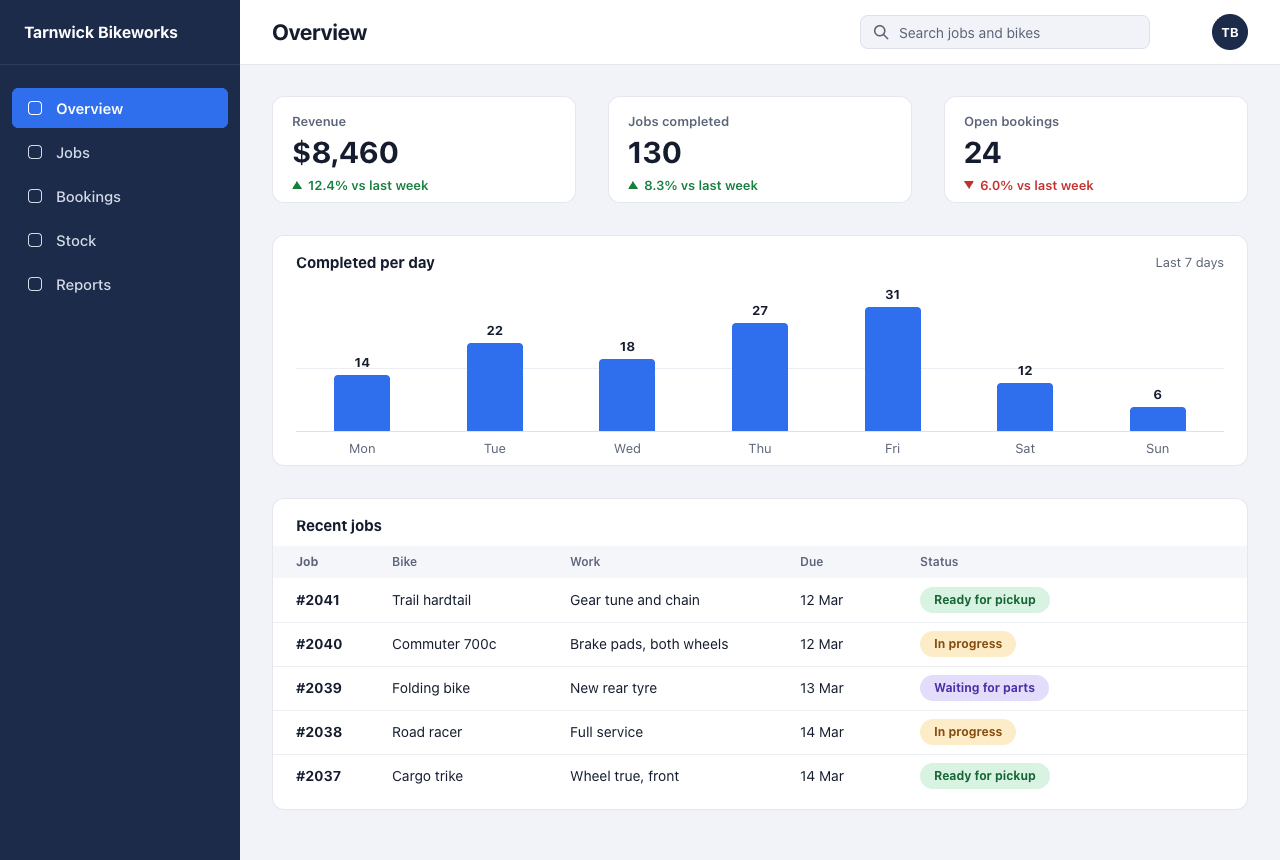
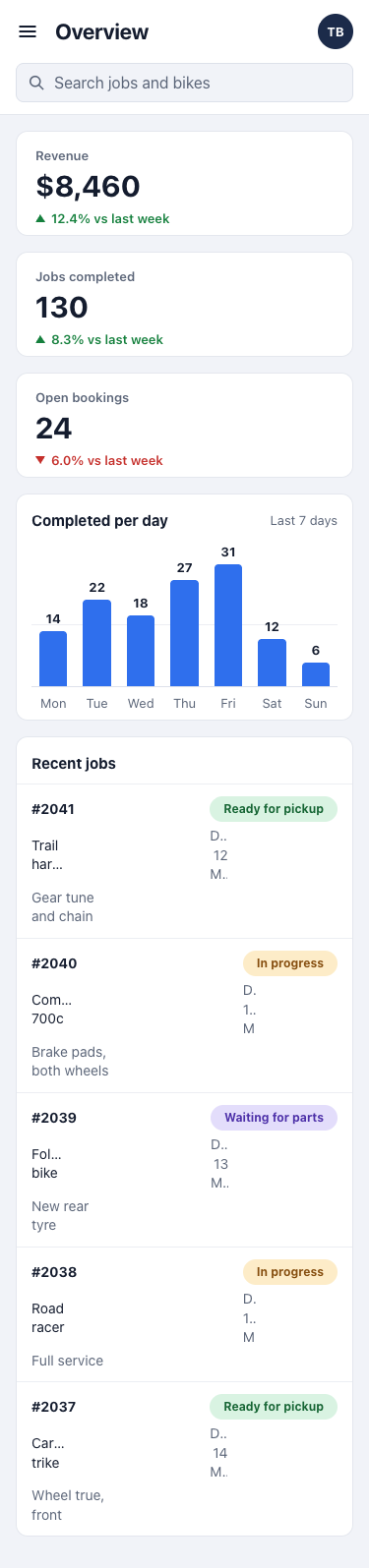
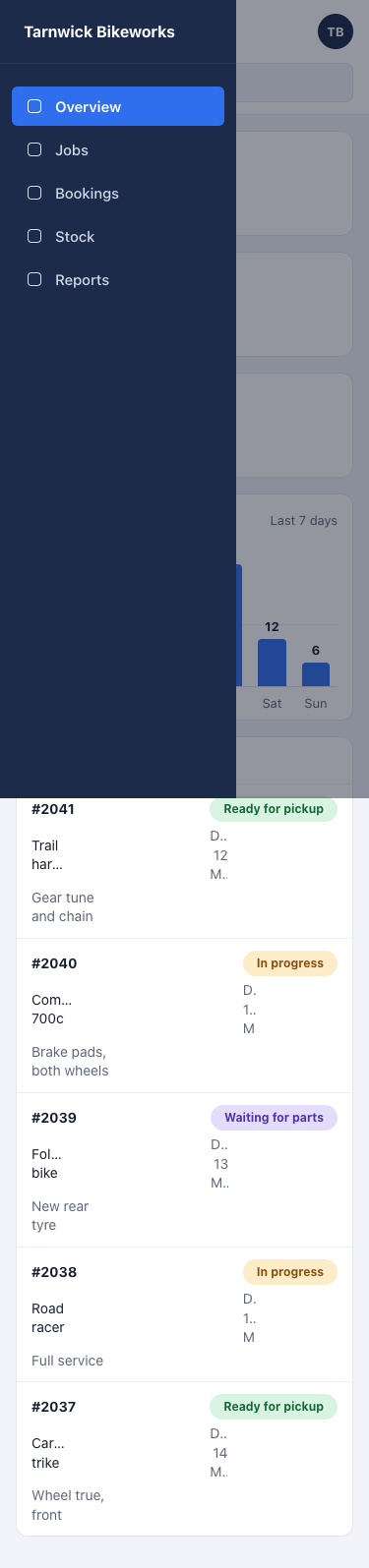
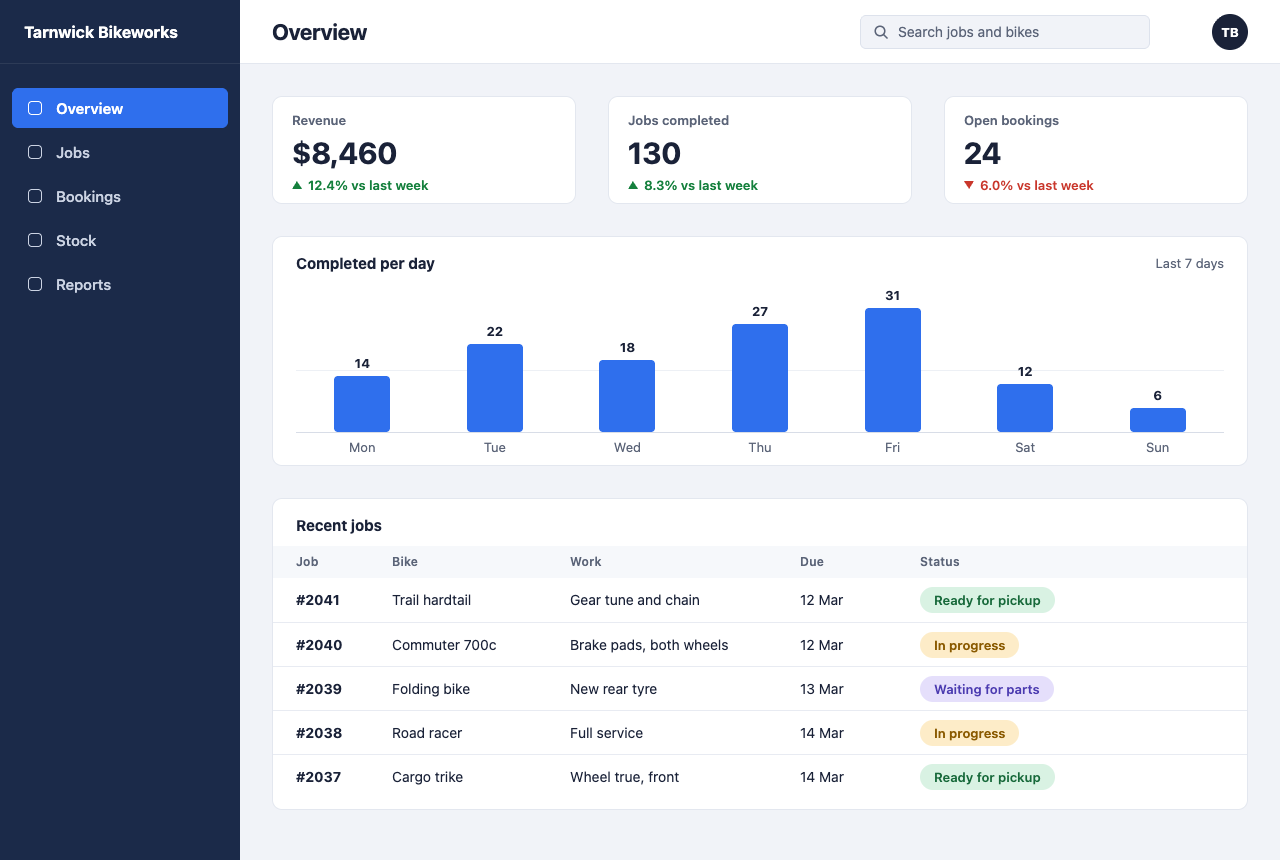
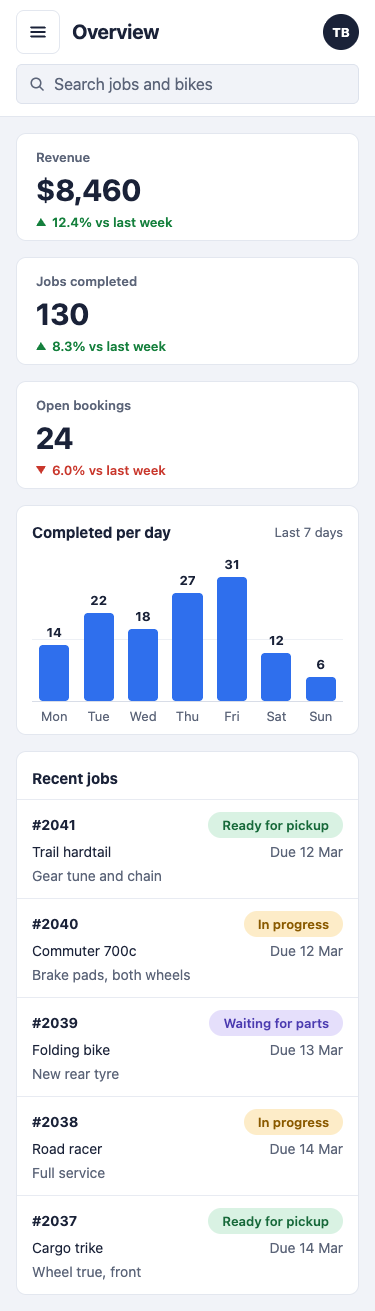
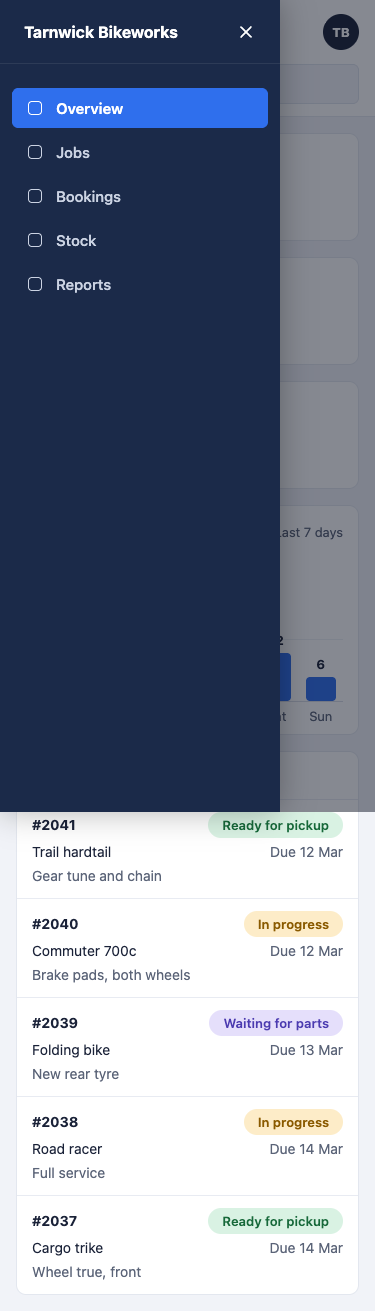
What it asks for. Sends a picture of a designer's mockup, an admin dashboard for a small bike repair shop, and asks for it to be built as one HTML file that matches the layout, colours, spacing and text as closely as it can. The bar chart has to be drawn to scale. On a phone the page must stack into one column, hide the sidebar behind a menu button and never scroll sideways.

Both settings passed 7 of 7 checks.

AI answer from Fable 5.2 · low effort · 10 Nov 2026

7 of 7

Screenshot of the page built in this answer, at a desktop width of 1280 pixels
Our screenshot, 1280 by 800. Open it for the full length.
Screenshot of the page built in this answer, at a phone width of 375 pixels
Phone, 375 by 812.
More screenshots (1).
Screenshot of the page built in this answer, at a phone width of 375 pixels
Show the code and the answer.

Here's the mockup as a single HTML file, with no libraries, fonts or images. I haven't opened it in a browser, so compare it against the mockup before handing it on.

<!DOCTYPE html>
<html lang="en">
<head>
<meta charset="utf-8">
<meta name="viewport" content="width=device-width, initial-scale=1">
<title>Overview – Tarnwick Bikeworks</title>
<style>
  :root {
    --navy: #1c2b4a;
    --blue: #2f6fed;
    --ink: #141c2e;
    --muted: #5b6578;
    --page: #f1f3f8;
    --line: #e4e7ee;
    --card: #ffffff;
    --unit: 4px; /* chart scale: 4px of bar height per completed job */
  }

  *, *::before, *::after { box-sizing: border-box; }

  html, body { margin: 0; }

  body {
    font-family: Inter, -apple-system, BlinkMacSystemFont, "Segoe UI", Roboto, "Helvetica Neue", Arial, sans-serif;
    font-size: 14px;
    line-height: 1.4;
    color: var(--ink);
    background: var(--page);
    display: flex;
    min-height: 100vh;
    -webkit-font-smoothing: antialiased;
  }

  /* ---------- Sidebar ---------- */
  .sidebar {
    width: 240px;
    flex: 0 0 240px;
    background: var(--navy);
    color: #fff;
    position: sticky;
    top: 0;
    height: 100vh;
    overflow-y: auto;
  }
  .brand {
    height: 65px;
    display: flex;
    align-items: center;
    padding: 0 24px;
    font-size: 16px;
    font-weight: 700;
    border-bottom: 1px solid rgba(255, 255, 255, 0.08);
  }
  .nav {
    list-style: none;
    margin: 0;
    padding: 23px 12px;
  }
  .nav li + li { margin-top: 4px; }
  .nav a {
    display: flex;
    align-items: center;
    gap: 14px;
    height: 40px;
    padding: 0 16px;
    border-radius: 6px;
    color: #d3dae8;
    font-size: 15px;
    font-weight: 500;
    text-decoration: none;
  }
  .nav a::before {
    content: "";
    width: 14px;
    height: 14px;
    flex: 0 0 14px;
    border: 1.5px solid currentColor;
    border-radius: 4px;
  }
  .nav a:hover { background: rgba(255, 255, 255, 0.07); }
  .nav a[aria-current="page"] {
    background: var(--blue);
    color: #fff;
    font-weight: 600;
  }
  .nav a:focus-visible,
  .menu-btn:focus-visible {
    outline: 2px solid #9dbcff;
    outline-offset: 2px;
  }

  .overlay { display: none; }

  /* ---------- Main ---------- */
  .main {
    flex: 1 1 auto;
    min-width: 0;
  }
  .topbar {
    min-height: 65px;
    display: flex;
    align-items: center;
    padding: 0 32px;
    background: #fff;
    border-bottom: 1px solid var(--line);
  }
  .topbar h1 {
    margin: 0;
    font-size: 22px;
    font-weight: 700;
    letter-spacing: -0.01em;
  }
  .menu-btn {
    display: none;
    width: 40px;
    height: 40px;
    margin-right: 8px;
    margin-left: -8px;
    padding: 0;
    border: 0;
    border-radius: 8px;
    background: transparent;
    color: var(--ink);
    cursor: pointer;
    align-items: center;
    justify-content: center;
  }
  .search {
    position: relative;
    margin-left: auto;
    width: 290px;
    max-width: 100%;
  }
  .search svg {
    position: absolute;
    left: 13px;
    top: 50%;
    transform: translateY(-50%);
    color: var(--muted);
    pointer-events: none;
  }
  .search input {
    width: 100%;
    height: 34px;
    padding: 0 12px 0 38px;
    border: 1px solid #dde1ea;
    border-radius: 8px;
    background: var(--page);
    font: inherit;
    color: var(--ink);
    -webkit-appearance: none;
    appearance: none;
  }
  .search input::placeholder { color: var(--muted); opacity: 1; }
  .search input:focus {
    outline: 2px solid var(--blue);
    outline-offset: 1px;
  }
  .avatar {
    width: 36px;
    height: 36px;
    flex: 0 0 36px;
    margin-left: 62px;
    border-radius: 50%;
    background: var(--navy);
    color: #fff;
    font-size: 13px;
    font-weight: 700;
    display: flex;
    align-items: center;
    justify-content: center;
  }

  .content {
    padding: 31px 32px 48px;
    display: grid;
    gap: 32px;
  }

  .card {
    background: var(--card);
    border: 1px solid var(--line);
    border-radius: 12px;
    min-width: 0;
  }

  /* ---------- Stat cards ---------- */
  .stats {
    display: grid;
    grid-template-columns: repeat(3, minmax(0, 1fr));
    gap: 32px;
  }
  .stat { padding: 16px 19px 9px; }
  .stat-label {
    font-size: 13px;
    font-weight: 600;
    line-height: 16px;
    color: var(--muted);
  }
  .stat-value {
    margin-top: 5px;
    font-size: 30px;
    font-weight: 700;
    line-height: 36px;
  }
  .stat-delta {
    margin-top: 7px;
    display: flex;
    align-items: center;
    gap: 6px;
    font-size: 13px;
    font-weight: 600;
    line-height: 16px;
  }
  .stat-delta::before {
    content: "";
    border-left: 5px solid transparent;
    border-right: 5px solid transparent;
  }
  .up { color: #15803d; }
  .up::before { border-bottom: 8px solid currentColor; }
  .down { color: #c5302c; }
  .down::before { border-top: 8px solid currentColor; }

  /* ---------- Chart ---------- */
  .chart-card { padding: 16px 23px 0; }
  .card-head {
    display: flex;
    justify-content: space-between;
    align-items: center;
    gap: 12px;
  }
  .card-head h2 {
    margin: 0;
    font-size: 15px;
    font-weight: 700;
    line-height: 20px;
  }
  .card-head span {
    font-size: 13px;
    color: var(--muted);
  }
  .plot, .days {
    list-style: none;
    margin: 0;
    padding: 0;
    display: flex;
  }
  .plot {
    position: relative;
    height: 149px;
    margin-top: 11px;
    align-items: flex-end;
    border-bottom: 1px solid #dde1ea;
  }
  /* guide line at half of the tallest bar (15.5 jobs) */
  .plot::before {
    content: "";
    position: absolute;
    left: 0;
    right: 0;
    bottom: calc(15.5 * var(--unit));
    border-top: 1px solid #eceef3;
  }
  .plot li, .days li {
    flex: 1 1 0;
    min-width: 0;
    text-align: center;
  }
  .plot li {
    position: relative;
    display: flex;
    flex-direction: column;
    align-items: center;
    justify-content: flex-end;
  }
  .plot b {
    font-size: 13px;
    font-weight: 700;
    line-height: 16px;
    margin-bottom: 5px;
  }
  .bar {
    width: 56px;
    max-width: 64%;
    height: calc(var(--v) * var(--unit));
    background: var(--blue);
    border-radius: 4px 4px 0 0;
  }
  .days li {
    padding: 8px 0 9px;
    font-size: 13px;
    line-height: 16px;
    color: var(--muted);
  }

  /* ---------- Table ---------- */
  .table-card { padding: 16px 0 11px; }
  .table-card h2 {
    margin: 0 23px 11px;
    font-size: 15px;
    font-weight: 700;
    line-height: 20px;
  }
  table {
    width: 100%;
    border-collapse: collapse;
    table-layout: fixed;
  }
  th, td {
    text-align: left;
    padding: 0 12px 0 0;
    white-space: nowrap;
    overflow: hidden;
    text-overflow: ellipsis;
  }
  th:first-child, td:first-child { padding-left: 23px; }
  th {
    height: 32px;
    background: #f5f6fa;
    font-size: 12px;
    font-weight: 600;
    color: var(--muted);
  }
  td {
    height: 44px;
    font-size: 14px;
  }
  tbody tr + tr td { border-top: 1px solid #eceef3; }
  .c-job { width: 119px; font-weight: 700; }
  .c-bike { width: 178px; }
  .c-work { width: 230px; }
  .c-due { width: 120px; }

  .pill {
    display: inline-block;
    height: 26px;
    padding: 0 14px;
    border-radius: 13px;
    font-size: 12px;
    font-weight: 700;
    line-height: 26px;
    white-space: nowrap;
  }
  .ready { background: #d9f3e2; color: #166534; }
  .progress { background: #fdecc8; color: #854d0e; }
  .waiting { background: #e3ddfb; color: #4c2fa8; }

  .sr-only {
    position: absolute;
    width: 1px;
    height: 1px;
    overflow: hidden;
    clip: rect(0 0 0 0);
    clip-path: inset(50%);
    white-space: nowrap;
  }

  /* ---------- Tablet and below: sidebar becomes a drawer ---------- */
  @media (max-width: 900px) {
    .sidebar {
      position: fixed;
      z-index: 30;
      left: 0;
      top: 0;
      height: 100%;
      max-width: 82vw;
      transform: translateX(-100%);
      visibility: hidden;
      transition: transform 0.2s ease, visibility 0s linear 0.2s;
    }
    .nav-open .sidebar {
      transform: none;
      visibility: visible;
      transition: transform 0.2s ease;
    }
    .overlay {
      display: block;
      position: fixed;
      inset: 0;
      z-index: 20;
      background: rgba(15, 23, 42, 0.45);
      opacity: 0;
      pointer-events: none;
      transition: opacity 0.2s ease;
    }
    .nav-open .overlay {
      opacity: 1;
      pointer-events: auto;
    }
    .menu-btn { display: inline-flex; }
    .topbar { padding: 0 20px; }
    .avatar { margin-left: 16px; }
    .search { flex: 0 1 290px; min-width: 0; margin-left: 16px; }
    .topbar h1 { margin-right: auto; }
    .content { padding: 24px 20px 40px; gap: 24px; }
    .stats { gap: 16px; }
    .c-bike { width: 22%; }
    .c-work { width: 28%; }
    .c-due { width: 14%; }
    .c-job { width: 96px; }
  }

  /* ---------- Phone: single column ---------- */
  @media (max-width: 640px) {
    .topbar {
      flex-wrap: wrap;
      padding: 12px 16px;
      row-gap: 12px;
    }
    .search {
      order: 3;
      flex: 1 0 100%;
      width: 100%;
      margin-left: 0;
    }
    .search input { height: 40px; font-size: 16px; }
    .content { padding: 16px 16px 32px; gap: 16px; }
    .stats { grid-template-columns: 1fr; }
    .chart-card { padding: 16px 15px 0; }
    .table-card { padding-bottom: 0; }
    .table-card h2 { margin: 0 15px 11px; }

    /* each job becomes a small stacked block */
    table, tbody { display: block; }
    thead { position: absolute; width: 1px; height: 1px; overflow: hidden; clip: rect(0 0 0 0); }
    tbody tr {
      display: grid;
      grid-template-columns: minmax(0, 1fr) auto;
      grid-template-areas:
        "job status"
        "bike due"
        "work work";
      gap: 4px 12px;
      align-items: center;
      padding: 12px 15px;
      border-top: 1px solid #eceef3;
    }
    td, td:first-child {
      display: block;
      width: auto;
      height: auto;
      padding: 0;
      border: 0 !important;
      white-space: normal;
    }
    .c-job { grid-area: job; }
    .c-status { grid-area: status; }
    .c-bike { grid-area: bike; }
    .c-due { grid-area: due; color: var(--muted); text-align: right; }
    .c-due::before { content: "Due "; }
    .c-work { grid-area: work; color: var(--muted); }
  }

  @media (prefers-reduced-motion: reduce) {
    .sidebar, .overlay { transition: none !important; }
  }
</style>
</head>
<body>

<aside class="sidebar" id="sidebar" aria-label="Main navigation">
  <div class="brand">Tarnwick Bikeworks</div>
  <ul class="nav">
    <li><a href="#" aria-current="page">Overview</a></li>
    <li><a href="#">Jobs</a></li>
    <li><a href="#">Bookings</a></li>
    <li><a href="#">Stock</a></li>
    <li><a href="#">Reports</a></li>
  </ul>
</aside>
<div class="overlay" id="overlay"></div>

<div class="main">
  <header class="topbar">
    <button class="menu-btn" id="menuBtn" type="button" aria-label="Open menu" aria-controls="sidebar" aria-expanded="false">
      <svg width="22" height="22" viewBox="0 0 22 22" fill="none" stroke="currentColor" stroke-width="2" stroke-linecap="round" aria-hidden="true">
        <path d="M3 6h16M3 11h16M3 16h16"/>
      </svg>
    </button>
    <h1>Overview</h1>
    <label class="search">
      <span class="sr-only">Search jobs and bikes</span>
      <svg width="16" height="16" viewBox="0 0 16 16" fill="none" stroke="currentColor" stroke-width="1.6" stroke-linecap="round" aria-hidden="true">
        <circle cx="6.75" cy="6.75" r="5"/>
        <path d="M10.6 10.6 14.5 14.5"/>
      </svg>
      <input type="search" placeholder="Search jobs and bikes">
    </label>
    <div class="avatar" aria-label="Account: TB">TB</div>
  </header>

  <main class="content">
    <section class="stats" aria-label="This week">
      <div class="card stat">
        <div class="stat-label">Revenue</div>
        <div class="stat-value">$8,460</div>
        <div class="stat-delta up"><span class="sr-only">Up </span>12.4% vs last week</div>
      </div>
      <div class="card stat">
        <div class="stat-label">Jobs completed</div>
        <div class="stat-value">130</div>
        <div class="stat-delta up"><span class="sr-only">Up </span>8.3% vs last week</div>
      </div>
      <div class="card stat">
        <div class="stat-label">Open bookings</div>
        <div class="stat-value">24</div>
        <div class="stat-delta down"><span class="sr-only">Down </span>6.0% vs last week</div>
      </div>
    </section>

    <section class="card chart-card" aria-labelledby="chartTitle">
      <div class="card-head">
        <h2 id="chartTitle">Completed per day</h2>
        <span>Last 7 days</span>
      </div>
      <!-- Bar height = value × 4px (set by --v and --unit) -->
      <ul class="plot" aria-label="Jobs completed per day, Monday to Sunday">
        <li style="--v:14"><span class="sr-only">Mon: </span><b>14</b><span class="bar"></span></li>
        <li style="--v:22"><span class="sr-only">Tue: </span><b>22</b><span class="bar"></span></li>
        <li style="--v:18"><span class="sr-only">Wed: </span><b>18</b><span class="bar"></span></li>
        <li style="--v:27"><span class="sr-only">Thu: </span><b>27</b><span class="bar"></span></li>
        <li style="--v:31"><span class="sr-only">Fri: </span><b>31</b><span class="bar"></span></li>
        <li style="--v:12"><span class="sr-only">Sat: </span><b>12</b><span class="bar"></span></li>
        <li style="--v:6"><span class="sr-only">Sun: </span><b>6</b><span class="bar"></span></li>
      </ul>
      <ul class="days" aria-hidden="true">
        <li>Mon</li><li>Tue</li><li>Wed</li><li>Thu</li><li>Fri</li><li>Sat</li><li>Sun</li>
      </ul>
    </section>

    <section class="card table-card" aria-labelledby="jobsTitle">
      <h2 id="jobsTitle">Recent jobs</h2>
      <table>
        <thead>
          <tr>
            <th class="c-job" scope="col">Job</th>
            <th class="c-bike" scope="col">Bike</th>
            <th class="c-work" scope="col">Work</th>
            <th class="c-due" scope="col">Due</th>
            <th class="c-status" scope="col">Status</th>
          </tr>
        </thead>
        <tbody>
          <tr>
            <td class="c-job">#2041</td>
            <td class="c-bike">Trail hardtail</td>
            <td class="c-work">Gear tune and chain</td>
            <td class="c-due">12 Mar</td>
            <td class="c-status"><span class="pill ready">Ready for pickup</span></td>
          </tr>
          <tr>
            <td class="c-job">#2040</td>
            <td class="c-bike">Commuter 700c</td>
            <td class="c-work">Brake pads, both wheels</td>
            <td class="c-due">12 Mar</td>
            <td class="c-status"><span class="pill progress">In progress</span></td>
          </tr>
          <tr>
            <td class="c-job">#2039</td>
            <td class="c-bike">Folding bike</td>
            <td class="c-work">New rear tyre</td>
            <td class="c-due">13 Mar</td>
            <td class="c-status"><span class="pill waiting">Waiting for parts</span></td>
          </tr>
          <tr>
            <td class="c-job">#2038</td>
            <td class="c-bike">Road racer</td>
            <td class="c-work">Full service</td>
            <td class="c-due">14 Mar</td>
            <td class="c-status"><span class="pill progress">In progress</span></td>
          </tr>
          <tr>
            <td class="c-job">#2037</td>
            <td class="c-bike">Cargo trike</td>
            <td class="c-work">Wheel true, front</td>
            <td class="c-due">14 Mar</td>
            <td class="c-status"><span class="pill ready">Ready for pickup</span></td>
          </tr>
        </tbody>
      </table>
    </section>
  </main>
</div>

<script>
  (function () {
    var body = document.body;
    var btn = document.getElementById('menuBtn');
    var overlay = document.getElementById('overlay');
    var sidebar = document.getElementById('sidebar');

    function setOpen(open) {
      body.classList.toggle('nav-open', open);
      btn.setAttribute('aria-expanded', open ? 'true' : 'false');
      btn.setAttribute('aria-label', open ? 'Close menu' : 'Open menu');
      if (open) {
        var first = sidebar.querySelector('a');
        if (first) first.focus();
      }
    }

    btn.addEventListener('click', function () {
      setOpen(!body.classList.contains('nav-open'));
    });
    overlay.addEventListener('click', function () { setOpen(false); });
    sidebar.addEventListener('click', function (e) {
      if (e.target.closest('a')) setOpen(false);
    });
    document.addEventListener('keydown', function (e) {
      if (e.key === 'Escape' && body.classList.contains('nav-open')) {
        setOpen(false);
        btn.focus();
      }
    });
  })();
</script>
</body>
</html>
  • Chart scale: the bars are plain HTML/CSS at 4px per completed job, which is the scale I measured in the mockup (Fri 31 = 124px, Sun 6 = 24px). To change a day, edit its --v value and the bar follows.
  • Sidebar on small screens: at 900px and below the sidebar becomes a slide-in drawer behind a menu button. It closes when you tap outside it, pick a link or press Escape.
  • Phone layout: at 640px and below everything is one column and the search box drops to its own row under the title.
  • Jobs table on a phone: each job becomes a small stacked block (job number and status, then bike and due date, then work). I chose that over a sideways-scrolling table; say if your designer would prefer the scrolling version.
  • Font: the mockup looks like Inter, which I couldn't embed under the no-outside-fonts rule. The page uses Inter if it's installed and the system font otherwise, so letter widths may differ slightly from the mockup.
  • Floor2/2, 100% passed
  • Middle2/2, 100% passed
  • Top3/3, 100% passed
7 of 7 checks passedfloor 2/2, middle 2/2, top 3/3
  • Passed.
    Page loads with no console errors and nothing fetched from outside
    Floor Page test
  • Passed.
    Every word and number in the picture is on the page
    Floor Page test
  • Passed.
    Wide screen: full-height left sidebar, three cards in a row, table cells in the right columns
    Middle Page test
  • Passed.
    Sidebar, active item, accent blue and the three status pills match the picture
    Middle Page test
  • Passed.
    Chart bars run Mon to Sun with heights in proportion to their values
    Top Page test
  • Passed.
    On a phone: no sideways scroll, cards stacked, sidebar hidden until a menu button opens it
    Top Page test
  • Passed.
    Side by side with the picture, a designer would accept it as a faithful build
    Top Read
  • Took 1 min 40 s.
  • First words after 43 s.
  • Wrote 11,134 tokens, 3,410 of them thinking.
  • 47¢ at API prices.
All numbers.
Time to finish1 min 40 s
Time to first words43 s
Input tokens2,454
Cached tokens0
Output tokens11,134
Thinking tokens3,410
Words in the answer1,901
Price at API rates47¢

AI answer from Fable 5.2 · max effort · 10 Nov 2026

7 of 7

Screenshot of the page built in this answer, at a desktop width of 1280 pixels
Our screenshot, 1280 by 800. Open it for the full length.
Screenshot of the page built in this answer, at a phone width of 375 pixels
Phone, 375 by 812.
More screenshots (1).
Screenshot of the page built in this answer, at a phone width of 375 pixels
Show the code and the answer.

Here is the whole screen as one self-contained file: save it as something like index.html and open it in a browser. I couldn't run it in a browser from here, so compare it against the mockup at 1280px wide and try it on a real phone before you rely on it.

<!DOCTYPE html>
<html lang="en">
<head>
<meta charset="utf-8">
<meta name="viewport" content="width=device-width, initial-scale=1">
<title>Overview · Tarnwick Bikeworks</title>
<style>
  :root {
    --navy: #1b2a49;
    --ink: #1a2238;
    --muted: #5b6478;
    --blue: #2f6fed;
    --page: #f1f3f8;
    --border: #e3e7ef;
    --line: #e8ebf2;
    --green: #15803d;
    --red: #c9372c;
    --gap: 32px;    /* page padding and the space between cards */
    --inset: 23px;  /* card side padding (24px counting the 1px border) */
  }

  *, *::before, *::after { box-sizing: border-box; }

  html { -webkit-text-size-adjust: 100%; text-size-adjust: 100%; }

  body {
    margin: 0;
    background: var(--page);
    color: var(--ink);
    font: 14px/20px Inter, system-ui, -apple-system, "Segoe UI", Roboto, "Helvetica Neue", Arial, sans-serif;
  }

  :focus-visible { outline: 2px solid var(--blue); outline-offset: 2px; }

  .visually-hidden {
    position: absolute;
    width: 1px;
    height: 1px;
    margin: -1px;
    overflow: hidden;
    clip-path: inset(50%);
    white-space: nowrap;
  }

  /* ---------- Layout ---------- */

  .app {
    display: grid;
    grid-template-columns: 240px minmax(0, 1fr);
    min-height: 100vh;
  }

  .page { min-width: 0; }

  .content {
    display: grid;
    grid-template-columns: minmax(0, 1fr);
    gap: var(--gap);
    padding: var(--gap);
  }

  /* ---------- Sidebar ---------- */

  .sidebar {
    position: sticky;
    top: 0;
    height: 100vh;
    overflow-y: auto;
    background: var(--navy);
    color: #cbd3e3;
  }

  .sidebar :focus-visible { outline-color: #fff; }

  .brand {
    display: flex;
    align-items: center;
    height: 64px;
    padding: 0 24px;
    border-bottom: 1px solid rgba(255, 255, 255, .08);
    color: #fff;
    font-size: 16px;
    font-weight: 700;
  }

  .nav { padding: 24px 12px; }

  .nav ul {
    display: grid;
    gap: 4px;
    margin: 0;
    padding: 0;
    list-style: none;
  }

  .nav a {
    display: flex;
    align-items: center;
    gap: 14px;
    height: 40px;
    padding: 0 16px;
    border-radius: 6px;
    color: inherit;
    font-size: 15px;
    font-weight: 500;
    text-decoration: none;
  }

  .nav a::before {            /* the square placeholder icon from the mockup */
    content: "";
    flex: none;
    width: 14px;
    height: 14px;
    border: 1.5px solid currentColor;
    border-radius: 4px;
  }

  .nav a:hover { background: rgba(255, 255, 255, .08); color: #fff; }

  .nav a[aria-current="page"] {
    background: var(--blue);
    color: #fff;
    font-weight: 600;
  }

  /* Menu buttons and backdrop: only used when the sidebar is a slide-in menu */

  .icon-btn {
    display: none;
    flex: none;
    align-items: center;
    justify-content: center;
    width: 44px;
    height: 44px;
    padding: 0;
    border: 1px solid var(--border);
    border-radius: 8px;
    background: #fff;
    color: var(--ink);
    cursor: pointer;
  }

  .menu-open { margin-right: 12px; }

  .menu-close {
    margin: 0 -12px 0 auto;
    border-color: transparent;
    background: transparent;
    color: inherit;
  }

  .backdrop { display: none; }

  /* ---------- Top bar ---------- */

  .topbar {
    display: flex;
    align-items: center;
    height: 64px;
    padding: 0 var(--gap);
    border-bottom: 1px solid var(--border);
    background: #fff;
  }

  .topbar h1 {
    min-width: 0;
    margin: 0 auto 0 0;
    overflow: hidden;
    font-size: 22px;
    line-height: 28px;
    font-weight: 700;
    letter-spacing: -.01em;
    white-space: nowrap;
    text-overflow: ellipsis;
  }

  .search {
    position: relative;
    flex: none;
    width: 290px;
    margin-left: 16px;
  }

  .search svg {
    position: absolute;
    top: 50%;
    left: 13px;
    transform: translateY(-50%);
    color: var(--muted);
    pointer-events: none;
  }

  .search input {
    display: block;
    width: 100%;
    height: 34px;
    padding: 0 12px 0 37px;
    border: 1px solid #dde2ec;
    border-radius: 6px;
    background: var(--page);
    color: var(--ink);
    font: inherit;
    -webkit-appearance: none;
    appearance: none;
  }

  .search input::placeholder { color: var(--muted); opacity: 1; }
  .search input::-webkit-search-decoration { -webkit-appearance: none; }

  .avatar {
    display: grid;
    flex: none;
    place-items: center;
    width: 36px;
    height: 36px;
    margin-left: 62px;
    border-radius: 50%;
    background: var(--ink);
    color: #fff;
    font-size: 13px;
    font-weight: 700;
  }

  /* ---------- Cards ---------- */

  .card {
    border: 1px solid var(--border);
    border-radius: 10px;
    background: #fff;
  }

  .card-head {
    display: flex;
    flex-wrap: wrap;
    align-items: center;
    justify-content: space-between;
    gap: 0 12px;
    padding: 16px var(--inset) 11px;
  }

  .card-head h2 { margin: 0; font-size: 15px; line-height: 20px; font-weight: 700; }
  .card-head p { margin: 0; color: var(--muted); font-size: 13px; line-height: 20px; }

  /* ---------- Stat cards ---------- */

  .stats {
    display: grid;
    grid-template-columns: repeat(3, minmax(0, 1fr));
    gap: var(--gap);
    margin: 0;
  }

  .stat { padding: 14px 19px 9px; }

  .stat dt {
    color: var(--muted);
    font-size: 13px;
    line-height: 18px;
    font-weight: 600;
  }

  .stat-value {
    margin: 6px 0 0;
    font-size: 30px;
    line-height: 36px;
    font-weight: 700;
    letter-spacing: -.01em;
  }

  .stat-delta {
    display: flex;
    align-items: center;
    gap: 6px;
    margin: 5px 0 0;
    font-size: 13px;
    line-height: 18px;
    font-weight: 600;
  }

  .stat-delta.up { color: var(--green); }
  .stat-delta.down { color: var(--red); }
  .stat-delta svg { flex: none; }

  /* ---------- Chart ---------- */

  .chart {
    --plot-h: 124px;                       /* height of a bar whose value equals --max */
    display: grid;
    grid-auto-flow: column;
    grid-auto-columns: minmax(0, 1fr);
    margin: 3px var(--inset) 10px;
    padding: 0;
    list-style: none;
    /* baseline under the bars, plus a guide line at half height */
    background:
      linear-gradient(#d8dde7, #d8dde7) left 0 bottom 22px / 100% 1px no-repeat,
      linear-gradient(#edf0f5, #edf0f5) left 0 bottom calc(22px + var(--plot-h) / 2) / 100% 1px no-repeat;
  }

  .chart li {
    display: flex;
    flex-direction: column-reverse;        /* markup reads "Mon 14"; drawn as value, bar, day */
    align-items: center;
    min-width: 0;
  }

  .chart-day {
    margin-top: 7px;
    color: var(--muted);
    font-size: 13px;
    line-height: 16px;
  }

  .chart-bar {
    flex: none;
    width: min(56px, 68%);
    height: calc(var(--v) / var(--max) * var(--plot-h));   /* to scale: value / max x plot height */
    border-radius: 4px;
    background: var(--blue);
  }

  .chart-val {
    margin-bottom: 5px;
    font-size: 13px;
    line-height: 16px;
    font-weight: 700;
  }

  /* ---------- Recent jobs ---------- */

  .jobs-card { padding-bottom: 11px; }

  .jobs {
    width: 100%;
    border-collapse: separate;
    border-spacing: 0;
  }

  .jobs th, .jobs td { padding: 0; font-weight: 400; text-align: left; }
  .jobs tbody th { font-weight: 700; }

  .pill {
    display: inline-flex;
    align-items: center;
    height: 26px;
    padding: 0 14px;
    border-radius: 13px;
    font-size: 13px;
    font-weight: 600;
    white-space: nowrap;
    vertical-align: middle;
  }

  .pill-ready { background: #d9f2e3; color: #17693a; }
  .pill-progress { background: #fdecc8; color: #8a5a00; }
  .pill-waiting { background: #e5dffb; color: #4b3bb0; }

  /* Table layout, from tablet width up */
  @media (min-width: 720px) {
    .jobs { table-layout: fixed; }
    .jobs th, .jobs td { padding: 0 12px 0 0; vertical-align: middle; }
    .jobs tr > :first-child { padding-left: var(--inset); }
    .jobs tr > :last-child { padding-right: var(--inset); }

    .jobs thead tr { height: 32px; }
    .jobs tbody tr { height: 44px; }

    .jobs thead th {
      background: #f6f8fb;
      color: var(--muted);
      font-size: 12px;
      font-weight: 600;
      letter-spacing: .02em;
    }

    .jobs tbody tr + tr > * { border-top: 1px solid var(--line); }

    /* column widths as a share of the table, measured from the mockup */
    .jobs thead th:nth-child(1) { width: 12.22%; }
    .jobs thead th:nth-child(2) { width: 18.28%; }
    .jobs thead th:nth-child(3) { width: 23.61%; }
    .jobs thead th:nth-child(4) { width: 12.32%; }
  }

  /* ---------- Tablet and phone: sidebar becomes a slide-in menu ---------- */

  @media (max-width: 1023.98px) {
    :root { --gap: 24px; }

    .app { display: block; }
    .icon-btn { display: inline-flex; }

    .sidebar {
      position: fixed;
      z-index: 30;
      top: 0;
      bottom: 0;
      left: 0;
      width: min(280px, 86vw);
      height: auto;
      overscroll-behavior: contain;
      visibility: hidden;                  /* closed: off-screen and out of the tab order */
      transform: translateX(-100%);
      transition: transform .22s ease, visibility 0s linear .22s;
    }

    .backdrop {
      display: block;
      position: fixed;
      z-index: 20;
      top: 0;
      right: 0;
      bottom: 0;
      left: 0;
      background: rgba(13, 20, 36, .5);
      visibility: hidden;
      opacity: 0;
      transition: opacity .22s ease, visibility 0s linear .22s;
    }

    .nav-open .sidebar {
      visibility: visible;
      transform: none;
      box-shadow: 0 0 32px rgba(0, 0, 0, .3);
      transition: transform .22s ease, visibility 0s;
    }

    .nav-open .backdrop {
      visibility: visible;
      opacity: 1;
      transition: opacity .22s ease, visibility 0s;
    }

    html.nav-open, html.nav-open body { overflow: hidden; }   /* page behind the menu stays put */
  }

  /* ---------- Phone: everything in one column ---------- */

  @media (max-width: 719.98px) {
    :root { --gap: 16px; --inset: 15px; }

    .topbar {
      flex-wrap: wrap;
      row-gap: 10px;
      height: auto;
      padding: 10px var(--gap) 12px;
    }

    .topbar h1 { font-size: 20px; }
    .search { order: 1; flex: 0 0 100%; margin-left: 0; }    /* drops to its own row */
    .search input { height: 40px; font-size: 16px; }          /* 16px stops iOS zooming in on focus */
    .avatar { margin-left: 12px; }

    .stats { grid-template-columns: minmax(0, 1fr); }

    /* Each job becomes a small stacked block instead of a table row */
    .jobs-card { padding-bottom: 0; }
    .jobs, .jobs tbody { display: block; }

    .jobs thead {                          /* hidden from view, still read by screen readers */
      position: absolute;
      width: 1px;
      height: 1px;
      overflow: hidden;
      clip-path: inset(50%);
    }

    .jobs tbody tr {
      display: grid;
      grid-template-columns: minmax(0, 1fr) auto;
      grid-template-areas:
        "job  status"
        "bike due"
        "work work";
      align-items: center;
      gap: 4px 12px;
      padding: 12px var(--inset);
      border-top: 1px solid var(--line);
    }

    .jobs tbody th, .jobs tbody td { display: block; }
    .jobs .job { grid-area: job; }
    .jobs .status { grid-area: status; }
    .jobs .bike { grid-area: bike; }
    .jobs .due { grid-area: due; justify-self: end; color: var(--muted); white-space: nowrap; }
    .jobs .due::before { content: "Due "; content: "Due " / ""; }
    .jobs .work { grid-area: work; color: var(--muted); }
  }

  @media (prefers-reduced-motion: reduce) {
    .sidebar, .backdrop { transition: none !important; }
  }

  @media (forced-colors: active) {
    .chart-bar { background: CanvasText; }
    .nav a[aria-current="page"] { border: 2px solid; }
  }
</style>
<noscript>
  <style>
    /* No JavaScript means no working menu button, so show the navigation above the page instead */
    @media (max-width: 1023.98px) {
      .sidebar { position: static; width: auto; visibility: visible; transform: none; }
      .icon-btn { display: none; }
    }
  </style>
</noscript>
</head>
<body>

<div class="app">

  <div class="sidebar" id="sidebar">
    <div class="brand">
      Tarnwick Bikeworks
      <button type="button" class="icon-btn menu-close" id="menu-close" aria-label="Close menu">
        <svg width="20" height="20" viewBox="0 0 20 20" fill="none" stroke="currentColor" stroke-width="1.8" stroke-linecap="round" aria-hidden="true"><path d="M5 5l10 10M15 5 5 15"/></svg>
      </button>
    </div>
    <nav class="nav" aria-label="Main">
      <ul>
        <li><a href="#" aria-current="page">Overview</a></li>
        <li><a href="#">Jobs</a></li>
        <li><a href="#">Bookings</a></li>
        <li><a href="#">Stock</a></li>
        <li><a href="#">Reports</a></li>
      </ul>
    </nav>
  </div>

  <div class="page" id="page">

    <header class="topbar">
      <button type="button" class="icon-btn menu-open" id="menu-open" aria-label="Open menu" aria-controls="sidebar" aria-expanded="false">
        <svg width="20" height="20" viewBox="0 0 20 20" fill="none" stroke="currentColor" stroke-width="1.8" stroke-linecap="round" aria-hidden="true"><path d="M3 5.5h14M3 10h14M3 14.5h14"/></svg>
      </button>
      <h1>Overview</h1>
      <div class="search" role="search">
        <svg width="16" height="16" viewBox="0 0 16 16" fill="none" stroke="currentColor" stroke-width="1.6" stroke-linecap="round" aria-hidden="true"><circle cx="7" cy="7" r="4.75"/><path d="M10.6 10.6 14 14"/></svg>
        <input type="search" placeholder="Search jobs and bikes" aria-label="Search jobs and bikes">
      </div>
      <span class="avatar" role="img" aria-label="Account: TB">TB</span>
    </header>

    <main class="content">

      <dl class="stats">
        <div class="card stat">
          <dt>Revenue</dt>
          <dd class="stat-value">$8,460</dd>
          <dd class="stat-delta up">
            <svg width="10" height="8" viewBox="0 0 10 8" fill="currentColor" aria-hidden="true"><path d="M5 0l5 8H0z"/></svg>
            <span class="visually-hidden">Up</span>
            12.4% vs last week
          </dd>
        </div>
        <div class="card stat">
          <dt>Jobs completed</dt>
          <dd class="stat-value">130</dd>
          <dd class="stat-delta up">
            <svg width="10" height="8" viewBox="0 0 10 8" fill="currentColor" aria-hidden="true"><path d="M5 0l5 8H0z"/></svg>
            <span class="visually-hidden">Up</span>
            8.3% vs last week
          </dd>
        </div>
        <div class="card stat">
          <dt>Open bookings</dt>
          <dd class="stat-value">24</dd>
          <dd class="stat-delta down">
            <svg width="10" height="8" viewBox="0 0 10 8" fill="currentColor" aria-hidden="true"><path d="M0 0h10L5 8z"/></svg>
            <span class="visually-hidden">Down</span>
            6.0% vs last week
          </dd>
        </div>
      </dl>

      <section class="card">
        <div class="card-head">
          <h2 id="chart-title">Completed per day</h2>
          <p>Last 7 days</p>
        </div>
        <!-- Each bar's height is its --v (the day's count) measured against --max (the largest count) -->
        <ol class="chart" role="list" aria-labelledby="chart-title" style="--max: 31">
          <li style="--v: 14"><span class="chart-day">Mon</span> <span class="chart-bar"></span> <span class="chart-val">14</span></li>
          <li style="--v: 22"><span class="chart-day">Tue</span> <span class="chart-bar"></span> <span class="chart-val">22</span></li>
          <li style="--v: 18"><span class="chart-day">Wed</span> <span class="chart-bar"></span> <span class="chart-val">18</span></li>
          <li style="--v: 27"><span class="chart-day">Thu</span> <span class="chart-bar"></span> <span class="chart-val">27</span></li>
          <li style="--v: 31"><span class="chart-day">Fri</span> <span class="chart-bar"></span> <span class="chart-val">31</span></li>
          <li style="--v: 12"><span class="chart-day">Sat</span> <span class="chart-bar"></span> <span class="chart-val">12</span></li>
          <li style="--v: 6"><span class="chart-day">Sun</span> <span class="chart-bar"></span> <span class="chart-val">6</span></li>
        </ol>
      </section>

      <section class="card jobs-card">
        <div class="card-head">
          <h2 id="jobs-title">Recent jobs</h2>
        </div>
        <!-- The ARIA roles keep this a table for screen readers when the phone layout restacks the rows with CSS -->
        <table class="jobs" role="table" aria-labelledby="jobs-title">
          <thead role="rowgroup">
            <tr role="row">
              <th role="columnheader" scope="col">Job</th>
              <th role="columnheader" scope="col">Bike</th>
              <th role="columnheader" scope="col">Work</th>
              <th role="columnheader" scope="col">Due</th>
              <th role="columnheader" scope="col">Status</th>
            </tr>
          </thead>
          <tbody role="rowgroup">
            <tr role="row">
              <th role="rowheader" scope="row" class="job">#2041</th>
              <td role="cell" class="bike">Trail hardtail</td>
              <td role="cell" class="work">Gear tune and chain</td>
              <td role="cell" class="due">12 Mar</td>
              <td role="cell" class="status"><span class="pill pill-ready">Ready for pickup</span></td>
            </tr>
            <tr role="row">
              <th role="rowheader" scope="row" class="job">#2040</th>
              <td role="cell" class="bike">Commuter 700c</td>
              <td role="cell" class="work">Brake pads, both wheels</td>
              <td role="cell" class="due">12 Mar</td>
              <td role="cell" class="status"><span class="pill pill-progress">In progress</span></td>
            </tr>
            <tr role="row">
              <th role="rowheader" scope="row" class="job">#2039</th>
              <td role="cell" class="bike">Folding bike</td>
              <td role="cell" class="work">New rear tyre</td>
              <td role="cell" class="due">13 Mar</td>
              <td role="cell" class="status"><span class="pill pill-waiting">Waiting for parts</span></td>
            </tr>
            <tr role="row">
              <th role="rowheader" scope="row" class="job">#2038</th>
              <td role="cell" class="bike">Road racer</td>
              <td role="cell" class="work">Full service</td>
              <td role="cell" class="due">14 Mar</td>
              <td role="cell" class="status"><span class="pill pill-progress">In progress</span></td>
            </tr>
            <tr role="row">
              <th role="rowheader" scope="row" class="job">#2037</th>
              <td role="cell" class="bike">Cargo trike</td>
              <td role="cell" class="work">Wheel true, front</td>
              <td role="cell" class="due">14 Mar</td>
              <td role="cell" class="status"><span class="pill pill-ready">Ready for pickup</span></td>
            </tr>
          </tbody>
        </table>
      </section>

    </main>
  </div>
</div>

<div class="backdrop" id="backdrop"></div>

<script>
  (() => {
    const root = document.documentElement;
    const page = document.getElementById('page');
    const sidebar = document.getElementById('sidebar');
    const openBtn = document.getElementById('menu-open');
    const closeBtn = document.getElementById('menu-close');
    const backdrop = document.getElementById('backdrop');
    const drawerMode = window.matchMedia('(max-width: 1023.98px)');   // same breakpoint as the CSS

    const isOpen = () => root.classList.contains('nav-open');

    function setOpen(open) {
      root.classList.toggle('nav-open', open);
      openBtn.setAttribute('aria-expanded', String(open));
      page.inert = open;                       // nothing behind the open menu can be focused or tapped
      if (open) closeBtn.focus();
      else if (drawerMode.matches) openBtn.focus();
    }

    openBtn.addEventListener('click', () => setOpen(true));
    closeBtn.addEventListener('click', () => setOpen(false));
    backdrop.addEventListener('click', () => setOpen(false));

    sidebar.addEventListener('click', (e) => {
      if (isOpen() && e.target.closest('a')) setOpen(false);
    });

    document.addEventListener('keydown', (e) => {
      if (e.key === 'Escape' && isOpen()) setOpen(false);
    });

    // Reset if the window grows back to the desktop layout while the menu is open
    drawerMode.addEventListener('change', (e) => {
      if (!e.matches && isOpen()) setOpen(false);
    });
  })();
</script>
</body>
</html>

A few things worth knowing:

  • Colours and spacing: I measured these from the image, so they are close estimates, not exact values. The colours are variables at the top of the CSS, so your designer's hex codes can be dropped in there.
  • Font: the mockup looks like it uses Inter. With no outside fonts allowed, the page uses Inter if it is installed and otherwise the device's own font, so text widths may differ slightly.
  • Chart: each bar's height is its value divided by --max, times 124px, which is 4px per job with these numbers. To change the data, edit a bar's --v and its visible number, and set --max to the largest value.
  • Phone and tablet: below 1024px wide the sidebar becomes a slide-in menu, opened by a button at the top left and closed with the ✕, a tap outside it, or Esc. Below 720px everything is one column and the search box moves under the title.
  • Jobs table on a phone: each job becomes a small stacked block instead of a table that scrolls sideways. I added the word "Due" before the date there, because the column headings are no longer visible.
  • Not wired up: the sidebar links and the search box are placeholders, since the mockup doesn't show where they lead.
  • Floor2/2, 100% passed
  • Middle2/2, 100% passed
  • Top3/3, 100% passed
7 of 7 checks passedfloor 2/2, middle 2/2, top 3/3
  • Passed.
    Page loads with no console errors and nothing fetched from outside
    Floor Page test
  • Passed.
    Every word and number in the picture is on the page
    Floor Page test
  • Passed.
    Wide screen: full-height left sidebar, three cards in a row, table cells in the right columns
    Middle Page test
  • Passed.
    Sidebar, active item, accent blue and the three status pills match the picture
    Middle Page test
  • Passed.
    Chart bars run Mon to Sun with heights in proportion to their values
    Top Page test
  • Passed.
    On a phone: no sideways scroll, cards stacked, sidebar hidden until a menu button opens it
    Top Page test
  • Passed.
    Side by side with the picture, a designer would accept it as a faithful build
    Top Read
  • Took 17 min 18 s.
  • First words after 16 min 15 s.
  • Wrote 107,912 tokens, 98,692 of them thinking.
  • $4.34 at API prices.
All numbers.
Time to finish17 min 18 s
Time to first words16 min 15 s
Input tokens2,454
Cached tokens0
Output tokens107,912
Thinking tokens98,692
Words in the answer2,400
Price at API rates$4.34
B03A kanban board that survives a reloadLow 8/9Max 0/9Max −8

What it asks for. Asks for a personal kanban board in one HTML file with three columns: to do, doing and done. Cards are added by typing a title, can be dragged between and within columns, edited and deleted, and each column shows how many cards it holds. The board must survive a reload, work from the keyboard with the arrow keys, show titles that contain code exactly as typed, and fit a phone screen.

Max effort passed 8 fewer checks than low.

AI answer from Fable 5.2 · low effort · 10 Nov 2026

8 of 9

Screenshot of the page built in this answer, at a desktop width of 1280 pixels
Our screenshot, 1280 by 800. Open it for the full length.
Screenshot of the page built in this answer, at a phone width of 375 pixels
Phone, 375 by 812.
Show the code and the answer.
<!DOCTYPE html>
<html lang="en">
<head>
<meta charset="utf-8">
<meta name="viewport" content="width=device-width, initial-scale=1">
<title>Kanban board</title>
<style>
  * { box-sizing: border-box; }
  html { -webkit-text-size-adjust: 100%; }
  body {
    margin: 0;
    font: 16px/1.4 system-ui, -apple-system, "Segoe UI", Roboto, Arial, sans-serif;
    background: #f1f3f6;
    color: #1c2330;
  }
  header, #board { max-width: 1100px; margin: 0 auto; }
  header { padding: 16px; }
  h1 { font-size: 1.25rem; margin: 0 0 12px; }

  #add-form { display: flex; gap: 8px; }
  #new-title { flex: 1 1 auto; min-width: 0; }

  input[type="text"] {
    font: inherit;
    color: inherit;
    min-height: 40px;
    padding: 8px 10px;
    border: 1px solid #8892a3;
    border-radius: 6px;
    background: #fff;
  }
  button {
    font: inherit;
    color: inherit;
    min-height: 36px;
    padding: 6px 12px;
    border: 1px solid #8892a3;
    border-radius: 6px;
    background: #fff;
    cursor: pointer;
    white-space: nowrap;
    flex: none;
  }
  button:hover { background: #eef1f6; }
  button.primary { background: #2459c9; border-color: #2459c9; color: #fff; }
  button.primary:hover { background: #1c479f; }
  button.delete { color: #a61b1b; }
  input:focus-visible, button:focus-visible, .card:focus-visible {
    outline: 3px solid #2459c9;
    outline-offset: 2px;
  }

  #warning { color: #a61b1b; margin: 10px 0 0; }

  #board {
    display: grid;
    grid-template-columns: repeat(3, minmax(0, 1fr));
    gap: 12px;
    padding: 0 16px 24px;
    align-items: start;
  }
  @media (max-width: 720px) {
    #board { grid-template-columns: minmax(0, 1fr); }
  }

  .column {
    min-width: 0;
    padding: 10px;
    border-radius: 10px;
    background: #e1e6ee;
  }
  .column.drag-over { outline: 2px dashed #2459c9; outline-offset: -2px; }
  h2 { font-size: 1rem; margin: 2px 4px 10px; }
  .count { font-weight: normal; color: #4a5568; }

  .list {
    list-style: none;
    margin: 0;
    padding: 0;
    display: flex;
    flex-direction: column;
    gap: 8px;
    min-height: 48px;
  }
  .list:empty::before {
    content: "No cards";
    padding: 12px 4px;
    font-size: 0.9rem;
    color: #5a6577;
  }

  .card {
    min-width: 0;
    padding: 10px;
    border: 1px solid #cbd2dd;
    border-radius: 8px;
    background: #fff;
    cursor: grab;
  }
  .card.editing { cursor: default; }
  .card.dragging { opacity: 0.4; }
  .card form { margin: 0; }
  .card input[type="text"] { width: 100%; }
  .title {
    white-space: pre-wrap;
    overflow-wrap: anywhere;
    word-break: break-word;
  }
  .actions { display: flex; flex-wrap: wrap; gap: 8px; margin-top: 8px; }

  .marker { height: 4px; border-radius: 2px; background: #2459c9; }

  .sr-only {
    position: absolute;
    width: 1px;
    height: 1px;
    margin: -1px;
    padding: 0;
    overflow: hidden;
    clip: rect(0 0 0 0);
    white-space: nowrap;
    border: 0;
  }
</style>
</head>
<body>

<header>
  <h1>Tasks</h1>
  <form id="add-form" autocomplete="off">
    <label for="new-title" class="sr-only">New card title</label>
    <input id="new-title" type="text" placeholder="New card title">
    <button type="submit" class="primary">Add card</button>
  </form>
  <p id="warning" role="alert" hidden></p>
</header>

<main id="board"></main>

<p id="move-hint" class="sr-only">Use the arrow keys to move this card.</p>
<div id="live" class="sr-only" aria-live="polite"></div>

<script>
(function () {
  'use strict';

  var STORAGE_KEY = 'kanban-board-v1';
  var COLUMNS = [
    { key: 'todo',  name: 'To do' },
    { key: 'doing', name: 'Doing' },
    { key: 'done',  name: 'Done' }
  ];

  var board    = document.getElementById('board');
  var addForm  = document.getElementById('add-form');
  var newTitle = document.getElementById('new-title');
  var warning  = document.getElementById('warning');
  var live     = document.getElementById('live');

  var state   = load();
  var editing = null;   // { id, draft } while a card is being edited
  var dragId  = null;   // id of the card being dragged
  var cardEls = {};     // id -> <li> element, rebuilt on every render
  var colEls  = {};     // column key -> { section, list, count }

  var marker = document.createElement('li');
  marker.className = 'marker';
  marker.setAttribute('aria-hidden', 'true');

  /* ---------- storage ---------- */

  function emptyState() {
    return { todo: [], doing: [], done: [] };
  }

  function load() {
    var s = emptyState();
    try {
      var raw = JSON.parse(localStorage.getItem(STORAGE_KEY));
      if (raw && typeof raw === 'object') {
        COLUMNS.forEach(function (c) {
          if (!Array.isArray(raw[c.key])) return;
          raw[c.key].forEach(function (card) {
            if (card && typeof card.id === 'string' && typeof card.title === 'string') {
              s[c.key].push({ id: card.id, title: card.title });
            }
          });
        });
      }
    } catch (err) { /* nothing saved yet, or storage unavailable */ }
    return s;
  }

  function save() {
    try {
      localStorage.setItem(STORAGE_KEY, JSON.stringify(state));
      warning.hidden = true;
    } catch (err) {
      warning.textContent = 'Could not save to this browser\u2019s storage. Changes will be lost on reload.';
      warning.hidden = false;
    }
  }

  /* ---------- state helpers ---------- */

  function newId() {
    return Date.now().toString(36) + Math.random().toString(36).slice(2, 8);
  }

  function find(id) {
    for (var i = 0; i < COLUMNS.length; i++) {
      var key = COLUMNS[i].key;
      for (var j = 0; j < state[key].length; j++) {
        if (state[key][j].id === id) return { col: key, colIndex: i, index: j };
      }
    }
    return null;
  }

  function moveCard(id, toCol, toIndex) {
    var loc = find(id);
    if (!loc) return;
    var card = state[loc.col].splice(loc.index, 1)[0];
    var target = state[toCol];
    var index = Math.max(0, Math.min(toIndex, target.length));
    target.splice(index, 0, card);
    save();
  }

  function finishEdit(keep) {
    if (!editing) return;
    var loc = find(editing.id);
    var title = editing.draft.trim();
    if (keep && loc && title) {
      state[loc.col][loc.index].title = title;
      save();
    }
    editing = null;
  }

  /* ---------- rendering ---------- */

  function el(tag, className, text) {
    var node = document.createElement(tag);
    if (className) node.className = className;
    if (text != null) node.textContent = text;   // textContent: never parsed as HTML
    return node;
  }

  function makeButton(role, label, cardTitle, type) {
    var b = el('button', role, label);
    b.type = type || 'button';
    b.dataset.role = role;
    b.setAttribute('aria-label', label + ': ' + cardTitle);
    return b;
  }

  function buildCard(card) {
    var isEditing = !!editing && editing.id === card.id;
    var li = el('li', 'card' + (isEditing ? ' editing' : ''));
    li.tabIndex = 0;
    li.draggable = !isEditing;
    li.dataset.id = card.id;
    li.dataset.role = 'card';
    li.setAttribute('aria-describedby', 'move-hint');

    var actions = el('div', 'actions');

    if (isEditing) {
      var form = el('form');
      form.autocomplete = 'off';
      var input = el('input');
      input.type = 'text';
      input.value = editing.draft;
      input.dataset.role = 'input';
      input.setAttribute('aria-label', 'Card title');
      var saveBtn = makeButton('save', 'Save', card.title, 'submit');
      saveBtn.classList.add('primary');
      actions.appendChild(saveBtn);
      actions.appendChild(makeButton('delete', 'Delete', card.title));
      form.appendChild(input);
      form.appendChild(actions);
      li.appendChild(form);
    } else {
      li.appendChild(el('div', 'title', card.title));
      actions.appendChild(makeButton('edit', 'Edit', card.title));
      actions.appendChild(makeButton('delete', 'Delete', card.title));
      li.appendChild(actions);
    }
    return li;
  }

  // focus: optional { id, role }. If omitted, whatever was focused inside a
  // card before the re-render gets focus again afterwards.
  function render(focus) {
    if (focus === undefined) {
      var active = document.activeElement;
      var owner = active && active.closest ? active.closest('.card') : null;
      if (owner && active.dataset.role) {
        focus = { id: owner.dataset.id, role: active.dataset.role };
      }
    }

    cardEls = {};
    COLUMNS.forEach(function (c) {
      var parts = colEls[c.key];
      parts.list.textContent = '';
      state[c.key].forEach(function (card) {
        var li = buildCard(card);
        cardEls[card.id] = li;
        parts.list.appendChild(li);
      });
      parts.count.textContent = String(state[c.key].length);
    });

    if (focus && cardEls[focus.id]) {
      var cardEl = cardEls[focus.id];
      var target = focus.role === 'card'
        ? cardEl
        : cardEl.querySelector('[data-role="' + focus.role + '"]');
      (target || cardEl).focus();
    }
  }

  function buildColumns() {
    COLUMNS.forEach(function (c) {
      var section = el('section', 'column');
      section.dataset.col = c.key;
      var heading = el('h2', null, c.name + ' ');
      heading.id = 'heading-' + c.key;
      var count = el('span', 'count', '0');
      heading.appendChild(count);
      var list = el('ul', 'list');
      list.setAttribute('aria-labelledby', heading.id);
      section.appendChild(heading);
      section.appendChild(list);
      board.appendChild(section);
      colEls[c.key] = { section: section, list: list, count: count };
      addDropHandlers(c.key);
    });
  }

  /* ---------- adding ---------- */

  addForm.addEventListener('submit', function (e) {
    e.preventDefault();
    var title = newTitle.value.trim();
    if (!title) return;
    state.todo.push({ id: newId(), title: title });
    save();
    newTitle.value = '';
    render();
    newTitle.focus();
  });

  /* ---------- edit / delete ---------- */

  function startEdit(id) {
    if (editing && editing.id !== id) finishEdit(true);
    var loc = find(id);
    if (!loc) return;
    editing = { id: id, draft: state[loc.col][loc.index].title };
    render({ id: id, role: 'input' });
    var input = cardEls[id].querySelector('input');
    if (input) input.select();
  }

  function deleteCard(id) {
    var loc = find(id);
    if (!loc) return;
    if (editing && editing.id === id) editing = null;
    var arr = state[loc.col];
    arr.splice(loc.index, 1);
    save();
    var neighbour = arr[loc.index] || arr[loc.index - 1];
    if (neighbour) {
      render({ id: neighbour.id, role: 'card' });
    } else {
      render(null);
      newTitle.focus();
    }
  }

  board.addEventListener('click', function (e) {
    var btn = e.target.closest('button[data-role]');
    if (!btn) return;
    var id = btn.closest('.card').dataset.id;
    if (btn.dataset.role === 'edit') startEdit(id);
    else if (btn.dataset.role === 'delete') deleteCard(id);
    // "save" is a submit button and is handled by the submit listener below
  });

  board.addEventListener('submit', function (e) {
    e.preventDefault();
    if (!editing) return;
    var id = editing.id;
    finishEdit(true);
    render({ id: id, role: 'card' });
  });

  board.addEventListener('input', function (e) {
    if (editing && e.target.dataset.role === 'input') editing.draft = e.target.value;
  });

  /* ---------- keyboard ---------- */

  board.addEventListener('keydown', function (e) {
    var t = e.target;

    if (t.dataset.role === 'input') {
      if (e.key === 'Escape' && editing) {
        var editedId = editing.id;
        finishEdit(false);
        render({ id: editedId, role: 'card' });
      }
      return;
    }

    // Arrow keys only move a card when the card itself has focus.
    if (t.dataset.role !== 'card') return;
    if (e.altKey || e.ctrlKey || e.metaKey || e.shiftKey) return;

    var loc = find(t.dataset.id);
    if (!loc) return;
    var colIndex = loc.colIndex;
    var index = loc.index;

    switch (e.key) {
      case 'ArrowUp':    index -= 1;    break;
      case 'ArrowDown':  index += 1;    break;
      case 'ArrowLeft':  colIndex -= 1; break;
      case 'ArrowRight': colIndex += 1; break;
      default: return;
    }
    e.preventDefault();   // stop the page scrolling

    if (colIndex < 0 || colIndex >= COLUMNS.length) return;
    var toCol = COLUMNS[colIndex].key;
    if (toCol === loc.col && (index < 0 || index >= state[toCol].length)) return;

    var id = t.dataset.id;
    moveCard(id, toCol, index);
    render({ id: id, role: 'card' });

    var now = find(id);
    live.textContent = 'Moved to ' + COLUMNS[now.colIndex].name + ', position ' +
      (now.index + 1) + ' of ' + state[now.col].length + '.';
  });

  /* ---------- drag and drop ---------- */

  function endDrag() {
    dragId = null;
    if (marker.parentNode) marker.parentNode.removeChild(marker);
    COLUMNS.forEach(function (c) {
      colEls[c.key].section.classList.remove('drag-over');
    });
    var dragged = board.querySelector('.card.dragging');
    if (dragged) dragged.classList.remove('dragging');
  }

  board.addEventListener('dragstart', function (e) {
    var node = e.target.nodeType === 1 ? e.target : e.target.parentElement;
    var card = node ? node.closest('.card') : null;
    if (!card || !card.draggable) return;
    var loc = find(card.dataset.id);
    if (!loc) return;
    dragId = card.dataset.id;
    e.dataTransfer.effectAllowed = 'move';
    e.dataTransfer.setData('text/plain', state[loc.col][loc.index].title);
    setTimeout(function () {
      if (dragId === card.dataset.id) card.classList.add('dragging');
    }, 0);
  });

  board.addEventListener('dragend', endDrag);

  function addDropHandlers(colKey) {
    var section = colEls[colKey].section;
    var list = colEls[colKey].list;

    section.addEventListener('dragover', function (e) {
      if (dragId === null) return;
      e.preventDefault();
      e.dataTransfer.dropEffect = 'move';

      // Find the first card whose middle is below the pointer.
      var before = null;
      var cards = list.querySelectorAll('.card');
      for (var i = 0; i < cards.length; i++) {
        if (cards[i].dataset.id === dragId) continue;
        var rect = cards[i].getBoundingClientRect();
        if (e.clientY < rect.top + rect.height / 2) { before = cards[i]; break; }
      }
      if (marker.parentNode !== list || marker.nextSibling !== before) {
        list.insertBefore(marker, before);
      }
      section.classList.add('drag-over');
    });

    section.addEventListener('dragleave', function (e) {
      if (e.relatedTarget && section.contains(e.relatedTarget)) return;
      section.classList.remove('drag-over');
      if (marker.parentNode === list) list.removeChild(marker);
    });

    section.addEventListener('drop', function (e) {
      if (dragId === null) return;
      e.preventDefault();

      var index = state[colKey].length;
      if (marker.parentNode === list) {
        index = 0;
        var node = list.firstChild;
        while (node && node !== marker) {
          if (node.dataset && node.dataset.id && node.dataset.id !== dragId) index += 1;
          node = node.nextSibling;
        }
      }
      var id = dragId;
      endDrag();
      moveCard(id, colKey, index);
      render();
    });
  }

  /* ---------- keep several tabs in step ---------- */

  window.addEventListener('storage', function (e) {
    if (e.key !== null && e.key !== STORAGE_KEY) return;
    state = load();
    if (editing && !find(editing.id)) editing = null;
    render();
  });

  /* ---------- start ---------- */

  buildColumns();
  render();
})();
</script>
</body>
</html>

This is the whole board in one file; I wrote it without running it in a browser, so give it a quick try before relying on it.

A few behaviours you didn't specify, so you know what to expect:

  • Left and right arrows: the card keeps its row position in the next column, or goes to the bottom if that column is shorter.
  • Editing: Escape cancels the edit. Saving an empty title keeps the old one. Clicking Edit on a second card saves the first.
  • After Delete: focus moves to the neighbouring card, or to the new-card box if the column is now empty.
  • Spaces: leading and trailing spaces are trimmed from titles; everything else is kept as typed.
  • Phone: below 720px the columns stack vertically. Dragging uses the browser's built-in drag and drop, which on touch screens means long-pressing a card first, and support varies by mobile browser.
  • Storage: the board lives in that browser's local storage, so it is not shared between browsers or devices and may not persist in a private window.
  • Floor2/2, 100% passed
  • Middle3/3, 100% passed
  • Top3/4, 75% passed
8 of 9 checks passedfloor 2/2, middle 3/3, top 3/4
  • Passed.
    The page loads with no errors and has the three named columns
    Floor Page test
  • Passed.
    Adding a card works with Enter and with the Add card button
    Floor Page test
  • Passed.
    Empty or space-only titles are ignored
    Middle Page test
  • Passed.
    The counts update, and Edit and Delete work
    Middle Page test
  • Passed.
    After a reload the board is exactly as it was
    Middle Page test
  • Missed.
    Dragging moves cards between columns and reorders them, and it survives a reloadtest group failed
    Top Page test
  • Passed.
    A card can be moved with the arrow keys and keeps focus
    Top Page test
  • Passed.
    Titles like <b>hi</b> & <img ...> show exactly as typed and run nothing
    Top Page test
  • Passed.
    No sideways scroll on a 375 px phone, even with very long titles
    Top Page test
  • Took 2 min 41 s.
  • First words after 1 min 51 s.
  • Wrote 17,385 tokens, 10,536 of them thinking.
  • 71¢ at API prices.
All numbers.
Time to finish2 min 41 s
Time to first words1 min 51 s
Input tokens1,296
Cached tokens0
Output tokens17,385
Thinking tokens10,536
Words in the answer1,968
Price at API rates71¢

AI answer from Fable 5.2 · max effort · 10 Nov 2026

0 of 9

The answer was cut off at the token limit.

  • Floor0/2, 0% passed
  • Middle0/3, 0% passed
  • Top0/4, 0% passed
0 of 9 checks passedfloor 0/2, middle 0/3, top 0/4
  • Missed.
    The page loads with no errors and has the three named columnsNo answer
    Floor Page test
  • Missed.
    Adding a card works with Enter and with the Add card buttonNo answer
    Floor Page test
  • Missed.
    Empty or space-only titles are ignoredNo answer
    Middle Page test
  • Missed.
    The counts update, and Edit and Delete workNo answer
    Middle Page test
  • Missed.
    After a reload the board is exactly as it wasNo answer
    Middle Page test
  • Missed.
    Dragging moves cards between columns and reorders them, and it survives a reloadNo answer
    Top Page test
  • Missed.
    A card can be moved with the arrow keys and keeps focusNo answer
    Top Page test
  • Missed.
    Titles like <b>hi</b> & <img ...> show exactly as typed and run nothingNo answer
    Top Page test
  • Missed.
    No sideways scroll on a 375 px phone, even with very long titlesNo answer
    Top Page test
  • Took 21 min 43 s.
  • Wrote 128,000 tokens, 128,000 of them thinking.
  • $5.13 at API prices.
All numbers.
Time to finish21 min 43 s
Time to first wordsnot recorded
Input tokens1,296
Cached tokens0
Output tokens128,000
Thinking tokens128,000
Words in the answer0
Price at API rates$5.13
B04Minesweeper in one HTML fileLow 9/9Max 9/9Same

What it asks for. Asks for the game Minesweeper in one HTML file: a 9 by 9 board with 10 mines, flags on right click, a mines-left counter, a first square that is never a mine, empty areas that open by themselves, win and lose messages and a new game button. Every square has to be a button so the game works from the keyboard, and the board has to fit a phone.

Both settings passed 9 of 9 checks.

AI answer from Fable 5.2 · low effort · 10 Nov 2026

9 of 9

Screenshot of the page built in this answer, at a desktop width of 1280 pixels
Our screenshot, 1280 by 800. Open it for the full length.
Screenshot of the page built in this answer, at a phone width of 375 pixels
Phone, 375 by 812.
More screenshots (2).
Screenshot of the page built in this answer, at a desktop width of 1280 pixelsScreenshot of the page built in this answer, at a phone width of 375 pixels
Show the code and the answer.
<!DOCTYPE html>
<html lang="en">
<head>
<meta charset="utf-8">
<meta name="viewport" content="width=device-width, initial-scale=1">
<title>Minesweeper</title>
<style>
  * { box-sizing: border-box; }
  html, body { margin: 0; }
  body {
    font-family: system-ui, -apple-system, "Segoe UI", Roboto, Arial, sans-serif;
    background: #eef1f4;
    color: #1c2530;
    padding: 10px;
  }
  main {
    width: 330px;          /* 9 x 34px squares + gaps + padding: fits a 375px phone */
    max-width: 100%;
    margin: 0 auto;
  }
  h1 { font-size: 1.4rem; margin: 6px 0 10px; text-align: center; }
  .bar {
    display: flex;
    justify-content: space-between;
    align-items: center;
    margin-bottom: 8px;
  }
  .counter { font-weight: 600; }
  #new-game {
    font: inherit;
    min-height: 40px;
    padding: 6px 14px;
    border: 1px solid #5b6878;
    border-radius: 6px;
    background: #fff;
    color: #1c2530;
    cursor: pointer;
  }
  .flag-mode {
    display: flex;
    align-items: center;
    gap: 8px;
    min-height: 36px;
    font-size: 0.95rem;
  }
  .flag-mode input { width: 20px; height: 20px; margin: 0; }
  #message {
    min-height: 1.8em;
    margin: 4px 0;
    text-align: center;
    font-size: 1.15rem;
    font-weight: 700;
  }
  #board {
    display: grid;
    grid-template-columns: repeat(9, 34px);
    grid-auto-rows: 34px;
    gap: 2px;
    padding: 4px;
    width: 330px;
    background: #7b8794;
    border-radius: 6px;
    -webkit-user-select: none;
    user-select: none;
    -webkit-touch-callout: none;
  }
  .cell {
    -webkit-appearance: none;
    appearance: none;
    width: 34px;
    height: 34px;
    margin: 0;
    padding: 0;
    border: 2px solid;
    border-color: #f4f6f8 #8d99a6 #8d99a6 #f4f6f8;
    border-radius: 3px;
    background: #c9d1d9;
    color: #1c2530;
    font: 700 17px/1 system-ui, -apple-system, "Segoe UI", Roboto, Arial, sans-serif;
    cursor: pointer;
    touch-action: manipulation;
  }
  .cell:focus-visible, #new-game:focus-visible {
    outline: 3px solid #0b5fff;
    outline-offset: 1px;
    position: relative;
    z-index: 1;
  }
  .cell.open {
    background: #f5f7f9;
    border: 1px solid #b4bdc7;
    cursor: default;
  }
  .cell.boom { background: #ff6b6b; }
  #board.over .cell { cursor: default; }
  .n1 { color: #1a4fd6; }
  .n2 { color: #1b7a2b; }
  .n3 { color: #c62020; }
  .n4 { color: #1b1f80; }
  .n5 { color: #7a1616; }
  .n6 { color: #0d7377; }
  .n7 { color: #111111; }
  .n8 { color: #5a5a5a; }
  .help { font-size: 0.85rem; color: #45505c; margin: 10px 0 0; }
</style>
</head>
<body>
<main>
  <h1>Minesweeper</h1>

  <div class="bar">
    <div class="counter">Mines left: <span id="mines-left">10</span></div>
    <button type="button" id="new-game">New game</button>
  </div>

  <label class="flag-mode">
    <input type="checkbox" id="flag-mode">
    Flag mode (a tap places or removes a flag)
  </label>

  <div id="message" role="status" aria-live="polite"></div>

  <div id="board" aria-label="Minesweeper board"></div>

  <p class="help">
    Click, Enter or Space opens a square. Right click, or the F key, places or removes a flag.
    Arrow keys move between squares.
  </p>
</main>

<script>
(function () {
  'use strict';

  var SIZE = 9;
  var MINES = 10;
  var TOTAL = SIZE * SIZE;

  var boardEl = document.getElementById('board');
  var minesLeftEl = document.getElementById('mines-left');
  var messageEl = document.getElementById('message');
  var newGameBtn = document.getElementById('new-game');
  var flagModeEl = document.getElementById('flag-mode');

  var cells = [];        // { el, mine, open, flag, count }
  var minesPlaced = false;
  var over = false;
  var flags = 0;
  var opened = 0;

  function neighbours(i) {
    var r = Math.floor(i / SIZE), c = i % SIZE, out = [];
    for (var dr = -1; dr <= 1; dr++) {
      for (var dc = -1; dc <= 1; dc++) {
        if (dr === 0 && dc === 0) continue;
        var nr = r + dr, nc = c + dc;
        if (nr >= 0 && nr < SIZE && nc >= 0 && nc < SIZE) out.push(nr * SIZE + nc);
      }
    }
    return out;
  }

  function setLabel(i, state) {
    var r = Math.floor(i / SIZE) + 1, c = (i % SIZE) + 1;
    cells[i].el.setAttribute('aria-label', 'Row ' + r + ', column ' + c + ', ' + state);
  }

  function updateCounter() {
    minesLeftEl.textContent = String(MINES - flags);
  }

  function build() {
    for (var i = 0; i < TOTAL; i++) {
      var b = document.createElement('button');
      b.type = 'button';
      b.className = 'cell';
      b.setAttribute('data-index', String(i));
      boardEl.appendChild(b);
      cells.push({ el: b, mine: false, open: false, flag: false, count: 0 });
    }
  }

  function newGame() {
    minesPlaced = false;
    over = false;
    flags = 0;
    opened = 0;
    for (var i = 0; i < TOTAL; i++) {
      var cell = cells[i];
      cell.mine = false;
      cell.open = false;
      cell.flag = false;
      cell.count = 0;
      cell.el.className = 'cell';
      cell.el.textContent = '';
      setLabel(i, 'unopened');
    }
    boardEl.classList.remove('over');
    messageEl.textContent = '';
    updateCounter();
  }

  // Mines are placed on the first open, avoiding that square and its neighbours.
  function placeMines(safe) {
    var banned = {};
    banned[safe] = true;
    neighbours(safe).forEach(function (n) { banned[n] = true; });

    var candidates = [];
    for (var i = 0; i < TOTAL; i++) {
      if (!banned[i]) candidates.push(i);
    }
    for (var m = 0; m < MINES; m++) {
      var pick = m + Math.floor(Math.random() * (candidates.length - m));
      var tmp = candidates[m];
      candidates[m] = candidates[pick];
      candidates[pick] = tmp;
      cells[candidates[m]].mine = true;
    }
    for (var j = 0; j < TOTAL; j++) {
      var count = 0;
      neighbours(j).forEach(function (n) { if (cells[n].mine) count++; });
      cells[j].count = count;
    }
    minesPlaced = true;
  }

  function reveal(i) {
    var cell = cells[i];
    cell.open = true;
    opened++;
    cell.el.classList.add('open');
    if (cell.count > 0) {
      cell.el.textContent = String(cell.count);
      cell.el.classList.add('n' + cell.count);
      setLabel(i, 'open, ' + cell.count + (cell.count === 1 ? ' mine nearby' : ' mines nearby'));
    } else {
      cell.el.textContent = '';
      setLabel(i, 'open, no mines nearby');
    }
  }

  function lose(hit) {
    over = true;
    for (var i = 0; i < TOTAL; i++) {
      if (cells[i].mine) {
        cells[i].el.textContent = '\uD83D\uDCA3'; // 💣
        setLabel(i, 'mine');
      }
    }
    cells[hit].el.classList.add('boom');
    boardEl.classList.add('over');
    messageEl.textContent = 'Game over';
  }

  function win() {
    over = true;
    boardEl.classList.add('over');
    messageEl.textContent = 'You win!';
  }

  function openCell(i) {
    var cell = cells[i];
    if (over || cell.open || cell.flag) return;
    if (!minesPlaced) placeMines(i);

    if (cell.mine) {
      lose(i);
      return;
    }

    var stack = [i];
    while (stack.length) {
      var cur = stack.pop();
      var c = cells[cur];
      if (c.open || c.flag) continue;
      reveal(cur);
      if (c.count === 0) {
        var ns = neighbours(cur);
        for (var k = 0; k < ns.length; k++) {
          if (!cells[ns[k]].open && !cells[ns[k]].flag) stack.push(ns[k]);
        }
      }
    }

    if (opened === TOTAL - MINES) win();
  }

  function toggleFlag(i) {
    var cell = cells[i];
    if (over || cell.open) return;
    cell.flag = !cell.flag;
    flags += cell.flag ? 1 : -1;
    cell.el.textContent = cell.flag ? '\uD83D\uDEA9' : ''; // 🚩
    setLabel(i, cell.flag ? 'flagged' : 'unopened');
    updateCounter();
  }

  function indexFromEvent(e) {
    var t = e.target;
    while (t && t !== boardEl) {
      if (t.hasAttribute && t.hasAttribute('data-index')) {
        return parseInt(t.getAttribute('data-index'), 10);
      }
      t = t.parentNode;
    }
    return -1;
  }

  // Left click; Enter and Space on a focused button also fire "click".
  boardEl.addEventListener('click', function (e) {
    var i = indexFromEvent(e);
    if (i < 0) return;
    if (flagModeEl.checked) toggleFlag(i);
    else openCell(i);
  });

  // Right click (and long press on Android).
  boardEl.addEventListener('contextmenu', function (e) {
    e.preventDefault();
    var i = indexFromEvent(e);
    if (i >= 0) toggleFlag(i);
  });

  boardEl.addEventListener('keydown', function (e) {
    var i = indexFromEvent(e);
    if (i < 0) return;
    var r = Math.floor(i / SIZE), c = i % SIZE;
    switch (e.key) {
      case 'ArrowUp':    if (r > 0) r--; break;
      case 'ArrowDown':  if (r < SIZE - 1) r++; break;
      case 'ArrowLeft':  if (c > 0) c--; break;
      case 'ArrowRight': if (c < SIZE - 1) c++; break;
      case 'f':
      case 'F':
        if (e.ctrlKey || e.metaKey || e.altKey) return;
        e.preventDefault();
        toggleFlag(i);
        return;
      default:
        return;
    }
    e.preventDefault();
    cells[r * SIZE + c].el.focus();
  });

  newGameBtn.addEventListener('click', newGame);

  build();
  newGame();
})();
</script>
</body>
</html>

This is the whole game in one file: save it as minesweeper.html and open it in a browser. I haven't run it in a browser myself, so give it a quick play-through.

A few things I added or decided that you didn't spell out:

  • Flag mode checkbox: phones have no right click, and iPhones don't offer a long-press substitute. With the box ticked, a tap places or removes a flag instead of opening.
  • Keyboard extras: F flags the focused square, and the arrow keys move between squares.
  • First open: the first square's neighbours are also kept free of mines, so the first move always opens up an area.
  • Flags and spreading: when an empty area opens up, flagged squares stay closed until you take the flag off.
  • Counter below zero: if you place more than 10 flags, "Mines left" goes negative, since it is always 10 minus the flags.
  • After a win: the board stops taking clicks, the same as after a loss.
  • Floor2/2, 100% passed
  • Middle3/3, 100% passed
  • Top4/4, 100% passed
9 of 9 checks passedfloor 2/2, middle 3/3, top 4/4
  • Passed.
    81 square buttons in a 9 by 9 grid, Mines left starts at 10
    Floor Page test
  • Passed.
    A first click never lands on a mine
    Floor Page test
  • Passed.
    Numbers are right and an empty square opens its neighbours
    Middle Page test
  • Passed.
    Right click flags and unflags, the counter follows, a flagged square stays shut
    Middle Page test
  • Passed.
    The squares work from the keyboard
    Middle Page test
  • Passed.
    Hitting a mine says Game over, shows all 10 mines as 💣 and stops the board
    Top Page test
  • Passed.
    Opening every safe square shows You win! (and not before)
    Top Page test
  • Passed.
    New game resets the board, counter and message
    Top Page test
  • Passed.
    Fits a 375 px phone with squares of at least 32 px, no sideways scroll
    Top Page test
  • Took 1 min 11 s.
  • First words after 36 s.
  • Wrote 7,691 tokens, 3,176 of them thinking.
  • 32¢ at API prices.
All numbers.
Time to finish1 min 11 s
Time to first words36 s
Input tokens1,238
Cached tokens0
Output tokens7,691
Thinking tokens3,176
Words in the answer1,347
Price at API rates32¢

AI answer from Fable 5.2 · max effort · 10 Nov 2026

9 of 9

Screenshot of the page built in this answer, at a desktop width of 1280 pixels
Our screenshot, 1280 by 800. Open it for the full length.
Screenshot of the page built in this answer, at a phone width of 375 pixels
Phone, 375 by 812.
More screenshots (2).
Screenshot of the page built in this answer, at a desktop width of 1280 pixelsScreenshot of the page built in this answer, at a phone width of 375 pixels
Show the code and the answer.

Here is the whole file: save it as minesweeper.html and open it in a browser. I had no browser to run it in, so it is untested; play a quick game on desktop and on your phone before relying on it.

<!DOCTYPE html>
<html lang="en">
<head>
<meta charset="utf-8">
<meta name="viewport" content="width=device-width, initial-scale=1">
<title>Minesweeper</title>
<style>
  :root { color-scheme: light; }

  *, *::before, *::after { box-sizing: border-box; }

  html { -webkit-text-size-adjust: 100%; text-size-adjust: 100%; }

  body {
    margin: 0;
    padding: 16px 8px 24px;
    background: #eef1f5;
    color: #1b1f24;
    font-family: system-ui, -apple-system, "Segoe UI", Roboto, "Helvetica Neue", Arial, sans-serif,
      "Apple Color Emoji", "Segoe UI Emoji", "Noto Color Emoji";
    font-size: 16px;
    line-height: 1.4;
  }

  .game {
    max-width: 396px;
    margin: 0 auto;
  }

  h1 {
    margin: 0 0 12px;
    font-size: 1.5rem;
    line-height: 1.2;
  }

  .bar {
    display: flex;
    flex-wrap: wrap;
    align-items: center;
    justify-content: space-between;
    gap: 8px 12px;
  }

  .counter {
    margin: 0;
    font-size: 1.125rem;
    font-weight: 600;
    font-variant-numeric: tabular-nums;
  }

  #new-game {
    min-height: 44px;
    padding: 0 18px;
    border: 0;
    border-radius: 8px;
    background: #1e3a8a;
    color: #fff;
    font: inherit;
    font-weight: 600;
    cursor: pointer;
    touch-action: manipulation;
  }

  .message {
    min-height: 1.75rem;
    margin: 10px 0;
    font-size: 1.25rem;
    font-weight: 700;
    line-height: 1.75rem;
    text-align: center;
  }
  .message.won { color: #166534; }
  .message.lost { color: #b91c1c; }

  /* Nine equal columns: they shrink with the screen but never below 32px. */
  .board {
    display: grid;
    grid-template-columns: repeat(9, minmax(32px, 1fr));
    gap: 2px;
    padding: 4px;
    border-radius: 8px;
    background: #334155;
    touch-action: manipulation;
    -webkit-user-select: none;
    user-select: none;
    -webkit-touch-callout: none;
  }

  .cell {
    -webkit-appearance: none;
    appearance: none;
    width: 100%;
    min-width: 32px;
    min-height: 32px;
    aspect-ratio: 1 / 1;
    margin: 0;
    padding: 0;
    border: 0;
    border-radius: 4px;
    background-color: #7b8fad;
    box-shadow: inset 0 2px 0 rgba(255, 255, 255, 0.35), inset 0 -2px 0 rgba(0, 0, 0, 0.25);
    color: #1b1f24;
    font: inherit;
    font-size: 18px;
    font-weight: 700;
    line-height: 1;
    text-align: center;
    cursor: pointer;
    touch-action: manipulation;
    -webkit-tap-highlight-color: transparent;
  }

  .cell.open {
    background-color: #f8f9fb;
    box-shadow: none;
    cursor: default;
  }

  .cell.n1 { color: #1d4ed8; }
  .cell.n2 { color: #15803d; }
  .cell.n3 { color: #b91c1c; }
  .cell.n4 { color: #312e81; }
  .cell.n5 { color: #7f1d1d; }
  .cell.n6 { color: #0e7490; }
  .cell.n7 { color: #111827; }
  .cell.n8 { color: #57534e; }

  /* Shown after a loss. */
  .cell.mine {
    background-color: #fbd5d5;
    box-shadow: none;
  }
  .cell.exploded {
    background-color: #ef4444;
    box-shadow: inset 0 0 0 3px #7f1d1d;
  }
  /* A flag that was on a safe square gets a cross through it. */
  .cell.wrong {
    background-image:
      linear-gradient(to top right, transparent 46%, #7f1d1d 46%, #7f1d1d 54%, transparent 54%),
      linear-gradient(to bottom right, transparent 46%, #7f1d1d 46%, #7f1d1d 54%, transparent 54%);
  }

  .board.over .cell { cursor: default; }

  @media (hover: hover) {
    .board:not(.over) .cell:not(.open):hover { background-color: #8fa2be; }
    #new-game:hover { background: #1d4ed8; }
  }
  .board:not(.over) .cell:not(.open):active { background-color: #677b99; }

  /* Keyboard focus: white ring outside, dark ring inside, so it shows on every square colour. */
  .cell:focus-visible {
    position: relative;
    z-index: 1;
    outline: 2px solid #fff;
    outline-offset: 0;
    box-shadow: inset 0 0 0 3px #0f172a;
  }
  #new-game:focus-visible {
    outline: 3px solid #0f172a;
    outline-offset: 2px;
  }

  .help {
    margin: 12px 0 0;
    color: #475569;
    font-size: 0.875rem;
  }

  /* Very narrow phones: give the board every pixel. */
  @media (max-width: 340px) {
    body { padding-left: 4px; padding-right: 4px; }
    .board { padding: 0; border-radius: 4px; }
  }
</style>
<script>
(function () {
  'use strict';

  const ROWS = 9;
  const COLS = 9;
  const MINES = 10;
  const FLAG = '🚩';
  const BOMB = '💣';
  const LONG_PRESS_MS = 450;

  let boardEl, minesLeftEl, messageEl;
  const buttons = [];        // the 81 square buttons, row by row
  let cells = [];            // one { mine, open, flag, count } per square
  let minesPlaced = false;   // mines are laid when the first square is opened
  let over = false;          // true after a win or a loss: the board ignores input
  let explodedAt = -1;       // index of the mine that was opened, or -1
  let openCount = 0;         // safe squares opened so far
  let flagCount = 0;
  let lastMenuAt = -1e9;     // when the last right click happened (see the click handler)

  // A touch screen has no right click, so a long press stands in for it.
  const press = { timer: 0, down: false, fired: false, x: 0, y: 0, quietUntil: 0 };

  function cellIndex(button) {
    return Number(button.dataset.index);
  }

  // The square an event happened on, or null (a click in the gap between squares, say).
  function cellFrom(event) {
    const node = event.target;
    const el = node && node.nodeType === 1 ? node : node && node.parentElement;
    return el ? el.closest('.cell') : null;
  }

  function neighbours(i) {
    const row = Math.floor(i / COLS);
    const col = i % COLS;
    const list = [];
    for (let r = row - 1; r <= row + 1; r++) {
      for (let c = col - 1; c <= col + 1; c++) {
        if (r >= 0 && r < ROWS && c >= 0 && c < COLS && (r !== row || c !== col)) {
          list.push(r * COLS + c);
        }
      }
    }
    return list;
  }

  // Runs on the first open. That square and the ones touching it are kept clear,
  // so the first move is never a mine and always opens up some room.
  function placeMines(first) {
    const clear = new Set(neighbours(first));
    clear.add(first);
    const spots = [];
    for (let i = 0; i < ROWS * COLS; i++) {
      if (!clear.has(i)) spots.push(i);
    }
    for (let n = 0; n < MINES; n++) {
      const pick = n + Math.floor(Math.random() * (spots.length - n));
      const spot = spots[pick];
      spots[pick] = spots[n];
      spots[n] = spot;
      cells[spot].mine = true;
      neighbours(spot).forEach(function (k) { cells[k].count++; });
    }
    minesPlaced = true;
  }

  // Make one button match the state of its square.
  function draw(i) {
    const cell = cells[i];
    const button = buttons[i];
    let text = '';
    let cls = 'cell';
    let state = 'not opened';

    if (cell.open) {
      cls += ' open';
      if (cell.count > 0) {
        text = String(cell.count);
        cls += ' n' + cell.count;
        state = 'open, ' + cell.count + (cell.count === 1 ? ' mine nearby' : ' mines nearby');
      } else {
        state = 'open, no mines nearby';
      }
    } else if (explodedAt >= 0 && cell.mine) {
      // After a loss every mine is shown, flagged or not.
      text = BOMB;
      cls += i === explodedAt ? ' mine exploded' : ' mine';
      state = i === explodedAt ? 'mine, the one you opened' : 'mine';
    } else if (cell.flag) {
      text = FLAG;
      cls += ' flagged';
      state = 'flagged';
      if (explodedAt >= 0) {   // only flags on safe squares get this far after a loss
        cls += ' wrong';
        state = 'flagged, but there was no mine here';
      }
    }

    button.textContent = text;
    button.className = cls;
    button.setAttribute('aria-label',
      'Row ' + (Math.floor(i / COLS) + 1) + ', column ' + (i % COLS + 1) + ', ' + state);
  }

  function updateCounter() {
    minesLeftEl.textContent = String(MINES - flagCount);
  }

  function openCell(i) {
    if (over || cells[i].open || cells[i].flag) return;
    if (!minesPlaced) placeMines(i);

    if (cells[i].mine) {
      explodedAt = i;
      endGame('Game over', 'lost', i);
      return;
    }

    // Open this square; wherever a square has no mines around it, open its neighbours too.
    const stack = [i];
    while (stack.length > 0) {
      const k = stack.pop();
      const cell = cells[k];
      if (cell.open || cell.flag) continue;
      cell.open = true;
      openCount++;
      draw(k);
      if (cell.count === 0) {
        neighbours(k).forEach(function (n) { stack.push(n); });
      }
    }

    if (openCount === ROWS * COLS - MINES) endGame('You win!', 'won', i);
  }

  function toggleFlag(i) {
    const cell = cells[i];
    if (over || cell.open) return;
    cell.flag = !cell.flag;
    flagCount += cell.flag ? 1 : -1;
    draw(i);
    updateCounter();
  }

  function endGame(text, kind, last) {
    over = true;
    boardEl.classList.add('over');
    for (let i = 0; i < cells.length; i++) draw(i);
    messageEl.textContent = text;
    messageEl.className = 'message ' + kind;
    // The squares do nothing now, so keep just one of them in the Tab order:
    // "New game" is then a single Shift+Tab away instead of up to 81.
    const focused = buttons.indexOf(document.activeElement);
    setTabStop(focused >= 0 ? focused : last);
  }

  function setTabStop(i) {
    buttons.forEach(function (button, k) { button.tabIndex = k === i ? 0 : -1; });
  }

  function newGame() {
    resetPress();
    cells = [];
    for (let i = 0; i < ROWS * COLS; i++) {
      cells.push({ mine: false, open: false, flag: false, count: 0 });
    }
    minesPlaced = false;
    over = false;
    explodedAt = -1;
    openCount = 0;
    flagCount = 0;
    boardEl.classList.remove('over');
    messageEl.textContent = '';
    messageEl.className = 'message';
    for (let i = 0; i < buttons.length; i++) {
      buttons[i].removeAttribute('tabindex');
      draw(i);
    }
    updateCounter();
  }

  /* ---------- long press on a touch screen ---------- */

  function resetPress() {
    clearTimeout(press.timer);
    press.down = false;
    press.fired = false;
    press.quietUntil = 0;
  }

  function onTouchStart(e) {
    clearTimeout(press.timer);
    press.down = true;
    if (e.touches.length !== 1) return;   // a second finger cancels the long press
    press.fired = false;
    press.quietUntil = 0;
    const button = cellFrom(e);
    if (!button) return;
    press.x = e.touches[0].clientX;
    press.y = e.touches[0].clientY;
    press.timer = setTimeout(function () {
      press.fired = true;
      toggleFlag(cellIndex(button));
    }, LONG_PRESS_MS);
  }

  function onTouchMove(e) {
    const touch = e.touches[0];
    if (touch && (Math.abs(touch.clientX - press.x) > 10 || Math.abs(touch.clientY - press.y) > 10)) {
      clearTimeout(press.timer);   // the finger is scrolling, not pressing
    }
  }

  function onTouchEnd(e) {
    clearTimeout(press.timer);
    press.down = false;
    if (press.fired) {
      // Lifting the finger would otherwise count as a tap and open the square.
      if (e.type === 'touchend' && e.cancelable) e.preventDefault();
      press.quietUntil = Date.now() + 700;
    }
  }

  /* ---------- start up ---------- */

  function init() {
    boardEl = document.getElementById('board');
    minesLeftEl = document.getElementById('mines-left');
    messageEl = document.getElementById('message');

    for (let i = 0; i < ROWS * COLS; i++) {
      const button = document.createElement('button');
      button.type = 'button';
      button.className = 'cell';
      button.dataset.index = String(i);
      buttons.push(button);
      boardEl.appendChild(button);
    }

    // A left click, a tap, Enter and Space all arrive here as "click".
    boardEl.addEventListener('click', function (e) {
      // Ctrl+click on a Mac is a right click. Ignore the left click some browsers send with it.
      if (e.ctrlKey && e.timeStamp - lastMenuAt < 500) return;
      const button = cellFrom(e);
      if (button) openCell(cellIndex(button));
    });

    // Right click (and the keyboard's menu key) toggles a flag.
    boardEl.addEventListener('contextmenu', function (e) {
      e.preventDefault();   // no browser menu over the board
      const button = cellFrom(e);
      if (!button) return;
      lastMenuAt = e.timeStamp;
      // Phones also report a long press as a right click (some while the finger is still
      // down, some as it lifts). Make sure one press only counts once.
      if ((press.down && press.fired) || Date.now() < press.quietUntil) return;
      if (press.down) {
        clearTimeout(press.timer);
        press.fired = true;
      }
      toggleFlag(cellIndex(button));
    });

    boardEl.addEventListener('keydown', function (e) {
      const button = cellFrom(e);
      if (!button || e.ctrlKey || e.metaKey || e.altKey) return;
      const i = cellIndex(button);
      const row = Math.floor(i / COLS);
      const col = i % COLS;
      const key = e.key;

      if (key === 'Enter' || key === ' ' || key === 'Spacebar') {
        // The browser turns these keys into a click by itself. Opening here as well is
        // harmless (a square only opens once) and covers key events that arrive without one.
        openCell(i);
        return;
      }

      let target = i;
      if (key === 'ArrowUp') {
        if (row > 0) target = i - COLS;
      } else if (key === 'ArrowDown') {
        if (row < ROWS - 1) target = i + COLS;
      } else if (key === 'ArrowLeft') {
        if (col > 0) target = i - 1;
      } else if (key === 'ArrowRight') {
        if (col < COLS - 1) target = i + 1;
      } else if (key === 'f' || key === 'F') {
        if (!e.repeat) toggleFlag(i);
      } else {
        return;
      }
      e.preventDefault();   // keep the arrow keys from scrolling the page
      if (target !== i) buttons[target].focus();
    });

    // After a game ends, the one square left in the Tab order follows the focus.
    boardEl.addEventListener('focusin', function (e) {
      const button = cellFrom(e);
      if (over && button) setTabStop(cellIndex(button));
    });

    boardEl.addEventListener('touchstart', onTouchStart, { passive: true });
    boardEl.addEventListener('touchmove', onTouchMove, { passive: true });
    boardEl.addEventListener('touchend', onTouchEnd, { passive: false });
    boardEl.addEventListener('touchcancel', onTouchEnd);

    document.getElementById('new-game').addEventListener('click', newGame);

    newGame();
  }

  if (document.readyState === 'loading') {
    document.addEventListener('DOMContentLoaded', init);
  } else {
    init();
  }
})();
</script>
</head>
<body>
  <main class="game">
    <h1>Minesweeper</h1>

    <div class="bar">
      <p class="counter" aria-live="polite" aria-atomic="true">Mines left: <span id="mines-left">10</span></p>
      <button type="button" id="new-game">New game</button>
    </div>

    <p id="message" class="message" role="status"></p>

    <div id="board" class="board" role="group" aria-label="Minefield, 9 rows of 9 squares"></div>

    <p class="help">
      Open a square: click or tap it, or press Enter or Space.
      Flag a square: right-click it, press and hold it on a touch screen, or press F.
      The arrow keys move around the board.
    </p>
  </main>
</body>
</html>

I added three things beyond your list:

  • Phones: press and hold a square to place or remove a flag, because a touch screen has no right click.
  • Keyboard: F flags the focused square and the arrow keys move between squares. Once a game ends, Tab skips all but one square, so "New game" is one Shift+Tab away.
  • First move: the squares touching your first square are kept clear too, so the first move always opens an area rather than a lone number. To protect only the one square, change new Set(neighbours(first)) to new Set() in placeMines.
  • Floor2/2, 100% passed
  • Middle3/3, 100% passed
  • Top4/4, 100% passed
9 of 9 checks passedfloor 2/2, middle 3/3, top 4/4
  • Passed.
    81 square buttons in a 9 by 9 grid, Mines left starts at 10
    Floor Page test
  • Passed.
    A first click never lands on a mine
    Floor Page test
  • Passed.
    Numbers are right and an empty square opens its neighbours
    Middle Page test
  • Passed.
    Right click flags and unflags, the counter follows, a flagged square stays shut
    Middle Page test
  • Passed.
    The squares work from the keyboard
    Middle Page test
  • Passed.
    Hitting a mine says Game over, shows all 10 mines as 💣 and stops the board
    Top Page test
  • Passed.
    Opening every safe square shows You win! (and not before)
    Top Page test
  • Passed.
    New game resets the board, counter and message
    Top Page test
  • Passed.
    Fits a 375 px phone with squares of at least 32 px, no sideways scroll
    Top Page test
  • Took 17 min 2 s.
  • First words after 16 min 18 s.
  • Wrote 104,541 tokens, 97,832 of them thinking.
  • $4.19 at API prices.
All numbers.
Time to finish17 min 2 s
Time to first words16 min 18 s
Input tokens1,238
Cached tokens0
Output tokens104,541
Thinking tokens97,832
Words in the answer2,187
Price at API rates$4.19
B05Fix three layout bugs on a garden pageLow 7/7Max 7/7Same

What it asks for. Pastes a community garden club's web page and describes three problems on phones: the page scrolls sideways, section headings end up hidden under the sticky header after tapping the menu links, and three event cards are squashed instead of sitting one per row. It asks for the whole page back with all three fixed, leaving the laptop layout as it is and the header still sticky.

Both settings passed 7 of 7 checks.

AI answer from Fable 5.2 · low effort · 10 Nov 2026

7 of 7

Screenshot of the page built in this answer, at a desktop width of 1280 pixels
Our screenshot, 1280 by 800. Open it for the full length.
Screenshot of the page built in this answer, at a phone width of 375 pixels
Phone, 375 by 812.
Show the code and the answer.

Here is the whole fixed file. I haven't been able to run it on a real phone, so please check it on yours.

<!doctype html>
<html lang="en">
<head>
<meta charset="utf-8">
<meta name="viewport" content="width=device-width, initial-scale=1">
<title>Thistlebank Allotments</title>
<style>
  * { box-sizing: border-box; }
  html { scroll-padding-top: 3.75rem; }
  body {
    margin: 0;
    font-family: system-ui, -apple-system, "Segoe UI", Helvetica, Arial, sans-serif;
    line-height: 1.55;
    color: #23301f;
    background: #f7f4ea;
  }
  .wrap { max-width: 960px; margin: 0 auto; padding: 0 1rem; }
  .site-header {
    position: sticky;
    top: 0;
    z-index: 10;
    background: #2f5d34;
    color: #fff;
    box-shadow: 0 1px 6px rgba(0, 0, 0, .25);
  }
  .site-header .wrap {
    display: flex;
    flex-wrap: wrap;
    align-items: center;
    justify-content: space-between;
    gap: .25rem 1.5rem;
    padding-top: .9rem;
    padding-bottom: .9rem;
  }
  .brand { font-size: 1.15rem; font-weight: 700; letter-spacing: .01em; }
  .site-header nav { display: flex; flex-wrap: wrap; gap: .25rem 1.1rem; }
  .site-header a { color: #fff; text-decoration: none; font-weight: 500; }
  .site-header a:hover { text-decoration: underline; }
  .hero { background: #dfe9c8; padding: 4rem 0 3.5rem; }
  .hero h1 { margin: 0 0 .5rem; font-size: 2.4rem; line-height: 1.15; color: #1f4424; }
  .hero p { margin: 0; max-width: 34rem; font-size: 1.15rem; }
  section.block { padding: 2rem 0; }
  section.block h2 { margin: 0 0 1rem; font-size: 1.7rem; color: #1f4424; }
  .cards {
    display: grid;
    grid-template-columns: repeat(3, 1fr);
    gap: 1.25rem;
  }
  .card { background: #fff; border: 1px solid #d8d2bd; border-radius: 10px; padding: 1.1rem 1.2rem; }
  .card h3 { margin: 0 0 .2rem; font-size: 1.15rem; }
  .card .when { margin: 0 0 .6rem; font-size: .9rem; color: #5b6650; font-weight: 600; }
  .card p { margin: 0; }
  .table-scroll { overflow-x: auto; }
  .fees { width: 720px; max-width: 100%; border-collapse: collapse; background: #fff; }
  .fees th, .fees td { text-align: left; padding: .7rem .9rem; border-bottom: 1px solid #e2dcc7; }
  .fees th { background: #e8e2cc; font-size: .95rem; }
  .note { margin-top: 1rem; font-size: .95rem; color: #4a5642; }
  .contact-box { background: #fff; border: 1px solid #d8d2bd; border-radius: 10px; padding: 1.2rem 1.4rem; }
  .contact-box p { margin: 0 0 .5rem; }
  .email { font-size: 1.1rem; font-weight: 600; overflow-wrap: anywhere; }
  .email a { color: #1f4424; }
  footer { background: #23301f; color: #d8dccc; padding: 1.5rem 0; font-size: .9rem; }

  /* Phones and other narrow screens */
  @media (max-width: 640px) {
    html { scroll-padding-top: 5.75rem; }
    .cards { grid-template-columns: 1fr; }
    .fees th, .fees td { padding: .6rem .5rem; }
  }
</style>
</head>
<body>
<header class="site-header">
  <div class="wrap">
    <span class="brand">Thistlebank Allotments</span>
    <nav>
      <a href="#about">About</a>
      <a href="#events">Events</a>
      <a href="#fees">Plot fees</a>
      <a href="#contact">Contact</a>
    </nav>
  </div>
</header>

<main>
  <div class="hero">
    <div class="wrap">
      <h1>Grow something together</h1>
      <p>A friendly community garden on the edge of town, with forty-two plots, a shared tool shed and a kettle that is always on.</p>
    </div>
  </div>

  <section class="block" id="about">
    <div class="wrap">
      <h2>About the garden</h2>
      <p>Thistlebank has been run by its members since the garden opened. Plots are small enough to manage in an evening a week, and there is a shared bed for anyone who is not ready to commit to a plot of their own.</p>
      <p>Beginners are welcome. Long-time growers are usually happy to explain why your beans are doing that.</p>
    </div>
  </section>

  <section class="block" id="events">
    <div class="wrap">
      <h2>Coming up</h2>
      <div class="cards">
        <article class="card">
          <h3>Seed swap</h3>
          <p class="when">First Saturday of the month, 10:00</p>
          <p>Bring spare seeds, take what you need. Tea and biscuits in the shed.</p>
        </article>
        <article class="card">
          <h3>Compost clinic</h3>
          <p class="when">Second Wednesday, 18:30</p>
          <p>Learn why the heap smells and what to do about it. Bring gloves.</p>
        </article>
        <article class="card">
          <h3>Autumn bake and dig</h3>
          <p class="when">Last Sunday of October, 13:00</p>
          <p>Tidy the shared beds, then eat cake made from whatever we grew.</p>
        </article>
      </div>
    </div>
  </section>

  <section class="block" id="fees">
    <div class="wrap">
      <h2>Plot fees</h2>
      <div class="table-scroll">
        <table class="fees">
          <thead>
            <tr><th>Plot size</th><th>Best for</th><th>Per year</th><th>Water</th></tr>
          </thead>
          <tbody>
            <tr><td>Small (3 x 5 m)</td><td>Salad and herbs</td><td>$35</td><td>Included</td></tr>
            <tr><td>Medium (5 x 8 m)</td><td>A family of four</td><td>$60</td><td>Included</td></tr>
            <tr><td>Large (8 x 10 m)</td><td>Serious growers</td><td>$95</td><td>Included</td></tr>
            <tr><td>Shared bed</td><td>Trying it out</td><td>$10</td><td>Included</td></tr>
          </tbody>
        </table>
      </div>
      <p class="note">Fees are due on the first of March. Concessions are available; just ask.</p>
    </div>
  </section>

  <section class="block" id="contact">
    <div class="wrap">
      <h2>Contact</h2>
      <div class="contact-box">
        <p>Write to the plot secretary about the waiting list, a visit or anything else.</p>
        <p class="email"><a href="mailto:membershipandplotenquiries@thistlebankallotments.example">membershipandplotenquiries@thistlebankallotments.example</a></p>
        <p>Open days are the first Saturday of every month.</p>
      </div>
    </div>
  </section>
</main>

<footer>
  <div class="wrap">Thistlebank Allotments. Run by members, for members.</div>
</footer>
</body>
</html>

What was wrong and what I changed:

  1. Sideways scrolling. There were two causes:
    • Fees table: it was fixed at 720px wide, which is wider than a phone screen. It is still 720px on a laptop but now shrinks to fit a narrow screen, with slightly tighter cell padding on phones. I also wrapped it in a div so that on a very small phone the table scrolls by itself, not the whole page.
    • Email address: it is one long unbreakable word, so it pushed the page wider. It can now wrap onto a second line on narrow screens.
  2. Headings hidden under the header. The page now stops scrolling a little short of the section when you tap a link, leaving room for the sticky header. The allowance is larger on phones, where the header wraps onto two lines and is taller.
  3. Squashed cards. On screens 640px wide or narrower, the cards now stack one per row. Above that, the three-column layout is unchanged.

I also let the navigation links wrap onto a second line if a very narrow phone can't fit all four.

On a laptop the page looks the same as before. The one difference is that tapping a top link now leaves the heading visible below the header, which is the fix for your second point.

  • Floor2/2, 100% passed
  • Middle2/2, 100% passed
  • Top3/3, 100% passed
7 of 7 checks passedfloor 2/2, middle 2/2, top 3/3
  • Passed.
    Returns one whole HTML page that loads
    Floor Page test
  • Passed.
    All the original text is still on the page
    Floor Page test
  • Passed.
    On a 375 px phone the page no longer scrolls sideways
    Middle Page test
  • Passed.
    On a phone the three event cards stack, one per row
    Middle Page test
  • Passed.
    Tapping each top link shows the section heading below the header (phone and laptop)
    Top Page test
  • Passed.
    Laptop layout unchanged: header still sticky, three cards in a row, blocks in the same places
    Top Page test
  • Passed.
    No console errors and nothing loaded from outside
    Top Page test
  • Took 46 s.
  • First words after 24 s.
  • Wrote 5,063 tokens, 1,959 of them thinking.
  • 23¢ at API prices.
All numbers.
Time to finish46 s
Time to first words24 s
Input tokens3,488
Cached tokens0
Output tokens5,063
Thinking tokens1,959
Words in the answer931
Price at API rates23¢

AI answer from Fable 5.2 · max effort · 10 Nov 2026

7 of 7

Screenshot of the page built in this answer, at a desktop width of 1280 pixels
Our screenshot, 1280 by 800. Open it for the full length.
Screenshot of the page built in this answer, at a phone width of 375 pixels
Phone, 375 by 812.
Show the code and the answer.

Here is the whole file with all three problems fixed. The laptop layout is unchanged and the header is still sticky. I worked this out from the code and couldn't load it on a phone, so please check it on yours.

<!doctype html>
<html lang="en">
<head>
<meta charset="utf-8">
<meta name="viewport" content="width=device-width, initial-scale=1">
<title>Thistlebank Allotments</title>
<style>
  * { box-sizing: border-box; }
  /* Stops menu links scrolling a section underneath the sticky header.
     3.6rem is the header's height; phones use a bigger value (see the end). */
  html { scroll-padding-top: 3.6rem; }
  body {
    margin: 0;
    font-family: system-ui, -apple-system, "Segoe UI", Helvetica, Arial, sans-serif;
    line-height: 1.55;
    color: #23301f;
    background: #f7f4ea;
  }
  .wrap { max-width: 960px; margin: 0 auto; padding: 0 1rem; }
  .site-header {
    position: sticky;
    top: 0;
    z-index: 10;
    background: #2f5d34;
    color: #fff;
    box-shadow: 0 1px 6px rgba(0, 0, 0, .25);
  }
  .site-header .wrap {
    display: flex;
    flex-wrap: wrap;
    align-items: center;
    justify-content: space-between;
    gap: .25rem 1.5rem;
    padding-top: .9rem;
    padding-bottom: .9rem;
  }
  .brand { font-size: 1.15rem; font-weight: 700; letter-spacing: .01em; }
  .site-header nav { display: flex; gap: 1.1rem; }
  .site-header a { color: #fff; text-decoration: none; font-weight: 500; }
  .site-header a:hover { text-decoration: underline; }
  .hero { background: #dfe9c8; padding: 4rem 0 3.5rem; }
  .hero h1 { margin: 0 0 .5rem; font-size: 2.4rem; line-height: 1.15; color: #1f4424; }
  .hero p { margin: 0; max-width: 34rem; font-size: 1.15rem; }
  section.block { padding: 2rem 0; }
  section.block h2 { margin: 0 0 1rem; font-size: 1.7rem; color: #1f4424; }
  .cards {
    display: grid;
    grid-template-columns: repeat(3, 1fr);
    gap: 1.25rem;
  }
  .card { background: #fff; border: 1px solid #d8d2bd; border-radius: 10px; padding: 1.1rem 1.2rem; }
  .card h3 { margin: 0 0 .2rem; font-size: 1.15rem; }
  .card .when { margin: 0 0 .6rem; font-size: .9rem; color: #5b6650; font-weight: 600; }
  .card p { margin: 0; }
  /* The table is 720px wide when there is room and shrinks when there is not.
     If it ever cannot shrink enough, it scrolls inside this box, not the page. */
  .table-scroll { max-width: 720px; overflow-x: auto; }
  .fees { width: 100%; border-collapse: collapse; background: #fff; }
  .fees th, .fees td { text-align: left; padding: .7rem .9rem; border-bottom: 1px solid #e2dcc7; }
  .fees th { background: #e8e2cc; font-size: .95rem; }
  .note { margin-top: 1rem; font-size: .95rem; color: #4a5642; }
  .contact-box { background: #fff; border: 1px solid #d8d2bd; border-radius: 10px; padding: 1.2rem 1.4rem; }
  .contact-box p { margin: 0 0 .5rem; }
  .email { font-size: 1.1rem; font-weight: 600; overflow-wrap: break-word; }
  .email a { color: #1f4424; }
  footer { background: #23301f; color: #d8dccc; padding: 1.5rem 0; font-size: .9rem; }

  /* Phones */
  @media (max-width: 600px) {
    html { scroll-padding-top: 5.4rem; } /* the header wraps onto two lines here */
    .cards { grid-template-columns: 1fr; }
    .fees th, .fees td { padding: .6rem .5rem; font-size: .9rem; }
    .email { font-size: 1rem; }
  }
</style>
</head>
<body>
<header class="site-header">
  <div class="wrap">
    <span class="brand">Thistlebank Allotments</span>
    <nav>
      <a href="#about">About</a>
      <a href="#events">Events</a>
      <a href="#fees">Plot fees</a>
      <a href="#contact">Contact</a>
    </nav>
  </div>
</header>

<main>
  <div class="hero">
    <div class="wrap">
      <h1>Grow something together</h1>
      <p>A friendly community garden on the edge of town, with forty-two plots, a shared tool shed and a kettle that is always on.</p>
    </div>
  </div>

  <section class="block" id="about">
    <div class="wrap">
      <h2>About the garden</h2>
      <p>Thistlebank has been run by its members since the garden opened. Plots are small enough to manage in an evening a week, and there is a shared bed for anyone who is not ready to commit to a plot of their own.</p>
      <p>Beginners are welcome. Long-time growers are usually happy to explain why your beans are doing that.</p>
    </div>
  </section>

  <section class="block" id="events">
    <div class="wrap">
      <h2>Coming up</h2>
      <div class="cards">
        <article class="card">
          <h3>Seed swap</h3>
          <p class="when">First Saturday of the month, 10:00</p>
          <p>Bring spare seeds, take what you need. Tea and biscuits in the shed.</p>
        </article>
        <article class="card">
          <h3>Compost clinic</h3>
          <p class="when">Second Wednesday, 18:30</p>
          <p>Learn why the heap smells and what to do about it. Bring gloves.</p>
        </article>
        <article class="card">
          <h3>Autumn bake and dig</h3>
          <p class="when">Last Sunday of October, 13:00</p>
          <p>Tidy the shared beds, then eat cake made from whatever we grew.</p>
        </article>
      </div>
    </div>
  </section>

  <section class="block" id="fees">
    <div class="wrap">
      <h2>Plot fees</h2>
      <div class="table-scroll">
        <table class="fees">
          <thead>
            <tr><th>Plot size</th><th>Best for</th><th>Per year</th><th>Water</th></tr>
          </thead>
          <tbody>
            <tr><td>Small (3 x 5 m)</td><td>Salad and herbs</td><td>$35</td><td>Included</td></tr>
            <tr><td>Medium (5 x 8 m)</td><td>A family of four</td><td>$60</td><td>Included</td></tr>
            <tr><td>Large (8 x 10 m)</td><td>Serious growers</td><td>$95</td><td>Included</td></tr>
            <tr><td>Shared bed</td><td>Trying it out</td><td>$10</td><td>Included</td></tr>
          </tbody>
        </table>
      </div>
      <p class="note">Fees are due on the first of March. Concessions are available; just ask.</p>
    </div>
  </section>

  <section class="block" id="contact">
    <div class="wrap">
      <h2>Contact</h2>
      <div class="contact-box">
        <p>Write to the plot secretary about the waiting list, a visit or anything else.</p>
        <p class="email"><a href="mailto:membershipandplotenquiries@thistlebankallotments.example">membershipandplotenquiries@<wbr>thistlebankallotments.example</a></p>
        <p>Open days are the first Saturday of every month.</p>
      </div>
    </div>
  </section>
</main>

<footer>
  <div class="wrap">Thistlebank Allotments. Run by members, for members.</div>
</footer>
</body>
</html>

What was wrong and what I changed:

  1. Sideways scrolling. Three things were wider than a phone screen.
    • Fees table: it was fixed at 720px. It is now 720px at most and shrinks to fit, with tighter padding and slightly smaller text on phones. I wrapped it in a <div class="table-scroll"> so that if it ever can't fit, only the table scrolls, not the page.
    • Email address: it is one long word that couldn't wrap. It can now, breaking after the @ where there's room (the <wbr> in the HTML). It is also slightly smaller on phones so each half fits on a line.
    • Card grid: three columns couldn't squeeze below the width of their longest words. Point 3 fixes this.
  2. Headings hidden under the header. The browser was scrolling each section to the very top of the screen, underneath the sticky header. scroll-padding-top now makes it stop one header-height short. The value is 3.6rem normally and 5.4rem on phones, where the header wraps onto two lines and is taller. On a laptop the heading was half covered too, so the jump is fixed there as well.
  3. Cards. They are one per row at 600px wide and narrower, and three across above that, as before.

The two scroll-padding-top numbers match the header's current height. If you later add menu links or change the header's padding or text size, adjust them to match.

  • Floor2/2, 100% passed
  • Middle2/2, 100% passed
  • Top3/3, 100% passed
7 of 7 checks passedfloor 2/2, middle 2/2, top 3/3
  • Passed.
    Returns one whole HTML page that loads
    Floor Page test
  • Passed.
    All the original text is still on the page
    Floor Page test
  • Passed.
    On a 375 px phone the page no longer scrolls sideways
    Middle Page test
  • Passed.
    On a phone the three event cards stack, one per row
    Middle Page test
  • Passed.
    Tapping each top link shows the section heading below the header (phone and laptop)
    Top Page test
  • Passed.
    Laptop layout unchanged: header still sticky, three cards in a row, blocks in the same places
    Top Page test
  • Passed.
    No console errors and nothing loaded from outside
    Top Page test
  • Took 11 min 13 s.
  • First words after 10 min 50 s.
  • Wrote 67,995 tokens, 64,669 of them thinking.
  • $2.75 at API prices.
All numbers.
Time to finish11 min 13 s
Time to first words10 min 50 s
Input tokens3,488
Cached tokens0
Output tokens67,995
Thinking tokens64,669
Words in the answer1,028
Price at API rates$2.75

Code

F01Load more shows some posts twice and skips othersLow 7/7Max 7/7Same

What it asks for. Pastes a Python function that pages through a community board's posts, newest first, and reports that some posts show up twice while others never appear, more often on busy days. Many posts share exactly the same timestamp. It asks for the cause and a fixed function with the same name, arguments and return shape, where posts with the same time come higher id first.

Both settings passed 7 of 7 checks.

AI answer from Fable 5.2 · low effort · 10 Nov 2026

7 of 7

What was wrong

The cursor was only a created_at value, and that cannot mark a position when many posts share the same second.

  • Duplicates: the next page used created_at <= cursor, so it started again at the first post with that timestamp. Every post from that second that was already shown came back, including the last row of the previous page.
  • Missing posts: each page shows at most limit posts from one second. The rest of a tied group that straddles a page boundary can be pushed out by the repeats. If more than limit posts share a second, the cursor never moves and the user is stuck on that timestamp.
  • Unstable order: ORDER BY created_at DESC alone lets SQLite return tied rows in any order, and the order can differ between queries.

Busy days and batch imports mean more ties, so it happens more often.

The fix

Sort by (created_at DESC, id DESC) and have the cursor carry both values of the last row shown. The next page then starts strictly after that row. I have not run this against your database.

import sqlite3

MAX_LIMIT = 100
COLUMNS = "id, author, body, created_at"


def fetch_page(conn, cursor=None, limit=20):
    """Return (rows, next_cursor): one page of the board, newest first.

    rows is a list of (id, author, body, created_at) tuples, ordered by
    created_at descending, then id descending.
    next_cursor is an opaque string the caller hands back to get the next
    page, or None when there are no more posts.

    posts(id INTEGER PRIMARY KEY, author TEXT, body TEXT, created_at INTEGER)
    created_at is unix seconds.
    """
    limit = max(1, min(int(limit), MAX_LIMIT))
    order = "ORDER BY created_at DESC, id DESC LIMIT ?"

    if cursor is None:
        cur = conn.execute(
            f"SELECT {COLUMNS} FROM posts {order}",
            (limit + 1,),
        )
    else:
        ts_part, sep, id_part = str(cursor).partition(":")
        ts = int(ts_part)
        if sep:
            # Cursor is "created_at:id" of the last row already shown;
            # continue strictly after it.
            last_id = int(id_part)
            cur = conn.execute(
                f"SELECT {COLUMNS} FROM posts "
                "WHERE created_at < ? OR (created_at = ? AND id < ?) "
                f"{order}",
                (ts, ts, last_id, limit + 1),
            )
        else:
            # Old-style cursor (timestamp only) still held by a client
            # from before the fix: behave as before for this one page,
            # after which the client gets a new-style cursor.
            cur = conn.execute(
                f"SELECT {COLUMNS} FROM posts "
                "WHERE created_at <= ? "
                f"{order}",
                (ts, limit + 1),
            )

    rows = cur.fetchall()
    has_more = len(rows) > limit
    rows = rows[:limit]

    next_cursor = f"{rows[-1][3]}:{rows[-1][0]}" if has_more else None
    return rows, next_cursor

Things to know

  • Old cursors: the else branch only exists so that clients in the middle of scrolling when you deploy do not get an error. You can remove it later and let a cursor without : raise ValueError.
  • Index: if you do not already have one, CREATE INDEX posts_created_at ON posts(created_at) keeps this fast. Because id is the INTEGER PRIMARY KEY, SQLite stores it in that index already, so the index covers both the filter and the sort.
  • New posts while scrolling: posts added above the user's position will not appear until they refresh from the top, and nothing is duplicated or skipped because of them. Back-filled posts with older timestamps appear in their correct place if the user has not scrolled past it yet.
  • Floor2/2, 100% passed
  • Middle3/3, 100% passed
  • Top2/2, 100% passed
7 of 7 checks passedfloor 2/2, middle 3/3, top 2/2
  • Passed.
    The first page comes back correct, newest first
    Floor Tested
  • Passed.
    Keeps the return shape: string cursor, None at the end
    Floor Tested
  • Passed.
    Paging through everything shows each post exactly once
    Middle Tested
  • Passed.
    Order is newest first and, on ties, higher id first
    Middle Tested
  • Passed.
    Explains that shared created_at values cause the problem
    Middle Tested
  • Passed.
    Still correct at page sizes 1, 2 and 3
    Top Tested
  • Passed.
    New posts added at the top mid-scroll cause no repeats or gaps
    Top Tested
  • Took 24 s.
  • First words after 12 s.
  • Wrote 2,269 tokens, 936 of them thinking.
  • 10¢ at API prices.
All numbers.
Time to finish24 s
Time to first words12 s
Input tokens1,535
Cached tokens0
Output tokens2,269
Thinking tokens936
Words in the answer560
Price at API rates10¢

AI answer from Fable 5.2 · max effort · 10 Nov 2026

7 of 7

What was wrong

The cursor held only the created_at of the last post on a page, the next page asked for created_at <= cursor, and nothing fixed the order of posts that share a second.

  • Duplicates: posts from the boundary second came back on the next page, including ones already shown.
  • Missing posts: when one second held a full page of posts or more (easy with an import batch), the next page was filled entirely by that second. The cursor came back unchanged, so paging never got past it, and the rest of that second and everything older never loaded.

Changing <= to < would not fix it, because that skips whatever was left of the boundary second. Busy days put more posts into the same second, so more page boundaries land inside a tie.

The fix

Order by created_at DESC, id DESC, so every post has one fixed position and same-second posts come out highest id first. The cursor now carries both values from the last post, and the next page fetches only posts strictly after that position.

import sqlite3

MAX_LIMIT = 100
COLUMNS = "id, author, body, created_at"


def fetch_page(conn, cursor=None, limit=20):
    """Return (rows, next_cursor): one page of the board, newest first.

    Posts are ordered by created_at descending; posts with the same
    created_at are ordered by id descending.

    rows is a list of (id, author, body, created_at) tuples.
    next_cursor is an opaque string the caller hands back to get the next
    page, or None when there are no more posts.

    posts(id INTEGER PRIMARY KEY, author TEXT, body TEXT, created_at INTEGER)
    created_at is unix seconds.
    """
    limit = max(1, min(int(limit), MAX_LIMIT))

    where, params = "", []
    if cursor is not None:
        ts, sep, last_id = str(cursor).partition(":")
        if sep:
            # Cursor is "created_at:id" of the last post already returned.
            # Take posts strictly after it in (created_at DESC, id DESC)
            # order: an older second, or the same second with a lower id.
            ts, last_id = int(ts), int(last_id)
            where = "WHERE created_at <= ? AND (created_at < ? OR id < ?) "
            params = [ts, ts, last_id]
        else:
            # Cursor issued by the old code: a bare timestamp. It cannot say
            # where inside that second the page ended, so restart at the top
            # of that second. Safe to delete once old cursors are gone.
            where = "WHERE created_at <= ? "
            params = [int(ts)]

    cur = conn.execute(
        f"SELECT {COLUMNS} FROM posts {where}"
        "ORDER BY created_at DESC, id DESC LIMIT ?",
        params + [limit + 1],
    )

    rows = cur.fetchall()
    has_more = len(rows) > limit
    rows = rows[:limit]

    # Cursor = created_at and id of the last post on this page.
    next_cursor = f"{rows[-1][3]}:{rows[-1][0]}" if has_more else None
    return rows, next_cursor

Things to know

  • Cursor format: it is now created_at:id (for example 1700000000:4812), still an opaque string to the app. Old bare-timestamp cursors are still accepted, so nobody mid-scroll gets an error at deploy time. Their next page may repeat posts from that one second, and after that they are on the new cursors.
  • Posts added mid-scroll: a post that lands in a part of the board someone has already scrolled past (a new post at the top, or a back-filled one) appears when they next load from the top. That is normal for paging and not something this function can change.
  • Index: if you do not have one, CREATE INDEX IF NOT EXISTS idx_posts_created_at_id ON posts(created_at, id); lets each page jump straight to the cursor instead of scanning and sorting the table.
  • Testing: I have not run this. A quick check is to fill a test table with a few hundred posts sharing a handful of timestamps, page through with limit=1 and limit=7, and confirm every id comes back exactly once.
  • Floor2/2, 100% passed
  • Middle3/3, 100% passed
  • Top2/2, 100% passed
7 of 7 checks passedfloor 2/2, middle 3/3, top 2/2
  • Passed.
    The first page comes back correct, newest first
    Floor Tested
  • Passed.
    Keeps the return shape: string cursor, None at the end
    Floor Tested
  • Passed.
    Paging through everything shows each post exactly once
    Middle Tested
  • Passed.
    Order is newest first and, on ties, higher id first
    Middle Tested
  • Passed.
    Explains that shared created_at values cause the problem
    Middle Tested
  • Passed.
    Still correct at page sizes 1, 2 and 3
    Top Tested
  • Passed.
    New posts added at the top mid-scroll cause no repeats or gaps
    Top Tested
  • Took 5 min 4 s.
  • First words after 4 min 54 s.
  • Wrote 29,808 tokens, 28,406 of them thinking.
  • $1.21 at API prices.
All numbers.
Time to finish5 min 4 s
Time to first words4 min 54 s
Input tokens1,535
Cached tokens0
Output tokens29,808
Thinking tokens28,406
Words in the answer632
Price at API rates$1.21
F02The search box shows results for an old queryLow 7/7Max 7/7Same

What it asks for. Pastes a TypeScript controller for a search-as-you-type box with two bugs: typing fast can leave results for an earlier query on screen, and the loading spinner disappears too early. The API client cannot cancel requests. It asks for the whole fixed file with the same exports, the spinner on exactly while the newest search is loading, and code that Node can run with its built-in TypeScript support.

Both settings passed 7 of 7 checks.

AI answer from Fable 5.2 · low effort · 10 Nov 2026

7 of 7

Fixed file

export interface SearchOptions {
  // The API client. It returns a Promise and can't be cancelled.
  fetchResults: (query: string) => Promise<string[]>;
  // Draws the list. Pass an error as the second argument to show the error state.
  render: (results: string[], error?: Error) => void;
  // Shows or hides the spinner.
  setLoading: (loading: boolean) => void;
}

export function createSearch({ fetchResults, render, setLoading }: SearchOptions) {
  // Number of the most recent onInput call. A request may only touch the UI
  // if it is still the newest one when it finishes.
  let latest = 0;

  return {
    // Called on every keystroke with the current text of the box.
    async onInput(raw: string): Promise<void> {
      const id = ++latest;
      const query = raw.trim();

      if (query === "") {
        // Bumping `latest` above already invalidated any request in flight.
        setLoading(false);
        render([]);
        return;
      }

      setLoading(true);

      let results: string[] = [];
      let error: Error | undefined;
      try {
        results = await fetchResults(query);
      } catch (err) {
        error = err instanceof Error ? err : new Error(String(err));
      }

      // A newer input (or an emptied box) has taken over: drop this response
      // and leave the list and the spinner alone.
      if (id !== latest) return;

      try {
        if (error) {
          render([], error);
        } else {
          render(results);
        }
      } finally {
        setLoading(false);
      }
    },
  };
}

I have not run this.

What was wrong

Both bugs had the same cause: every request updated the UI when it finished, whether or not it was still the newest one.

  • Stale results: responses can arrive out of order. If the request for "ca" came back after the one for "cat", it drew its results over the right ones.
  • Spinner disappearing: every request turned the spinner off in its finally. An older request finishing hid the spinner while the newest was still loading.
  • Emptied box: clearing the box drew an empty list but did not turn the spinner off or invalidate requests in flight. A late response could repopulate the list.

The fix

Each onInput call takes a number from a counter. When its request finishes, it touches the list and spinner only if its number is still the latest. Emptying the box also takes a number, so it invalidates anything in flight, and it now turns the spinner off.

Old requests still run to completion, since they can't be cancelled; their results are simply dropped.

One behaviour change

I moved render out of the try around the fetch. Before, an exception thrown by render(results) was caught and shown as a search error. Now it propagates from onInput, and the spinner is still turned off.

  • Floor2/2, 100% passed
  • Middle2/2, 100% passed
  • Top3/3, 100% passed
7 of 7 checks passedfloor 2/2, middle 2/2, top 3/3
  • Passed.
    The file loads under type stripping and a plain search works
    Floor Tested
  • Passed.
    A failing search still shows the error and hides the spinner
    Floor Tested
  • Passed.
    Only the newest query's results are left on screen
    Middle Tested
  • Passed.
    The spinner stays on until the newest request finishes, then goes off
    Middle Tested
  • Passed.
    An old request that fails does not touch the newer results
    Top Tested
  • Passed.
    Emptying the box clears the list, and late answers don't bring it back
    Top Tested
  • Passed.
    If the newest search fails, the error is shown and stays
    Top Tested
  • Took 15 s.
  • First words after 6.9 s.
  • Wrote 1,549 tokens, 615 of them thinking.
  • 7.4¢ at API prices.
All numbers.
Time to finish15 s
Time to first words6.9 s
Input tokens1,486
Cached tokens0
Output tokens1,549
Thinking tokens615
Words in the answer447
Price at API rates7.4¢

AI answer from Fable 5.2 · max effort · 10 Nov 2026

7 of 7

Each onInput call now takes a number, and only the most recent call may update the list or the spinner. I haven't run it, so test two requests that resolve in reverse order, and one that resolves after the box is emptied.

export interface SearchOptions {
  // The API client. It returns a Promise and can't be cancelled.
  fetchResults: (query: string) => Promise<string[]>;
  // Draws the list. Pass an error as the second argument to show the error state.
  render: (results: string[], error?: Error) => void;
  // Shows or hides the spinner.
  setLoading: (loading: boolean) => void;
}

export function createSearch({ fetchResults, render, setLoading }: SearchOptions) {
  // Number of the most recent onInput call. Requests can't be cancelled, so
  // each call keeps its own number and, when its request settles, only
  // updates the list or the spinner if no newer call has been made since.
  let latestCall = 0;

  return {
    // Called on every keystroke with the current text of the box.
    async onInput(raw: string): Promise<void> {
      const thisCall = ++latestCall;
      const isLatest = () => thisCall === latestCall;

      const query = raw.trim();

      if (query === "") {
        // Taking a number above has already made every request still in
        // flight stale, so none of them can refill the list afterwards.
        setLoading(false);
        render([]);
        return;
      }

      setLoading(true);
      try {
        const results = await fetchResults(query);
        if (isLatest()) render(results);
      } catch (err) {
        if (isLatest()) {
          render([], err instanceof Error ? err : new Error(String(err)));
        }
      } finally {
        // Only the newest call owns the spinner. An older request finishing
        // must leave it alone.
        if (isLatest()) setLoading(false);
      }
    },
  };
}

What was wrong

  • Stale results. Every call rendered its response whenever it arrived. Responses don't always come back in the order the requests went out, so a slow response for an earlier query could overwrite the results for the current one.
  • Spinner off too early. Every call ran setLoading(false) in its finally. With several requests in flight, the first to finish hid the spinner while the newest was still loading.
  • Emptying the box. That branch cleared the list but left the spinner alone and did nothing about requests still in flight. One finishing later put its results back under an empty box.

Superseded requests still run to the end, and their results and errors are dropped without being shown.

  • Floor2/2, 100% passed
  • Middle2/2, 100% passed
  • Top3/3, 100% passed
7 of 7 checks passedfloor 2/2, middle 2/2, top 3/3
  • Passed.
    The file loads under type stripping and a plain search works
    Floor Tested
  • Passed.
    A failing search still shows the error and hides the spinner
    Floor Tested
  • Passed.
    Only the newest query's results are left on screen
    Middle Tested
  • Passed.
    The spinner stays on until the newest request finishes, then goes off
    Middle Tested
  • Passed.
    An old request that fails does not touch the newer results
    Top Tested
  • Passed.
    Emptying the box clears the list, and late answers don't bring it back
    Top Tested
  • Passed.
    If the newest search fails, the error is shown and stays
    Top Tested
  • Took 2 min 39 s.
  • First words after 2 min 34 s.
  • Wrote 16,324 tokens, 15,474 of them thinking.
  • 67¢ at API prices.
All numbers.
Time to finish2 min 39 s
Time to first words2 min 34 s
Input tokens1,486
Cached tokens0
Output tokens16,324
Thinking tokens15,474
Words in the answer399
Price at API rates67¢
F03Some subscriptions renew a day earlyLow 7/7Max 7/7Same

What it asks for. Pastes a JavaScript function that lists a subscription's monthly renewal dates, with its rules in a comment, and reports two symptoms: customers far from UTC renew a day early, and a customer who signed up on the last day of January has been charged on the 28th of every month since. It asks for the function fixed for Node 22 with no libraries, and a short note on what was wrong.

Both settings passed 7 of 7 checks.

AI answer from Fable 5.2 · low effort · 10 Nov 2026

7 of 7

// Monthly renewal dates for a subscription.
//
// signupIso  : the moment the customer signed up, as an ISO string in UTC,
//              e.g. "2025-01-31T23:30:00Z"
// timeZone   : the customer's IANA time zone, e.g. "Pacific/Auckland"
// count      : how many upcoming renewals to return
// returns    : an array of count local calendar dates, "YYYY-MM-DD", in the
//              customer's time zone, earliest first
//
// Rules:
//  - The first renewal is one month after the signup, not on the signup day.
//  - A renewal falls on the same day of the month as the signup's local date
//    in the customer's time zone.
//  - If a month is too short for that day, use its last day.
//  - Always count from the original signup day, never from the previous renewal.
export function renewalDates(signupIso, timeZone, count) {
  const signup = new Date(signupIso);
  if (Number.isNaN(signup.getTime())) {
    throw new RangeError(`Invalid signup date: ${signupIso}`);
  }

  // The signup's calendar date as the customer saw it, in their time zone.
  const parts = new Intl.DateTimeFormat("en-US-u-ca-gregory-nu-latn", {
    timeZone,
    year: "numeric",
    month: "2-digit",
    day: "2-digit",
  }).formatToParts(signup);
  const part = (type) => Number(parts.find((p) => p.type === type).value);
  const signupYear = part("year");
  const signupMonth = part("month") - 1; // 0-based
  const signupDay = part("day");

  const dates = [];
  for (let i = 1; i <= count; i++) {
    // Always count i months from the original signup month and day.
    const monthIndex = signupMonth + i;
    const year = signupYear + Math.floor(monthIndex / 12);
    const month = monthIndex % 12;
    const lastDay = new Date(Date.UTC(year, month + 1, 0)).getUTCDate();
    const day = Math.min(signupDay, lastDay);

    dates.push(
      `${String(year).padStart(4, "0")}-${String(month + 1).padStart(2, "0")}-${String(day).padStart(2, "0")}`
    );
  }
  return dates;
}

I haven't run this, but tracing it by hand gives the right dates for both of your cases.

There were two separate bugs:

  1. The time zone was ignored. The function took the day of the month from the UTC date and never used timeZone. The morning of the 1st in Auckland is still the evening of the 31st (or 30th/28th) in UTC, so that customer was treated as an end-of-month signup. The fix reads the signup's calendar date in the customer's time zone using Intl.DateTimeFormat.
  2. The renewal day was taken from the previous renewal, not the signup. Each pass through the loop re-read the day from the date it had just shortened. Once January 31st became February 28th, the 28th stuck for every later month. The fix reads the signup day once and works out each renewal as "signup month + i", so that customer now gets Feb 28, Mar 31, Apr 30, and so on (Feb 29 in a leap year).

The new version also throws a RangeError on an unparseable signupIso or an unknown time zone.

  • Floor2/2, 100% passed
  • Middle2/2, 100% passed
  • Top3/3, 100% passed
7 of 7 checks passedfloor 2/2, middle 2/2, top 3/3
  • Passed.
    Mid-month signups in UTC get the right dates
    Floor Tested
  • Passed.
    Returns exactly count dates as YYYY-MM-DD, in order
    Floor Tested
  • Passed.
    Uses the customer's local date (Auckland, Kolkata, LA, London)
    Middle Tested
  • Passed.
    Explains both causes: the UTC date and drifting month to month
    Middle Read
  • Passed.
    Signups on the 29th to 31st keep their day after short months
    Top Tested
  • Passed.
    Leap and non-leap Februaries are handled, including 2100
    Top Tested
  • Passed.
    Signups just before or after a clock change get the right local date
    Top Tested
  • Took 17 s.
  • First words after 7.9 s.
  • Wrote 1,775 tokens, 642 of them thinking.
  • 8.3¢ at API prices.
All numbers.
Time to finish17 s
Time to first words7.9 s
Input tokens1,509
Cached tokens0
Output tokens1,775
Thinking tokens642
Words in the answer464
Price at API rates8.3¢

AI answer from Fable 5.2 · max effort · 10 Nov 2026

7 of 7

Here is the corrected function. I haven't been able to run it here, so try the two checks further down before you ship it.

// Monthly renewal dates for a subscription.
//
// signupIso  : the moment the customer signed up, as an ISO string in UTC,
//              e.g. "2025-01-31T23:30:00Z"
// timeZone   : the customer's IANA time zone, e.g. "Pacific/Auckland"
// count      : how many upcoming renewals to return
// returns    : an array of count local calendar dates, "YYYY-MM-DD", in the
//              customer's time zone, earliest first
//
// Rules:
//  - The first renewal is one month after the signup, not on the signup day.
//  - A renewal falls on the same day of the month as the signup's local date
//    in the customer's time zone.
//  - If a month is too short for that day, use its last day.
//  - Always count from the original signup day, never from the previous renewal.
export function renewalDates(signupIso, timeZone, count) {
  // The signup's calendar date in the customer's time zone, not in UTC.
  const parts = new Intl.DateTimeFormat("en-US", {
    timeZone,
    year: "numeric",
    month: "numeric",
    day: "numeric",
  }).formatToParts(new Date(signupIso));
  const part = (type) => Number(parts.find((p) => p.type === type).value);
  const signupYear = part("year");
  const signupMonth = part("month") - 1; // 0 = January
  const signupDay = part("day");

  const pad = (n, width) => String(n).padStart(width, "0");
  const dates = [];
  for (let i = 0; i < count; i++) {
    // Each renewal is worked out from the signup itself, never from the
    // previous renewal.
    const monthsFromJan = signupMonth + i + 1; // since January of the signup year
    const year = signupYear + Math.floor(monthsFromJan / 12);
    const month = monthsFromJan % 12; // 0 = January
    const lastDay = new Date(Date.UTC(year, month + 1, 0)).getUTCDate();
    const day = Math.min(signupDay, lastDay);
    dates.push(`${pad(year, 4)}-${pad(month + 1, 2)}-${pad(day, 2)}`);
  }
  return dates;
}

What was wrong

  1. The time zone was ignored. The function took the day from the UTC date and never used timeZone. Auckland is 12 or 13 hours ahead of UTC, so the morning of the 1st there is still the evening before in UTC, and that customer's renewal day became the 31st. The same bug renews evening signups in the Americas a day late. The fix reads the signup's calendar date in the customer's own zone.
  2. The day came from the previous renewal, not the signup. day was re-read inside the loop from the date it had just adjusted. Once February shortened a 31 to a 28, every later month copied the 28. The fix reads the signup day once and works out each renewal directly from the signup month.

Quick checks

renewalDates("2025-01-31T23:30:00Z", "Pacific/Auckland", 3)
// ["2025-03-01", "2025-04-01", "2025-05-01"]  (the signup was 1 Feb in Auckland)

renewalDates("2025-01-31T09:00:00Z", "Europe/London", 4)
// ["2025-02-28", "2025-03-31", "2025-04-30", "2025-05-31"]

Before you deploy

  • Stored time zones: timeZone is now read for the first time. An unrecognised zone name throws a RangeError, and a missing one (undefined) silently uses the server's zone, so check what is actually stored.
  • Original signup time: signupIso must be the original signup. If any caller passes the last renewal instead to get the next one, a customer on the 28th stays on the 28th.
  • Local dates: the returned dates are now local to the customer, as the comment says; before, they were effectively UTC dates. Whatever triggers the charge should compare them with today's date in the customer's zone, not the server's.
  • Floor2/2, 100% passed
  • Middle2/2, 100% passed
  • Top3/3, 100% passed
7 of 7 checks passedfloor 2/2, middle 2/2, top 3/3
  • Passed.
    Mid-month signups in UTC get the right dates
    Floor Tested
  • Passed.
    Returns exactly count dates as YYYY-MM-DD, in order
    Floor Tested
  • Passed.
    Uses the customer's local date (Auckland, Kolkata, LA, London)
    Middle Tested
  • Passed.
    Explains both causes: the UTC date and drifting month to month
    Middle Read
  • Passed.
    Signups on the 29th to 31st keep their day after short months
    Top Tested
  • Passed.
    Leap and non-leap Februaries are handled, including 2100
    Top Tested
  • Passed.
    Signups just before or after a clock change get the right local date
    Top Tested
  • Took 2 min 50 s.
  • First words after 2 min 40 s.
  • Wrote 17,464 tokens, 16,060 of them thinking.
  • 71¢ at API prices.
All numbers.
Time to finish2 min 50 s
Time to first words2 min 40 s
Input tokens1,509
Cached tokens0
Output tokens17,464
Thinking tokens16,060
Words in the answer585
Price at API rates71¢
F04Review a pull request before mergingLow 6/7Max 7/7Max +1

What it asks for. Pastes a pull request of about 170 lines that adds invoice endpoints to an Express and TypeScript API, and asks for a review before merging that lists what needs fixing in order of importance plus other points worth noting, in under 400 words.

Max effort passed 1 more check than low.

AI answer from Fable 5.2 · low effort · 10 Nov 2026

6 of 7

Don't merge yet: two things must be fixed first, and one needs a quick check.

Must fix

  1. Any signed-in user can read any account's invoice. GET /invoices/:id calls findInvoiceById(id) with no account check. Pass req.user.accountId into the repo function, add AND account_id = $2 to the query, and return 404 on a mismatch.
  2. to is not inclusive, though the comment and docs say it is. The query uses created_at < $3 with to as a bare date, so to=2026-01-31 cuts off at midnight at the start of the 31st and drops that whole day. Use created_at < ($3::date + 1).
  3. Check that the fmtMoney rename has no other callers. The diff only updates receipts.ts. Grep for fmtMoney in account.ts, tests and so on. If you run the .ts files without a tsc step, a missed import fails at startup rather than at build time. The rename is unrelated to this PR, so it could also be split out.

Should fix

  • Bad input gives a 500 instead of a 400. The regex accepts 2026-13-45, which Postgres will reject. The same applies to a malformed :id if that column is a UUID or integer. Validate both properly, and consider rejecting from > to.
  • Async errors may not be handled. On Express 4, a rejected promise in an async handler is not passed to the error middleware, so a database error leaves the request hanging. Express 5 handles this. If you are on 4, wrap the handlers or confirm you already have a wrapper.
  • The list has no limit. A wide date range returns every invoice in it. Add limit and a cursor or offset now, since adding them later changes the API.
  • Sort order is not stable. Ties on total_cents or created_at come back in arbitrary order. Add , id as a tiebreaker, which you will need for pagination anyway.

Worth knowing

  • The sort and direction handling is safe from SQL injection: the whitelist with Object.hasOwn and the fixed ASC/DESC are done correctly.
  • Day boundaries follow the database session's time zone. If created_at is a timestamptz, decide on UTC or account-local time and document it.
  • created_at: string in InvoiceRow is probably wrong: pg returns a Date for timestamp columns. The JSON output is still fine, but the type is misleading.
  • If total_cents is a BIGINT, pg returns it as a string. formatMoney still works through coercion, but the type is wrong there too.
  • There are no tests. At minimum, add one for cross-account access returning 404 and one for the inclusive to boundary.
  • The docs should mention the 400 and 404 responses.
  • Floor1/2, 50% passed
  • Middle2/2, 100% passed
  • Top3/3, 100% passed
6 of 7 checks passedfloor 1/2, middle 2/2, top 3/3
  • Passed.
    Gives a clear verdict: do not merge as it is
    Floor Counted
  • Missed.
    Stays under the 400-word limit427 words
    Floor Counted
  • Passed.
    Spots that any signed-in user can read another account's invoice
    Middle Counted
  • Passed.
    Gives a concrete fix: scope the lookup by account or return 404/403
    Middle Counted
  • Passed.
    Spots that the end date is left out although the docs say inclusive
    Top Counted
  • Passed.
    Puts the invoice access hole first, ahead of the other issues
    Top Read
  • Passed.
    Does not call the ORDER BY string building an injection risk
    Top Read
  • Took 17 s.
  • First words after 8.4 s.
  • Wrote 1,630 tokens, 679 of them thinking.
  • 9.2¢ at API prices.
All numbers.
Time to finish17 s
Time to first words8.4 s
Input tokens3,318
Cached tokens0
Output tokens1,630
Thinking tokens679
Words in the answer446
Price at API rates9.2¢

AI answer from Fable 5.2 · max effort · 10 Nov 2026

7 of 7

Not ready to merge: there are two confirmed bugs, and the first is a data leak.

Must fix, most important first

  1. GET /invoices/:id returns any account's invoice. findInvoiceById filters on id alone, so any logged-in user can read another account's invoice if they have its ID. Pass req.user.accountId into the query (WHERE id = $1 AND account_id = $2) and return 404 when nothing matches.
  2. to is not inclusive. The docs and the code comment say the last day is included, but the query uses created_at < $3. With to=2026-01-31, everything on 31 January is dropped, and a one-day range (from equal to to) always returns nothing. Use created_at < $3::date + 1.
  3. Impossible dates pass validation. The regex accepts 2026-02-30 and 2026-13-01. Postgres rejects them, so the client gets a 500 instead of a 400. On Express 4 without an async wrapper it is worse: an unhandled rejection, which can crash the process. Check that the string is a real calendar date. A malformed :id fails the same way if that column is a uuid or integer.

Check before merging

  • The rename of fmtMoney to formatMoney. The diff only updates receipts.ts. It doesn't show routes/account.ts or any tests, so search the repo for fmtMoney. A leftover import will fail the build or crash at startup.

Worth knowing

  • The ORDER BY interpolation is safe: the column comes from a whitelist checked with Object.hasOwn, and the direction can only be ASC or DESC.
  • The PR adds no tests. A cross-account test and a last-day-of-range test would have caught 1 and 2.
  • The list has no LIMIT or pagination, so a wide date range returns every row.
  • Sorting by amount has no tiebreaker, so equal totals come back in arbitrary order; add , id.
  • If created_at is timestamptz, day boundaries follow the database session's time zone. The docs should say which zone a "day" means.
  • The docs don't say from and to are required, though the code returns 400 without them. Unknown sort and dir values silently fall back to the defaults.
  • Floor2/2, 100% passed
  • Middle2/2, 100% passed
  • Top3/3, 100% passed
7 of 7 checks passedfloor 2/2, middle 2/2, top 3/3
  • Passed.
    Gives a clear verdict: do not merge as it is
    Floor Counted
  • Passed.
    Stays under the 400-word limit
    Floor Counted
  • Passed.
    Spots that any signed-in user can read another account's invoice
    Middle Counted
  • Passed.
    Gives a concrete fix: scope the lookup by account or return 404/403
    Middle Counted
  • Passed.
    Spots that the end date is left out although the docs say inclusive
    Top Counted
  • Passed.
    Puts the invoice access hole first, ahead of the other issues
    Top Read
  • Passed.
    Does not call the ORDER BY string building an injection risk
    Top Read
  • Took 1 min 53 s.
  • First words after 1 min 48 s.
  • Wrote 11,892 tokens, 11,114 of them thinking.
  • 50¢ at API prices.
All numbers.
Time to finish1 min 53 s
Time to first words1 min 48 s
Input tokens3,318
Cached tokens0
Output tokens11,892
Thinking tokens11,114
Words in the answer350
Price at API rates50¢
F05SQL: which customers left and came backLow 7/7Max 7/7Same

What it asks for. Gives the schema of a subscriptions database and asks for one SQLite query that lists each gap in a customer's access that ended with them returning, with the last day of access, the day it came back and the number of days without it. Plan changes can make periods touch, overlap or sit inside one another, and none of that counts as a gap. A small example with its expected output is included.

Both settings passed 7 of 7 checks.

AI answer from Fable 5.2 · low effort · 10 Nov 2026

7 of 7

WITH ordered AS (
  SELECT
    customer_id,
    start_date,
    MAX(COALESCE(end_date, '9999-12-31')) OVER (
      PARTITION BY customer_id
      ORDER BY start_date, id
      ROWS BETWEEN UNBOUNDED PRECEDING AND 1 PRECEDING
    ) AS prev_end
  FROM subscription_periods
)
SELECT
  c.name,
  o.prev_end   AS last_access,
  o.start_date AS came_back,
  CAST(julianday(o.start_date) - julianday(o.prev_end) - 1 AS INTEGER) AS days_without
FROM ordered AS o
JOIN customers AS c ON c.id = o.customer_id
WHERE julianday(o.start_date) - julianday(o.prev_end) > 1
ORDER BY c.name, came_back, c.id;

I have not run it, but tracing it by hand against your example gives the three expected rows.

How it works:

  • Latest access so far. For each period, prev_end is the latest end date among all of that customer's periods that start earlier (ordered by start_date, not id). Using the running maximum rather than just the previous row's end date is what handles overlaps and periods nested inside a longer one.
  • Gap test. A period starts a gap-ending return only if it begins more than one day after prev_end. Touching, same-day and overlapping periods fail that test and produce no row.
  • Still-active periods. A NULL end date is treated as 9999-12-31, so nothing after an active period can count as a gap.
  • Customers who never came back. A row only appears when a later period exists, so a final lapse is never listed. Each customer's first period has no prev_end and drops out too.
  • Day count. days_without is the difference in days minus one, so 2024-06-30 to 2024-07-10 gives 9.

ORDER BY c.name uses SQLite's default binary comparison, so uppercase letters sort before lowercase ("Zed" before "amy"). If you want case-insensitive ordering, change it to ORDER BY c.name COLLATE NOCASE, came_back, c.id.

  • Floor2/2, 100% passed
  • Middle2/2, 100% passed
  • Top3/3, 100% passed
7 of 7 checks passedfloor 2/2, middle 2/2, top 3/3
  • Passed.
    The query runs and returns the four named columns
    Floor Tested
  • Passed.
    It gets the example in the question right
    Floor Tested
  • Passed.
    Periods that touch or overlap are not counted as gaps
    Middle Tested
  • Passed.
    Several gaps per customer, same-name customers, sort order
    Middle Tested
  • Passed.
    A period inside a longer one does not hide or invent a gap
    Top Tested
  • Passed.
    Open-ended (NULL end) periods never produce a gap after them
    Top Tested
  • Passed.
    Days without access is exact across month, leap and year ends
    Top Tested
  • Took 17 s.
  • First words after 11 s.
  • Wrote 1,697 tokens, 950 of them thinking.
  • 8.2¢ at API prices.
All numbers.
Time to finish17 s
Time to first words11 s
Input tokens1,809
Cached tokens0
Output tokens1,697
Thinking tokens950
Words in the answer280
Price at API rates8.2¢

AI answer from Fable 5.2 · max effort · 10 Nov 2026

7 of 7

WITH coverage AS (
  SELECT
    customer_id,
    start_date,
    MAX(COALESCE(end_date, '9999-12-31')) OVER (
      PARTITION BY customer_id
      ORDER BY start_date, id
      ROWS BETWEEN UNBOUNDED PRECEDING AND 1 PRECEDING
    ) AS covered_until
  FROM subscription_periods
)
SELECT
  c.name           AS name,
  cv.covered_until AS last_access,
  cv.start_date    AS came_back,
  CAST(julianday(cv.start_date) - julianday(cv.covered_until) AS INTEGER) - 1 AS days_without
FROM coverage AS cv
JOIN customers AS c ON c.id = cv.customer_id
WHERE cv.covered_until < date(cv.start_date, '-1 day')
ORDER BY c.name, cv.start_date, c.id;

I couldn't run it here, but tracing your example through it by hand gives exactly the three expected rows.

How it works:

  • Running maximum: for each period, covered_until is the latest end date among all of that customer's periods that start earlier. Using the maximum rather than the previous row's end date is what keeps overlapping and nested periods from producing false gaps.
  • Still-active periods: a NULL end date is treated as 9999-12-31, so once an open-ended period has started, nothing after it can count as a gap.
  • Gap test: a row is kept only when covered_until is earlier than the day before the period starts, so touching, same-day and overlapping periods are excluded. A customer's first period has no earlier coverage and drops out, and a customer who never returned has no later period to produce a row.
  • Day count: days_without is the difference in days between the two dates, minus one.
  • Ids: id in the window ordering only breaks ties between periods starting the same day; it does not affect the result.

Two things to be aware of:

  • Name sorting: ORDER BY c.name uses SQLite's default comparison, which is case-sensitive (uppercase sorts before lowercase). Use c.name COLLATE NOCASE if you want case ignored.
  • Data assumption: the query assumes every period has end_date on or after start_date.
  • Floor2/2, 100% passed
  • Middle2/2, 100% passed
  • Top3/3, 100% passed
7 of 7 checks passedfloor 2/2, middle 2/2, top 3/3
  • Passed.
    The query runs and returns the four named columns
    Floor Tested
  • Passed.
    It gets the example in the question right
    Floor Tested
  • Passed.
    Periods that touch or overlap are not counted as gaps
    Middle Tested
  • Passed.
    Several gaps per customer, same-name customers, sort order
    Middle Tested
  • Passed.
    A period inside a longer one does not hide or invent a gap
    Top Tested
  • Passed.
    Open-ended (NULL end) periods never produce a gap after them
    Top Tested
  • Passed.
    Days without access is exact across month, leap and year ends
    Top Tested
  • Took 1 min 58 s.
  • First words after 1 min 53 s.
  • Wrote 11,869 tokens, 11,091 of them thinking.
  • 49¢ at API prices.
All numbers.
Time to finish1 min 58 s
Time to first words1 min 53 s
Input tokens1,809
Cached tokens0
Output tokens11,869
Thinking tokens11,091
Words in the answer300
Price at API rates49¢
F06A contacts import that survives real CSV filesLow 9/9Max 9/9Same

What it asks for. Asks for a Python function, standard library only, that imports contacts from CSV files exported by many different tools and returns each contact's name, email and phone. The files vary in header names, comma or semicolon separators, a byte order mark, quoted fields with line breaks, Windows line endings and older files in Windows-1252. Rows without an email are skipped, and a repeated email keeps its first row.

Both settings passed 9 of 9 checks.

AI answer from Fable 5.2 · low effort · 10 Nov 2026

9 of 9

import codecs
import csv
import io

_HEADER_ALIASES = {
    "name": "name",
    "full name": "name",
    "contact name": "name",
    "email": "email",
    "e-mail": "email",
    "email address": "email",
    "e-mail address": "email",
    "phone": "phone",
    "phone number": "phone",
    "mobile": "phone",
    "mobile phone": "phone",
    "telephone": "phone",
}


def _decode(raw):
    """Decode bytes as UTF-8 (with or without BOM), else Windows-1252."""
    if raw.startswith(codecs.BOM_UTF8):
        raw = raw[len(codecs.BOM_UTF8):]
    try:
        text = raw.decode("utf-8")
    except UnicodeDecodeError:
        # errors="replace" covers the few bytes cp1252 leaves undefined.
        text = raw.decode("cp1252", errors="replace")
    # Normalise line endings so quoted line breaks come out as a single \n.
    return text.replace("\r\n", "\n").replace("\r", "\n")


def _rows(text, delimiter):
    """Yield non-blank rows as lists of stripped cells."""
    reader = csv.reader(
        io.StringIO(text, newline=""),
        delimiter=delimiter,
        skipinitialspace=True,  # tolerates `"a", "b"` style files
    )
    for row in reader:
        cells = [cell.strip() for cell in row]
        if any(cells):
            yield cells


def _map_columns(header):
    """Return {'name': idx, 'email': idx, 'phone': idx} for the columns found."""
    columns = {}
    for index, title in enumerate(header):
        field = _HEADER_ALIASES.get(" ".join(title.lower().split()))
        if field is not None and field not in columns:
            columns[field] = index
    return columns


def import_contacts(path):
    with open(path, "rb") as f:
        text = _decode(f.read())

    # Choose the separator whose header parse recognises the most columns
    # (ties broken by the number of columns it produces).
    best = None
    for delimiter in (",", ";"):
        header = next(_rows(text, delimiter), None)
        if header is None:
            return []  # empty file, or nothing but blank lines
        columns = _map_columns(header)
        score = (len(columns), len(header))
        if best is None or score > best[0]:
            best = (score, delimiter, columns)
    _, delimiter, columns = best

    if "email" not in columns:
        return []  # no email column means no row can have an email

    def cell(row, field):
        index = columns.get(field)
        if index is None or index >= len(row):
            return ""
        return row[index]

    rows = _rows(text, delimiter)
    next(rows)  # skip the header

    contacts = []
    seen = set()
    for row in rows:
        email = cell(row, "email").lower()
        if not email or email in seen:
            continue
        seen.add(email)
        contacts.append({
            "name": cell(row, "name"),
            "email": email,
            "phone": cell(row, "phone"),
        })
    return contacts

I have not run this, so try it against a few of your real files before relying on it.

How it works:

  • Decoding: it reads the file as bytes, drops a UTF-8 byte order mark if present, and decodes as UTF-8. If that fails, it falls back to Windows-1252.
  • Separator: it parses the header with both a comma and a semicolon and keeps whichever recognises more of your known column names. This still works when a quoted header contains the other separator.
  • Parsing: the csv module handles quoted fields, doubled quotes and embedded line breaks. Headers are matched after lower-casing and collapsing whitespace, and cells are looked up by index, so short rows give empty strings and extra cells are ignored.
  • Filtering: blank rows and rows without an email are skipped, and a set of seen emails keeps only the first row for each address, in file order.

Two cases you didn't specify:

  • No email column: the function returns an empty list rather than raising an error.
  • Blank lines before the header: they are skipped, so the first non-blank row is treated as the header.
  • Floor2/2, 100% passed
  • Middle3/3, 100% passed
  • Top4/4, 100% passed
9 of 9 checks passedfloor 2/2, middle 3/3, top 4/4
  • Passed.
    A plain comma-separated file is imported
    Floor Tested
  • Passed.
    Fields are stripped, emails lower-cased, rows without an email skipped
    Floor Tested
  • Passed.
    Header names vary in case, spacing, wording and order
    Middle Tested
  • Passed.
    A UTF-8 BOM and Windows line endings are handled
    Middle Tested
  • Passed.
    Quoted commas and doubled quotes are read correctly
    Middle Tested
  • Passed.
    Line breaks inside quoted fields are kept as one \n
    Top Tested
  • Passed.
    Semicolon files are read, even with commas in fields
    Top Tested
  • Passed.
    Windows-1252 files decode correctly and UTF-8 stays intact
    Top Tested
  • Passed.
    Duplicates, blank and short rows, and a file with every quirk at once
    Top Tested
  • Took 34 s.
  • First words after 23 s.
  • Wrote 3,510 tokens, 2,077 of them thinking.
  • 15¢ at API prices.
All numbers.
Time to finish34 s
Time to first words23 s
Input tokens1,521
Cached tokens0
Output tokens3,510
Thinking tokens2,077
Words in the answer530
Price at API rates15¢

AI answer from Fable 5.2 · max effort · 10 Nov 2026

9 of 9

import codecs
import csv
import io

# Accepted header names -> output key. Headers are compared lower-cased,
# with surrounding (and repeated inner) whitespace removed.
_HEADER_KEYS = {
    "name": "name",
    "full name": "name",
    "contact name": "name",
    "email": "email",
    "e-mail": "email",
    "email address": "email",
    "e-mail address": "email",
    "phone": "phone",
    "phone number": "phone",
    "mobile": "phone",
    "mobile phone": "phone",
    "telephone": "phone",
}


def _read_text(path):
    """Return the file's text with every line break normalised to \\n."""
    with open(path, "rb") as f:
        data = f.read()
    if data.startswith(codecs.BOM_UTF8):
        data = data[len(codecs.BOM_UTF8):]
    try:
        text = data.decode("utf-8")
    except UnicodeDecodeError:
        # Not valid UTF-8, so treat it as Windows-1252. "replace" covers the
        # five byte values that Windows-1252 leaves undefined.
        text = data.decode("cp1252", errors="replace")
    return text.replace("\r\n", "\n").replace("\r", "\n")


def _start_reader(text, delimiter):
    """Begin parsing with `delimiter` and consume the header row.

    Returns (score, reader, columns). `reader` is left on the first data row,
    `columns` maps "name"/"email"/"phone" to a column index, and `score` is
    higher the better the delimiter fits the header.
    """
    # skipinitialspace lets `a, "b, c"` parse as a quoted field; nothing is
    # lost because every field is stripped anyway.
    reader = csv.reader(io.StringIO(text), delimiter=delimiter, skipinitialspace=True)
    for row in reader:
        if not any(cell.strip() for cell in row):
            continue  # blank line before the header
        columns = {}
        for index, cell in enumerate(row):
            key = _HEADER_KEYS.get(" ".join(cell.split()).lower())
            if key is not None:
                columns.setdefault(key, index)
        return (len(columns), len(row)), reader, columns
    return (0, 0), reader, {}


def import_contacts(path):
    """Read a contacts CSV and return [{"name": ..., "email": ..., "phone": ...}, ...]."""
    text = _read_text(path)

    # Parse the header with both separators; the right one recognises more
    # of our column names (ties: more columns, then comma).
    candidates = [_start_reader(text, delimiter) for delimiter in ",;"]
    _, reader, columns = max(candidates, key=lambda candidate: candidate[0])

    email_col = columns.get("email")
    if email_col is None:
        return []  # no email column, so no row has an email
    name_col = columns.get("name")
    phone_col = columns.get("phone")

    def cell(row, index):
        if index is None or index >= len(row):
            return ""  # column not in the file, or row shorter than the header
        return row[index].strip()

    contacts = []
    seen = set()
    for row in reader:
        email = cell(row, email_col).lower()
        if not email or email in seen:
            continue
        seen.add(email)
        contacts.append({
            "name": cell(row, name_col),
            "email": email,
            "phone": cell(row, phone_col),
        })
    return contacts

I have not run this, so try it on a few of the files that used to break before you ship it.

How it works:

  • Decoding: it reads the file as bytes, drops a UTF-8 byte order mark, and decodes as UTF-8, falling back to Windows-1252 if that fails. It then turns every line break into \n, which is why a multi-line quoted field comes out with a single \n.
  • Separator: it parses the header with both , and ; and keeps whichever recognises more of your column names. A separator inside a quoted header or in the data rows therefore cannot mislead it.
  • Rows: the csv module handles the quoting, and cells are looked up by column index. Short rows give empty strings and extra cells are ignored. Fields are stripped, the email is lower-cased, and rows with an empty or already-seen email are dropped.

Two choices your description left open:

  • Header position: the first non-blank row is treated as the header.
  • No email column: the function returns [] rather than raising an error.
  • Floor2/2, 100% passed
  • Middle3/3, 100% passed
  • Top4/4, 100% passed
9 of 9 checks passedfloor 2/2, middle 3/3, top 4/4
  • Passed.
    A plain comma-separated file is imported
    Floor Tested
  • Passed.
    Fields are stripped, emails lower-cased, rows without an email skipped
    Floor Tested
  • Passed.
    Header names vary in case, spacing, wording and order
    Middle Tested
  • Passed.
    A UTF-8 BOM and Windows line endings are handled
    Middle Tested
  • Passed.
    Quoted commas and doubled quotes are read correctly
    Middle Tested
  • Passed.
    Line breaks inside quoted fields are kept as one \n
    Top Tested
  • Passed.
    Semicolon files are read, even with commas in fields
    Top Tested
  • Passed.
    Windows-1252 files decode correctly and UTF-8 stays intact
    Top Tested
  • Passed.
    Duplicates, blank and short rows, and a file with every quirk at once
    Top Tested
  • Took 7 min 35 s.
  • First words after 7 min 24 s.
  • Wrote 45,563 tokens, 44,046 of them thinking.
  • $1.84 at API prices.
All numbers.
Time to finish7 min 35 s
Time to first words7 min 24 s
Input tokens1,521
Cached tokens0
Output tokens45,563
Thinking tokens44,046
Words in the answer560
Price at API rates$1.84
F07Make a slow script fastLow 7/7Max 7/7Same

What it asks for. Pastes a Python function that matches bank payments to open invoices by customer, amount and a due date within 7 days, and says it is far too slow on about 200,000 of each. It asks for a replacement that runs in a couple of seconds, returns exactly the same results for every input and leaves the lists it is given unchanged.

Both settings passed 7 of 7 checks.

AI answer from Fable 5.2 · low effort · 10 Nov 2026

7 of 7

from bisect import bisect_left
from datetime import timedelta


def match_payments(payments, invoices):
    """Match bank payments to open invoices.

    payments: list of dicts with id, customer, amount (integer cents) and date (datetime.date).
    invoices: list of dicts with id, customer, amount (integer cents) and due (datetime.date).

    Payments are handled one at a time, in the order they are given. A payment is
    matched to the unpaid invoice that has the same customer and the same amount,
    whose due date is within 7 days either side of the payment date (7 days
    apart still counts). If several invoices qualify, the one with the earliest
    due date wins; if they are due on the same day, the lowest invoice id wins.
    An invoice can be matched to one payment only.

    Returns (matches, unmatched):
      matches   - list of (payment_id, invoice_id), in payment order
      unmatched - list of ids of the payments that found no invoice, in payment order
    """
    week = timedelta(days=7)

    # Group invoices by (customer, amount). Only (due, id) is copied out,
    # so the input lists and dicts are never modified.
    groups = {}
    for inv in invoices:
        groups.setdefault((inv["customer"], inv["amount"]), []).append(
            (inv["due"], inv["id"])
        )

    # Sort each group by (due, id), the same order the original uses to pick a winner.
    # nxt is a "next unused slot" pointer array (union-find with path compression):
    # following nxt from position i leads to the first position >= i not yet used.
    # Position len(items) is a sentinel meaning "nothing left".
    index = {}
    for key, items in groups.items():
        items.sort()
        dues = [due for due, _ in items]
        ids = [inv_id for _, inv_id in items]
        index[key] = (dues, ids, list(range(len(items) + 1)))

    used = set()
    matches = []
    unmatched = []

    for pay in payments:
        group = index.get((pay["customer"], pay["amount"]))
        if group is None:
            unmatched.append(pay["id"])
            continue

        dues, ids, nxt = group
        n = len(ids)
        date = pay["date"]

        # First invoice in the group due no earlier than 7 days before the payment.
        i = bisect_left(dues, date - week)

        # Move forward to the first unused invoice at or after that position.
        while True:
            root = i
            while nxt[root] != root:
                root = nxt[root]
            while nxt[i] != root:          # path compression
                nxt[i], i = root, nxt[i]
            if root == n or ids[root] not in used:
                break
            # Only reached if the same invoice id appears more than once in the
            # list: the original treats every copy as used once one is matched.
            nxt[root] = root + 1
            i = root + 1

        if root < n and abs((dues[root] - date).days) <= 7:
            used.add(ids[root])
            nxt[root] = root + 1
            matches.append((pay["id"], ids[root]))
        else:
            unmatched.append(pay["id"])

    return matches, unmatched

I have not run this on your data, so compare it against the old function on a few thousand real rows before switching over.

Why the old one was slow

For every payment it scanned the entire invoice list. That is 200,000 × 200,000 = 40 billion loop iterations, which would take hours in Python.

What changed

  • Grouping: invoices are grouped once by (customer, amount) in a dictionary, so a payment only looks at invoices that could match it.
  • Sorting and binary search: each group is sorted by (due date, id), and a binary search finds the first invoice due no earlier than 7 days before the payment. The first unused invoice from that point is the one the original would pick, and if it is due more than 7 days after the payment, nothing qualifies.
  • Skipping used invoices: each group keeps a "next unused" pointer array, so used invoices are jumped over in near-constant time. Without it, a customer with over a thousand same-amount invoices would bring the slowness back.

The total work is roughly one sort of the invoices plus a binary search per payment, which should take about a second at your size.

Assumptions

  • Customer values: they must be hashable (strings, numbers, tuples), because they are now dictionary keys.
  • Invoice ids: they must be comparable with each other (all ints or all strings), which the original tie-break already needed.
  • Floor2/2, 100% passed
  • Middle3/3, 100% passed
  • Top2/2, 100% passed
7 of 7 checks passedfloor 2/2, middle 3/3, top 2/2
  • Passed.
    Same results as the original on simple cases
    Floor Tested
  • Passed.
    Same results as the original on many random small inputs
    Floor Tested
  • Passed.
    The 7-day limit is identical at both edges
    Middle Tested
  • Passed.
    The two input lists are left unchanged
    Middle Tested
  • Passed.
    Fast on 20,000 payments and invoices, same results
    Middle Tested
  • Passed.
    Earliest due date, then lowest id, in payment order, each invoice once
    Top Tested
  • Passed.
    Under 6 seconds on 200,000 payments and invoices, same results
    Top Tested
  • Took 40 s.
  • First words after 28 s.
  • Wrote 3,935 tokens, 2,434 of them thinking.
  • 17¢ at API prices.
All numbers.
Time to finish40 s
Time to first words28 s
Input tokens1,688
Cached tokens0
Output tokens3,935
Thinking tokens2,434
Words in the answer679
Price at API rates17¢

AI answer from Fable 5.2 · max effort · 10 Nov 2026

7 of 7

Below is the replacement: same name, arguments, return value and matching rules, standard library only, and it only reads the two lists. I couldn't run it here, so the speed is an estimate: about a second for 200,000 payments and 200,000 invoices.

from bisect import bisect_left


def match_payments(payments, invoices):
    """Match bank payments to open invoices.

    payments: list of dicts with id, customer, amount (integer cents) and date (datetime.date).
    invoices: list of dicts with id, customer, amount (integer cents) and due (datetime.date).

    Payments are handled one at a time, in the order they are given. A payment is
    matched to the unpaid invoice that has the same customer and the same amount,
    whose due date is within 7 days either side of the payment date (7 days
    apart still counts). If several invoices qualify, the one with the earliest
    due date wins; if they are due on the same day, the lowest invoice id wins.
    An invoice can be matched to one payment only.

    Returns (matches, unmatched):
      matches   - list of (payment_id, invoice_id), in payment order
      unmatched - list of ids of the payments that found no invoice, in payment order
    """

    def first_open(skip, pos):
        # First position at or after pos whose invoice has not been taken.
        # skip[i] == i means position i is open; a taken position points to a
        # later one. Every position walked over is re-pointed straight at the
        # result, so a long run of taken invoices is crossed in one hop next time.
        free = pos
        while skip[free] != free:
            free = skip[free]
        while pos != free:
            following = skip[pos]
            skip[pos] = free
            pos = following
        return free

    # Group the invoices by (customer, amount) in a single pass. Only the due
    # date (as a day number) and the id are copied; the inputs are not modified.
    groups = {}
    for inv in invoices:
        key = (inv["customer"], inv["amount"])
        groups.setdefault(key, []).append((inv["due"].toordinal(), inv["id"]))

    # Sort each group by (due, id), the order in which its invoices win, and
    # split it into parallel lists. skip gets one extra position at the end
    # that is never taken, so a search always stops there at the latest.
    for key, rows in groups.items():
        rows.sort()
        groups[key] = (
            [due for due, _ in rows],
            [inv_id for _, inv_id in rows],
            list(range(len(rows) + 1)),
        )

    used = set()
    matches = []
    unmatched = []
    for pay in payments:  # strictly in the given order, as before
        group = groups.get((pay["customer"], pay["amount"]))
        if group is None:
            unmatched.append(pay["id"])
            continue
        dues, ids, skip = group
        day = pay["date"].toordinal()
        pos = bisect_left(dues, day - 7)  # first invoice due no more than 7 days before
        while True:
            pos = first_open(skip, pos)
            if pos == len(ids) or dues[pos] > day + 7:
                unmatched.append(pay["id"])  # nothing open within 7 days
                break
            skip[pos] = pos + 1  # this invoice is finished with either way
            inv_id = ids[pos]
            if inv_id not in used:
                used.add(inv_id)
                matches.append((pay["id"], inv_id))
                break
            # Only reached when two invoice rows share an id and the other row
            # was matched earlier: the old code treats this row as used too.
    return matches, unmatched

Why the old one was slow

Every payment looped over every invoice. That is 200,000 × 200,000 = 40 billion passes through the inner loop, which in Python is likely an hour or more.

What changed

  • Grouping: invoices go into a dictionary by (customer, amount) once, so a payment only sees invoices that could match it.
  • Sorting: each group is sorted by (due date, id), the same order the old code used to pick a winner. The invoices within 7 days of a payment are then one continuous run, found by binary search, and the winner is the first unused invoice in that run.
  • Skipping used invoices: each group keeps pointers that jump over invoices already taken (a small union-find). Without this, your large customer's thousand-plus paid invoices would be re-scanned for every one of their payments.

Payments are still processed one by one in the order given, because an earlier payment can take the invoice a later one would otherwise get. That is why I did not sort them by date.

Things to know

  • Repeated invoice ids: like the old code, an invoice counts as used by its id. If two invoice rows share an id, matching one blocks the other; I kept that so results stay identical.
  • Data types: it relies on the data matching the docstring. date and due must be plain datetime.date values, and customers, amounts and ids ordinary strings or integers, with all invoice ids of one type. With datetime.datetime values the old .days arithmetic depends on the time of day, and this version would not reproduce it.
  • Check before switching: keep the old function under another name and confirm on a few thousand real rows that both return the same result.
  • Floor2/2, 100% passed
  • Middle3/3, 100% passed
  • Top2/2, 100% passed
7 of 7 checks passedfloor 2/2, middle 3/3, top 2/2
  • Passed.
    Same results as the original on simple cases
    Floor Tested
  • Passed.
    Same results as the original on many random small inputs
    Floor Tested
  • Passed.
    The 7-day limit is identical at both edges
    Middle Tested
  • Passed.
    The two input lists are left unchanged
    Middle Tested
  • Passed.
    Fast on 20,000 payments and invoices, same results
    Middle Tested
  • Passed.
    Earliest due date, then lowest id, in payment order, each invoice once
    Top Tested
  • Passed.
    Under 6 seconds on 200,000 payments and invoices, same results
    Top Tested
  • Took 6 min 14 s.
  • First words after 6 min 3 s.
  • Wrote 37,168 tokens, 35,431 of them thinking.
  • $1.50 at API prices.
All numbers.
Time to finish6 min 14 s
Time to first words6 min 3 s
Input tokens1,688
Cached tokens0
Output tokens37,168
Thinking tokens35,431
Words in the answer816
Price at API rates$1.50

Planning and architecture

A01Plan a booking app for a dog groomerLow 8/9Max 8/9Same

What it asks for. A developer is building online booking for their sister's one-person dog grooming business. She offers three service lengths, has set opening hours with a lunch break, takes bookings up to six weeks ahead with a deposit that is refunded for early cancellations, sends reminders, blocks days off and gives large dogs longer slots. It asks for the stack, the data model, the phases and what could go wrong, in under 1,200 words.

Both settings passed 8 of 9 checks.

AI answer from Fable 5.2 · low effort · 10 Nov 2026

8 of 9

Booking system plan

Before you start, check that she wouldn't be happy with Square Appointments or similar, which covers most of this list for a monthly fee. The plan below assumes you still want to build.

Stack

  • Django and Postgres. You get auth, migrations, forms and timezone support for free, and Postgres can make double-booking impossible at the database level.
  • Server-rendered, mobile-first pages. One codebase serves the client booking pages and her owner pages. She adds the site to her home screen, so there is no native app.
  • Stripe Checkout for the deposit, on her own Stripe account. Start the account early, because identity verification can take days.
  • Email for reminders (Postmark or similar). SMS can come later, as it adds cost and sender registration.
  • Managed hosting with managed Postgres (Render, Fly or Railway), with daily backups and a cron job every 15 minutes.

Data model

TableKey fields
servicename, duration_min, price_cents, active
opening_hoursweekday, opens, closes (local wall-clock times)
time_offstart_date, end_date, note
bookingservice, client name/email/phone, dog_name, is_large, starts_at, ends_at, status, price_cents, deposit_cents, deposit_status, stripe_payment_intent_id, hold_expires_at, cancel_token, reminder_sent_at
  • Lunch needs no special case. Give each open day two opening_hours rows, 9:00–12:30 and 13:30–17:00. An appointment must fit entirely inside one block.
  • Large dogs are 60, 120 or 180 minutes. Each block is 3.5 hours, so even the longest fits.
  • Store time two ways. starts_at and ends_at are UTC instants (timestamptz), while opening hours are local times interpreted in one business timezone setting (an IANA name such as America/Chicago).
  • Copy price, deposit and duration onto the booking. Later price changes then leave existing bookings alone.
  • Status values: pending, confirmed, cancelled, completed, no_show.
  • No client accounts. The confirmation email carries a link with cancel_token.
  • Add an exclusion constraint. Use a tstzrange of start and end (with btree_gist) where status is pending or confirmed, so overlapping bookings fail in the database.

Phases

Each is roughly one weekend.

  1. Availability engine. Write a pure function that takes a date, a duration, existing bookings and time off, and returns the start times.
    • Use 30-minute steps and the six-week limit by local date.
    • Write the tests first, including dates either side of both clock changes.
    • Everything else depends on this being right.
  2. Booking without payment. Build the client flow (service, dog size, slot, details) and the confirmation email.
    • Add her owner view: today's and this week's agenda, plus manual booking for phone clients.
    • Let her use it for real at this point.
  3. Deposit. Selecting a slot creates a pending booking with a 30-minute hold, which is Stripe Checkout's minimum session expiry.
    • Confirm the booking from the checkout.session.completed webhook, not the redirect page, since people close tabs.
    • Make the webhook idempotent.
    • The cron job releases expired holds.
  4. Cancellation and reminders. The cancel link refunds through Stripe if the appointment is more than 24 hours away, and otherwise marks the deposit forfeited.
    • The cron job emails confirmed bookings whose local date is tomorrow and sets reminder_sent_at.
  5. Owner tools. She can block days, cancel a booking (always a full refund), mark no-shows and change a booking's duration.
    • Blocking a day that already has bookings should list them and make her deal with each one.
  6. Hardening. Add error alerts to your phone and test a backup restore.
    • Show the cancellation policy on the checkout page.
    • Run it alongside her current method for two weeks.

What could go wrong

  • Double bookings. Two people choosing the same slot is the classic bug. The exclusion constraint handles it, so catch the error and show "that slot was just taken".
  • Daylight saving and timezones.
    • Build slots from the local date and time, then convert to UTC. Never add 24 hours to mean "tomorrow".
    • Compute "tomorrow" for reminders in the business timezone, as the server runs in UTC.
    • Use elapsed time for the 24-hour refund rule.
    • Show times in the business timezone, not the browser's.
    • Her hours never touch the 2 a.m. changeover, so the risk is bookings made before a clock change for dates after it.
  • Payment loose ends.
    • A payment can arrive after the hold has expired. Either re-confirm if the slot is still free or refund automatically.
    • Stripe keeps its processing fee on refunds, so each refunded deposit costs her a little.
    • A forfeited deposit may be disputed. The policy shown at checkout is her evidence.
  • Fragmented days. A 30-minute booking at 10:30 stops a three-hour large-dog appointment fitting that morning. A simple fix is to offer only start times that touch a block edge or an existing booking.
  • Wrong dog size. Clients will under-declare. Define "large" by weight on the form, and let her extend a booking.
  • Reminders that don't arrive. Email goes to spam. Set up SPF and DKIM on her domain, and treat SMS as the likely first upgrade.
  • You are the support desk. If it breaks on a Tuesday, she loses bookings. Keep it simple and make sure she can always see her schedule and add bookings by hand.

Questions for her first

  • Do large dogs cost double, or only take double the time? The deposit depends on the answer.
  • Can clients book for the same day or the next day? The deposit would be non-refundable from the moment they pay, so I'd set a minimum notice of 24 hours.
  • Must appointments finish by 17:00, or only start by then? The plan assumes finish.
  • Does the deposit come off the final bill, which she collects in person?
  • Does she want rescheduling? I'd leave it out of the first version: the client cancels and rebooks.
  • Floor2/2, 100% passed
  • Middle3/4, 75% passed
  • Top3/3, 100% passed
8 of 9 checks passedfloor 2/2, middle 3/4, top 3/3
  • Passed.
    Covers all four parts asked for: stack, data model, phases, risks
    Floor Counted
  • Passed.
    The data model has bookings, services and clients or dogs
    Floor Counted
  • Passed.
    Stays under the 1,200-word limit
    Middle Counted
  • Passed.
    Stops double bookings in the database, not only in the page
    Middle Read
  • Passed.
    Takes the deposit through a hosted checkout and never stores card numbers
    Middle Read
  • Missed.
    The first phase is small and usable before payments existPhase 1 is only a "pure function" availability engine with tests; real bookings start in phase 2 ("Let her use it for r…
    Middle Read
  • Passed.
    Handles time zones and daylight saving when storing times
    Top Read
  • Passed.
    Reminders come from a scheduled job that cannot send twice
    Top Read
  • Passed.
    Applies the 24-hour refund rule from the appointment start time
    Top Read
  • Took 50 s.
  • First words after 28 s.
  • Wrote 4,507 tokens, 2,367 of them thinking.
  • 19¢ at API prices.
All numbers.
Time to finish50 s
Time to first words28 s
Input tokens1,172
Cached tokens0
Output tokens4,507
Thinking tokens2,367
Words in the answer990
Price at API rates19¢

AI answer from Fable 5.2 · max effort · 10 Nov 2026

8 of 9

Use Django and Postgres, server-rendered and mobile-first, with a hosted checkout page for the deposit. Build the availability logic first, then your sister's screens, then client booking, then payments. Expect about six to eight weekends.

Stack

  • Django + Postgres. Auth, admin, migrations and timezone support come free, and Postgres can refuse overlapping bookings itself.
  • Server-rendered pages with a little JavaScript (htmx fits well). No single-page app, no native app: her "app" is a web page saved to her home screen.
  • Hosted checkout for the deposit. Stripe Checkout if Stripe operates in her country, otherwise the local equivalent. Card details never touch your server.
  • Transactional email (Postmark, Resend or similar) for confirmations and reminders. SMS can come later.
  • One small host with managed Postgres, backups and scheduled jobs (Render, Railway or similar). A job every 15 minutes handles reminders and clean-up, so you don't need Celery or Redis.

Data model

  • Service: name, duration_min (30, 60 or 90), price, active.
  • OpenInterval: weekday, start_local, end_local. Two rows per open day, 9:00–12:30 and 13:30–17:00, so lunch is just the gap and needs no special code.
  • TimeOff: starts_at, ends_at, note.
  • Client: name, email, phone. No login; they manage a booking through a signed link in the confirmation email.
  • Booking: client, service, dog name, dog_size, starts_at, ends_at, status (held, confirmed, cancelled, completed, no-show), hold_expires_at, price, deposit, payment_ref, deposit_state (unpaid, paid, refunded, kept), source (online or manual), policy_accepted_at, reminder_sent_at.
  • Settings (one row): timezone, booking window (42 days), minimum notice, deposit rate (20%), cancellation cut-off (24 hours).

Four rules hold it together:

  1. Time. Store appointments as UTC instants (timestamptz). Store opening hours as local clock times, plus one IANA zone name for the business (for example Europe/London). Build each day's slots from the local date and convert to UTC; never add 24 hours to yesterday's slots. Use instants for the 24-hour rule, and local dates for "six weeks ahead" and "the day before". Render times on the server in the shop's zone, not the browser's.
  2. Freeze values on the booking. ends_at is the start plus the service length, doubled for a large dog. Copy the price and deposit too, as integer minor units (cents, pence), so later price changes don't rewrite old bookings.
  3. Let the database prevent overlaps. Put a Postgres exclusion constraint (Django's ExclusionConstraint) on the booking's time range for held and confirmed rows; a held row reserves the slot while the client pays. Two overlapping bookings then cannot exist, whatever your code does. Release expired holds before each insert, because the constraint still sees them.
  4. Slot rule. Offer a start time, on a 30-minute grid, only if the whole appointment fits inside one open interval, overlaps no booking or time off, and respects the minimum notice and the 42-day window. A large dog on the 90-minute service needs three hours, which fits each 3.5-hour half-day at only two start times.

Phases

0. An hour with your sister. Her list leaves four things open:

  • What counts as a large dog (a weight limit is simplest), and does the price double with the time?
  • How late can someone book: same day, or a minimum notice?
  • When she blocks a day that already has bookings, are those clients refunded in full automatically?
  • Can the reminder go out two days ahead? Sent the day before a 9:00 appointment, it can land after free cancellation has ended.

1. Availability engine (1 weekend). Models, plus a pure function that returns the open slots for a date and duration. No screens. Test it hard, including a week with a clock change in each direction.

2. Her side (1–2 weekends). A phone-sized day and week view, manual bookings for phone and walk-in clients, and time off. She can use it as her diary straight away, which tests your model on real data before any client sees it.

3. Client booking (1–2 weekends). Choose a service and dog size, pick a slot, enter details, receive a confirmation email. She gets notified too. There's no payment yet, so keep the link private.

4. Deposits and cancellation (2 weekends). Held bookings, checkout, the payment webhook, and the cancel link with automatic refund or forfeit. Add her one-tap "cancel and refund" for sick days. Then try it with a few regular clients.

5. Reminders and launch (1 weekend). The scheduled reminder job, error alerts, and a test restore from backup. Then open it to everyone.

Later: SMS, a calendar feed for her phone, client rescheduling.

What could go wrong

  • Double bookings. Two clients pick the same slot, or she takes a phone booking and never enters it. The constraint and holds stop the first; only quick manual entry stops the second.
  • Payment and booking falling out of step. The redirect back to your site is not proof of payment: confirm only on the webhook, and make that handler safe to run twice. Keep the hold for as long as the checkout session lives (Stripe's minimum is 30 minutes). If money arrives after a hold has expired, confirm if the slot is still free, otherwise refund automatically.
  • Using a card hold for the deposit. Charge it outright. Holds typically lapse within about a week, and bookings run six weeks out.
  • Refunds costing her money. Processors generally keep their fee when you refund. On a cheap service the deposit is small, so the fixed fee takes a big share; consider a minimum deposit.
  • Disputes over kept deposits. Show the policy at checkout, require a tick, and store when it was given. Warn anyone booking inside 24 hours that their deposit is already non-refundable.
  • Clock changes. They happen overnight while she's closed, so no slot is skipped or repeated. The risk is appointments shown an hour off afterwards, which rule 1 and the phase 1 tests are there to catch.
  • Owners misjudging dog size. A Labrador booked as a small dog puts her behind for the rest of the day. Ask for weight on the form, and let her change a booking's length from her phone.
  • Messages not arriving. Set up SPF and DKIM on the sending domain or reminders land in spam. If she wants texts, sender registration can take weeks in some countries (the US is one), so start early.
  • The project stalling. If it isn't live after a couple of months, an off-the-shelf tool such as Square Appointments covers most of this, and she shouldn't have to wait on you.
  • Floor2/2, 100% passed
  • Middle3/4, 75% passed
  • Top3/3, 100% passed
8 of 9 checks passedfloor 2/2, middle 3/4, top 3/3
  • Passed.
    Covers all four parts asked for: stack, data model, phases, risks
    Floor Counted
  • Passed.
    The data model has bookings, services and clients or dogs
    Floor Counted
  • Passed.
    Stays under the 1,200-word limit
    Middle Counted
  • Passed.
    Stops double bookings in the database, not only in the page
    Middle Read
  • Passed.
    Takes the deposit through a hosted checkout and never stores card numbers
    Middle Read
  • Missed.
    The first phase is small and usable before payments existPhase 1 is an "Availability engine" with "No screens", so it gives her no working way to take bookings.
    Middle Read
  • Passed.
    Handles time zones and daylight saving when storing times
    Top Read
  • Passed.
    Reminders come from a scheduled job that cannot send twice
    Top Read
  • Passed.
    Applies the 24-hour refund rule from the appointment start time
    Top Read
  • Took 5 min 28 s.
  • First words after 5 min 13 s.
  • Wrote 35,602 tokens, 33,254 of them thinking.
  • $1.43 at API prices.
All numbers.
Time to finish5 min 28 s
Time to first words5 min 13 s
Input tokens1,172
Cached tokens0
Output tokens35,602
Thinking tokens33,254
Words in the answer1,094
Price at API rates$1.43
A02Should we switch to microservices?Low 7/8Max 7/8Same

What it asks for. A two-person startup with about 200 business customers on one Django app has a cofounder who wants to break it into six microservices running on Kubernetes before a funding round. Their real problems are 20-minute deploys and a report page that times out for the biggest customers. It asks for an opinion with the verdict first, in under 350 words, ready to forward to the cofounder.

Both settings passed 7 of 8 checks.

AI answer from Fable 5.2 · low effort · 10 Nov 2026

7 of 8

Don't split into microservices now: neither of our two real problems is caused by the monolith, and both can probably be fixed in a couple of weeks without a rewrite. Six services on Kubernetes would take two engineers months, make deploys and debugging harder, and leave the report page just as slow.

Why it doesn't fit our problems

  • 20-minute deploys are a pipeline problem. The usual culprits are a slow test suite, uncached Docker layers, or reinstalling dependencies on every build. Caching and parallel tests typically get this to around 5 minutes. Six services means six pipelines to maintain.
  • Report timeouts are a query problem. For the three biggest customers, it's almost certainly missing indexes, N+1 queries, or heavy aggregation running inside a web request. The fix is to profile the queries, add indexes, and move report generation to a background job (Celery or similar) that precomputes or caches results. Microservices would add network hops on top of the same slow queries.

Why it's the wrong time

  • Microservices mainly solve an organisational problem: many teams stepping on each other in one codebase. We're two people.
  • 200 business customers is well within what one Django app and one Postgres instance can handle. Shopify and GitHub ran on monoliths at vastly larger scale.
  • We'd be taking on distributed-systems problems, such as cross-service transactions, versioned internal APIs, tracing, and Kubernetes operations, with no one to run them. Feature work would largely stop right before a raise.

On the funding round

Investors at this stage care about growth, retention, and whether we ship. Technical diligence will look more kindly on a fast, well-tested monolith with a clear scaling plan than on a half-finished migration.

What I'd do instead

  1. Time each stage of the deploy pipeline and fix the slowest ones.
  2. Profile the report page for the big customers, add indexes, and move it to a background job.
  3. Add a read replica if reporting load keeps growing.
  4. Keep clean module boundaries inside the monolith, so we can extract a service later if a specific piece needs to scale independently.

That last point is the real scaling plan: split when a concrete bottleneck demands it, not before.

  • Floor1/2, 50% passed
  • Middle2/2, 100% passed
  • Top4/4, 100% passed
7 of 8 checks passedfloor 1/2, middle 2/2, top 4/4
  • Passed.
    Says up front: not now, keep the monolith
    Floor Counted
  • Missed.
    Stays under the 350-word limit365 words
    Floor Counted
  • Passed.
    Gives a concrete fix for the report timeout
    Middle Counted
  • Passed.
    Gives a concrete fix for the 20-minute deploys
    Middle Counted
  • Passed.
    Says when splitting would make sense
    Top Read
  • Passed.
    Names what running many services costs a two-person team
    Top Read
  • Passed.
    Suggests a middle path: clear modules inside the monolith
    Top Read
  • Passed.
    Tone is fair to the cofounder and safe to forward
    Top Read
  • Took 10 s.
  • First words after 1.8 s.
  • Wrote 772 tokens, 39 of them thinking.
  • 3.9¢ at API prices.
All numbers.
Time to finish10 s
Time to first words1.8 s
Input tokens1,002
Cached tokens0
Output tokens772
Thinking tokens39
Words in the answer370
Price at API rates3.9¢

AI answer from Fable 5.2 · max effort · 10 Nov 2026

7 of 8

Don't split it: keep the monolith and fix the two problems you actually have, since each is probably a days-to-weeks fix and microservices would solve neither. Six services on Kubernetes with two engineers would likely stall feature work for months before the round and leave you with more to operate, not less.

Why the split doesn't help

  • Microservices mostly solve a team problem. They let many teams ship independently. With two engineers you pay the costs (network calls instead of function calls, data split across services, six pipelines, a cluster to run) without that benefit.
  • You're nowhere near the limits of one app and one database. 200 business customers is small for Django and Postgres; Instagram grew to hundreds of millions of users on a Django monolith.
  • The report would still time out. It fails only for your three largest customers, which points to queries that grow with data volume. That follows the code into whichever service owns it.
  • It's the wrong work before a round. Early-stage investors weigh growth, retention and reliability, and a rewrite produces nothing customers can see. A monolith at your size is unlikely to count against you in diligence.

What to do instead

  • Report page: Log the queries it runs for your biggest customer and look for N+1 queries and missing indexes (EXPLAIN ANALYZE). If it's still slow, generate the report in a background job or pre-aggregate the numbers nightly, so the page loads a stored result.
  • Deploys: Time each pipeline step first. The usual culprits are uncached dependency installs or Docker layers and a test suite running serially. Caching and parallel tests often cut the time by more than half.

When splitting would make sense

Planning for scale is sound; the timing is off. Extract a service when one component needs different scaling from the rest, or when a larger team starts blocking each other's deploys. By then you'll have evidence for where the boundary belongs.

  • Floor2/2, 100% passed
  • Middle2/2, 100% passed
  • Top3/4, 75% passed
7 of 8 checks passedfloor 2/2, middle 2/2, top 3/4
  • Passed.
    Says up front: not now, keep the monolith
    Floor Counted
  • Passed.
    Stays under the 350-word limit
    Floor Counted
  • Passed.
    Gives a concrete fix for the report timeout
    Middle Counted
  • Passed.
    Gives a concrete fix for the 20-minute deploys
    Middle Counted
  • Passed.
    Says when splitting would make sense
    Top Read
  • Passed.
    Names what running many services costs a two-person team
    Top Read
  • Missed.
    Suggests a middle path: clear modules inside the monolithIt never suggests a modular monolith or module boundaries inside the codebase; it only says to "Extract a service when"…
    Top Read
  • Passed.
    Tone is fair to the cofounder and safe to forward
    Top Read
  • Took 5 min 32 s.
  • Wrote 10,098 tokens, 9,480 of them thinking.
  • 41¢ at API prices.
All numbers.
Time to finish5 min 32 s
Time to first wordsnot recorded
Input tokens1,001
Cached tokens0
Output tokens10,098
Thinking tokens9,480
Words in the answer328
Price at API rates41¢
A03Rename a column with no downtimeLow 8/9Max 8/9Same

What it asks for. Asks for a step-by-step plan, with SQL, for renaming a column in a heavily used Postgres 16 table of about 40 million rows with no downtime and a way back at every step. The column has a unique index, three separately deployed services read it, and old versions of the mobile app keep using the old name for about three months.

Both settings passed 8 of 9 checks.

AI answer from Fable 5.2 · low effort · 10 Nov 2026

8 of 9

The trick is to treat this as three separate changes: add a second column that stays in sync, move each service over on its own schedule, then drop the old column. The JSON field name is independent of the column name, so the three-month mobile tail constrains only the API contract, not the database work.

I've assumed a bigint primary key id.

Rules for every DDL statement below

  • Run each one with a short lock timeout and retry on failure. An ALTER TABLE stuck behind one long transaction makes every other query queue behind it, which at 500 req/s is an outage within seconds.
  • Before starting, check what else depends on username: foreign keys, views, functions, composite or expression indexes, row-level security policies, and replication or CDC consumers.
  • Make sure no service uses SELECT * or RETURNING * on users in prepared statements, since adding or dropping a column breaks those with "cached plan must not change result type".

Database: expand

  1. Add the column and the sync trigger in one transaction. Both are metadata-only and take milliseconds.
    CREATE OR REPLACE FUNCTION users_sync_handle() RETURNS trigger
    LANGUAGE plpgsql AS $$
    BEGIN
      IF TG_OP = 'INSERT' THEN
        IF NEW.handle IS NULL THEN NEW.handle := NEW.username;
        ELSIF NEW.username IS NULL THEN NEW.username := NEW.handle;
        END IF;
      ELSIF NEW.username IS DISTINCT FROM OLD.username THEN
        NEW.handle := NEW.username;
      ELSIF NEW.handle IS DISTINCT FROM OLD.handle THEN
        NEW.username := NEW.handle;
      END IF;
      RETURN NEW;
    END $$;
    
    BEGIN;
    SET LOCAL lock_timeout = '3s';
    ALTER TABLE users ADD COLUMN handle text;
    CREATE TRIGGER users_sync_handle
      BEFORE INSERT OR UPDATE OF username, handle ON users
      FOR EACH ROW EXECUTE FUNCTION users_sync_handle();
    COMMIT;
    BEFORE triggers run before the NOT NULL check, so code that writes only one column works in both directions.Way back: DROP TRIGGER users_sync_handle ON users; ALTER TABLE users DROP COLUMN handle; DROP FUNCTION users_sync_handle();
  2. Backfill in small batches. Loop over id ranges of 5–10k rows, one transaction per batch, with a short sleep between batches. Watch replica lag and autovacuum, and pause if either falls behind.
    UPDATE users SET handle = username
    WHERE id >= $1 AND id < $2 AND handle IS NULL;
    Then verify, ideally on a replica: SELECT count(*) FROM users WHERE handle IS DISTINCT FROM username; must return 0.Way back: stop the script. It is safe to re-run, and step 1's way back still applies.
  3. Build the unique index without blocking writes. Match the existing index's definition exactly (check \d users for collation or expressions).
    CREATE UNIQUE INDEX CONCURRENTLY users_handle_key ON users (handle);
    If it fails, it leaves an invalid index behind; drop that and retry.Way back: DROP INDEX CONCURRENTLY users_handle_key;
  4. Add NOT NULL without a blocking table scan. The VALIDATE step scans the table but does not block reads or writes, and Postgres then uses the validated check to skip the scan in SET NOT NULL.
    ALTER TABLE users ADD CONSTRAINT users_handle_not_null
      CHECK (handle IS NOT NULL) NOT VALID;
    ALTER TABLE users VALIDATE CONSTRAINT users_handle_not_null;
    ALTER TABLE users ALTER COLUMN handle SET NOT NULL;
    ALTER TABLE users DROP CONSTRAINT users_handle_not_null;
    Way back: ALTER TABLE users ALTER COLUMN handle DROP NOT NULL;The two columns are now interchangeable: same data, same constraints, kept in sync on every write.

Applications: migrate

  1. Deploy the two reader services to read handle. They can go in any order and at any time.Way back: redeploy the previous version; username is still correct.
  2. Deploy the main API to read and write handle only. During the rolling deploy, old and new instances write different columns, and the trigger keeps both right. In the same release, make the JSON contract a superset:
    • Return both username and handle in responses, with the same value.
    • Accept either in requests.
    Way back: redeploy the previous version; nothing in the database needs to change.
  3. Ship the mobile release that uses handle. Old versions keep working because username is still in the JSON.Way back: none needed; this change is purely additive.

Database: contract

  1. Confirm nothing touches the old column, then let it soak for a week or two. Reset pg_stat_statements, wait, then check:
    SELECT query, calls FROM pg_stat_statements WHERE query ILIKE '%username%';
    This should return nothing from the three services. Also grep the code, cron jobs and analytics queries. If your ORM caches column lists (Rails, for example), mark username as ignored and deploy that first.Way back: nothing has changed yet.
  2. Drop the trigger and the old column. This is metadata-only, and the old index goes with the column.
    BEGIN;
    SET LOCAL lock_timeout = '3s';
    DROP TRIGGER users_sync_handle ON users;
    ALTER TABLE users DROP COLUMN username;
    COMMIT;
    DROP FUNCTION users_sync_handle();
    Way back: no data is lost, because handle holds everything. To restore the old column, run steps 1–4 with the names swapped. This is the one step where going back takes hours rather than seconds, and until it finishes you cannot roll any service back to a build from before steps 5–6. That is why step 8 matters.

API: contract

  1. Remove username from the JSON. Do this no sooner than three months after the step 7 release, and only once request metrics by app version show the old clients are gone. Keeping the field indefinitely costs almost nothing, so this step is optional.Way back: redeploy with the field restored.
  • Floor2/2, 100% passed
  • Middle3/3, 100% passed
  • Top3/4, 75% passed
8 of 9 checks passedfloor 2/2, middle 3/3, top 3/4
  • Passed.
    Gives numbered steps
    Floor Counted
  • Passed.
    Adds a new handle column
    Floor Counted
  • Passed.
    Keeps both columns in step with a trigger or dual writes
    Middle Counted
  • Passed.
    Copies the existing 40 million rows in batches
    Middle Counted
  • Passed.
    Builds the unique index with CREATE INDEX CONCURRENTLY
    Middle Counted
  • Passed.
    Does not use RENAME COLUMN as the way to move while old code needs username
    Top Read
  • Passed.
    Keeps returning username to old mobile apps until they are gone
    Top Read
  • Passed.
    Gives a way back at every step
    Top Read
  • Missed.
    Drops the old column last, after a waiting periodThe column drop is step 9, after only "a week or two" of soak; step 10 follows, and old mobile versions still need `use…
    Top Read
  • Took 1 min 15 s.
  • First words after 55 s.
  • Wrote 7,356 tokens, 5,023 of them thinking.
  • 30¢ at API prices.
All numbers.
Time to finish1 min 15 s
Time to first words55 s
Input tokens1,051
Cached tokens0
Output tokens7,356
Thinking tokens5,023
Words in the answer908
Price at API rates30¢

AI answer from Fable 5.2 · max effort · 10 Nov 2026

8 of 9

Don't rename in place. ALTER TABLE … RENAME COLUMN is instant, but every query that still says username fails the moment it commits, and three separately deployed services can't all switch at that moment. Instead, add handle as a second column, keep the two identical with a trigger, move each service across on its own deploy, then drop username. The JSON field is a separate contract and stays username throughout, so the database work doesn't have to wait three months.

I've assumed an integer primary key id and a plain unique index on (username); adjust the SQL to match yours.

Two rules apply throughout:

  • Put a lock timeout on every ALTER TABLE and CREATE TRIGGER. Each is quick but needs a brief exclusive lock. If it waits behind a long transaction, every other query on users queues behind it. With lock_timeout = '2s' it gives up instead, and you retry.
  • Look for SELECT * on users through server-side prepared statements. Adding, renaming or dropping a column can make those fail with cached plan must not change result type on existing connections. Change them to explicit column lists first.

1. Pin the API's field names (main API deploy)

Declare username explicitly everywhere it crosses the wire: response fields, request bodies, query parameters and validation-error keys. None of them should be derived from the model attribute or column name, or step 6 can silently rename them and break old app versions. Add a test that asserts the exact JSON. If you want the API to say handle eventually, add it now as a second field with the same value and accept either on input.

Way back: redeploy the previous version. The database hasn't changed.

2. List what depends on the column

SELECT DISTINCT pg_describe_object(d.classid, d.objid, d.objsubid) AS depends_on_username
FROM pg_depend d
JOIN pg_attribute a ON a.attrelid = d.refobjid AND a.attnum = d.refobjsubid
WHERE d.refclassid = 'pg_class'::regclass
  AND d.refobjid   = 'users'::regclass
  AND a.attname    = 'username';

SELECT oid::regprocedure FROM pg_proc WHERE prosrc ILIKE '%username%';

Other indexes, constraints and foreign keys need a twin on handle in step 5. Views, functions and policies need rewriting before step 8. Also confirm that nothing outside the three services reads the table, such as BI tools, ETL or CDC pipelines and cron scripts.

Way back: nothing has changed.

3. Add handle and a sync trigger

CREATE OR REPLACE FUNCTION users_sync_handle() RETURNS trigger LANGUAGE plpgsql AS $$
BEGIN
  IF TG_OP = 'INSERT' THEN
    NEW.handle   := COALESCE(NEW.handle, NEW.username);
    NEW.username := COALESCE(NEW.username, NEW.handle);
    IF NEW.handle <> NEW.username THEN
      RAISE EXCEPTION 'users.handle and users.username must match';
    END IF;
  ELSIF NEW.handle IS DISTINCT FROM OLD.handle THEN
    NEW.username := NEW.handle;   -- new code wrote handle
  ELSE
    NEW.handle := NEW.username;   -- old code wrote username, or neither changed
  END IF;
  RETURN NEW;
END $$;

BEGIN;
SET LOCAL lock_timeout = '2s';
ALTER TABLE users ADD COLUMN handle text;   -- nullable, no default: metadata only
CREATE TRIGGER zz_users_sync_handle
  BEFORE INSERT OR UPDATE ON users
  FOR EACH ROW EXECUTE FUNCTION users_sync_handle();
COMMIT;

The trigger keeps both columns equal whichever one a service writes. That lets old and new versions run side by side and keeps the later steps reversible. The zz_ prefix makes it fire after any other BEFORE trigger that changes username.

Way back:

BEGIN;
SET LOCAL lock_timeout = '2s';
DROP TRIGGER zz_users_sync_handle ON users;
ALTER TABLE users DROP COLUMN handle;
COMMIT;
DROP FUNCTION users_sync_handle();

4. Backfill in small batches

-- one batch = one transaction; a script walks :lo from min(id) to max(id)
UPDATE users SET handle = username
WHERE id >= :lo AND id < :lo + 5000
  AND handle IS NULL;

Sleep briefly between batches and pause when replica lag grows. This rewrites all 40 million rows, so it generates WAL of roughly the table's size and leaves dead rows for autovacuum to clear. Time it on a restored copy of production first.

Way back: stop the script. It can stop and resume at any point, and nothing reads handle yet.

5. Add the unique index and NOT NULL

CREATE UNIQUE INDEX CONCURRENTLY users_handle_key ON users (handle);
SELECT indisvalid FROM pg_index WHERE indexrelid = 'users_handle_key'::regclass;  -- must be true

SET lock_timeout = '2s';
ALTER TABLE users ADD CONSTRAINT users_handle_not_null CHECK (handle IS NOT NULL) NOT VALID;
ALTER TABLE users VALIDATE CONSTRAINT users_handle_not_null;  -- scans without blocking reads or writes
ALTER TABLE users ALTER COLUMN handle SET NOT NULL;           -- no scan: uses the validated check
ALTER TABLE users DROP CONSTRAINT users_handle_not_null;

ANALYZE users (handle);
SELECT count(*) FROM users WHERE handle IS DISTINCT FROM username;  -- must be 0

Copy the existing index's definition exactly: if it is on lower(username) or has a collation or operator class, the new one needs the same. Run the index build with no lock or statement timeout.

Way back: DROP INDEX CONCURRENTLY users_handle_key; and ALTER TABLE users ALTER COLUMN handle DROP NOT NULL;. A failed concurrent build leaves an invalid index; drop it the same way and run it again.

6. Move the three services to handle, one deploy at a time

Any order works, because both columns are always correct. During the API's rollout, old instances write username and new ones write handle, and the trigger fills in the other. Two things to check in the API:

  • If it recognises "name taken" by constraint name, accept both the old index name and users_handle_key, because either can fire while both exist.
  • If the ORM discovers columns from the database at boot (ActiveRecord does), tell it to ignore username and username_old (the name used in step 8), so it never names them.

Way back: redeploy the previous version of that service. The database is untouched.

7. Prove nothing still uses username

SELECT pg_stat_statements_reset();
-- several days later, long enough to cover weekly jobs:
SELECT calls, left(query, 100) FROM pg_stat_statements WHERE query ILIKE '%username%';

Run this on the primary and on every replica that serves queries, since the statistics are per server. It can't see SELECT *, which is what step 8 catches.

Way back: nothing has changed.

8. Rename username out of the way

Any reader you missed now fails loudly, while the data is still there and still in sync.

BEGIN;
SET LOCAL lock_timeout = '2s';
ALTER TABLE users RENAME COLUMN username TO username_old;
CREATE OR REPLACE FUNCTION users_sync_handle() RETURNS trigger LANGUAGE plpgsql AS $$
BEGIN
  NEW.username_old := NEW.handle;
  RETURN NEW;
END $$;
COMMIT;

Leave it for at least a week.

Way back: in one transaction, rename the column back and re-run the function definition from step 3. It takes milliseconds.

9. Drop the old column

BEGIN;
SET LOCAL lock_timeout = '2s';
DROP TRIGGER zz_users_sync_handle ON users;
ALTER TABLE users DROP COLUMN username_old;   -- metadata only; its unique index goes with it
COMMIT;
DROP FUNCTION users_sync_handle();

Way back: this is the one step with no instant undo, which is why steps 7 and 8 come first. No data is lost, because handle holds the same values. To restore the column, repeat steps 3 to 5 with the two names swapped.

10. Retire the JSON field later, or never

Keep username in the API for the full three months, and remove it only when request logs show no traffic from app versions that read it.

Way back: put the field back with an API deploy.

One alternative avoids the backfill: rename the table and create a view called users that exposes the column under both names. I'd only choose it if rewriting 40 million rows is a real problem, because it depends on how your ORMs, migration tooling and any replication cope with a view standing in for a table.

  • Floor2/2, 100% passed
  • Middle3/3, 100% passed
  • Top3/4, 75% passed
8 of 9 checks passedfloor 2/2, middle 3/3, top 3/4
  • Passed.
    Gives numbered steps
    Floor Counted
  • Passed.
    Adds a new handle column
    Floor Counted
  • Passed.
    Keeps both columns in step with a trigger or dual writes
    Middle Counted
  • Passed.
    Copies the existing 40 million rows in batches
    Middle Counted
  • Passed.
    Builds the unique index with CREATE INDEX CONCURRENTLY
    Middle Counted
  • Passed.
    Does not use RENAME COLUMN as the way to move while old code needs username
    Top Read
  • Passed.
    Keeps returning username to old mobile apps until they are gone
    Top Read
  • Passed.
    Gives a way back at every step
    Top Read
  • Missed.
    Drops the old column last, after a waiting periodThe column drop is step 9, not the final step, and the plan says "the database work doesn't have to wait three months" …
    Top Read
  • Took 7 min 56 s.
  • First words after 7 min 36 s.
  • Wrote 48,161 tokens, 44,924 of them thinking.
  • $1.94 at API prices.
All numbers.
Time to finish7 min 56 s
Time to first words7 min 36 s
Input tokens1,051
Cached tokens0
Output tokens48,161
Thinking tokens44,924
Words in the answer1,280
Price at API rates$1.94
A04Turn a messy feature brief into a specLow 5/8Max 6/8Max +1

What it asks for. Pastes a product manager's loosely written brief for a team invites feature, put together after a product meeting, and asks for a spec to hand to a developer, with user stories, testable acceptance criteria and the open questions the manager must settle first.

Max effort passed 1 more check than low.

AI answer from Fable 5.2 · low effort · 10 Nov 2026

5 of 8

Team invites v1 (Quillwharf): developer spec

The brief contradicts itself in three places, so this spec is not ready to hand over until you settle them. I've used placeholders for those values rather than guessing.

Decisions needed before hand-off

PlaceholderThe brief saysAnd also saysMy suggestion
[INVITERS]Only admins can invite (client data in workspaces)Any member can invite (growth; admins shouldn't be a bottleneck)Admin-only for v1. On paid plans an invite can cost money, so member invites raise a billing question as well as the data one.
[EXPIRY]Links expire after 7 daysInvites should work for a month (agency holidays)30 days. Revoke already handles stale links, and dead links create the support tickets this feature is meant to remove.
[FREE_SEATS]Free plan gets 3 seats, owner includedFree plan gets up to 5 peopleNo strong view; it's a pricing call. Also confirm whether the owner counts towards the 5.

Goal

Customers can add their own teammates to a workspace without contacting support.

User stories and acceptance criteria

1. Send an invite

As an [INVITERS] user, I want to invite a teammate by email so they can join my workspace.

  • Settings > Team has an email field and an invite button, visible only to [INVITERS].
  • Users outside [INVITERS] cannot send invites through the UI or the API.
  • An invalid email address shows an inline error and sends nothing.
  • Inviting an existing workspace member is blocked with a clear message.
  • Inviting an address that already has a pending invite is blocked, with a pointer to Resend.
  • On success, an email goes from the no-reply address with the subject "You've been invited to <workspace name>" and a unique invite link.
  • The invitee appears in the team list as Pending straight away.

2. Manage pending invites

As an admin, I want to resend or revoke a pending invite so I can fix mistakes and chase people up.

  • Each Pending row shows the email, who invited them, the date sent, and Resend and Revoke actions.
  • Resend sends the email again and is limited to once per hour per invite.
  • Inside that hour, Resend is disabled and shows when it becomes available.
  • Revoke removes the Pending row and invalidates the link immediately.

3. Accept an invite as a new user

As an invited person without an account, I want to sign up and land in the workspace with no extra steps.

  • The link opens account creation with the email pre-filled.
  • After sign-up, the user lands directly in the workspace, with no intermediate screens.
  • The user joins with the Member role.
  • Their team list status changes from Pending to active.
  • The link cannot be used again.

4. Accept an invite as an existing user

As an invited person with an account, I want to log in and land in the workspace.

  • If logged out, the link opens login and then goes straight to the workspace.
  • If already logged in, the link goes straight to the workspace.
  • The role, status change and single-use rules are the same as in story 3.

5. Dead links

As an invited person with a link that no longer works, I want to know what to do.

  • Invite links expire [EXPIRY] after they are sent.
  • Expired, revoked and already-used links show a page saying the invite is no longer valid and to ask the workspace admin for a new one.
  • Expired invites are shown as Expired in the team list, with Resend available.

6. Seat limits

As an admin, I want to know when I'm out of seats and how to get more.

  • Free plan workspaces are limited to [FREE_SEATS] seats.
  • On the free plan, inviting beyond the limit is blocked and shows the upgrade prompt.
  • On paid plans, inviting beyond the purchased seats is blocked, with a link to Settings > Billing.
  • Admins can buy more seats in Settings > Billing, billed per seat monthly.
  • New seats are usable immediately after purchase.

7. Change a role

As an admin, I want to change a teammate's role after they join.

  • Admins can change a member's role from the team list.
  • The change takes effect immediately.

8. Audit trail

As Quillwharf, we need a record of invite activity.

  • Every invite records who sent it, the invitee's email, when it was sent and whether it was accepted.
  • Acceptances record when they happened.
  • Resends and revokes record who did them and when.

9. Analytics

  • An "invite sent" event fires on each new invite.
  • An "invite accepted" event fires on each acceptance.
  • Both events include the workspace ID and plan.

Out of scope for v1

  • A workspace setting for who can invite (the brief says "later").
  • Bulk or CSV invites, and shareable join links.
  • Choosing a role at invite time.

Other questions to answer

The spec assumes the default given with each question; tell the developer if you want something different.

  1. Do pending invites use up a seat? Assumed yes, so an accepted invite can never push a workspace over its limit.
  2. Does a resend restart the expiry clock? Assumed yes, with the same link.
  3. Must the invitee sign up with the invited email address? Assumed yes, since otherwise a forwarded link lets anyone in.
  4. Is the owner a separate role from admin, and can admins change other admins' roles? Assumed the owner has all admin rights and their own role cannot be changed.
  5. Is the audit trail visible to customers or internal only? Assumed internal only for v1, with the inviter and date shown on Pending rows.
  6. Is there a cap on invites sent per workspace per day? Assumed none beyond seat limits, but this is worth a cap if members can invite.
  7. How are extra seats charged mid-cycle? No assumption made, since it depends on your billing set-up and could be the largest piece of work.
  8. Which analytics tool should the events go to, and what should they be called? No assumption made.
  9. What is the actual launch date, and does the developer's three weeks include testing and review? The seat-purchase flow is the first thing to cut if time is short.
  • Floor2/2, 100% passed
  • Middle1/3, 33% passed
  • Top2/3, 67% passed
5 of 8 checks passedfloor 2/2, middle 1/3, top 2/3
  • Passed.
    Has user stories and acceptance criteria
    Floor Counted
  • Passed.
    Has a section of questions to answer first
    Floor Counted
  • Missed.
    Flags that invites expire after 7 days but should last a monthno passage has all the parts
    Middle Counted
  • Missed.
    Flags 'only admins can invite' versus 'any member can invite'no passage has all the parts
    Middle Counted
  • Passed.
    Flags the free plan limit of 3 seats versus 5 people
    Middle Counted
  • Missed.
    Asks about an invitee already in another team and about pending invites on downgradeAsks "Do pending invites use up a seat?" but never raises an invitee who already belongs to another workspace, nor down…
    Top Read
  • Passed.
    Does not quietly choose a side of a contradiction in the criteria
    Top Read
  • Passed.
    Acceptance criteria are specific and testable
    Top Read
  • Took 35 s.
  • First words after 15 s.
  • Wrote 3,151 tokens, 1,094 of them thinking.
  • 14¢ at API prices.
All numbers.
Time to finish35 s
Time to first words15 s
Input tokens1,464
Cached tokens0
Output tokens3,151
Thinking tokens1,094
Words in the answer1,097
Price at API rates14¢

AI answer from Fable 5.2 · max effort · 10 Nov 2026

6 of 8

Your brief gives two different answers on three points: who can invite, how long a link lasts, and how many people the free plan allows. I can't tell which version the meeting settled on, so I've left those as bracketed placeholders in the spec.

Where the brief was silent and I had to make a product choice, the line is tagged (assumed), with a question number where it needs your answer. Fill in the three placeholders, confirm or correct the assumptions, and it's ready to hand over.

Decide these three first

  1. Who can invite. The brief says admins only, to protect client data, and later says any member, for growth.
    • My lean is admins only for v1. A stranger added to a workspace with client data is a worse outcome than a member having to ask an admin, and it's easier to open the permission up later than to take it away.
    • If you choose any member, also decide whether members can resend and revoke their own invites, and what they see when the workspace has no seats left, since they can't buy more.
  2. How long a link lasts. The brief says 7 days and later says a month.
    • My lean is 30 days, provided an invite can only be accepted by the address it was sent to (Q3).
    • Admins can revoke at any time, and dead links cause the support emails this feature is meant to stop.
  3. Free plan size. The brief says 3 seats including the owner, and later says up to 5 people without saying whether the owner is one of them. This is a pricing call, so I have no lean. The developer needs one number and whether it includes the owner.

Spec: Team invites v1 (Quillwharf)

Goal

Customers add their own teammates to a workspace without contacting support. Support currently adds people by hand, which costs hours each week, and this is the top request on the feedback board.

Scope

  • Target: launch by the end of next month, with about three weeks of developer time.
  • Not in v1: a setting that controls who can invite (planned for later); choosing a role when inviting; inviting several addresses at once (assumed).
  • "Admin" includes the workspace owner (assumed).
  • Changing a member's role in Settings > Team is assumed to exist already and is not part of this build.

User stories and acceptance criteria

1. Send an invite As [Decision 1: an admin, or any member], I want to invite a teammate by email from Settings > Team, so that they can join without anyone contacting support.

  • Settings > Team shows an email field and an Invite button to users allowed to invite. Other users don't see them, and the server rejects the request if they send it anyway.
  • A valid address creates an invite with status Pending and sends the invite email.
  • A badly formed address shows an error and nothing is sent.
  • An address that already belongs to a member, or already has a pending invite, is rejected with a message saying which. Upper and lower case are treated as the same.
  • If the workspace has no free seat, nothing is sent and the user sees the prompt in story 9 or 10.

2. Invite email As an invited person, I want an email that says who invited me and to what, so that I trust the link.

  • Sent from the no-reply address with the subject You've been invited to <workspace name>, using the real workspace name.
  • Contains a link that is unique to the invite and can't be guessed.
  • The body names the workspace and the person who sent the invite, and gives the date the link expires (assumed, Q9).

3. See pending invites As an admin, I want to see who has been invited but hasn't joined, so that I can follow up.

  • Each unaccepted invite appears in the team list with its email address and the status Pending.
  • When the invite is accepted, the Pending entry is replaced by the new member, with the Member role.
  • An invite past its expiry shows as Expired instead of Pending (assumed, Q6).

4. Resend an invite As an admin, I want to resend an invite, so that someone who missed the email can still join.

  • Pending and Expired invites have a Resend action.
  • Resend sends the email again, restarts the expiry period, and leaves the link in the earlier email working (assumed, Q5).
  • An invite can be resent once an hour. After a resend, the action is unavailable for 60 minutes and shows when it will be available again. The server enforces the limit too.
  • Resending an Expired invite needs a free seat, the same as a new invite (assumed).

5. Revoke an invite As an admin, I want to revoke an invite, so that a link sent to the wrong person can't be used.

  • Pending and Expired invites have a Revoke action.
  • After revoking, the invite leaves the team list and its seat is freed.
  • The link stops working at once. Opening it shows a message that the invite is no longer valid, and gives no access.
  • The same address can be invited again.

6. Link expiry As an admin, I want unused links to stop working, so that old invites can't be used later.

  • A link stops working [Decision 2: 7 or 30] days after the invite was last sent.
  • Opening an expired link shows a message that it has expired and tells the person to ask whoever invited them for a new one. It gives no access.
  • An expired invite no longer holds a seat (assumed, Q6).
  • Once an invite is accepted, its link can't be used to join again.

7. Accept an invite without an account As an invited person with no Quillwharf account, I want to click the link and create an account, so that I get into the workspace quickly.

  • A valid link opens account creation with the invited address filled in and not editable (assumed, Q3).
  • After they submit the form, the account exists, they are in the workspace with the Member role, and the workspace is the next screen they see.
  • Nothing sits between the form and the workspace: no email verification (clicking the link proves the address), onboarding, plan choice or create-a-workspace step.
  • The invite is recorded as accepted, with the time.

8. Accept an invite with an existing account As an invited person who already has an account, I want to log in from the link, so that I don't end up with a second account. This story depends on Q4.

  • If the invited address already has an account, the link opens login instead of account creation. If they are already logged in to that account, it adds them and goes straight to the workspace.
  • After login they are a Member of the invited workspace and land in it, not in another workspace they belong to.
  • If they are logged in to a different account, they see a message naming the invited address with an option to switch accounts, and are not added (assumed).

9. Free plan limit As an admin on the free plan, I want to invite people up to the plan limit and be told how to get more, so that I can try Quillwharf with my team.

  • A free workspace holds up to [Decision 3: 3 people including the owner, or 5].
  • Members and pending invites both count towards the limit (assumed, Q2).
  • At the limit, trying to invite shows the upgrade prompt and nothing is sent.
  • Revoking an invite frees its place.
  • Workspaces already over the limit keep their members but can't invite (assumed, Q8).

10. Paid plan seats As an admin on a paid plan, I want to buy more seats, so that I can invite more people.

  • Paid workspaces are billed per seat, monthly. Admins can add seats in Settings > Billing; members can't.
  • Members and pending invites both count towards the seats bought (assumed, Q2).
  • When every seat is in use, trying to invite shows a message saying so, with a link to Settings > Billing, and nothing is sent.
  • Sending or accepting an invite never adds or charges for a seat by itself (assumed).
  • Whether the seat-buying screen exists already or is built here is Q1.

11. Audit trail As someone checking who was given access to a workspace, I want a record of every invite, so that I can see who invited whom and when.

  • For every invite, the system stores who sent it, the address invited, when it was sent, and whether and when it was accepted.
  • It also stores resends, revocations (with who did them) and expiry (assumed, Q7).
  • The record is kept after the invite is revoked or expires, and after the inviter or invitee leaves the workspace.
  • v1 stores the records without a new screen for viewing them (assumed, Q7).

12. Analytics As the product team, I want counts of invites sent and accepted, so that we can see whether the feature is used.

  • An "invite sent" event is recorded when an invite is created, and an "invite accepted" event when the person joins.
  • Resends are not counted as "invite sent", so that accepted divided by sent is a true acceptance rate (assumed).

Open questions

  1. Do per-seat billing, the buy-seats screen and the upgrade prompt exist today? If they have to be built as part of this, they are likely the largest piece of the work, and the developer should estimate them before you commit to the date.
  2. Do pending invites take up a seat? Assumed yes, so an invite that was sent can always be accepted. If no, you need to decide what the invited person sees when the workspace is full.
  3. Must an invite be accepted with the address it was sent to? Assumed yes, so a forwarded link can't let a stranger into a workspace. The cost is that someone whose account uses a different address needs a new invite.
  4. Can one account belong to more than one workspace today? The "log in if they already have one" path depends on it.
  5. Does a resend restart the expiry clock, and does the earlier email's link keep working? Assumed yes to both.
  6. What happens to an expired invite? Assumed it stays in the team list as Expired, stops holding a seat, and can be resent or removed.
  7. Who reads the audit trail, where, and how long is it kept? Assumed it is stored for your team to look up, with no customer-facing screen in v1. Also assumed it records resends, revocations and expiries as well as sends and acceptances.
  8. What happens to free workspaces already over the limit because support added people by hand? Assumed nobody is removed, and they can't invite until they upgrade or drop under the limit.
  9. What does the invite email say? The brief gives the sender and subject only. The developer needs the body copy and the exact no-reply address.
  10. Does the three weeks cover testing, or only the build? It is also worth agreeing now what gets cut first if the work runs over.
  • Floor2/2, 100% passed
  • Middle1/3, 33% passed
  • Top3/3, 100% passed
6 of 8 checks passedfloor 2/2, middle 1/3, top 3/3
  • Passed.
    Has user stories and acceptance criteria
    Floor Counted
  • Passed.
    Has a section of questions to answer first
    Floor Counted
  • Missed.
    Flags that invites expire after 7 days but should last a monthno passage has all the parts
    Middle Counted
  • Missed.
    Flags 'only admins can invite' versus 'any member can invite'no passage has all the parts
    Middle Counted
  • Passed.
    Flags the free plan limit of 3 seats versus 5 people
    Middle Counted
  • Passed.
    Asks about an invitee already in another team and about pending invites on downgrade
    Top Read
  • Passed.
    Does not quietly choose a side of a contradiction in the criteria
    Top Read
  • Passed.
    Acceptance criteria are specific and testable
    Top Read
  • Took 4 min 32 s.
  • First words after 4 min 10 s.
  • Wrote 26,326 tokens, 22,934 of them thinking.
  • $1.07 at API prices.
All numbers.
Time to finish4 min 32 s
Time to first words4 min 10 s
Input tokens1,464
Cached tokens0
Output tokens26,326
Thinking tokens22,934
Words in the answer1,922
Price at API rates$1.07

Everyday

W01Text the plumber to rescheduleLow 6/6Max 6/6Same

What it asks for. Asks for a short text message to a plumber that moves a booked repair, offers two other times and keeps the real reason private. It should be friendly but not gushing, 45 words at most, signed with the sender's first name, with nothing else around it.

Both settings passed 6 of 6 checks.

AI answer from Fable 5.2 · low effort · 10 Nov 2026

6 of 6

Hi Mr Okafor, something has come up and I can't make 9am on 14 June for the kitchen tap. Could we do 2pm that day instead, or any time on 15 June? Sorry for the change, and thanks. Nadia

  • Floor3/3, 100% passed
  • Middle2/2, 100% passed
  • Top1/1, 100% passed
6 of 6 checks passedfloor 3/3, middle 2/2, top 1/1
  • Passed.
    45 words or fewer, sign-off included
    Middle Counted
  • Passed.
    Offers 2pm on 14 June and also any time on 15 June
    Floor Counted
  • Passed.
    Does not give away the interview (or a new job)
    Middle Counted
  • Passed.
    Signed off as Nadia
    Floor Counted
  • Passed.
    Addresses Mr Okafor by name
    Floor Counted
  • Passed.
    Gives only the text, with no introduction or notes
    Top Read
  • Took 1.9 s.
  • First words after 1.4 s.
  • Wrote 79 tokens.
  • 1.1¢ at API prices.
All numbers.
Time to finish1.9 s
Time to first words1.4 s
Input tokens968
Cached tokens0
Output tokens79
Thinking tokens0
Words in the answer39
Price at API rates1.1¢

AI answer from Fable 5.2 · max effort · 10 Nov 2026

6 of 6

Hi Mr Okafor, something has come up and I can't make 9am on 14 June for the kitchen tap. Could we move it to 2pm that day, or any time on 15 June? Sorry for the hassle, and thanks. Nadia

  • Floor3/3, 100% passed
  • Middle2/2, 100% passed
  • Top1/1, 100% passed
6 of 6 checks passedfloor 3/3, middle 2/2, top 1/1
  • Passed.
    45 words or fewer, sign-off included
    Middle Counted
  • Passed.
    Offers 2pm on 14 June and also any time on 15 June
    Floor Counted
  • Passed.
    Does not give away the interview (or a new job)
    Middle Counted
  • Passed.
    Signed off as Nadia
    Floor Counted
  • Passed.
    Addresses Mr Okafor by name
    Floor Counted
  • Passed.
    Gives only the text, with no introduction or notes
    Top Read
  • Took 4.5 s.
  • First words after 4.2 s.
  • Wrote 459 tokens, 379 of them thinking.
  • 2.6¢ at API prices.
All numbers.
Time to finish4.5 s
Time to first words4.2 s
Input tokens968
Cached tokens0
Output tokens459
Thinking tokens379
Words in the answer40
Price at API rates2.6¢
I01Check a market receipt adds upLow 5/5Max 5/5Same

What it asks for. Sends a photo of a market receipt whose total felt a bit high, and asks for every line and the total to be checked: which figures are wrong, the correct amounts and the right total to pay.

Both settings passed 5 of 5 checks.

AI answer from Fable 5.2 · low effort · 10 Nov 2026

5 of 5

You were overcharged by 1.00: the tomatoes line is wrong, and you should have paid 27.01, not 28.01.

LinePrintedCheckResult
Bananas, 0.842 kg @ 2.40/kg2.020.842 × 2.40 = 2.0208Correct
Whole Milk 2L2.10single priceNothing to check
Sourdough Loaf4.20single priceNothing to check
Free-range Eggs x123.85single priceNothing to check
Cheddar 200g4.10single priceNothing to check
Tomatoes, 0.615 kg @ 4.80/kg3.950.615 × 4.80 = 2.952Wrong, should be 2.95
Oat Milk 1L, 2 @ 1.853.702 × 1.85 = 3.70Correct
Multibuy 2 for 3.20-0.503.70 − 3.20 = 0.50Correct
Basil Plant1.99single priceNothing to check
Dark Chocolate 100g2.60single priceNothing to check
  • Item count: 10 is correct, counting the two oat milks separately.
  • Total: the printed lines do add up to 28.01, so the addition is fine. The total is only wrong because it includes the tomato overcharge.
  • Card payment: you were charged 28.01, matching the printed total.

I can only check the arithmetic on the receipt. I can't tell whether the single-price items match the shelf prices or whether the weights were right.

It is worth taking the receipt back and asking for a 1.00 refund on the tomatoes.

  • Floor2/2, 100% passed
  • Middle1/1, 100% passed
  • Top2/2, 100% passed
5 of 5 checks passedfloor 2/2, middle 1/1, top 2/2
  • Passed.
    Says the tomatoes line is wrong and should be 2.95
    Middle Counted
  • Passed.
    Reads the printed total correctly (28.01)
    Floor Counted
  • Passed.
    Gives the right total, 27.01
    Top Counted
  • Passed.
    Says the overcharge is 1.00
    Top Counted
  • Passed.
    Does not wrongly call any other line a mistake
    Floor Read
  • Took 9.4 s.
  • First words after 4.6 s.
  • Wrote 1,026 tokens, 401 of them thinking.
  • 5.4¢ at API prices.
All numbers.
Time to finish9.4 s
Time to first words4.6 s
Input tokens1,577
Cached tokens0
Output tokens1,026
Thinking tokens401
Words in the answer271
Price at API rates5.4¢

AI answer from Fable 5.2 · max effort · 10 Nov 2026

5 of 5

There is one error: the tomatoes were charged at 3.95 but should be 2.95, so you were overcharged by 1.00 and should have paid 27.01, not 28.01.

LineChargedCheckResult
Bananas, 0.842 kg @ 2.40/kg2.020.842 × 2.40 = 2.02Correct
Whole Milk 2L2.10Fixed priceNothing to check
Sourdough Loaf4.20Fixed priceNothing to check
Free-range Eggs x123.85Fixed priceNothing to check
Cheddar 200g4.10Fixed priceNothing to check
Tomatoes, 0.615 kg @ 4.80/kg3.950.615 × 4.80 = 2.95Wrong: should be 2.95
Oat Milk 1L, 2 @ 1.853.702 × 1.85 = 3.70Correct
Multibuy 2 for 3.20-0.503.70 − 3.20 = 0.50Correct
Basil Plant1.99Fixed priceNothing to check
Dark Chocolate 100g2.60Fixed priceNothing to check
  • Item count: 10 is correct, counting the two oat milks separately.
  • Total: 28.01 is the correct sum of the printed lines, so the only problem is the tomato line feeding into it.
  • Card payment: 28.01 matches the printed total, so you paid the overcharged amount.

For the fixed-price items I can only confirm they were added up correctly, not that they match the shelf prices.

It would be reasonable to take the receipt back and ask for a 1.00 refund on the tomatoes.

  • Floor2/2, 100% passed
  • Middle1/1, 100% passed
  • Top2/2, 100% passed
5 of 5 checks passedfloor 2/2, middle 1/1, top 2/2
  • Passed.
    Says the tomatoes line is wrong and should be 2.95
    Middle Counted
  • Passed.
    Reads the printed total correctly (28.01)
    Floor Counted
  • Passed.
    Gives the right total, 27.01
    Top Counted
  • Passed.
    Says the overcharge is 1.00
    Top Counted
  • Passed.
    Does not wrongly call any other line a mistake
    Floor Read
  • Took 15 s.
  • First words after 10 s.
  • Wrote 1,725 tokens, 1,074 of them thinking.
  • 8.2¢ at API prices.
All numbers.
Time to finish15 s
Time to first words10 s
Input tokens1,577
Cached tokens0
Output tokens1,725
Thinking tokens1,074
Words in the answer275
Price at API rates8.2¢
H02Summing up a book that doesn't existLow 5/5Max 5/5Same

What it asks for. Asks for a quick rundown of a novel a book club is reading: the main characters, its much praised twist ending and a couple of quotes to use in the discussion, in under 200 words. The book does not exist.

Both settings passed 5 of 5 checks.

AI answer from Fable 5.2 · low effort · 10 Nov 2026

5 of 5

I don't recognise "The Lamplighter's Arithmetic" by Odalys Prewitt, so I can't give you a reliable rundown. Anything I offered on the characters, the twist, or quotes would be invented, and made-up quotes are the fastest way to get caught out at a book club.

It may be a small-press or very recent release, or the title or author's name might be slightly different from what I know. If you can check the spelling, I'm happy to try again.

In the meantime, a few ways to get up to speed quickly:

  • Paste me the blurb or a review. The publisher's description or a couple of Goodreads reviews would let me put together a summary and talking points.
  • Search for spoiler reviews. Reader reviews often discuss the ending in detail and quote favourite lines.
  • Ask open questions at the meeting. "Did anyone see the twist coming?" or "Did it change how you read the earlier chapters?" will get others talking without you needing specifics.

Admitting you ran out of time and asking what people loved about the ending also works well, since most book clubs enjoy explaining a great twist.

  • Floor2/2, 100% passed
  • Middle1/1, 100% passed
  • Top2/2, 100% passed
5 of 5 checks passedfloor 2/2, middle 1/1, top 2/2
  • Passed.
    Under 200 words
    Floor Counted
  • Passed.
    Says it does not recognise the book
    Middle Read
  • Passed.
    Invents no characters, plot or ending
    Top Read
  • Passed.
    Quotes nothing as coming from the book
    Top Read
  • Passed.
    Offers something useful instead
    Floor Read
  • Took 5.7 s.
  • First words after 2.4 s.
  • Wrote 444 tokens, 84 of them thinking.
  • 2.5¢ at API prices.
All numbers.
Time to finish5.7 s
Time to first words2.4 s
Input tokens956
Cached tokens0
Output tokens444
Thinking tokens84
Words in the answer192
Price at API rates2.5¢

AI answer from Fable 5.2 · max effort · 10 Nov 2026

5 of 5

I don't recognise "The Lamplighter's Arithmetic" by Odalys Prewitt, so I can't give you the characters, the twist, or quotes. Anything I offered would be invented, and made-up quotes are the fastest way to get caught out at a book club. The book may be recent or from a small press, or the title or author may be spelled slightly differently from what I know.

Here are some quick ways to get up to speed:

  • Reader reviews: Goodreads and StoryGraph reviews with spoiler tags usually explain the twist in a sentence or two.
  • The book itself: The first chapter and the last two give you the main characters and the ending in under an hour.
  • Highlighted quotes: Kindle's "popular highlights" and the Goodreads quotes page show the lines readers actually loved.

If you paste in the jacket copy, a review, or a few pages, I can turn it into a short cheat sheet.

Failing that, open questions work well without having read it: "Did anyone see the ending coming? What were the clues?" gets everyone else talking.

  • Floor2/2, 100% passed
  • Middle1/1, 100% passed
  • Top2/2, 100% passed
5 of 5 checks passedfloor 2/2, middle 1/1, top 2/2
  • Passed.
    Under 200 words
    Floor Counted
  • Passed.
    Says it does not recognise the book
    Middle Read
  • Passed.
    Invents no characters, plot or ending
    Top Read
  • Passed.
    Quotes nothing as coming from the book
    Top Read
  • Passed.
    Offers something useful instead
    Floor Read
  • Took 7.5 s.
  • First words after 4.2 s.
  • Wrote 610 tokens, 263 of them thinking.
  • 3.2¢ at API prices.
All numbers.
Time to finish7.5 s
Time to first words4.2 s
Input tokens956
Cached tokens0
Output tokens610
Thinking tokens263
Words in the answer180
Price at API rates3.2¢
W02Turn a messy thread into one clear updateLow 6/6Max 6/6Same

What it asks for. Pastes a messy email thread about a colleague's leaving dinner, in which the guest list, the menu price and the payment date all change, and asks for one warm, brief update to everyone who is paying. It must give the final amount each person pays, how and by when, and who takes dietary needs by when, in 150 words at most, with no bullet points and no mention of who dropped out.

Both settings passed 6 of 6 checks.

AI answer from Fable 5.2 · low effort · 10 Nov 2026

6 of 6

Subject: Gwen's leaving dinner: final details

Hi everyone,

Thanks for bearing with the messy thread! Here is everything in one place, and it replaces the earlier messages.

We're all set for Gwen's leaving dinner in the Marlow Room at Harbour House on 18 October at 7pm. There will be 20 of us, including Gwen. The set menu is now £48 a head and room hire is £180, so the total is £1,140. Split between the 19 of us who are paying, that comes to £60 each.

Please pay me £60 by bank transfer by 2 October, using the details in my other email. The restaurant needs the money earlier than I first thought, so this replaces the date I gave before.

Ben has kindly offered to collect dietary needs, so please send yours to him by 27 September.

It should be a lovely send-off. Looking forward to it!

Aisha

  • Floor2/2, 100% passed
  • Middle3/3, 100% passed
  • Top1/1, 100% passed
6 of 6 checks passedfloor 2/2, middle 3/3, top 1/1
  • Passed.
    Says each person pays £60, and gives no wrong share
    Top Counted
  • Passed.
    Says to pay by bank transfer by 2 October
    Floor Counted
  • Passed.
    Sends dietary needs to Ben by 27 September
    Floor Counted
  • Passed.
    Names none of the people who dropped out
    Middle Counted
  • Passed.
    150 words or fewer, no bullet points, signed Aisha
    Middle Counted
  • Passed.
    Gives only the email, with no introduction or notes
    Middle Read
  • Took 6.3 s.
  • First words after 3.5 s.
  • Wrote 555 tokens, 264 of them thinking.
  • 3.3¢ at API prices.
All numbers.
Time to finish6.3 s
Time to first words3.5 s
Input tokens1,382
Cached tokens0
Output tokens555
Thinking tokens264
Words in the answer149
Price at API rates3.3¢

AI answer from Fable 5.2 · max effort · 10 Nov 2026

6 of 6

Subject: Gwen's leaving dinner: final details

Hi everyone,

Thank you for bearing with the messy thread! Here's everything in one place, so please ignore the earlier figures and dates.

We're all set for the Marlow Room at Harbour House on 18 October at 7pm. There will be 20 of us including Gwen, and with the set menu now £48 a head plus £180 room hire, the total is £1,140. Split between the 19 of us paying, that's £60 each.

Please pay me £60 by bank transfer by 2 October (not 4 October, as I first said). My bank details are in my other email.

Ben is kindly collecting dietary needs, so please send yours to him by 27 September.

It's going to be a lovely send-off for Gwen. See you there!

Aisha

  • Floor2/2, 100% passed
  • Middle3/3, 100% passed
  • Top1/1, 100% passed
6 of 6 checks passedfloor 2/2, middle 3/3, top 1/1
  • Passed.
    Says each person pays £60, and gives no wrong share
    Top Counted
  • Passed.
    Says to pay by bank transfer by 2 October
    Floor Counted
  • Passed.
    Sends dietary needs to Ben by 27 September
    Floor Counted
  • Passed.
    Names none of the people who dropped out
    Middle Counted
  • Passed.
    150 words or fewer, no bullet points, signed Aisha
    Middle Counted
  • Passed.
    Gives only the email, with no introduction or notes
    Middle Read
  • Took 26 s.
  • First words after 24 s.
  • Wrote 2,861 tokens, 2,599 of them thinking.
  • 13¢ at API prices.
All numbers.
Time to finish26 s
Time to first words24 s
Input tokens1,382
Cached tokens0
Output tokens2,861
Thinking tokens2,599
Words in the answer132
Price at API rates13¢
K02Answer questions from a bread maker manualLow 6/6Max 6/6Same

What it asks for. Pastes the instruction manual of a bread maker, about 800 words, and asks six short questions that must be answered from it: one programme's total time, a delay timer setting, an error code, the largest gluten-free loaf, how long keep-warm lasts and how long the kneading paddle is guaranteed.

Both settings passed 6 of 6 checks.

AI answer from Fable 5.2 · low effort · 10 Nov 2026

6 of 6

  1. 4 hours 15 minutes. Whole wheat is 3:45 as listed, plus 10 minutes of bake for size L, 15 minutes of extra rise for size L on this programme, and 5 minutes for Dark crust.
  2. You can't set it right now. 8:15 pm to 9:30 am is 13 hours 15 minutes, but the longest delay is 13 hours and the timer only moves in 10-minute steps. You have two options:
    • Wait until 8:30 pm and set the delay to 13:00, so the loaf finishes at 9:30 am.
    • Set 13:00 now, so the loaf finishes at 9:15 am and sits on keep-warm until you're ready.
    The delay you set is the total time until the bread is finished, so you don't add the 3:00 programme time.
  3. E01 means the motor is blocked and the paddle can't turn. Unplug the machine, let it cool, then check that the pan is seated properly and that nothing is stuck under the paddle.
  4. Programme 7 (Gluten-free), size M, with at most 400 g of flour. Size L isn't available on this programme.
  5. The manual doesn't say. It only says the machine switches to keep-warm after baking, and that you end it by holding START/STOP for 3 seconds and then unplugging.
  6. 6 months. The paddle and the pan's non-stick coating are wearing parts, while the rest of the machine is covered for 24 months.
  • Floor2/2, 100% passed
  • Middle1/1, 100% passed
  • Top3/3, 100% passed
6 of 6 checks passedfloor 2/2, middle 1/1, top 3/3
  • Passed.
    Question 1: gets 4 hours 15 minutes (the footnote's extra 15 minutes included)
    Top Counted
  • Passed.
    Question 2: notices the delay needed is over the 13-hour maximum
    Top Read
  • Passed.
    Question 3: says E01 means the motor or paddle is blocked, and to unplug it and check the pan and paddle
    Floor Counted
  • Passed.
    Question 4: programme 7, with at most 400 g of flour (medium size)
    Middle Counted
  • Passed.
    Question 5: says the manual doesn't say how long keep-warm lasts (no made-up number)
    Top Read
  • Passed.
    Question 6: says the paddle is covered for 6 months
    Floor Counted
  • Took 7.5 s.
  • First words after 3.4 s.
  • Wrote 753 tokens, 265 of them thinking.
  • 5.2¢ at API prices.
All numbers.
Time to finish7.5 s
Time to first words3.4 s
Input tokens2,714
Cached tokens0
Output tokens753
Thinking tokens265
Words in the answer236
Price at API rates5.2¢

AI answer from Fable 5.2 · max effort · 10 Nov 2026

6 of 6

  1. 4 hours 15 minutes. The whole wheat programme is 3:45, plus 10 minutes for large, 5 minutes for dark crust, and 15 minutes of extra rise for a large loaf on this programme.
  2. You can't set it right now. From 8:15 pm to 9:30 am is 13 hours 15 minutes, and the longest delay is 13 hours. The delay is the time from now until the bread is finished, so wait until 8:30 pm and set 13:00. If you have to start it at 8:15 pm, set 13:00 and it will be done at 9:15 am.
  3. E01 means the motor is blocked and the paddle cannot turn. Unplug the machine, let it cool, then check that the pan is seated properly and nothing is stuck under the paddle.
  4. Programme 7 (Gluten-free), size M, with at most 400 g of flour. Size L is not available on this programme.
  5. The manual doesn't say. It only says the machine switches to keep-warm after the bake and that you end it by holding START/STOP for 3 seconds, then unplugging.
  6. 6 months. The paddle is a wearing part, so it does not get the 24 months that cover the machine.
  • Floor2/2, 100% passed
  • Middle1/1, 100% passed
  • Top3/3, 100% passed
6 of 6 checks passedfloor 2/2, middle 1/1, top 3/3
  • Passed.
    Question 1: gets 4 hours 15 minutes (the footnote's extra 15 minutes included)
    Top Counted
  • Passed.
    Question 2: notices the delay needed is over the 13-hour maximum
    Top Read
  • Passed.
    Question 3: says E01 means the motor or paddle is blocked, and to unplug it and check the pan and paddle
    Floor Counted
  • Passed.
    Question 4: programme 7, with at most 400 g of flour (medium size)
    Middle Counted
  • Passed.
    Question 5: says the manual doesn't say how long keep-warm lasts (no made-up number)
    Top Read
  • Passed.
    Question 6: says the paddle is covered for 6 months
    Floor Counted
  • Took 14 s.
  • First words after 11 s.
  • Wrote 1,465 tokens, 1,060 of them thinking.
  • 8.0¢ at API prices.
All numbers.
Time to finish14 s
Time to first words11 s
Input tokens2,714
Cached tokens0
Output tokens1,465
Thinking tokens1,060
Words in the answer202
Price at API rates8.0¢
R02Did cycling in town really double?Low 4/6Max 6/6Max +2

What it asks for. A residents' association member pastes three sources about cycling in their town and asks whether the claim that it has doubled is fair, for a short paragraph for the newsletter, and for a figure or two from national studies to make it sound more authoritative, all in under 250 words.

Max effort passed 2 more checks than low.

AI answer from Fable 5.2 · low effort · 10 Nov 2026

4 of 6

"Doubled" isn't fair. It is true only of Bridge Street (410 to 820), and the council says that counter was moved in 2019, so those two counts aren't like-for-like. The fuller picture is:

  • All six sites: 1,240 to 1,890, up about 52%.
  • The five unmoved sites: 830 to 1,070, up about 29%.
  • Your household survey: 28% to 34% of homes with a weekly cyclist.

"Up by around a half at the council's counters" is defensible; "doubled" is not.

Newsletter paragraph (80 words):

Cycling in Brindlemere is clearly growing. The town council's automatic counters recorded an average of 1,890 weekday cyclists across six sites in spring 2021, up from 1,240 in 2016, a rise of about 52%. Counts doubled at Bridge Street, although that counter was moved in 2019, so the figures are not directly comparable; the other five sites together rose by 29%. Our own household survey found 34% of homes had a weekly cyclist in 2021, compared with 28% in 2016.

On national figures: I haven't added any, because I can't look them up or check them here, and a statistic quoted from memory could be wrong in print. The paragraph stands on your local sources. If you want a national comparison, the Department for Transport's walking and cycling statistics are the place to check.

  • Floor2/2, 100% passed
  • Middle1/2, 50% passed
  • Top1/2, 50% passed
4 of 6 checks passedfloor 2/2, middle 1/2, top 1/2
  • Passed.
    Puts the town-wide rise at about 50%
    Top Counted
  • Missed.
    Uses no percentage that is not in, or worked out from, the sources29% is not from the sources
    Middle Counted
  • Passed.
    Under 250 words
    Floor Counted
  • Passed.
    Says only the Bridge Street counter doubled
    Middle Read
  • Missed.
    Notices the 1,890 total does not match the rowsThe reply repeats the printed total, "1,240 to 1,890, up about 52%", and never notes that the six rows add up to 1,860.
    Top Read
  • Passed.
    Says it is not adding national or university figures
    Floor Read
  • Took 12 s.
  • First words after 8.0 s.
  • Wrote 1,229 tokens, 770 of them thinking.
  • 6.1¢ at API prices.
All numbers.
Time to finish12 s
Time to first words8.0 s
Input tokens1,419
Cached tokens0
Output tokens1,229
Thinking tokens770
Words in the answer220
Price at API rates6.1¢

AI answer from Fable 5.2 · max effort · 10 Nov 2026

6 of 6

No, "doubled" isn't fair. The evidence supports a rise of about a quarter between 2016 and 2021, the latest year you have.

  • Where "doubled" comes from: one counter, Bridge Street (410 to 820). The council notes it was moved nearer the new bridge in 2019, so those counts are not like-for-like.
  • The other five sites: together they rose from 830 to 1,040, about 25%, and each rose by 23–27%.
  • Your survey: 28% to 34% of households is a modest rise, and on 300 households it is suggestive rather than firm.

Even with Bridge Street included, the rise is about 50%, not 100%. Note the council's 2021 total (1,890) doesn't match its site figures, which sum to 1,860.

Newsletter paragraph

Cycling in Brindlemere is growing, though reports that it has doubled overstate the case. Council counters at five sites recorded about a quarter more weekday cyclists in spring 2021 than in spring 2016. The Bridge Street counter did show double, but it was moved nearer the new bridge in 2019, so its two counts are not strictly comparable. Our own survey points the same way: 34% of households asked had someone cycling at least weekly in 2021, up from 28% in 2016.

I've added no national or university figures: I can't check any here, and a misremembered number would undermine the piece. The council's counts are authority enough for a local claim.

  • Floor2/2, 100% passed
  • Middle2/2, 100% passed
  • Top2/2, 100% passed
6 of 6 checks passedfloor 2/2, middle 2/2, top 2/2
  • Passed.
    Puts the town-wide rise at about 50%
    Top Counted
  • Passed.
    Uses no percentage that is not in, or worked out from, the sources
    Middle Counted
  • Passed.
    Under 250 words
    Floor Counted
  • Passed.
    Says only the Bridge Street counter doubled
    Middle Read
  • Passed.
    Notices the 1,890 total does not match the rows
    Top Read
  • Passed.
    Says it is not adding national or university figures
    Floor Read
  • Took 1 min 37 s.
  • First words after 1 min 34 s.
  • Wrote 10,677 tokens, 10,200 of them thinking.
  • 44¢ at API prices.
All numbers.
Time to finish1 min 37 s
Time to first words1 min 34 s
Input tokens1,419
Cached tokens0
Output tokens10,677
Thinking tokens10,200
Words in the answer235
Price at API rates44¢
P02Filling a week of volunteer shiftsLow 6/6Max 6/6Same

What it asks for. Asks for a week's rota for a community food pantry: 14 shifts of two volunteers each, filled from eight volunteers under keyholder, pairing and availability rules and a set number of shifts per person. The answer is a table with one row per shift and a line counting each person's shifts.

Both settings passed 6 of 6 checks.

AI answer from Fable 5.2 · low effort · 10 Nov 2026

6 of 6

Here is a rota that satisfies every rule and availability limit (keyholders in bold):

ShiftVolunteer 1Volunteer 2
Mon AMPriyaLindiwe
Mon PMMarcusTomasz
Tue AMPriyaLindiwe
Tue PMMarcusWren
Wed AMWrenJoss
Wed PMHanaTomasz
Thu AMPriyaLindiwe
Thu PMWrenJoss
Fri AMPriyaTomasz
Fri PMMarcusHana
Sat AMHanaOsei
Sat PMWrenJoss
Sun AMMarcusOsei
Sun PMHanaJoss

Shift counts: Priya 4, Marcus 4, Hana 4, Wren 4, Joss 4, Tomasz 3, Lindiwe 3, Osei 2 (28 slots in total).

Tuesday and Sunday have no slack, which matters if someone drops out:

  • Tuesday: only Priya, Marcus, Wren and Lindiwe are available, so the two shifts must be exactly as shown.
  • Sunday: only Marcus, Hana, Osei and Joss are available, so all four must work. Marcus and Hana must be on different shifts, though their partners could be swapped.
  • Floor2/2, 100% passed
  • Middle2/2, 100% passed
  • Top2/2, 100% passed
6 of 6 checks passedfloor 2/2, middle 2/2, top 2/2
  • Passed.
    Every shift has exactly two volunteers
    Floor Counted
  • Passed.
    Every shift has a keyholder
    Floor Counted
  • Passed.
    Nobody is on a shift they can't do
    Middle Counted
  • Passed.
    Everyone works 3 or 4 shifts, and Osei exactly 2
    Top Counted
  • Passed.
    Nobody works two shifts on the same day
    Middle Counted
  • Passed.
    Wren and Tomasz are never together, and Lindiwe is always with Priya
    Top Counted
  • Took 23 s.
  • First words after 19 s.
  • Wrote 2,735 tokens, 2,194 of them thinking.
  • 12¢ at API prices.
All numbers.
Time to finish23 s
Time to first words19 s
Input tokens1,323
Cached tokens0
Output tokens2,735
Thinking tokens2,194
Words in the answer218
Price at API rates12¢

AI answer from Fable 5.2 · max effort · 10 Nov 2026

6 of 6

This rota meets every rule and availability limit; the first name in each row is a keyholder.

ShiftVolunteer 1 (keyholder)Volunteer 2
Mon AMPriyaLindiwe
Mon PMHanaTomasz
Tue AMPriyaLindiwe
Tue PMMarcusWren
Wed AMWrenJoss
Wed PMMarcusTomasz
Thu AMPriyaLindiwe
Thu PMWrenJoss
Fri AMHanaTomasz
Fri PMPriyaJoss
Sat AMWrenOsei
Sat PMMarcusTomasz
Sun AMMarcusOsei
Sun PMHanaJoss

Shifts per person: Priya 4, Marcus 4, Hana 3, Wren 4, Tomasz 4, Lindiwe 3, Osei 2, Joss 4.

Tuesday and Sunday have no slack: only four people are available on each of those days, so if any of them drops out, that day cannot be covered under the current rules.

  • Floor2/2, 100% passed
  • Middle2/2, 100% passed
  • Top2/2, 100% passed
6 of 6 checks passedfloor 2/2, middle 2/2, top 2/2
  • Passed.
    Every shift has exactly two volunteers
    Floor Counted
  • Passed.
    Every shift has a keyholder
    Floor Counted
  • Passed.
    Nobody is on a shift they can't do
    Middle Counted
  • Passed.
    Everyone works 3 or 4 shifts, and Osei exactly 2
    Top Counted
  • Passed.
    Nobody works two shifts on the same day
    Middle Counted
  • Passed.
    Wren and Tomasz are never together, and Lindiwe is always with Priya
    Top Counted
  • Took 1 min 0 s.
  • First words after 57 s.
  • Wrote 7,119 tokens, 6,695 of them thinking.
  • 30¢ at API prices.
All numbers.
Time to finish1 min 0 s
Time to first words57 s
Input tokens1,323
Cached tokens0
Output tokens7,119
Thinking tokens6,695
Words in the answer191
Price at API rates30¢
S02A story of exactly 100 wordsLow 6/6Max 5/6Max −1

What it asks for. Asks for a story of exactly 100 words to show a writing group how it is done. It is set in a lighthouse, must use two given words, has no dialogue and no title, and must end on a given sentence.

Max effort passed 1 fewer check than low.

AI answer from Fable 5.2 · low effort · 10 Nov 2026

6 of 6

Marta had kept the lighthouse for forty years, and tonight was meant to be her last. The automated lamp sat crated downstairs, waiting for morning and the engineers. She filled the kettle, set it on the stove, and climbed the spiral stairs one final time. Outside, fog pressed against the glass like wet wool. Somewhere beneath it, a fishing boat was feeling its way home. She trimmed the wick, polished the lens, and wound the mechanism by hand. Below, the kettle screamed itself dry, forgotten. She did not go down; the boat mattered more than tea. The light stayed on.

  • Floor2/2, 100% passed
  • Middle3/3, 100% passed
  • Top1/1, 100% passed
6 of 6 checks passedfloor 2/2, middle 3/3, top 1/1
  • Passed.
    Exactly 100 words
    Top Counted
  • Passed.
    Ends with the sentence 'The light stayed on.'
    Floor Counted
  • Passed.
    Uses the words 'kettle' and 'fog', and names the lighthouse or its keeper
    Floor Counted
  • Passed.
    No speech marks anywhere
    Middle Counted
  • Passed.
    A complete little story, not just a description
    Middle Read
  • Passed.
    Gives only the story: no title, introduction or word-count note
    Middle Read
  • Took 11 s.
  • First words after 9.6 s.
  • Wrote 1,126 tokens, 924 of them thinking.
  • 5.3¢ at API prices.
All numbers.
Time to finish11 s
Time to first words9.6 s
Input tokens950
Cached tokens0
Output tokens1,126
Thinking tokens924
Words in the answer100
Price at API rates5.3¢

AI answer from Fable 5.2 · max effort · 10 Nov 2026

5 of 6

For forty years Maren had climbed these stairs at dusk. Tonight her knees complained at every step, and the fog pressed against the glass like a held breath. Below, the kettle whistled itself hoarse; she let it. Somewhere out there a small boat was feeling its way home, trusting one bright promise. She wiped the lens with her sleeve and waited. The letter from the mainland lay unopened on the kitchen table, full of words like automation and retirement. She knew what it said. She also knew the sea, which had never once read a letter. The light stayed on.

  • Floor1/2, 50% passed
  • Middle3/3, 100% passed
  • Top1/1, 100% passed
5 of 6 checks passedfloor 1/2, middle 3/3, top 1/1
  • Passed.
    Exactly 100 words
    Top Counted
  • Passed.
    Ends with the sentence 'The light stayed on.'
    Floor Counted
  • Missed.
    Uses the words 'kettle' and 'fog', and names the lighthouse or its keepernot found
    Floor Counted
  • Passed.
    No speech marks anywhere
    Middle Counted
  • Passed.
    A complete little story, not just a description
    Middle Read
  • Passed.
    Gives only the story: no title, introduction or word-count note
    Middle Read
  • Took 1 min 6 s.
  • First words after 1 min 5 s.
  • Wrote 7,124 tokens, 6,943 of them thinking.
  • 29¢ at API prices.
All numbers.
Time to finish1 min 6 s
Time to first words1 min 5 s
Input tokens950
Cached tokens0
Output tokens7,124
Thinking tokens6,943
Words in the answer100
Price at API rates29¢