ModelLineup

Every answer on this page was written by an AI model, named on the answer. Answers can be wrong, out of date or made up, even when they sound sure. Check anything that matters before you rely on it.

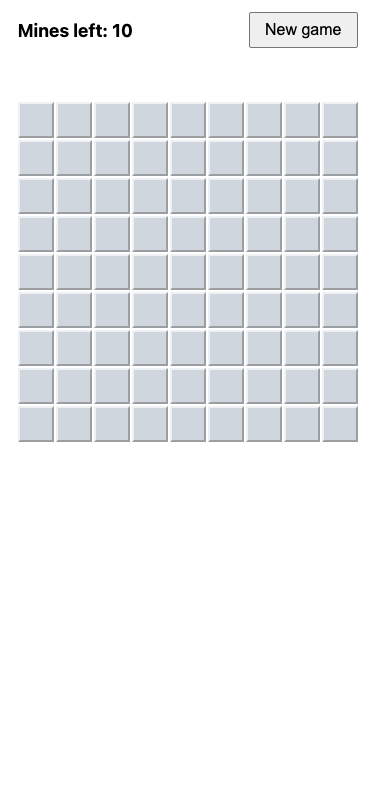
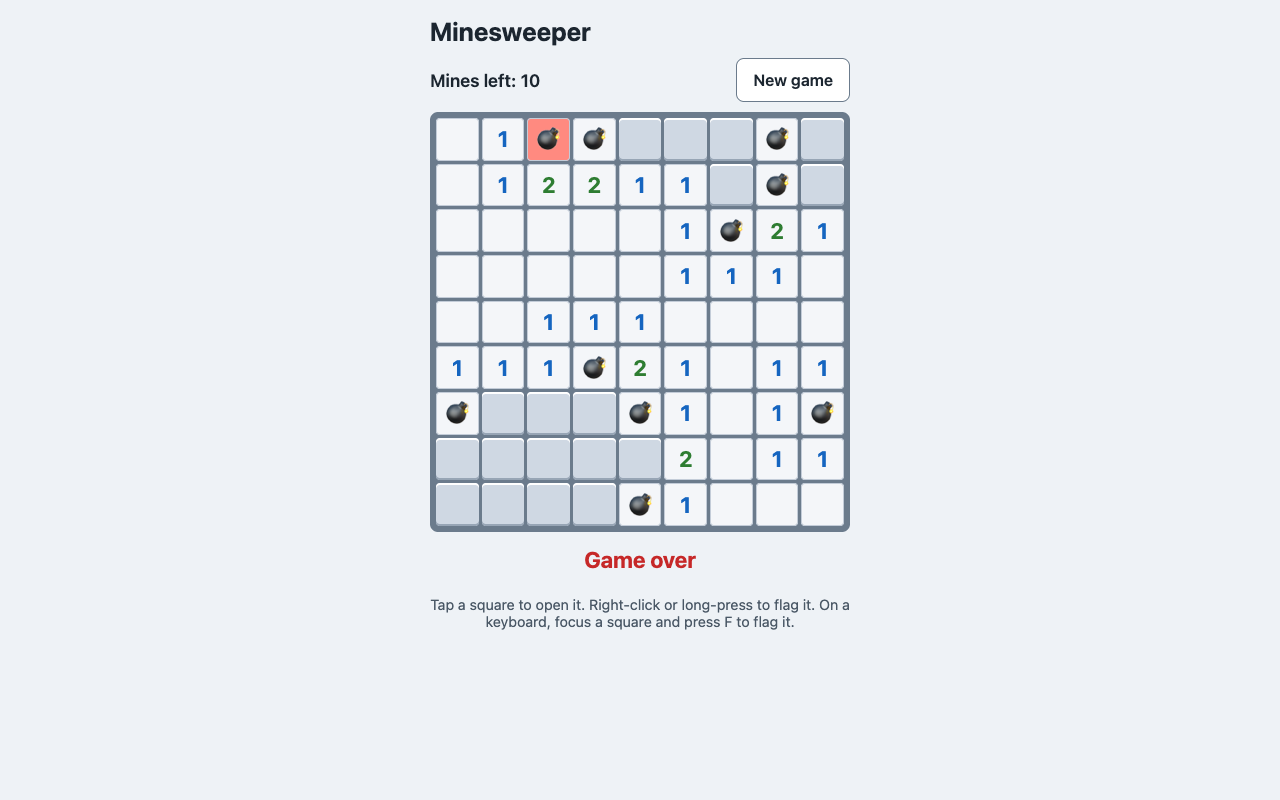
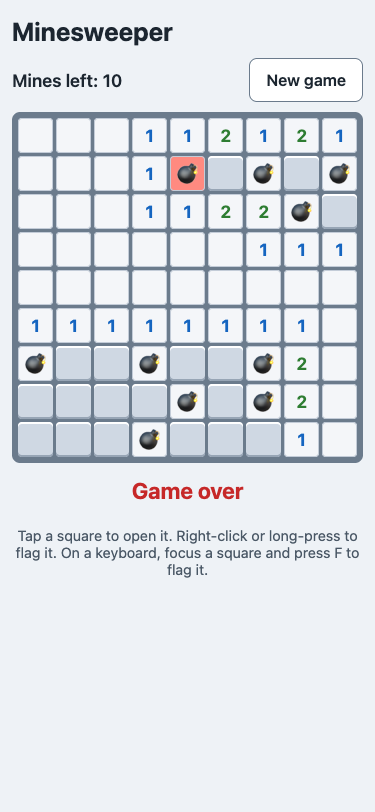
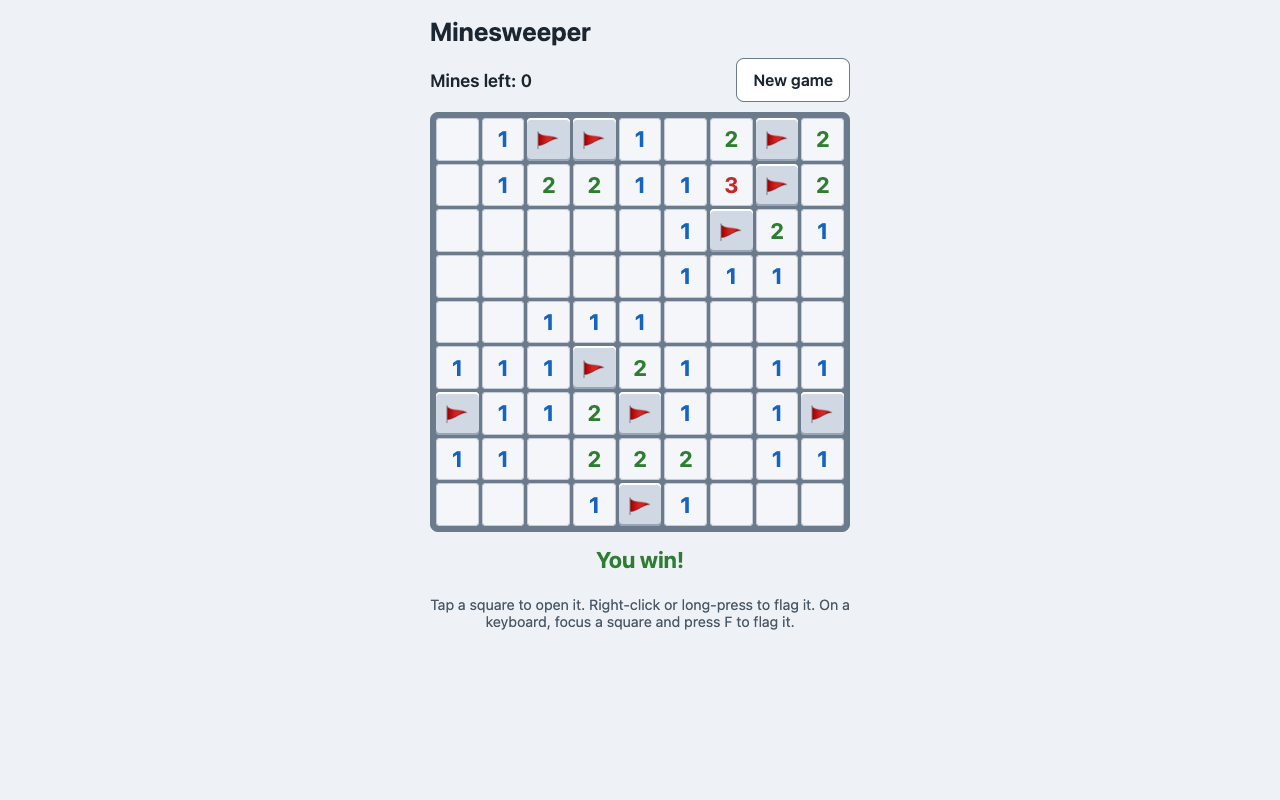
Models Haiku 5.5

Claude Haiku 5.5

Released
Tested
Settings
Low effort and Max effort

In short

Ranked 1st of 8 at max effort, level with Fable 5.1, Fable 5 and Opus 5.5.

Haiku 5.5 answered all 24 prompts at both efforts, scoring 94 at low effort and 97 at max. It passed every hidden test on every code prompt at both settings, and at max effort no answer ran out of room, the kanban board included.

At max effort Haiku 5.5 scored ahead of Haiku 4.5, and it scored level with Fable 5.1 at max effort, with a median max effort answer of 1 minute 56 seconds and $0.015.

Written by an AI model from these results; every figure in it is filled in by a program. How it was made.

Haiku 5.5

24 prompts, every check counted

Low effort

94

  • Floor48/49, 98% passed
  • Middle56/58, 97% passed
  • Top59/65, 91% passed

Median answer 13 s, 0.2¢.

Max effort

97

  • Floor49/49, 100% passed
  • Middle57/58, 98% passed
  • Top62/65, 95% passed

Median answer 1 min 56 s, 1.5¢.

Max passed 5 more checks, cost 10.2 times as much and took 10.6 times as long. Costs are at Anthropic’s API prices on the day it was tested, .

What the results show

Written by an AI model from these results; every figure in it is filled in by a program. How it was made.

Best at

  • Code at both efforts: it passed every hidden test on every code prompt, and its pull request review met every check too. F01 F05 F06 F04
  • Web pages: the landing page and the Minesweeper game passed every page test at both efforts, and at max effort so did the dashboard from the mockup and the garden page fixes. B01 B04 B02 B05
  • Careful reading at both efforts: it found the wrong line on the market receipt, said it did not know the invented novel, and kept its bread maker answers to what the manual says. I01 H02 K02
  • The text to the plumber, the update from a messy thread, the volunteer rota and the story of an exact length met every check at both efforts. W01 W02 P02 S02

Stumbled on

  • The booking plan left a working booking flow out of its first phase at both efforts, and at low effort it left out a part the prompt asked for. A01
  • The column rename plan dropped the old column after a waiting period but without tying it to old app versions, at both efforts. A03
  • At low effort the microservices answer gave too few reasons to split and no middle path, and the cycling paragraph took the printed total on trust and used a figure not in the sources. A02 R02
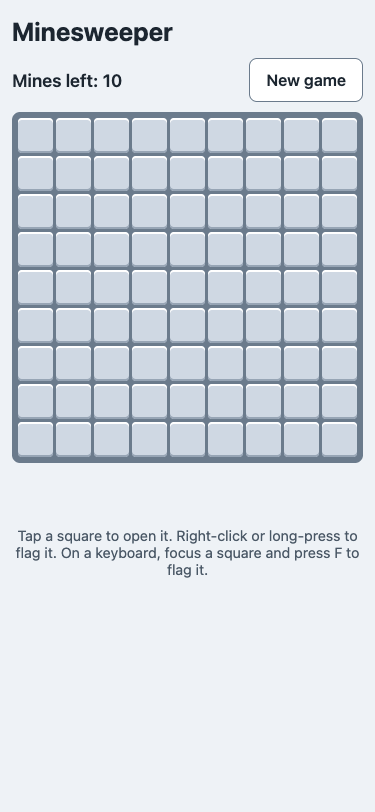
  • At max effort the kanban cards could not be moved from the keyboard, and the feature spec did not ask about an invitee already in another team or about pending invites on downgrade. B03 A04

What max effort changed

  • Overall it scored level at both efforts: 5 prompts gained at max effort, 2 lost ground and 17 stayed the same, for about 10.2 times the cost and 10.6 times the time.
  • Max effort gained on the cycling paragraph, from 4 of 6 checks to 6 of 6, and the microservices answer, from 6 of 8 to 8 of 8; the dashboard and the garden page fixes met every check at max. R02 A02 B02 B05
  • It lost a little on the kanban board, from 9 of 9 checks to 8 of 9, and the feature spec, from 8 of 8 to 7 of 8; thinking took 937,587 tokens at max against 47,601 at low. B03 A04

Worth knowing

  • Each prompt was answered once at each effort, so a single answer can move a prompt's score, and small gaps between scores are treated as level.
  • Each model gets its own standard output allowance. An answer that runs out of room is scored on whatever it did write, so an unfinished page or program usually fails its tests.
  • Its answers were collected with a newer release of the same program than the other models, the first release that offered it; the instruction, the prompts and the checks were the same.
  • Costs are what the same tokens would cost at the published API prices, not what anyone paid.

Score by kind of work

Building web pages

  • Low effort
    94
  • Max effort
    98

Code

  • Low effort
    100
  • Max effort
    100

Planning and architecture

  • Low effort
    85
  • Max effort
    91

Everyday

  • Low effort
    96
  • Max effort
    100

Every answer

Each row opens to the low and max answers side by side. Each prompt is described on the prompts page.

Building web pages

B01A landing page for a small invoicing appLow 9/9Max 9/9Same

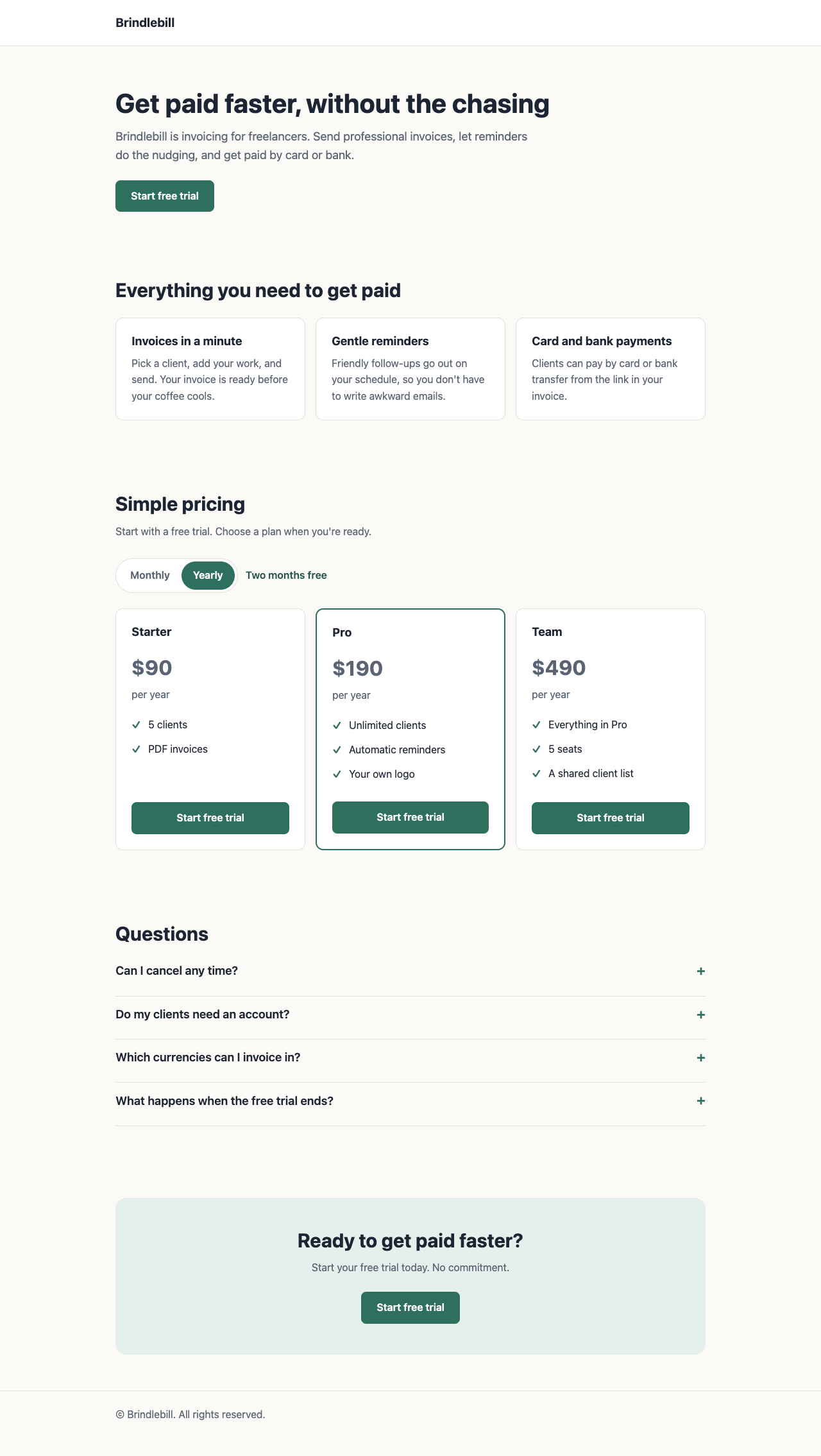
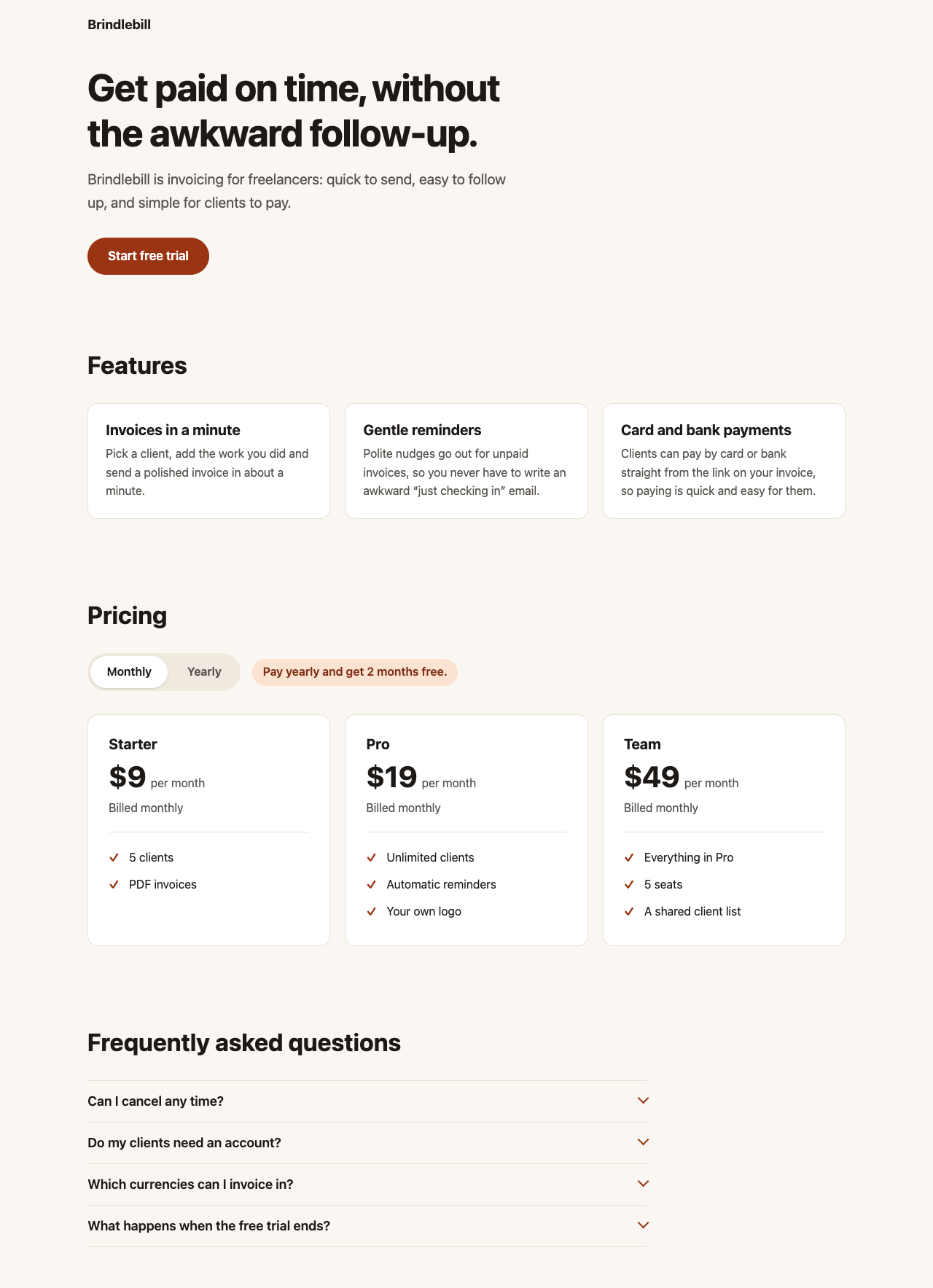
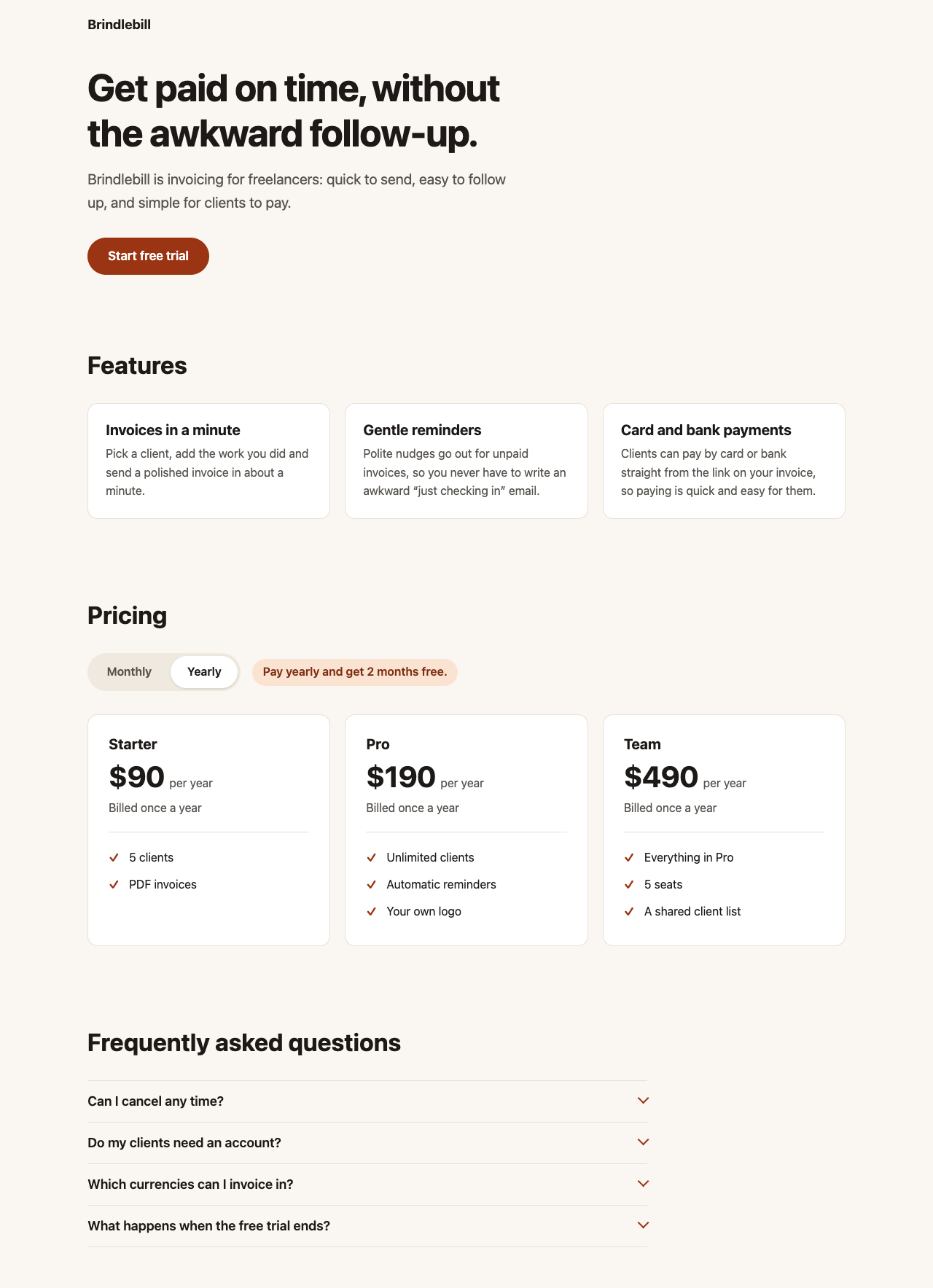
What it asks for. Asks for a one-page landing site for a small invoicing app for freelancers, as a single HTML file with no libraries and nothing loaded from outside. The page needs a headline, three named features, three price plans with a monthly and yearly switch (yearly gives two months free and is quoted as one total for the year), a four-question FAQ that opens and closes, and a sign-up button. It has to read well on a phone.

Both settings passed 9 of 9 checks.

AI answer from Haiku 5.5 · low effort · 8 Oct 2026

9 of 9
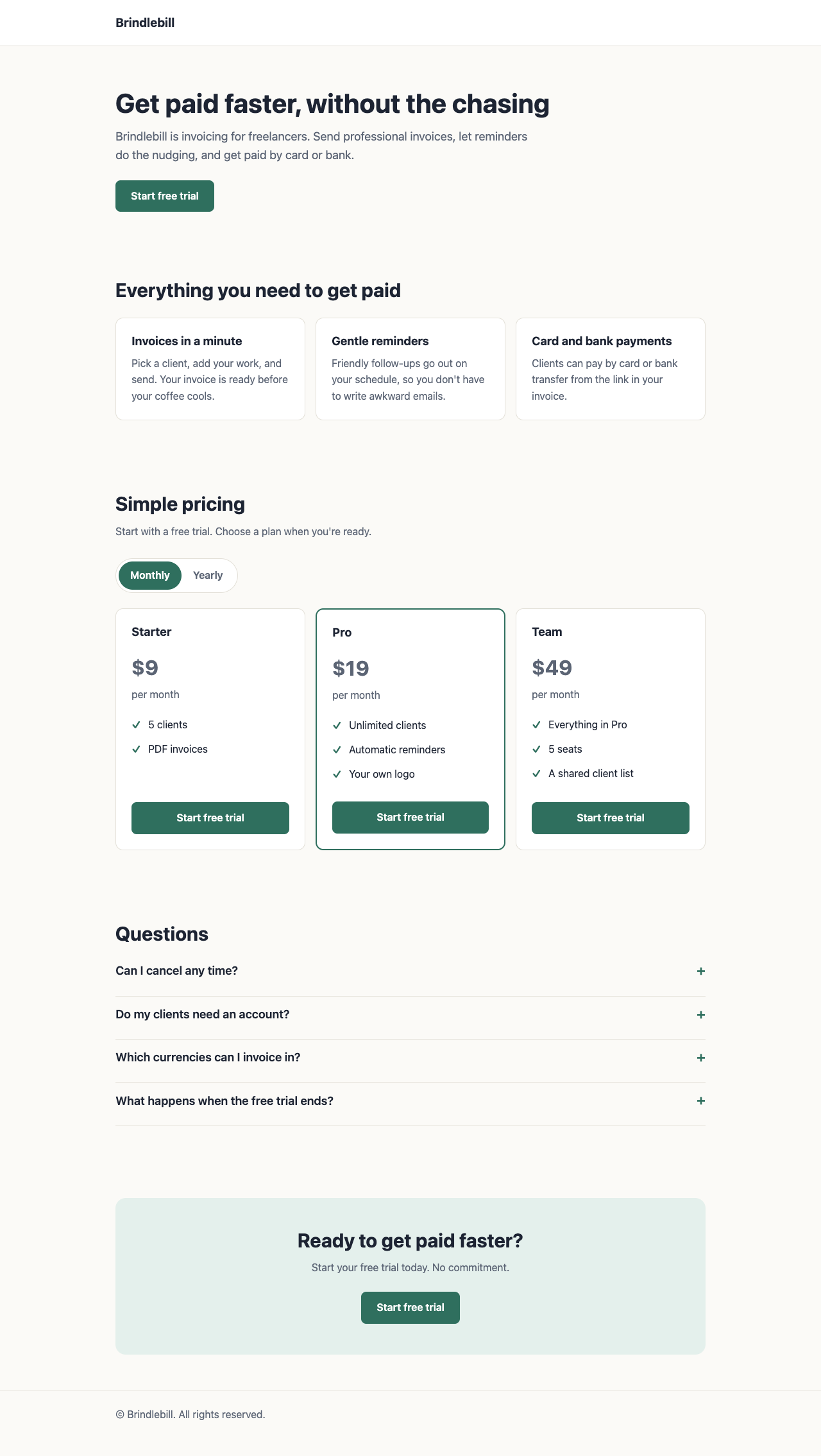
Screenshot of the page built in this answer, at a desktop width of 1280 pixels
Our screenshot, 1280 by 800. Open it for the full length.
Screenshot of the page built in this answer, at a phone width of 375 pixels
Phone, 375 by 812.
More screenshots (2).
Screenshot of the page built in this answer, at a desktop width of 1280 pixelsScreenshot of the page built in this answer, at a phone width of 375 pixels
Show the code and the answer.
<!DOCTYPE html>
<html lang="en">
<head>
  <meta charset="UTF-8">
  <meta name="viewport" content="width=device-width, initial-scale=1.0">
  <title>Brindlebill: Invoicing for freelancers</title>
  <meta name="description" content="Brindlebill is invoicing for freelancers. Create invoices in a minute, send gentle reminders, and get paid by card or bank.">
  <style>
    *, *::before, *::after {
      box-sizing: border-box;
    }

    :root {
      --ink: #1d2433;
      --muted: #5b6474;
      --paper: #fbfaf7;
      --card: #ffffff;
      --line: #e3e0d8;
      --accent: #2f6f5e;
      --accent-dark: #245749;
      --accent-soft: #e4f0ec;
    }

    html {
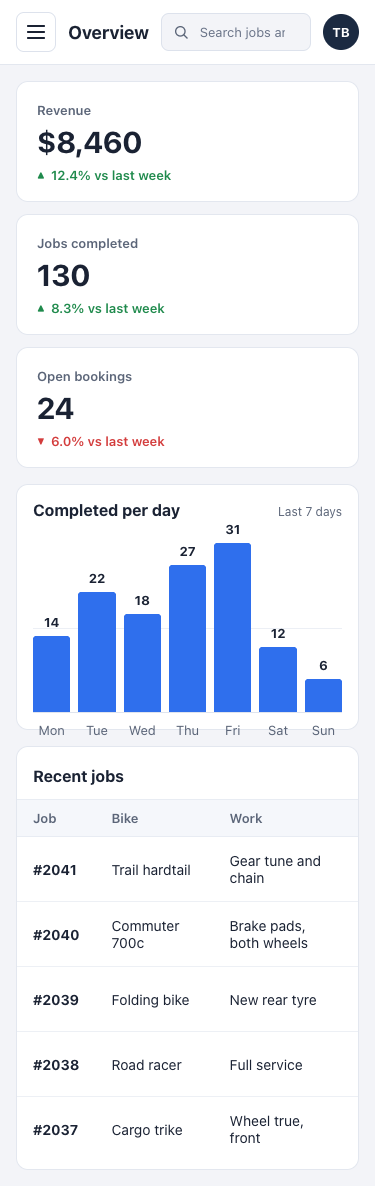
      -webkit-text-size-adjust: 100%;
      scroll-behavior: smooth;
    }

    body {
      margin: 0;
      font-family: -apple-system, BlinkMacSystemFont, "Segoe UI", Roboto, Helvetica, Arial, sans-serif;
      font-size: 16px;
      line-height: 1.6;
      color: var(--ink);
      background: var(--paper);
    }

    img, svg {
      max-width: 100%;
    }

    .container {
      width: 100%;
      max-width: 960px;
      margin: 0 auto;
      padding: 0 20px;
    }

    section {
      padding: 56px 0;
    }

    h1, h2, h3 {
      line-height: 1.2;
      margin: 0 0 12px;
    }

    h1 {
      font-size: 2.1rem;
    }

    h2 {
      font-size: 1.6rem;
    }

    h3 {
      font-size: 1.15rem;
    }

    p {
      margin: 0 0 12px;
    }

    .muted {
      color: var(--muted);
    }

    a {
      color: var(--accent);
    }

    a:focus-visible,
    button:focus-visible {
      outline: 3px solid var(--accent);
      outline-offset: 2px;
    }

    /* Header */
    .site-header {
      padding: 20px 0;
      border-bottom: 1px solid var(--line);
      background: var(--card);
    }

    .brand {
      font-weight: 700;
      font-size: 1.2rem;
      color: var(--ink);
      text-decoration: none;
    }

    /* Buttons */
    .btn {
      display: inline-block;
      min-height: 48px;
      padding: 12px 24px;
      font: inherit;
      font-weight: 600;
      color: #ffffff;
      background: var(--accent);
      border: none;
      border-radius: 8px;
      text-align: center;
      text-decoration: none;
      cursor: pointer;
    }

    .btn:hover {
      background: var(--accent-dark);
    }

    /* Hero */
    .hero {
      padding: 64px 0 48px;
    }

    .hero p.lead {
      font-size: 1.15rem;
      color: var(--muted);
      max-width: 36em;
      margin-bottom: 24px;
    }

    /* Features */
    .features {
      display: grid;
      gap: 16px;
      grid-template-columns: 1fr;
      margin-top: 24px;
    }

    .card {
      background: var(--card);
      border: 1px solid var(--line);
      border-radius: 12px;
      padding: 24px;
    }

    .card p {
      color: var(--muted);
      margin-bottom: 0;
    }

    /* Pricing */
    .billing-toggle {
      display: inline-flex;
      border: 1px solid var(--line);
      border-radius: 999px;
      padding: 4px;
      background: var(--card);
      margin: 16px 0 24px;
    }

    .billing-toggle button {
      min-height: 44px;
      padding: 8px 18px;
      font: inherit;
      font-weight: 600;
      color: var(--muted);
      background: transparent;
      border: none;
      border-radius: 999px;
      cursor: pointer;
    }

    .billing-toggle button[aria-pressed="true"] {
      background: var(--accent);
      color: #ffffff;
    }

    .save-note {
      font-size: 1rem;
      color: var(--accent-dark);
      font-weight: 600;
      margin-left: 8px;
    }

    .plans {
      display: grid;
      gap: 16px;
      grid-template-columns: 1fr;
    }

    .plan {
      display: flex;
      flex-direction: column;
    }

    .plan .price {
      font-size: 2rem;
      font-weight: 700;
      margin: 8px 0 4px;
    }

    .plan .price-note {
      color: var(--muted);
      margin-bottom: 16px;
    }

    .plan ul {
      list-style: none;
      padding: 0;
      margin: 0 0 24px;
      flex-grow: 1;
    }

    .plan li {
      padding: 6px 0 6px 26px;
      position: relative;
    }

    .plan li::before {
      content: "\2713";
      position: absolute;
      left: 0;
      color: var(--accent);
      font-weight: 700;
    }

    .plan .btn {
      width: 100%;
    }

    .plan.featured {
      border: 2px solid var(--accent);
    }

    /* FAQ */
    .faq-item {
      border-bottom: 1px solid var(--line);
    }

    .faq-question {
      width: 100%;
      min-height: 48px;
      display: flex;
      justify-content: space-between;
      align-items: center;
      gap: 16px;
      padding: 16px 0;
      font: inherit;
      font-weight: 600;
      color: var(--ink);
      background: transparent;
      border: none;
      text-align: left;
      cursor: pointer;
    }

    .faq-icon {
      flex-shrink: 0;
      font-size: 1.4rem;
      line-height: 1;
      color: var(--accent);
      transition: transform 0.2s ease;
    }

    .faq-question[aria-expanded="true"] .faq-icon {
      transform: rotate(45deg);
    }

    .faq-answer {
      padding: 0 0 16px;
      color: var(--muted);
    }

    .faq-answer[hidden] {
      display: none;
    }

    /* CTA and footer */
    .cta {
      text-align: center;
      background: var(--accent-soft);
      border-radius: 16px;
      padding: 48px 24px;
    }

    .cta p {
      color: var(--muted);
      margin-bottom: 24px;
    }

    .site-footer {
      padding: 24px 0 40px;
      color: var(--muted);
      font-size: 16px;
      border-top: 1px solid var(--line);
    }

    /* Larger screens */
    @media (min-width: 640px) {
      h1 {
        font-size: 2.6rem;
      }

      h2 {
        font-size: 1.9rem;
      }

      .features {
        grid-template-columns: repeat(3, 1fr);
      }

      .plans {
        grid-template-columns: repeat(3, 1fr);
      }
    }

    @media (prefers-reduced-motion: reduce) {
      html {
        scroll-behavior: auto;
      }

      .faq-icon {
        transition: none;
      }
    }
  </style>
</head>
<body>

  <header class="site-header">
    <div class="container">
      <a class="brand" href="#top">Brindlebill</a>
    </div>
  </header>

  <main id="top">

    <section class="hero">
      <div class="container">
        <h1>Get paid faster, without the chasing</h1>
        <p class="lead">Brindlebill is invoicing for freelancers. Send professional invoices, let reminders do the nudging, and get paid by card or bank.</p>
        <a class="btn" href="#signup">Start free trial</a>
      </div>
    </section>

    <section id="features">
      <div class="container">
        <h2>Everything you need to get paid</h2>
        <div class="features">
          <article class="card">
            <h3>Invoices in a minute</h3>
            <p>Pick a client, add your work, and send. Your invoice is ready before your coffee cools.</p>
          </article>
          <article class="card">
            <h3>Gentle reminders</h3>
            <p>Friendly follow-ups go out on your schedule, so you don't have to write awkward emails.</p>
          </article>
          <article class="card">
            <h3>Card and bank payments</h3>
            <p>Clients can pay by card or bank transfer from the link in your invoice.</p>
          </article>
        </div>
      </div>
    </section>

    <section id="pricing">
      <div class="container">
        <h2>Simple pricing</h2>
        <p class="muted">Start with a free trial. Choose a plan when you're ready.</p>

        <div class="billing-toggle" role="group" aria-label="Billing period">
          <button type="button" id="btn-monthly" aria-pressed="true" data-period="monthly">Monthly</button>
          <button type="button" id="btn-yearly" aria-pressed="false" data-period="yearly">Yearly</button>
        </div>
        <span class="save-note" id="save-note" hidden>Two months free</span>

        <div class="plans">
          <article class="card plan">
            <h3>Starter</h3>
            <p class="price" data-monthly="$9" data-yearly="$90">$9</p>
            <p class="price-note" data-monthly-note="per month" data-yearly-note="per year">per month</p>
            <ul>
              <li>5 clients</li>
              <li>PDF invoices</li>
            </ul>
            <a class="btn" href="#signup">Start free trial</a>
          </article>

          <article class="card plan featured">
            <h3>Pro</h3>
            <p class="price" data-monthly="$19" data-yearly="$190">$19</p>
            <p class="price-note" data-monthly-note="per month" data-yearly-note="per year">per month</p>
            <ul>
              <li>Unlimited clients</li>
              <li>Automatic reminders</li>
              <li>Your own logo</li>
            </ul>
            <a class="btn" href="#signup">Start free trial</a>
          </article>

          <article class="card plan">
            <h3>Team</h3>
            <p class="price" data-monthly="$49" data-yearly="$490">$49</p>
            <p class="price-note" data-monthly-note="per month" data-yearly-note="per year">per month</p>
            <ul>
              <li>Everything in Pro</li>
              <li>5 seats</li>
              <li>A shared client list</li>
            </ul>
            <a class="btn" href="#signup">Start free trial</a>
          </article>
        </div>
      </div>
    </section>

    <section id="faq">
      <div class="container">
        <h2>Questions</h2>

        <div class="faq-item">
          <h3>
            <button type="button" class="faq-question" aria-expanded="false" aria-controls="faq-1" id="faq-btn-1">
              Can I cancel any time?
              <span class="faq-icon" aria-hidden="true">+</span>
            </button>
          </h3>
          <div class="faq-answer" id="faq-1" role="region" aria-labelledby="faq-btn-1" hidden>
            <p>Yes. Cancel from your account page and you won't be charged again. Nothing is locked in.</p>
          </div>
        </div>

        <div class="faq-item">
          <h3>
            <button type="button" class="faq-question" aria-expanded="false" aria-controls="faq-2" id="faq-btn-2">
              Do my clients need an account?
              <span class="faq-icon" aria-hidden="true">+</span>
            </button>
          </h3>
          <div class="faq-answer" id="faq-2" role="region" aria-labelledby="faq-btn-2" hidden>
            <p>No. They open a link, see the invoice and pay. They never have to sign up.</p>
          </div>
        </div>

        <div class="faq-item">
          <h3>
            <button type="button" class="faq-question" aria-expanded="false" aria-controls="faq-3" id="faq-btn-3">
              Which currencies can I invoice in?
              <span class="faq-icon" aria-hidden="true">+</span>
            </button>
          </h3>
          <div class="faq-answer" id="faq-3" role="region" aria-labelledby="faq-btn-3" hidden>
            <p>You can invoice in 30 currencies, and each invoice shows the amount in your client's currency.</p>
          </div>
        </div>

        <div class="faq-item">
          <h3>
            <button type="button" class="faq-question" aria-expanded="false" aria-controls="faq-4" id="faq-btn-4">
              What happens when the free trial ends?
              <span class="faq-icon" aria-hidden="true">+</span>
            </button>
          </h3>
          <div class="faq-answer" id="faq-4" role="region" aria-labelledby="faq-btn-4" hidden>
            <p>You pick a plan. If you don't, your account switches to view-only and your invoices stay safe for 90 days.</p>
          </div>
        </div>
      </div>
    </section>

    <section id="signup">
      <div class="container">
        <div class="cta">
          <h2>Ready to get paid faster?</h2>
          <p>Start your free trial today. No commitment.</p>
          <a class="btn" href="#signup">Start free trial</a>
        </div>
      </div>
    </section>

  </main>

  <footer class="site-footer">
    <div class="container">
      <p>&copy; Brindlebill. All rights reserved.</p>
    </div>
  </footer>

  <script>
    // Monthly / Yearly switch
    (function () {
      var buttons = document.querySelectorAll('.billing-toggle button');
      var prices = document.querySelectorAll('.plan .price');
      var notes = document.querySelectorAll('.plan .price-note');
      var saveNote = document.getElementById('save-note');

      function setPeriod(period) {
        buttons.forEach(function (btn) {
          btn.setAttribute('aria-pressed', String(btn.dataset.period === period));
        });

        prices.forEach(function (el) {
          el.textContent = period === 'yearly' ? el.dataset.yearly : el.dataset.monthly;
        });

        notes.forEach(function (el) {
          el.textContent = period === 'yearly' ? el.dataset.yearlyNote : el.dataset.monthlyNote;
        });

        saveNote.hidden = period !== 'yearly';
      }

      buttons.forEach(function (btn) {
        btn.addEventListener('click', function () {
          setPeriod(btn.dataset.period);
        });
      });
    })();

    // FAQ open and close
    (function () {
      var questions = document.querySelectorAll('.faq-question');

      questions.forEach(function (btn) {
        btn.addEventListener('click', function () {
          var expanded = btn.getAttribute('aria-expanded') === 'true';
          var answer = document.getElementById(btn.getAttribute('aria-controls'));

          btn.setAttribute('aria-expanded', String(!expanded));
          answer.hidden = expanded;
        });
      });
    })();
  </script>

</body>
</html>
  • Floor2/2, 100% passed
  • Middle4/4, 100% passed
  • Top3/3, 100% passed
9 of 9 checks passedfloor 2/2, middle 4/4, top 3/3
  • Passed.
    The page loads with no errors in the console
    Floor Page test
  • Passed.
    Every section is there, with the exact plan names, prices and text
    Floor Page test
  • Passed.
    No sideways scroll on a 375 px phone
    Middle Page test
  • Passed.
    Nothing is loaded from outside the file
    Middle Page test
  • Passed.
    One h1, no skipped heading levels, text 16 px or larger, enough contrast
    Middle Page test
  • Passed.
    The page looks finished: clear hierarchy, pricing easy to compare, nothing broken
    Middle Read
  • Passed.
    Yearly shows $90, $190 and $490, and Monthly brings back $9, $19, $49
    Top Page test
  • Passed.
    Each FAQ question opens and closes from the keyboard
    Top Page test
  • Passed.
    Still no sideways scroll on a phone with Yearly on and every FAQ open
    Top Page test
  • Took 18 s.
  • First words after 3.2 s.
  • Wrote 5,676 tokens, 353 of them thinking.
  • 0.3¢ at API prices.
All numbers.
Time to finish18 s
Time to first words3.2 s
Input tokens1,417
Cached tokens0
Output tokens5,676
Thinking tokens353
Words in the answer1,220
Price at API rates0.3¢

AI answer from Haiku 5.5 · max effort · 8 Oct 2026

9 of 9

Screenshot of the page built in this answer, at a desktop width of 1280 pixels
Our screenshot, 1280 by 800. Open it for the full length.
Screenshot of the page built in this answer, at a phone width of 375 pixels
Phone, 375 by 812.
More screenshots (2).
Screenshot of the page built in this answer, at a desktop width of 1280 pixelsScreenshot of the page built in this answer, at a phone width of 375 pixels
Show the code and the answer.

Save this as index.html. Before you publish, replace the # in the Start free trial link with your sign-up URL. The yearly prices are ten months' worth ($90, $190, $490), so the two free months are built in.

<!DOCTYPE html>
<html lang="en">
<head>
  <meta charset="utf-8">
  <meta name="viewport" content="width=device-width, initial-scale=1">
  <title>Brindlebill: invoicing for freelancers</title>
  <meta name="description" content="Brindlebill is invoicing for freelancers: quick to send, easy to follow up, and simple for clients to pay.">
  <style>
    :root {
      --bg: #faf7f2;
      --surface: #ffffff;
      --text: #1c1917;
      --muted: #57534e;
      --accent: #9a3412;
      --accent-dark: #7c2d12;
      --accent-soft: #fbe3d2;
      --toggle-bg: #efe9df;
      --border: #e7e0d6;
      --radius: 14px;
      color-scheme: light;
    }

    *,
    *::before,
    *::after {
      box-sizing: border-box;
    }

    html {
      font-size: 100%;
      -webkit-text-size-adjust: 100%;
      text-size-adjust: 100%;
    }

    @media (prefers-reduced-motion: no-preference) {
      html {
        scroll-behavior: smooth;
      }
    }

    body {
      margin: 0;
      background: var(--bg);
      color: var(--text);
      font-family: system-ui, -apple-system, BlinkMacSystemFont, "Segoe UI", Roboto, "Helvetica Neue", Arial, sans-serif;
      font-size: 1rem; /* 16px minimum for all text */
      line-height: 1.6;
    }

    [hidden] {
      display: none !important;
    }

    button,
    .btn {
      font-family: inherit;
      font-size: 1rem;
      line-height: inherit;
    }

    :focus-visible {
      outline: 3px solid var(--accent);
      outline-offset: 3px;
    }

    h1,
    h2,
    h3 {
      line-height: 1.2;
      text-wrap: balance;
    }

    .container {
      max-width: 1080px;
      margin: 0 auto;
      padding: 0 1.25rem;
    }

    section {
      padding: 3.5rem 0;
    }

    h2 {
      margin: 0 0 2rem;
      font-size: clamp(1.6rem, 4vw, 2.1rem);
    }

    /* Header */
    .site-header {
      padding-top: 1.25rem;
    }

    .brand {
      color: var(--text);
      font-size: 1.125rem;
      font-weight: 700;
      text-decoration: none;
    }

    /* Hero */
    .hero {
      padding-top: 2.5rem;
      padding-bottom: 3rem;
    }

    .hero h1 {
      margin: 0 0 1rem;
      font-size: clamp(2rem, 6vw, 3.25rem);
      letter-spacing: -0.02em;
    }

    .pitch {
      max-width: 36rem;
      margin: 0 0 2rem;
      font-size: 1.25rem;
      color: var(--muted);
    }

    .btn {
      display: inline-flex;
      align-items: center;
      justify-content: center;
      min-height: 3rem;
      padding: 0.75rem 1.75rem;
      border-radius: 999px;
      font-size: 1.0625rem;
      font-weight: 600;
      text-decoration: none;
    }

    .btn-primary {
      background: var(--accent);
      color: #fff;
    }

    .btn-primary:hover {
      background: var(--accent-dark);
    }

    @media (max-width: 480px) {
      .hero .btn {
        width: 100%;
      }
    }

    /* Features */
    .features {
      display: grid;
      gap: 1.25rem;
      grid-template-columns: minmax(0, 1fr);
      list-style: none;
      margin: 0;
      padding: 0;
    }

    @media (min-width: 760px) {
      .features {
        grid-template-columns: repeat(3, minmax(0, 1fr));
      }
    }

    .card {
      padding: 1.5rem;
      background: var(--surface);
      border: 1px solid var(--border);
      border-radius: var(--radius);
    }

    .card h3 {
      margin: 0 0 0.5rem;
      font-size: 1.25rem;
    }

    .card p {
      margin: 0;
      color: var(--muted);
    }

    /* Pricing */
    .billing-row {
      display: flex;
      flex-wrap: wrap;
      align-items: center;
      gap: 1rem;
      margin-bottom: 2rem;
    }

    .billing-toggle {
      display: inline-flex;
      gap: 0.25rem;
      padding: 0.25rem;
      border-radius: 999px;
      background: var(--toggle-bg);
    }

    .toggle-btn {
      min-height: 2.75rem;
      padding: 0.5rem 1.4rem;
      border: 0;
      border-radius: 999px;
      background: transparent;
      color: var(--muted);
      font-weight: 600;
      cursor: pointer;
    }

    .toggle-btn[aria-pressed="true"] {
      background: var(--surface);
      color: var(--text);
      box-shadow: 0 1px 3px rgba(0, 0, 0, 0.12);
    }

    .savings {
      margin: 0;
      padding: 0.35rem 0.9rem;
      border-radius: 999px;
      background: var(--accent-soft);
      color: var(--accent-dark);
      font-weight: 600;
    }

    .plans {
      display: grid;
      gap: 1.25rem;
      grid-template-columns: minmax(0, 1fr);
    }

    @media (min-width: 900px) {
      .plans {
        grid-template-columns: repeat(3, minmax(0, 1fr));
      }
    }

    .plan {
      display: flex;
      flex-direction: column;
      padding: 1.75rem;
      background: var(--surface);
      border: 1px solid var(--border);
      border-radius: var(--radius);
    }

    .plan h3 {
      margin: 0 0 0.75rem;
      font-size: 1.25rem;
    }

    .price {
      display: flex;
      flex-wrap: wrap;
      align-items: baseline;
      gap: 0.4rem;
      margin: 0;
    }

    .amount {
      font-size: 2.5rem;
      font-weight: 700;
      line-height: 1;
      letter-spacing: -0.02em;
    }

    .period,
    .billed {
      color: var(--muted);
    }

    .billed {
      margin: 0.5rem 0 1.25rem;
    }

    .plan-features {
      margin: 0;
      padding: 1rem 0 0;
      border-top: 1px solid var(--border);
      list-style: none;
    }

    .plan-features li {
      position: relative;
      padding: 0.35rem 0 0.35rem 1.75rem;
    }

    .plan-features li::before {
      content: "\2713";
      position: absolute;
      left: 0;
      color: var(--accent);
      font-weight: 700;
    }

    /* FAQ */
    .faq-list {
      max-width: 48rem;
      border-top: 1px solid var(--border);
    }

    .faq-item {
      border-bottom: 1px solid var(--border);
    }

    .faq-item h3 {
      margin: 0;
      font-size: 1.125rem;
    }

    .faq-button {
      display: flex;
      align-items: center;
      justify-content: space-between;
      gap: 1rem;
      width: 100%;
      min-height: 3.5rem;
      padding: 1rem 0;
      border: 0;
      background: none;
      color: var(--text);
      font-size: 1.125rem;
      font-weight: 600;
      text-align: left;
      cursor: pointer;
    }

    /* Chevron drawn with CSS, so there is no text for screen readers to read out */
    .faq-button::after {
      content: "";
      flex: 0 0 auto;
      width: 0.7rem;
      height: 0.7rem;
      border-right: 2px solid var(--accent);
      border-bottom: 2px solid var(--accent);
      transform: translateY(-0.25rem) rotate(45deg);
    }

    .faq-button[aria-expanded="true"]::after {
      transform: translateY(0.25rem) rotate(-135deg);
    }

    .faq-answer {
      padding-bottom: 1.25rem;
    }

    .faq-answer p {
      margin: 0;
      color: var(--muted);
    }
  </style>
</head>
<body>
  <header class="site-header">
    <div class="container">
      <a class="brand" href="#top">Brindlebill</a>
    </div>
  </header>

  <main>
    <section class="hero" id="top">
      <div class="container">
        <h1>Get paid on time, without the awkward follow-up.</h1>
        <p class="pitch">Brindlebill is invoicing for freelancers: quick to send, easy to follow up, and simple for clients to pay.</p>
        <!-- Replace # with your sign-up page URL -->
        <a class="btn btn-primary" href="#">Start free trial</a>
      </div>
    </section>

    <section id="features" aria-labelledby="features-heading">
      <div class="container">
        <h2 id="features-heading">Features</h2>
        <ul class="features">
          <li class="card">
            <h3>Invoices in a minute</h3>
            <p>Pick a client, add the work you did and send a polished invoice in about a minute.</p>
          </li>
          <li class="card">
            <h3>Gentle reminders</h3>
            <p>Polite nudges go out for unpaid invoices, so you never have to write an awkward &ldquo;just checking in&rdquo; email.</p>
          </li>
          <li class="card">
            <h3>Card and bank payments</h3>
            <p>Clients can pay by card or bank straight from the link on your invoice, so paying is quick and easy for them.</p>
          </li>
        </ul>
      </div>
    </section>

    <section id="pricing" aria-labelledby="pricing-heading">
      <div class="container">
        <h2 id="pricing-heading">Pricing</h2>

        <div class="billing-row">
          <div class="billing-toggle" role="group" aria-label="Billing period">
            <button type="button" class="toggle-btn" data-billing="monthly" aria-pressed="true">Monthly</button>
            <button type="button" class="toggle-btn" data-billing="yearly" aria-pressed="false">Yearly</button>
          </div>
          <p class="savings">Pay yearly and get 2 months free.</p>
        </div>

        <div class="plans">
          <article class="plan">
            <h3>Starter</h3>
            <p class="price">
              <span class="amount" data-monthly="9" data-yearly="90">$9</span>
              <span class="period">per month</span>
            </p>
            <p class="billed">Billed monthly</p>
            <ul class="plan-features">
              <li>5 clients</li>
              <li>PDF invoices</li>
            </ul>
          </article>

          <article class="plan">
            <h3>Pro</h3>
            <p class="price">
              <span class="amount" data-monthly="19" data-yearly="190">$19</span>
              <span class="period">per month</span>
            </p>
            <p class="billed">Billed monthly</p>
            <ul class="plan-features">
              <li>Unlimited clients</li>
              <li>Automatic reminders</li>
              <li>Your own logo</li>
            </ul>
          </article>

          <article class="plan">
            <h3>Team</h3>
            <p class="price">
              <span class="amount" data-monthly="49" data-yearly="490">$49</span>
              <span class="period">per month</span>
            </p>
            <p class="billed">Billed monthly</p>
            <ul class="plan-features">
              <li>Everything in Pro</li>
              <li>5 seats</li>
              <li>A shared client list</li>
            </ul>
          </article>
        </div>
      </div>
    </section>

    <section id="faq" aria-labelledby="faq-heading">
      <div class="container">
        <h2 id="faq-heading">Frequently asked questions</h2>

        <div class="faq-list">
          <div class="faq-item">
            <h3>
              <button type="button" class="faq-button" id="faq-q1" aria-expanded="false" aria-controls="faq-a1">Can I cancel any time?</button>
            </h3>
            <div class="faq-answer" id="faq-a1" role="region" aria-labelledby="faq-q1" hidden>
              <p>Yes. Cancel from your account page and you won't be charged again. Nothing is locked in.</p>
            </div>
          </div>

          <div class="faq-item">
            <h3>
              <button type="button" class="faq-button" id="faq-q2" aria-expanded="false" aria-controls="faq-a2">Do my clients need an account?</button>
            </h3>
            <div class="faq-answer" id="faq-a2" role="region" aria-labelledby="faq-q2" hidden>
              <p>No. They open a link, see the invoice and pay. They never have to sign up.</p>
            </div>
          </div>

          <div class="faq-item">
            <h3>
              <button type="button" class="faq-button" id="faq-q3" aria-expanded="false" aria-controls="faq-a3">Which currencies can I invoice in?</button>
            </h3>
            <div class="faq-answer" id="faq-a3" role="region" aria-labelledby="faq-q3" hidden>
              <p>You can invoice in 30 currencies, and each invoice shows the amount in your client's currency.</p>
            </div>
          </div>

          <div class="faq-item">
            <h3>
              <button type="button" class="faq-button" id="faq-q4" aria-expanded="false" aria-controls="faq-a4">What happens when the free trial ends?</button>
            </h3>
            <div class="faq-answer" id="faq-a4" role="region" aria-labelledby="faq-q4" hidden>
              <p>You pick a plan. If you don't, your account switches to view-only and your invoices stay safe for 90 days.</p>
            </div>
          </div>
        </div>
      </div>
    </section>
  </main>

  <script>
    // FAQ: each question opens and closes on its own.
    document.querySelectorAll('.faq-button').forEach((button) => {
      button.addEventListener('click', () => {
        const isOpen = button.getAttribute('aria-expanded') === 'true';
        const panel = document.getElementById(button.getAttribute('aria-controls'));

        button.setAttribute('aria-expanded', String(!isOpen));
        panel.hidden = isOpen;
      });
    });

    // Monthly / Yearly switch. Yearly shows the full-year price, not a monthly equivalent.
    const billingButtons = document.querySelectorAll('.toggle-btn');
    const amounts = document.querySelectorAll('.amount');
    const periods = document.querySelectorAll('.period');
    const billedNotes = document.querySelectorAll('.billed');

    function setBilling(mode) {
      const yearly = mode === 'yearly';

      billingButtons.forEach((button) => {
        button.setAttribute('aria-pressed', String(button.dataset.billing === mode));
      });

      amounts.forEach((amount) => {
        amount.textContent = '$' + (yearly ? amount.dataset.yearly : amount.dataset.monthly);
      });

      periods.forEach((period) => {
        period.textContent = yearly ? 'per year' : 'per month';
      });

      billedNotes.forEach((note) => {
        note.textContent = yearly ? 'Billed once a year' : 'Billed monthly';
      });
    }

    billingButtons.forEach((button) => {
      button.addEventListener('click', () => setBilling(button.dataset.billing));
    });

    setBilling('monthly');
  </script>
</body>
</html>
  • Floor2/2, 100% passed
  • Middle4/4, 100% passed
  • Top3/3, 100% passed
9 of 9 checks passedfloor 2/2, middle 4/4, top 3/3
  • Passed.
    The page loads with no errors in the console
    Floor Page test
  • Passed.
    Every section is there, with the exact plan names, prices and text
    Floor Page test
  • Passed.
    No sideways scroll on a 375 px phone
    Middle Page test
  • Passed.
    Nothing is loaded from outside the file
    Middle Page test
  • Passed.
    One h1, no skipped heading levels, text 16 px or larger, enough contrast
    Middle Page test
  • Passed.
    The page looks finished: clear hierarchy, pricing easy to compare, nothing broken
    Middle Read
  • Passed.
    Yearly shows $90, $190 and $490, and Monthly brings back $9, $19, $49
    Top Page test
  • Passed.
    Each FAQ question opens and closes from the keyboard
    Top Page test
  • Passed.
    Still no sideways scroll on a phone with Yearly on and every FAQ open
    Top Page test
  • Took 3 min 15 s.
  • First words after 3 min 2 s.
  • Wrote 52,252 tokens, 46,616 of them thinking.
  • 2.6¢ at API prices.
All numbers.
Time to finish3 min 15 s
Time to first words3 min 2 s
Input tokens1,417
Cached tokens0
Output tokens52,252
Thinking tokens46,616
Words in the answer1,289
Price at API rates2.6¢
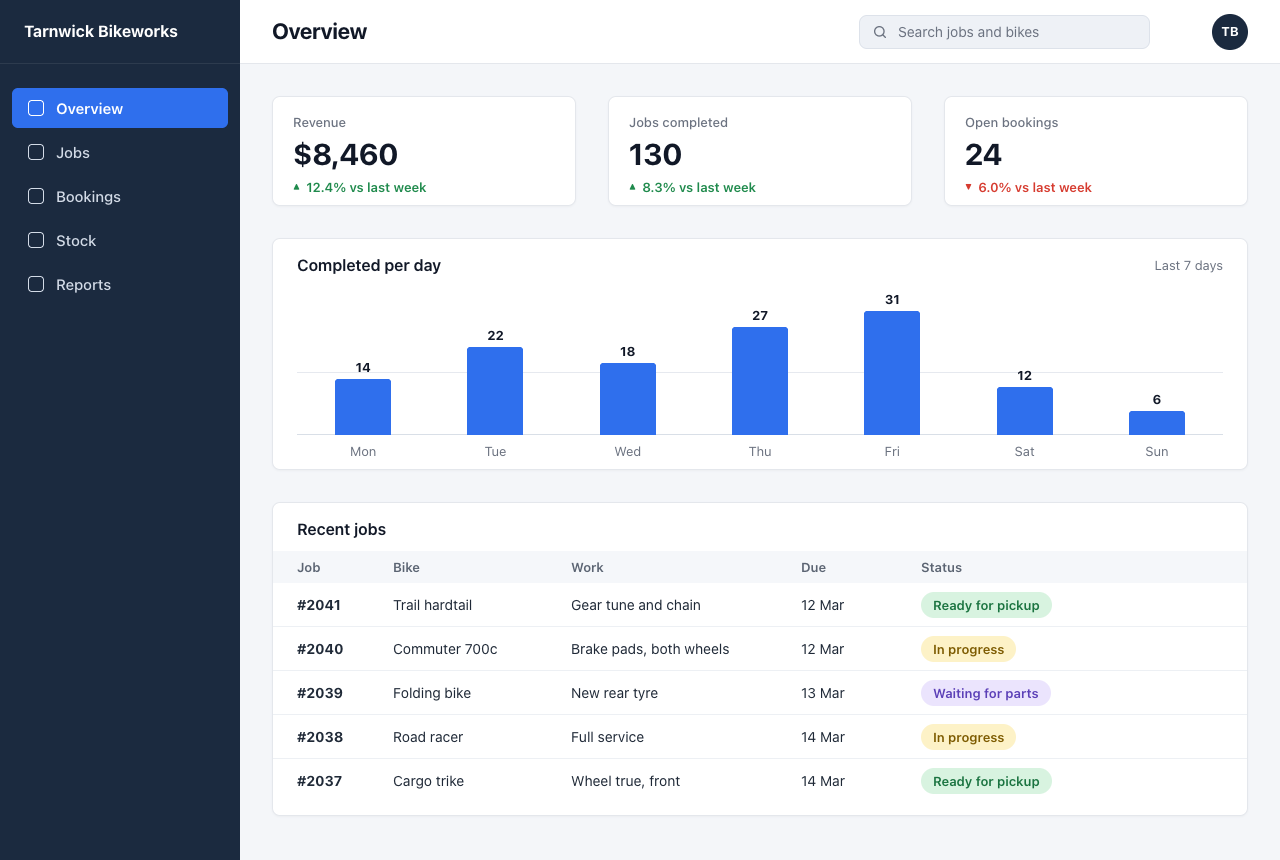
B02Build a dashboard from a picture of its designLow 6/7Max 7/7Max +1

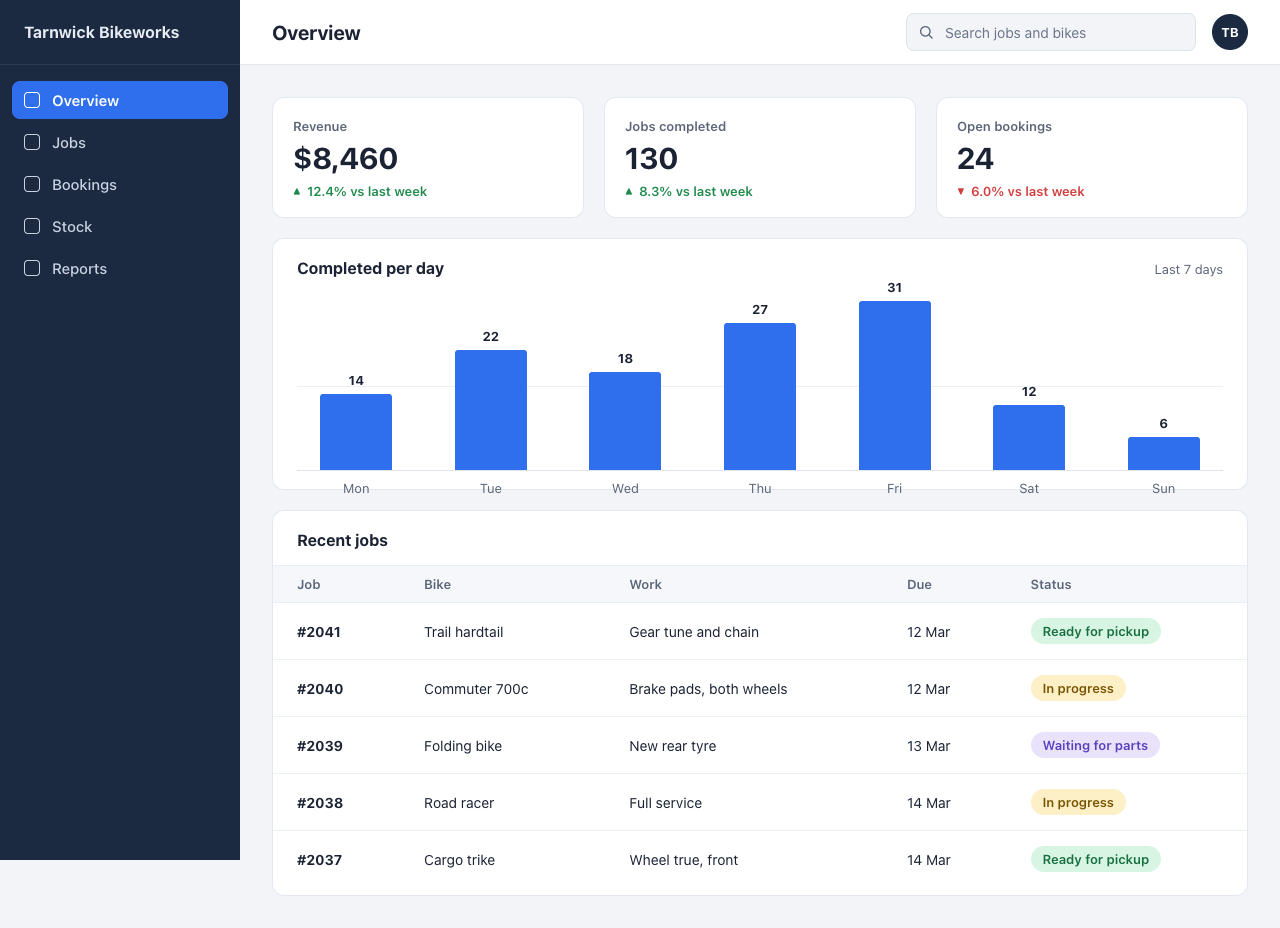
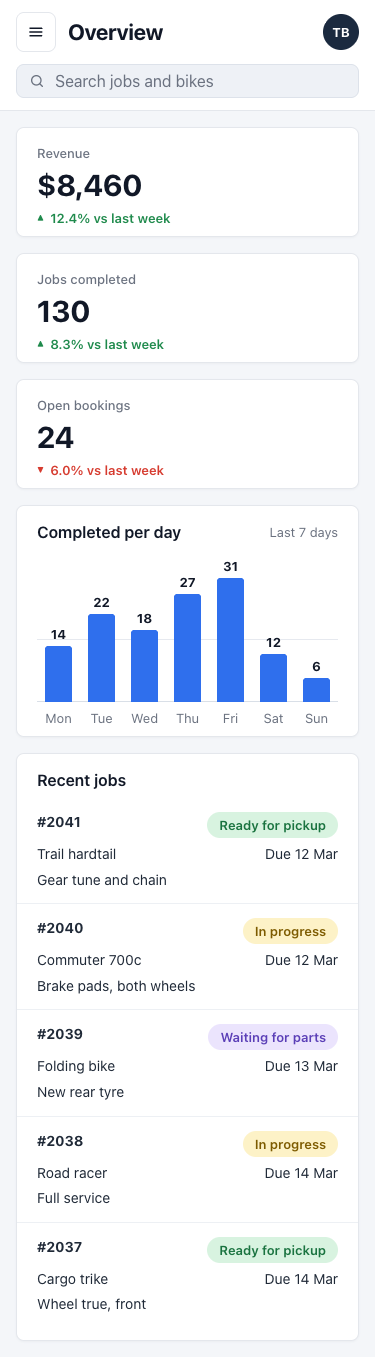
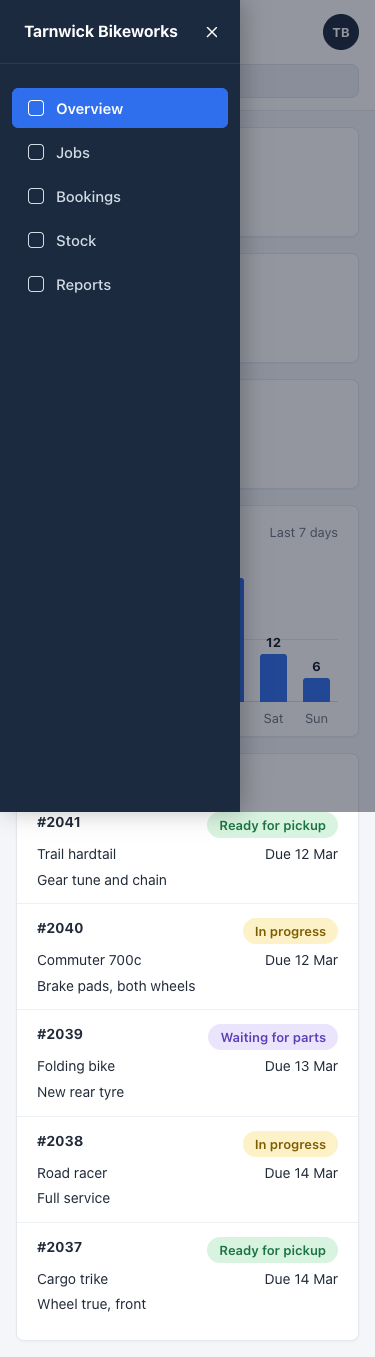
What it asks for. Sends a picture of a designer's mockup, an admin dashboard for a small bike repair shop, and asks for it to be built as one HTML file that matches the layout, colours, spacing and text as closely as it can. The bar chart has to be drawn to scale. On a phone the page must stack into one column, hide the sidebar behind a menu button and never scroll sideways.

Max effort passed 1 more check than low.

AI answer from Haiku 5.5 · low effort · 8 Oct 2026

6 of 7

Screenshot of the page built in this answer, at a desktop width of 1280 pixels
Our screenshot, 1280 by 800. Open it for the full length.
Screenshot of the page built in this answer, at a phone width of 375 pixels
Phone, 375 by 812.
More screenshots (1).
Screenshot of the page built in this answer, at a phone width of 375 pixels
Show the code and the answer.

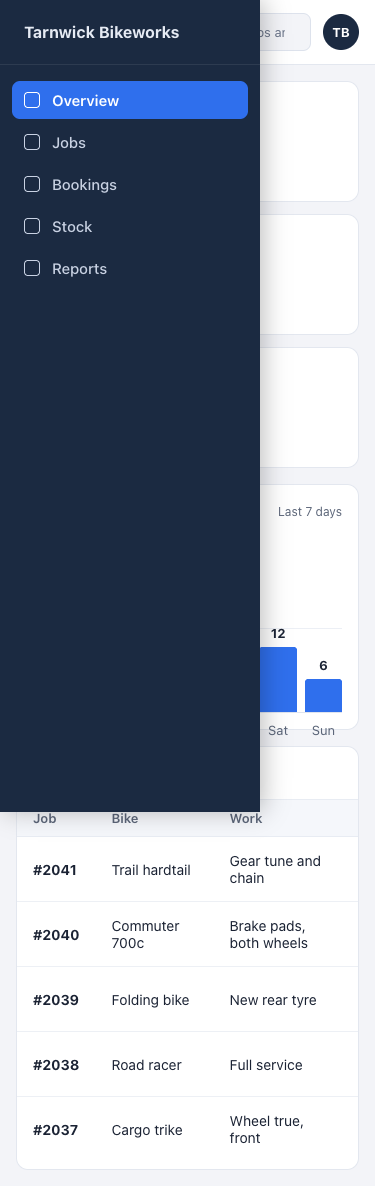
Here's the single-file version. It uses no libraries, fonts, or images. The chart is inline CSS, with each bar's height set as a fraction of the largest value (31), so the bars are drawn to scale. On phones the sidebar slides in from the left behind a menu button, everything stacks into one column, and the table scrolls inside its card so the page itself never scrolls sideways.

<!DOCTYPE html>
<html lang="en">
<head>
<meta charset="UTF-8">
<meta name="viewport" content="width=device-width, initial-scale=1">
<title>Overview · Tarnwick Bikeworks</title>
<style>
  * { box-sizing: border-box; margin: 0; padding: 0; }

  html, body {
    height: 100%;
  }

  body {
    font-family: -apple-system, BlinkMacSystemFont, "Segoe UI", Roboto, Helvetica, Arial, sans-serif;
    background: #f3f4f8;
    color: #1a2233;
    overflow-x: hidden;
    -webkit-font-smoothing: antialiased;
  }

  /* ---------- Layout shell ---------- */
  .app {
    display: flex;
    min-height: 100%;
  }

  /* ---------- Sidebar ---------- */
  .sidebar {
    width: 240px;
    flex-shrink: 0;
    background: #1b2a41;
    color: #e6ebf4;
    position: sticky;
    top: 0;
    height: 100vh;
    display: flex;
    flex-direction: column;
    z-index: 30;
  }

  .brand {
    height: 65px;
    display: flex;
    align-items: center;
    padding: 0 24px;
    font-size: 16px;
    font-weight: 700;
    border-bottom: 1px solid rgba(255,255,255,0.08);
    letter-spacing: 0.1px;
  }

  .nav {
    list-style: none;
    padding: 16px 12px;
  }

  .nav a {
    display: flex;
    align-items: center;
    gap: 12px;
    padding: 10px 12px;
    margin-bottom: 4px;
    border-radius: 8px;
    color: #c9d2e3;
    text-decoration: none;
    font-size: 15px;
    font-weight: 500;
  }

  .nav a .icon {
    width: 16px;
    height: 16px;
    border: 1.6px solid currentColor;
    border-radius: 4px;
    flex-shrink: 0;
  }

  .nav a:hover { background: rgba(255,255,255,0.06); }

  .nav a.active {
    background: #2f6fed;
    color: #ffffff;
    font-weight: 600;
  }

  /* ---------- Main column ---------- */
  .main {
    flex: 1;
    min-width: 0;
    display: flex;
    flex-direction: column;
  }

  .topbar {
    height: 65px;
    background: #ffffff;
    border-bottom: 1px solid #e3e7ef;
    display: flex;
    align-items: center;
    gap: 16px;
    padding: 0 32px;
    position: sticky;
    top: 0;
    z-index: 20;
  }

  .menu-btn {
    display: none;
    width: 40px;
    height: 40px;
    border: 1px solid #dde2ec;
    background: #ffffff;
    border-radius: 8px;
    cursor: pointer;
    align-items: center;
    justify-content: center;
    flex-direction: column;
    gap: 4px;
    flex-shrink: 0;
  }

  .menu-btn span {
    display: block;
    width: 18px;
    height: 2px;
    background: #1a2233;
    border-radius: 2px;
  }

  .page-title {
    font-size: 20px;
    font-weight: 700;
    white-space: nowrap;
  }

  .search {
    margin-left: auto;
    position: relative;
    width: 290px;
    max-width: 100%;
  }

  .search input {
    width: 100%;
    height: 38px;
    border: 1px solid #dde2ec;
    background: #f3f4f8;
    border-radius: 8px;
    padding: 0 12px 0 38px;
    font: inherit;
    font-size: 14px;
    color: #1a2233;
    outline: none;
  }

  .search input::placeholder { color: #6b7589; }

  .search input:focus {
    border-color: #2f6fed;
    background: #ffffff;
  }

  .search svg {
    position: absolute;
    left: 12px;
    top: 50%;
    transform: translateY(-50%);
    width: 16px;
    height: 16px;
    color: #5b6578;
  }

  .avatar {
    width: 36px;
    height: 36px;
    border-radius: 50%;
    background: #1b2a41;
    color: #ffffff;
    font-size: 13px;
    font-weight: 700;
    display: flex;
    align-items: center;
    justify-content: center;
    flex-shrink: 0;
  }

  .content {
    padding: 32px;
    display: flex;
    flex-direction: column;
    gap: 20px;
    min-width: 0;
  }

  /* ---------- Cards ---------- */
  .card {
    background: #ffffff;
    border: 1px solid #e3e7ef;
    border-radius: 12px;
    min-width: 0;
  }

  .kpis {
    display: grid;
    grid-template-columns: repeat(3, 1fr);
    gap: 20px;
  }

  .kpi {
    padding: 20px 20px 18px;
  }

  .kpi-label {
    font-size: 13px;
    font-weight: 600;
    color: #5b6578;
  }

  .kpi-value {
    font-size: 30px;
    font-weight: 700;
    margin: 6px 0 8px;
    letter-spacing: -0.3px;
  }

  .delta {
    font-size: 13px;
    font-weight: 600;
    display: flex;
    align-items: center;
    gap: 6px;
  }

  .delta.up { color: #1f8a4c; }
  .delta.down { color: #d33c3c; }

  .delta .arrow {
    font-size: 10px;
  }

  /* ---------- Chart ---------- */
  .chart-card {
    padding: 20px 24px 18px;
  }

  .card-head {
    display: flex;
    justify-content: space-between;
    align-items: baseline;
    gap: 12px;
  }

  .card-title {
    font-size: 16px;
    font-weight: 700;
  }

  .card-note {
    font-size: 13px;
    color: #5b6578;
    white-space: nowrap;
  }

  .chart {
    margin-top: 24px;
    height: 170px;
    display: flex;
    align-items: flex-end;
    justify-content: space-around;
    gap: 16px;
    border-bottom: 1px solid #dfe4ee;
    position: relative;
  }

  /* Faint midline gridline, sits at the 50%-of-max point */
  .chart::before {
    content: "";
    position: absolute;
    left: 0;
    right: 0;
    top: 50%;
    border-top: 1px solid #eceff5;
  }

  .bar-col {
    flex: 1;
    max-width: 72px;
    height: 100%;
    display: flex;
    flex-direction: column;
    justify-content: flex-end;
    align-items: center;
    position: relative;
    z-index: 1;
  }

  .bar {
    width: 100%;
    background: #2f6fed;
    border-radius: 3px 3px 0 0;
    position: relative;
  }

  .bar-value {
    position: absolute;
    top: -22px;
    left: 0;
    right: 0;
    text-align: center;
    font-size: 13px;
    font-weight: 700;
    color: #1a2233;
  }

  .bar-day {
    position: absolute;
    bottom: -26px;
    left: 0;
    right: 0;
    text-align: center;
    font-size: 13px;
    color: #5b6578;
  }

  /* ---------- Recent jobs table ---------- */
  .jobs-card {
    padding: 20px 0 8px;
  }

  .jobs-card .card-title {
    padding: 0 24px 16px;
  }

  .table-wrap {
    overflow-x: auto;
    -webkit-overflow-scrolling: touch;
  }

  table {
    width: 100%;
    border-collapse: collapse;
    font-size: 14px;
    min-width: 560px;
  }

  thead th {
    background: #f5f7fb;
    text-align: left;
    font-size: 13px;
    font-weight: 600;
    color: #5b6578;
    padding: 10px 24px;
    border-top: 1px solid #e8ecf3;
    border-bottom: 1px solid #e8ecf3;
  }

  tbody td {
    padding: 15px 24px;
    border-bottom: 1px solid #edf0f5;
    color: #1a2233;
    vertical-align: middle;
  }

  tbody tr:last-child td {
    border-bottom: none;
  }

  td.job-id {
    font-weight: 700;
  }

  .pill {
    display: inline-block;
    padding: 5px 12px;
    border-radius: 999px;
    font-size: 13px;
    font-weight: 600;
    white-space: nowrap;
  }

  .pill.ready   { background: #d8f5e4; color: #17703f; }
  .pill.progress{ background: #fdf0c6; color: #7a5200; }
  .pill.waiting { background: #e8e2fb; color: #5b3fbf; }

  /* ---------- Responsive: phones & small tablets ---------- */
  @media (max-width: 900px) {
    .kpis {
      grid-template-columns: 1fr;
    }
  }

  @media (max-width: 768px) {
    .sidebar {
      position: fixed;
      left: 0;
      top: 0;
      bottom: 0;
      height: 100%;
      width: 260px;
      transform: translateX(-100%);
      transition: transform 0.25s ease;
      box-shadow: none;
    }

    body.nav-open .sidebar {
      transform: translateX(0);
      box-shadow: 4px 0 24px rgba(0,0,0,0.25);
    }

    .overlay {
      display: block;
      position: fixed;
      inset: 0;
      background: rgba(10,16,28,0.45);
      opacity: 0;
      pointer-events: none;
      transition: opacity 0.25s ease;
      z-index: 25;
    }

    body.nav-open .overlay {
      opacity: 1;
      pointer-events: auto;
    }

    .menu-btn {
      display: flex;
    }

    .topbar {
      padding: 0 16px;
      gap: 12px;
    }

    .search {
      width: auto;
      flex: 1;
      min-width: 0;
      margin-left: 0;
    }

    .content {
      padding: 16px;
      gap: 16px;
    }

    .kpis {
      gap: 12px;
    }

    .chart-card {
      padding: 16px;
    }

    .card-note {
      font-size: 12px;
    }

    .chart {
      gap: 8px;
    }

    .jobs-card .card-title {
      padding: 0 16px 14px;
    }

    thead th, tbody td {
      padding-left: 16px;
      padding-right: 16px;
    }
  }

  @media (max-width: 480px) {
    .page-title {
      font-size: 18px;
    }

    .search input {
      font-size: 13px;
    }
  }

  /* Hide the overlay on desktop */
  .overlay { display: none; }
</style>
</head>
<body>

<div class="app">

  <!-- Sidebar -->
  <aside class="sidebar" id="sidebar">
    <div class="brand">Tarnwick Bikeworks</div>
    <ul class="nav">
      <li><a href="#" class="active"><span class="icon"></span>Overview</a></li>
      <li><a href="#"><span class="icon"></span>Jobs</a></li>
      <li><a href="#"><span class="icon"></span>Bookings</a></li>
      <li><a href="#"><span class="icon"></span>Stock</a></li>
      <li><a href="#"><span class="icon"></span>Reports</a></li>
    </ul>
  </aside>

  <div class="overlay" id="overlay"></div>

  <!-- Main -->
  <div class="main">

    <header class="topbar">
      <button class="menu-btn" id="menuBtn" aria-label="Open menu" aria-expanded="false">
        <span></span><span></span><span></span>
      </button>

      <h1 class="page-title">Overview</h1>

      <label class="search">
        <svg viewBox="0 0 24 24" fill="none" stroke="currentColor" stroke-width="2" stroke-linecap="round" stroke-linejoin="round" aria-hidden="true">
          <circle cx="11" cy="11" r="7"></circle>
          <line x1="21" y1="21" x2="16.65" y2="16.65"></line>
        </svg>
        <input type="search" placeholder="Search jobs and bikes">
      </label>

      <div class="avatar">TB</div>
    </header>

    <main class="content">

      <!-- KPI cards -->
      <section class="kpis">
        <div class="card kpi">
          <div class="kpi-label">Revenue</div>
          <div class="kpi-value">$8,460</div>
          <div class="delta up"><span class="arrow">▲</span> 12.4% vs last week</div>
        </div>

        <div class="card kpi">
          <div class="kpi-label">Jobs completed</div>
          <div class="kpi-value">130</div>
          <div class="delta up"><span class="arrow">▲</span> 8.3% vs last week</div>
        </div>

        <div class="card kpi">
          <div class="kpi-label">Open bookings</div>
          <div class="kpi-value">24</div>
          <div class="delta down"><span class="arrow">▼</span> 6.0% vs last week</div>
        </div>
      </section>

      <!-- Chart: bar heights are proportional to value (scale max = 31 => 100% of chart height) -->
      <section class="card chart-card">
        <div class="card-head">
          <div class="card-title">Completed per day</div>
          <div class="card-note">Last 7 days</div>
        </div>

        <div class="chart" role="img" aria-label="Completed per day: Mon 14, Tue 22, Wed 18, Thu 27, Fri 31, Sat 12, Sun 6">
          <div class="bar-col">
            <div class="bar" style="height: calc(14 / 31 * 100%);">
              <span class="bar-value">14</span>
            </div>
            <span class="bar-day">Mon</span>
          </div>
          <div class="bar-col">
            <div class="bar" style="height: calc(22 / 31 * 100%);">
              <span class="bar-value">22</span>
            </div>
            <span class="bar-day">Tue</span>
          </div>
          <div class="bar-col">
            <div class="bar" style="height: calc(18 / 31 * 100%);">
              <span class="bar-value">18</span>
            </div>
            <span class="bar-day">Wed</span>
          </div>
          <div class="bar-col">
            <div class="bar" style="height: calc(27 / 31 * 100%);">
              <span class="bar-value">27</span>
            </div>
            <span class="bar-day">Thu</span>
          </div>
          <div class="bar-col">
            <div class="bar" style="height: calc(31 / 31 * 100%);">
              <span class="bar-value">31</span>
            </div>
            <span class="bar-day">Fri</span>
          </div>
          <div class="bar-col">
            <div class="bar" style="height: calc(12 / 31 * 100%);">
              <span class="bar-value">12</span>
            </div>
            <span class="bar-day">Sat</span>
          </div>
          <div class="bar-col">
            <div class="bar" style="height: calc(6 / 31 * 100%);">
              <span class="bar-value">6</span>
            </div>
            <span class="bar-day">Sun</span>
          </div>
        </div>
      </section>

      <!-- Recent jobs -->
      <section class="card jobs-card">
        <div class="card-title">Recent jobs</div>
        <div class="table-wrap">
          <table>
            <thead>
              <tr>
                <th>Job</th>
                <th>Bike</th>
                <th>Work</th>
                <th>Due</th>
                <th>Status</th>
              </tr>
            </thead>
            <tbody>
              <tr>
                <td class="job-id">#2041</td>
                <td>Trail hardtail</td>
                <td>Gear tune and chain</td>
                <td>12 Mar</td>
                <td><span class="pill ready">Ready for pickup</span></td>
              </tr>
              <tr>
                <td class="job-id">#2040</td>
                <td>Commuter 700c</td>
                <td>Brake pads, both wheels</td>
                <td>12 Mar</td>
                <td><span class="pill progress">In progress</span></td>
              </tr>
              <tr>
                <td class="job-id">#2039</td>
                <td>Folding bike</td>
                <td>New rear tyre</td>
                <td>13 Mar</td>
                <td><span class="pill waiting">Waiting for parts</span></td>
              </tr>
              <tr>
                <td class="job-id">#2038</td>
                <td>Road racer</td>
                <td>Full service</td>
                <td>14 Mar</td>
                <td><span class="pill progress">In progress</span></td>
              </tr>
              <tr>
                <td class="job-id">#2037</td>
                <td>Cargo trike</td>
                <td>Wheel true, front</td>
                <td>14 Mar</td>
                <td><span class="pill ready">Ready for pickup</span></td>
              </tr>
            </tbody>
          </table>
        </div>
      </section>

    </main>
  </div>
</div>

<script>
  (function () {
    var body = document.body;
    var btn = document.getElementById('menuBtn');
    var overlay = document.getElementById('overlay');
    var links = document.querySelectorAll('.nav a');

    function setOpen(open) {
      body.classList.toggle('nav-open', open);
      btn.setAttribute('aria-expanded', open ? 'true' : 'false');
      btn.setAttribute('aria-label', open ? 'Close menu' : 'Open menu');
    }

    btn.addEventListener('click', function () {
      setOpen(!body.classList.contains('nav-open'));
    });

    overlay.addEventListener('click', function () { setOpen(false); });

    links.forEach(function (a) {
      a.addEventListener('click', function (e) {
        e.preventDefault();
        setOpen(false);
      });
    });

    document.addEventListener('keydown', function (e) {
      if (e.key === 'Escape') setOpen(false);
    });
  })();
</script>

</body>
</html>

A few notes on what I matched and what's approximate:

  • Colours and spacing are estimated from the screenshot (navy sidebar, #2f6fed blue accent, green/red deltas, and the pill colours for each status), since I can't sample exact pixel values. If your designer gives hex codes, they're all in the <style> block and easy to swap.
  • Chart scale: each bar is value / 31 of the chart height, so Friday's 31 fills the full height and the others are proportional to it.
  • Mobile: below 768px the sidebar becomes a slide-in drawer, opened by the menu button and closed by tapping the dimmed overlay, a nav link, or Escape. The jobs table scrolls horizontally inside its own card if the screen is too narrow for it, so the page stays put.
  • The nav links are placeholders (href="#"), so they'll need real URLs when you wire this up.
  • Floor2/2, 100% passed
  • Middle2/2, 100% passed
  • Top2/3, 67% passed
6 of 7 checks passedfloor 2/2, middle 2/2, top 2/3
  • Passed.
    Page loads with no console errors and nothing fetched from outside
    Floor Page test
  • Passed.
    Every word and number in the picture is on the page
    Floor Page test
  • Passed.
    Wide screen: full-height left sidebar, three cards in a row, table cells in the right columns
    Middle Page test
  • Passed.
    Sidebar, active item, accent blue and the three status pills match the picture
    Middle Page test
  • Passed.
    Chart bars run Mon to Sun with heights in proportion to their values
    Top Page test
  • Passed.
    On a phone: no sideways scroll, cards stacked, sidebar hidden until a menu button opens it
    Top Page test
  • Missed.
    Side by side with the picture, a designer would accept it as a faithful buildAll five sections are present and the colours match, but the navy sidebar stops at about 860px, leaving a pale strip at…
    Top Read
  • Took 28 s.
  • First words after 6.6 s.
  • Wrote 7,659 tokens, 738 of them thinking.
  • 0.4¢ at API prices.
All numbers.
Time to finish28 s
Time to first words6.6 s
Input tokens2,472
Cached tokens0
Output tokens7,659
Thinking tokens738
Words in the answer1,659
Price at API rates0.4¢

AI answer from Haiku 5.5 · max effort · 8 Oct 2026

7 of 7

Screenshot of the page built in this answer, at a desktop width of 1280 pixels
Our screenshot, 1280 by 800. Open it for the full length.
Screenshot of the page built in this answer, at a phone width of 375 pixels
Phone, 375 by 812.
More screenshots (1).
Screenshot of the page built in this answer, at a phone width of 375 pixels
Show the code and the answer.

Save this as index.html and open it in a browser. It covers the desktop layout and collapses to a single column on phones.

<!DOCTYPE html>
<html lang="en">
<head>
  <meta charset="UTF-8">
  <meta name="viewport" content="width=device-width, initial-scale=1">
  <title>Overview · Tarnwick Bikeworks</title>
  <style>
    *, *::before, *::after { box-sizing: border-box; }
    [hidden] { display: none !important; }
    html, body { margin: 0; }
    body {
      font-family: system-ui, -apple-system, "Segoe UI", Roboto, "Helvetica Neue", Arial, sans-serif;
      font-size: 14px;
      line-height: 1.4;
      color: #111827;
      background: #f4f6f9;
      -webkit-font-smoothing: antialiased;
    }
    h1, h2 { margin: 0; font-weight: 700; }
    button { font: inherit; }
    :focus-visible { outline: 2px solid #8fb4ff; outline-offset: 2px; }

    :root {
      --sidebar: #1b2a3f;
      --accent: #2f6fed;
      --card: #ffffff;
      --line: #e4e7ec;
      --line-soft: #edf0f4;
      --muted: #6b7280;
      --up: #1f8a4c;
      --down: #d63b2f;
      --pad: 24px;
    }

    /* ---------- Sidebar ---------- */
    .sidebar {
      position: fixed;
      top: 0;
      bottom: 0;
      left: 0;
      z-index: 20;
      width: 240px;
      display: flex;
      flex-direction: column;
      background: var(--sidebar);
      color: #d3dbe7;
    }
    .brand {
      height: 64px;
      display: flex;
      align-items: center;
      padding: 0 12px 0 24px;
      border-bottom: 1px solid rgba(255, 255, 255, .08);
      color: #fff;
      font-size: 16px;
      font-weight: 700;
      white-space: nowrap;
    }
    .sidebar-close {
      display: none;
      align-items: center;
      justify-content: center;
      width: 32px;
      height: 32px;
      margin-left: auto;
      padding: 0;
      border: 0;
      border-radius: 6px;
      background: transparent;
      color: #fff;
      cursor: pointer;
    }
    .nav {
      display: flex;
      flex-direction: column;
      gap: 4px;
      padding: 24px 12px;
    }
    .nav a {
      display: flex;
      align-items: center;
      gap: 12px;
      height: 40px;
      padding: 0 16px;
      border-radius: 6px;
      color: inherit;
      font-size: 15px;
      font-weight: 500;
      text-decoration: none;
    }
    .nav a:hover { background: rgba(255, 255, 255, .06); }
    .nav a.active { background: var(--accent); color: #fff; font-weight: 600; }
    .icon {
      flex: none;
      width: 16px;
      height: 16px;
      border: 1.5px solid currentColor;
      border-radius: 4px;
    }

    /* ---------- Top bar ---------- */
    .workspace {
      margin-left: 240px;
      min-width: 0;
      min-height: 100vh;
      overflow-x: clip;
    }
    .topbar {
      height: 64px;
      display: flex;
      align-items: center;
      padding: 0 32px;
      background: var(--card);
      border-bottom: 1px solid var(--line);
    }
    .topbar h1 {
      font-size: 22px;
      letter-spacing: -0.01em;
      white-space: nowrap;
    }
    .menu-btn {
      display: none;
      flex: none;
      align-items: center;
      justify-content: center;
      width: 40px;
      height: 40px;
      margin-right: 16px;
      padding: 0;
      border: 1px solid var(--line);
      border-radius: 8px;
      background: #fff;
      color: #111827;
      cursor: pointer;
    }
    .menu-btn svg { width: 18px; height: 18px; }
    .search {
      position: relative;
      flex: 0 1 291px;
      min-width: 0;
      margin-left: auto;
    }
    .search svg {
      position: absolute;
      left: 13px;
      top: 50%;
      width: 16px;
      height: 16px;
      transform: translateY(-50%);
      color: var(--muted);
      pointer-events: none;
    }
    .search input {
      -webkit-appearance: none;
      appearance: none;
      width: 100%;
      height: 34px;
      padding: 0 12px 0 38px;
      border: 1px solid #dde2ea;
      border-radius: 8px;
      background: #eef1f6;
      color: #111827;
      font: inherit;
      font-size: 14px;
      outline: none;
    }
    .search input::placeholder { color: var(--muted); }
    .search input::-webkit-search-cancel-button { display: none; }
    .search input:focus {
      border-color: var(--accent);
      background: #fff;
      box-shadow: 0 0 0 3px rgba(47, 111, 237, .18);
    }
    .avatar {
      flex: none;
      display: flex;
      align-items: center;
      justify-content: center;
      width: 36px;
      height: 36px;
      margin-left: 62px;
      border-radius: 50%;
      background: var(--sidebar);
      color: #fff;
      font-size: 13px;
      font-weight: 700;
    }

    /* ---------- Content ---------- */
    .content {
      display: flex;
      flex-direction: column;
      gap: 32px;
      padding: 32px;
    }
    .card {
      background: var(--card);
      border: 1px solid var(--line);
      border-radius: 8px;
      box-shadow: 0 1px 2px rgba(16, 24, 40, .04);
    }

    /* Summary cards */
    .kpis {
      display: grid;
      grid-template-columns: repeat(3, minmax(0, 1fr));
      gap: 32px;
    }
    .kpi { min-width: 0; padding: 16px 20px 9px; }
    .kpi-label {
      color: var(--muted);
      font-size: 13px;
      font-weight: 500;
      line-height: 18px;
    }
    .kpi-value {
      margin-top: 5px;
      font-size: 30px;
      font-weight: 700;
      line-height: 36px;
      letter-spacing: -0.01em;
    }
    .kpi-delta {
      margin-top: 6px;
      font-size: 13px;
      font-weight: 600;
      line-height: 18px;
    }
    .kpi-delta.up { color: var(--up); }
    .kpi-delta.down { color: var(--down); }
    .arrow {
      display: inline-block;
      margin-right: 6px;
      font-size: 9px;
      vertical-align: 2px;
    }

    .card-head {
      display: flex;
      align-items: center;
      justify-content: space-between;
      gap: 12px;
    }
    .card-head h2 { font-size: 16px; font-weight: 600; line-height: 20px; }
    .muted { color: var(--muted); font-size: 13px; line-height: 20px; }

    /* Chart: 4px per completed job, so every bar is drawn to scale */
    .chart-card { padding: 16px var(--pad) 10px; }
    .chart {
      position: relative;
      height: 144px;
      margin-top: 16px;
    }
    .chart::before,
    .chart::after {
      content: "";
      position: absolute;
      left: 0;
      right: 0;
      height: 1px;
    }
    .chart::before { bottom: 62px; background: #e6e9ef; } /* faint mid gridline */
    .chart::after  { bottom: 0;    background: #d9dfe7; } /* baseline */
    .bars {
      position: relative;
      z-index: 1;
      display: flex;
      height: 100%;
    }
    .bar-col {
      flex: 1 1 0;
      min-width: 0;
      display: flex;
      flex-direction: column;
      align-items: center;
      justify-content: flex-end;
    }
    .bar-val {
      margin-bottom: 4px;
      font-size: 13px;
      font-weight: 700;
      line-height: 16px;
    }
    .bar {
      width: 56px;
      max-width: 62%;
      height: calc(var(--v) * 4px);
      border-radius: 3px 3px 0 0;
      background: var(--accent);
    }
    .days { display: flex; margin-top: 8px; }
    .days span {
      flex: 1 1 0;
      min-width: 0;
      color: var(--muted);
      font-size: 13px;
      line-height: 16px;
      text-align: center;
    }

    /* Recent jobs */
    .jobs-card { padding: 16px 0 12px; }
    .jobs-card .card-head { padding: 0 var(--pad); }
    .jobs {
      width: 100%;
      margin-top: 12px;
      border-collapse: separate;
      border-spacing: 0;
      table-layout: fixed;
    }
    .c-job { width: 120px; }
    .c-bike { width: 178px; }
    .c-work { width: 230px; }
    .c-due { width: 120px; }
    .jobs th,
    .jobs td {
      padding: 0 16px 0 0;
      text-align: left;
      vertical-align: middle;
    }
    .jobs th:first-child,
    .jobs td:first-child { padding-left: var(--pad); }
    .jobs th {
      height: 32px;
      background: #f5f7fa;
      color: #5b6472;
      font-size: 13px;
      font-weight: 600;
    }
    .jobs td {
      height: 44px;
      border-bottom: 1px solid var(--line-soft);
      color: #1f2937;
      font-size: 14px;
    }
    .jobs tbody tr:last-child td { border-bottom: 0; }
    .cell-job { font-weight: 700; color: #111827; }

    .pill {
      display: inline-block;
      padding: 4px 12px;
      border-radius: 999px;
      font-size: 13px;
      font-weight: 600;
      line-height: 18px;
      white-space: nowrap;
    }
    .pill-ready { background: #d8f3e0; color: #1a7340; }
    .pill-progress { background: #fdf2c7; color: #7d5b00; }
    .pill-waiting { background: #ebe4fd; color: #5b3fb7; }

    .overlay {
      position: fixed;
      inset: 0;
      z-index: 15;
      background: rgba(15, 23, 42, .45);
    }

    /* ---------- Tablet and phone ---------- */
    @media (max-width: 900px) {
      .sidebar {
        transform: translateX(-100%);
        visibility: hidden;
        transition: transform .25s ease, visibility .25s;
      }
      .app.nav-open .sidebar {
        transform: none;
        visibility: visible;
        box-shadow: 4px 0 24px rgba(0, 0, 0, .25);
      }
      .sidebar-close,
      .menu-btn { display: inline-flex; }
      .workspace { margin-left: 0; }

      /* Jobs table becomes stacked rows */
      .jobs thead,
      .jobs colgroup { display: none; }
      .jobs,
      .jobs tbody { display: block; width: 100%; }
      .jobs { margin-top: 8px; }
      .jobs tr {
        display: grid;
        grid-template-columns: minmax(0, 1fr) auto;
        grid-template-areas:
          "job status"
          "bike due"
          "work work";
        gap: 6px 12px;
        padding: 14px var(--pad);
        border-bottom: 1px solid var(--line-soft);
      }
      .jobs tbody tr:last-child { border-bottom: 0; }
      .jobs td,
      .jobs td:first-child { display: block; height: auto; padding: 0; border: 0; }
      .cell-job { grid-area: job; }
      .cell-bike { grid-area: bike; }
      .cell-work { grid-area: work; color: #4b5563; }
      .cell-due { grid-area: due; justify-self: end; color: #4b5563; font-size: 13px; }
      .cell-due::before { content: "Due "; }
      .cell-status { grid-area: status; justify-self: end; }
    }

    @media (max-width: 760px) {
      .kpis { grid-template-columns: 1fr; gap: 16px; }
    }

    @media (max-width: 640px) {
      :root { --pad: 20px; }
      .content { gap: 16px; padding: 16px; }
      .topbar {
        flex-wrap: wrap;
        gap: 12px;
        height: auto;
        min-height: 64px;
        padding: 12px 16px;
      }
      .topbar h1 { flex: 1; min-width: 0; }
      .menu-btn { margin-right: 0; }
      .avatar { margin-left: 0; }
      .search { order: 1; flex: 0 0 100%; width: 100%; margin-left: 0; }
      .search input { font-size: 16px; } /* stops iOS zooming in on focus */
    }

    @media (prefers-reduced-motion: reduce) {
      .sidebar { transition: none; }
    }
  </style>
</head>
<body>
  <div class="app" id="app">

    <aside class="sidebar" id="sidebar" aria-label="Main navigation">
      <div class="brand">
        <span>Tarnwick Bikeworks</span>
        <button class="sidebar-close" id="sidebar-close" type="button" aria-label="Close menu">
          <svg viewBox="0 0 24 24" width="18" height="18" fill="none" stroke="currentColor" stroke-width="2" stroke-linecap="round" aria-hidden="true"><path d="M6 6l12 12M18 6L6 18"/></svg>
        </button>
      </div>
      <nav class="nav">
        <a class="active" href="#" aria-current="page"><span class="icon" aria-hidden="true"></span>Overview</a>
        <a href="#"><span class="icon" aria-hidden="true"></span>Jobs</a>
        <a href="#"><span class="icon" aria-hidden="true"></span>Bookings</a>
        <a href="#"><span class="icon" aria-hidden="true"></span>Stock</a>
        <a href="#"><span class="icon" aria-hidden="true"></span>Reports</a>
      </nav>
    </aside>

    <div class="overlay" id="overlay" hidden></div>

    <div class="workspace">
      <header class="topbar">
        <button class="menu-btn" id="menu-btn" type="button" aria-label="Open menu" aria-expanded="false" aria-controls="sidebar">
          <svg viewBox="0 0 24 24" fill="none" stroke="currentColor" stroke-width="2" stroke-linecap="round" aria-hidden="true"><path d="M4 7h16M4 12h16M4 17h16"/></svg>
        </button>
        <h1>Overview</h1>
        <div class="search">
          <svg viewBox="0 0 24 24" fill="none" stroke="currentColor" stroke-width="2" stroke-linecap="round" aria-hidden="true"><circle cx="11" cy="11" r="7"/><path d="M20 20l-3.5-3.5"/></svg>
          <input type="search" placeholder="Search jobs and bikes" aria-label="Search jobs and bikes">
        </div>
        <div class="avatar">TB</div>
      </header>

      <main class="content">

        <section class="kpis" aria-label="Summary">
          <article class="card kpi">
            <div class="kpi-label">Revenue</div>
            <div class="kpi-value">$8,460</div>
            <div class="kpi-delta up"><span class="arrow" aria-hidden="true">▲</span>12.4% vs last week</div>
          </article>
          <article class="card kpi">
            <div class="kpi-label">Jobs completed</div>
            <div class="kpi-value">130</div>
            <div class="kpi-delta up"><span class="arrow" aria-hidden="true">▲</span>8.3% vs last week</div>
          </article>
          <article class="card kpi">
            <div class="kpi-label">Open bookings</div>
            <div class="kpi-value">24</div>
            <div class="kpi-delta down"><span class="arrow" aria-hidden="true">▼</span>6.0% vs last week</div>
          </article>
        </section>

        <section class="card chart-card">
          <div class="card-head">
            <h2>Completed per day</h2>
            <span class="muted">Last 7 days</span>
          </div>
          <div class="chart" role="img" aria-label="Jobs completed per day, last 7 days: Mon 14, Tue 22, Wed 18, Thu 27, Fri 31, Sat 12, Sun 6">
            <div class="bars">
              <div class="bar-col"><span class="bar-val">14</span><div class="bar" style="--v: 14"></div></div>
              <div class="bar-col"><span class="bar-val">22</span><div class="bar" style="--v: 22"></div></div>
              <div class="bar-col"><span class="bar-val">18</span><div class="bar" style="--v: 18"></div></div>
              <div class="bar-col"><span class="bar-val">27</span><div class="bar" style="--v: 27"></div></div>
              <div class="bar-col"><span class="bar-val">31</span><div class="bar" style="--v: 31"></div></div>
              <div class="bar-col"><span class="bar-val">12</span><div class="bar" style="--v: 12"></div></div>
              <div class="bar-col"><span class="bar-val">6</span><div class="bar" style="--v: 6"></div></div>
            </div>
          </div>
          <div class="days" aria-hidden="true">
            <span>Mon</span><span>Tue</span><span>Wed</span><span>Thu</span><span>Fri</span><span>Sat</span><span>Sun</span>
          </div>
        </section>

        <section class="card jobs-card">
          <div class="card-head">
            <h2>Recent jobs</h2>
          </div>
          <table class="jobs">
            <colgroup>
              <col class="c-job">
              <col class="c-bike">
              <col class="c-work">
              <col class="c-due">
              <col>
            </colgroup>
            <thead>
              <tr>
                <th scope="col">Job</th>
                <th scope="col">Bike</th>
                <th scope="col">Work</th>
                <th scope="col">Due</th>
                <th scope="col">Status</th>
              </tr>
            </thead>
            <tbody>
              <tr>
                <td class="cell-job">#2041</td>
                <td class="cell-bike">Trail hardtail</td>
                <td class="cell-work">Gear tune and chain</td>
                <td class="cell-due">12 Mar</td>
                <td class="cell-status"><span class="pill pill-ready">Ready for pickup</span></td>
              </tr>
              <tr>
                <td class="cell-job">#2040</td>
                <td class="cell-bike">Commuter 700c</td>
                <td class="cell-work">Brake pads, both wheels</td>
                <td class="cell-due">12 Mar</td>
                <td class="cell-status"><span class="pill pill-progress">In progress</span></td>
              </tr>
              <tr>
                <td class="cell-job">#2039</td>
                <td class="cell-bike">Folding bike</td>
                <td class="cell-work">New rear tyre</td>
                <td class="cell-due">13 Mar</td>
                <td class="cell-status"><span class="pill pill-waiting">Waiting for parts</span></td>
              </tr>
              <tr>
                <td class="cell-job">#2038</td>
                <td class="cell-bike">Road racer</td>
                <td class="cell-work">Full service</td>
                <td class="cell-due">14 Mar</td>
                <td class="cell-status"><span class="pill pill-progress">In progress</span></td>
              </tr>
              <tr>
                <td class="cell-job">#2037</td>
                <td class="cell-bike">Cargo trike</td>
                <td class="cell-work">Wheel true, front</td>
                <td class="cell-due">14 Mar</td>
                <td class="cell-status"><span class="pill pill-ready">Ready for pickup</span></td>
              </tr>
            </tbody>
          </table>
        </section>

      </main>
    </div>
  </div>

  <script>
    (function () {
      var app = document.getElementById('app');
      var menuBtn = document.getElementById('menu-btn');
      var closeBtn = document.getElementById('sidebar-close');
      var overlay = document.getElementById('overlay');
      var wide = window.matchMedia('(min-width: 901px)');

      function isOpen() {
        return app.classList.contains('nav-open');
      }
      function setNav(open) {
        app.classList.toggle('nav-open', open);
        menuBtn.setAttribute('aria-expanded', open ? 'true' : 'false');
        overlay.hidden = !open;
      }
      function openNav() {
        setNav(true);
        closeBtn.focus();
      }
      function closeNav() {
        setNav(false);
        menuBtn.focus();
      }

      menuBtn.addEventListener('click', function () {
        if (isOpen()) { closeNav(); } else { openNav(); }
      });
      closeBtn.addEventListener('click', closeNav);
      overlay.addEventListener('click', closeNav);
      document.addEventListener('keydown', function (e) {
        if (e.key === 'Escape' && isOpen()) { closeNav(); }
      });
      wide.addEventListener('change', function (e) {
        if (e.matches) { setNav(false); }
      });
    })();
  </script>
</body>
</html>

Notes:

  • Chart scale: each job is drawn 4px tall, so Friday's 31 is 124px and Sunday's 6 is 24px. To change a day, edit its --v value.
  • Breakpoints: below 900px the sidebar becomes a drawer opened by the menu button. It closes with the × button, a tap on the dimmed area, or Esc. Below 760px the summary cards stack, and below 640px the search box drops under the title.
  • Jobs on phones: the column headers are hidden there, so each due date gets a "Due" label. That's the only text I added.
  • Font: outside fonts weren't allowed, so the page uses the system font. The mockup looks like Inter. If the designer's font is installed locally, add it first in font-family.
  • Check: I matched the colours and spacing by eye from the image and couldn't open the page in a browser here. Compare it against the mockup at phone width and adjust any colours that look off.
  • Floor2/2, 100% passed
  • Middle2/2, 100% passed
  • Top3/3, 100% passed
7 of 7 checks passedfloor 2/2, middle 2/2, top 3/3
  • Passed.
    Page loads with no console errors and nothing fetched from outside
    Floor Page test
  • Passed.
    Every word and number in the picture is on the page
    Floor Page test
  • Passed.
    Wide screen: full-height left sidebar, three cards in a row, table cells in the right columns
    Middle Page test
  • Passed.
    Sidebar, active item, accent blue and the three status pills match the picture
    Middle Page test
  • Passed.
    Chart bars run Mon to Sun with heights in proportion to their values
    Top Page test
  • Passed.
    On a phone: no sideways scroll, cards stacked, sidebar hidden until a menu button opens it
    Top Page test
  • Passed.
    Side by side with the picture, a designer would accept it as a faithful build
    Top Read
  • Took 6 min 8 s.
  • First words after 5 min 49 s.
  • Wrote 92,309 tokens, 84,309 of them thinking.
  • 4.6¢ at API prices.
All numbers.
Time to finish6 min 8 s
Time to first words5 min 49 s
Input tokens2,472
Cached tokens0
Output tokens92,309
Thinking tokens84,309
Words in the answer1,900
Price at API rates4.6¢
B03A kanban board that survives a reloadLow 9/9Max 8/9Max −1

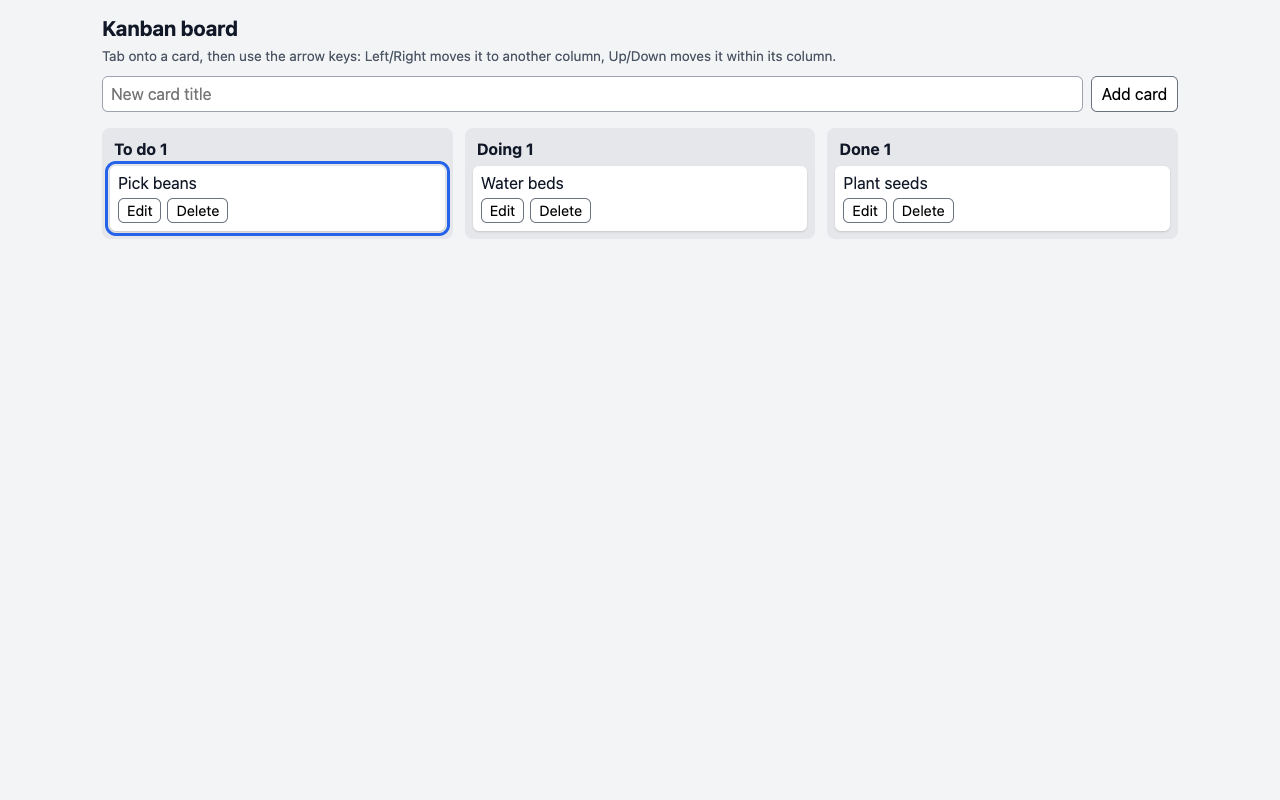
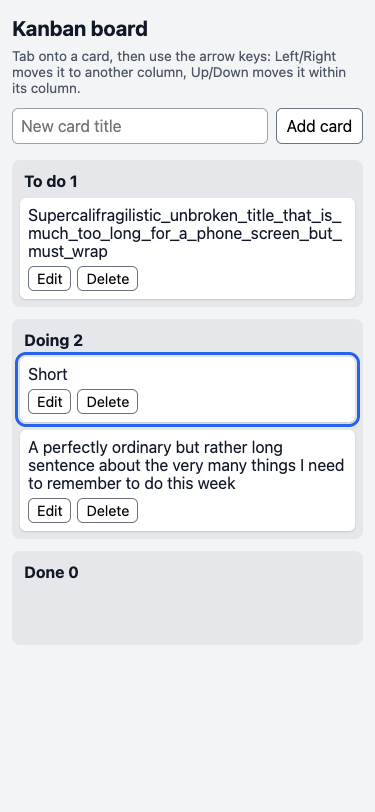
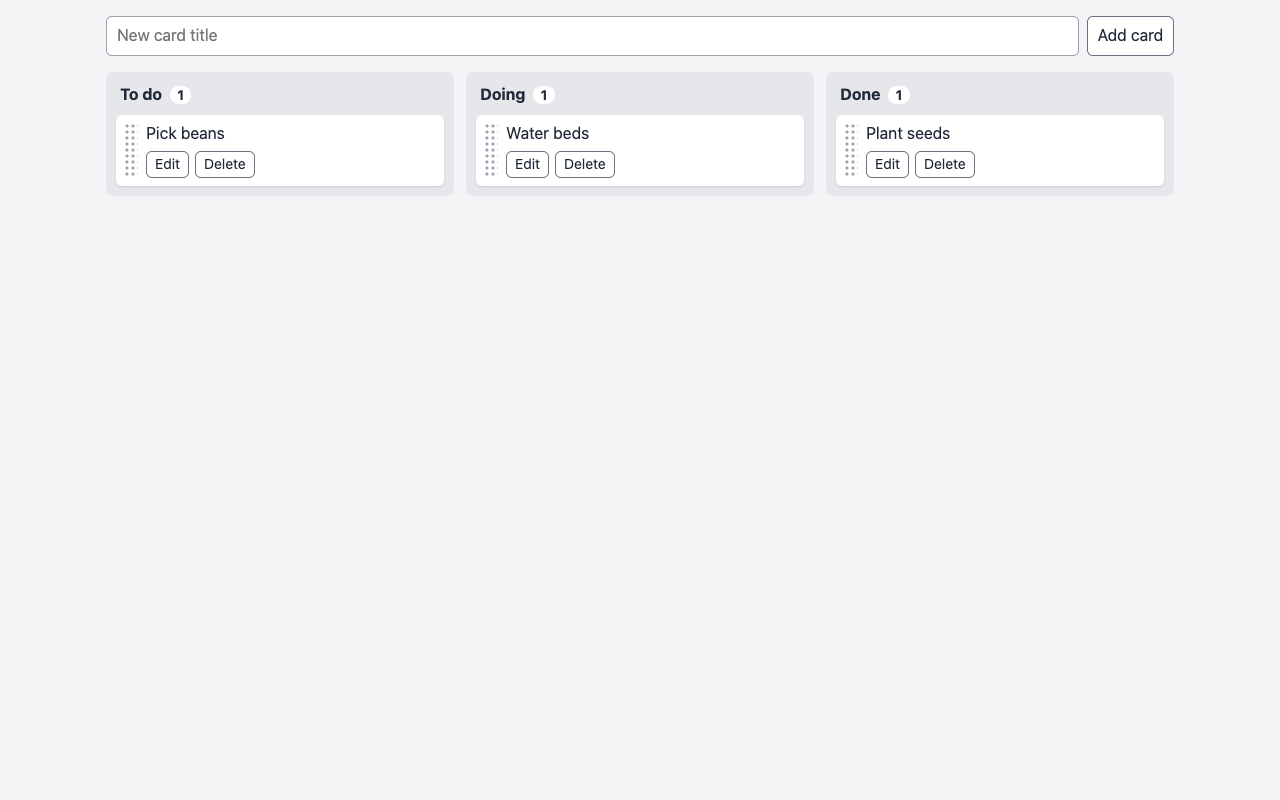
What it asks for. Asks for a personal kanban board in one HTML file with three columns: to do, doing and done. Cards are added by typing a title, can be dragged between and within columns, edited and deleted, and each column shows how many cards it holds. The board must survive a reload, work from the keyboard with the arrow keys, show titles that contain code exactly as typed, and fit a phone screen.

Max effort passed 1 fewer check than low.

AI answer from Haiku 5.5 · low effort · 8 Oct 2026

9 of 9

Screenshot of the page built in this answer, at a desktop width of 1280 pixels
Our screenshot, 1280 by 800. Open it for the full length.
Screenshot of the page built in this answer, at a phone width of 375 pixels
Phone, 375 by 812.
Show the code and the answer.
<!DOCTYPE html>
<html lang="en">
<head>
<meta charset="UTF-8">
<meta name="viewport" content="width=device-width, initial-scale=1">
<title>Kanban board</title>
<style>
  * { box-sizing: border-box; }
  html, body { margin: 0; padding: 0; }
  body {
    font-family: system-ui, -apple-system, "Segoe UI", Roboto, sans-serif;
    background: #f3f4f6;
    color: #111827;
    overflow-x: hidden;
  }
  main { padding: 12px; max-width: 1100px; margin: 0 auto; }
  h1 { font-size: 1.3rem; margin: 4px 0 8px; }
  .hint { font-size: 0.85rem; color: #4b5563; margin: 0 0 12px; overflow-wrap: anywhere; }

  .add-form { display: flex; gap: 8px; margin-bottom: 16px; min-width: 0; }
  .add-form input {
    flex: 1 1 auto;
    min-width: 0;
    padding: 8px;
    font: inherit;
    border: 1px solid #9ca3af;
    border-radius: 6px;
  }

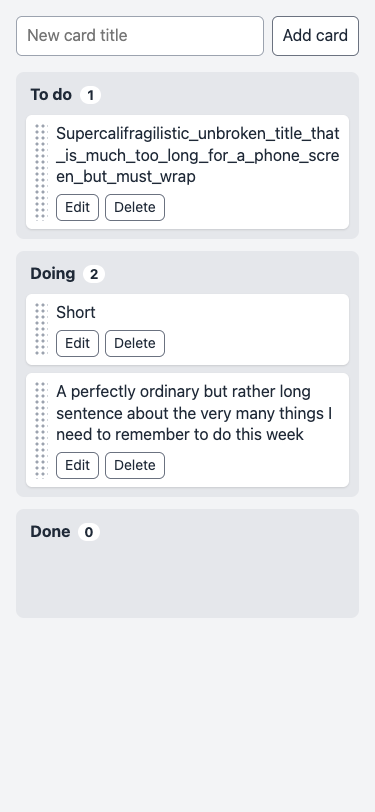
  button {
    font: inherit;
    padding: 6px 10px;
    border: 1px solid #6b7280;
    border-radius: 6px;
    background: #fff;
    cursor: pointer;
    flex: 0 0 auto;
  }
  button:hover { background: #e5e7eb; }
  button:focus-visible { outline: 3px solid #2563eb; outline-offset: 2px; }

  .board {
    display: grid;
    grid-template-columns: repeat(3, minmax(0, 1fr));
    gap: 12px;
    align-items: start;
  }
  @media (max-width: 700px) {
    .board { grid-template-columns: minmax(0, 1fr); }
  }

  .column {
    background: #e5e7eb;
    border-radius: 8px;
    padding: 8px;
    min-width: 0;
  }
  .column h2 {
    font-size: 1rem;
    margin: 4px 4px 8px;
    overflow-wrap: anywhere;
  }
  .list {
    min-height: 48px;
    display: flex;
    flex-direction: column;
    gap: 8px;
    border-radius: 6px;
  }
  .column.drag-over { outline: 2px dashed #2563eb; outline-offset: 2px; }

  .card {
    background: #fff;
    border-radius: 6px;
    padding: 8px;
    box-shadow: 0 1px 2px rgba(0, 0, 0, 0.15);
    min-width: 0;
    cursor: grab;
  }
  .card:focus { outline: 3px solid #2563eb; outline-offset: 2px; }
  .card.dragging { opacity: 0.5; }

  .title {
    overflow-wrap: anywhere;
    word-break: break-word;
    margin-bottom: 6px;
  }
  .card-actions {
    display: flex;
    flex-wrap: wrap;
    gap: 6px;
  }
  .card-actions button { padding: 3px 8px; font-size: 0.9rem; }

  .card input.edit {
    display: block;
    width: 100%;
    min-width: 0;
    padding: 6px;
    font: inherit;
    border: 1px solid #9ca3af;
    border-radius: 4px;
    margin-bottom: 6px;
  }
</style>
</head>
<body>
<main>
  <h1>Kanban board</h1>
  <p class="hint">Tab onto a card, then use the arrow keys: Left/Right moves it to another column, Up/Down moves it within its column.</p>

  <form class="add-form" id="add-form">
    <input type="text" id="new-title" placeholder="New card title" aria-label="New card title" autocomplete="off">
    <button type="submit">Add card</button>
  </form>

  <div class="board" id="board"></div>
</main>

<script>
(function () {
  'use strict';

  var KEY = 'kanban-board-v1';
  var COLUMNS = [
    { id: 'todo', name: 'To do' },
    { id: 'doing', name: 'Doing' },
    { id: 'done', name: 'Done' }
  ];

  var boardEl = document.getElementById('board');
  var addForm = document.getElementById('add-form');
  var addInput = document.getElementById('new-title');

  var state = load();
  var editingId = null;
  var dragId = null;

  function emptyState() {
    return { todo: [], doing: [], done: [] };
  }

  function load() {
    try {
      var raw = localStorage.getItem(KEY);
      if (!raw) return emptyState();
      var data = JSON.parse(raw);
      var s = emptyState();
      COLUMNS.forEach(function (c) {
        if (data && Array.isArray(data[c.id])) {
          s[c.id] = data[c.id].filter(function (card) {
            return card && typeof card.id === 'string' && typeof card.title === 'string';
          });
        }
      });
      return s;
    } catch (e) {
      return emptyState();
    }
  }

  function save() {
    try {
      localStorage.setItem(KEY, JSON.stringify(state));
    } catch (e) {
      /* storage unavailable or full; board still works for this session */
    }
  }

  function newId() {
    return Date.now().toString(36) + Math.random().toString(36).slice(2, 10);
  }

  function findCard(id) {
    for (var i = 0; i < COLUMNS.length; i++) {
      var colId = COLUMNS[i].id;
      for (var j = 0; j < state[colId].length; j++) {
        if (state[colId][j].id === id) return { col: colId, index: j };
      }
    }
    return null;
  }

  function makeButton(label, onClick) {
    var b = document.createElement('button');
    b.type = 'button';
    b.textContent = label;
    b.addEventListener('click', onClick);
    return b;
  }

  function render(focusId) {
    boardEl.textContent = '';

    COLUMNS.forEach(function (col) {
      var section = document.createElement('section');
      section.className = 'column';

      var h = document.createElement('h2');
      h.appendChild(document.createTextNode(col.name + ' '));
      var count = document.createElement('span');
      count.textContent = String(state[col.id].length);
      h.appendChild(count);
      section.appendChild(h);

      var list = document.createElement('div');
      list.className = 'list';
      list.dataset.col = col.id;
      list.addEventListener('dragover', function (e) { onDragOver(e, list); });
      list.addEventListener('drop', function (e) { onDrop(e, col.id, list); });

      state[col.id].forEach(function (card) {
        list.appendChild(renderCard(card));
      });

      section.appendChild(list);
      boardEl.appendChild(section);
    });

    if (editingId) {
      var input = findCardElement(editingId);
      var editField = input && input.querySelector('input.edit');
      if (editField) {
        editField.focus();
        editField.select();
      }
    } else if (focusId) {
      var el = findCardElement(focusId);
      if (el) el.focus();
    }
  }

  function findCardElement(id) {
    var cards = boardEl.querySelectorAll('.card');
    for (var i = 0; i < cards.length; i++) {
      if (cards[i].dataset.id === id) return cards[i];
    }
    return null;
  }

  function renderCard(card) {
    var el = document.createElement('div');
    el.className = 'card';
    el.tabIndex = 0;
    el.dataset.id = card.id;
    el.draggable = editingId !== card.id;

    if (editingId === card.id) {
      var input = document.createElement('input');
      input.type = 'text';
      input.className = 'edit';
      input.value = card.title;
      input.setAttribute('aria-label', 'Edit title');
      input.addEventListener('keydown', function (e) {
        if (e.key === 'Enter') {
          e.preventDefault();
          saveEdit(card.id, input.value);
        } else if (e.key === 'Escape') {
          e.preventDefault();
          cancelEdit(card.id);
        }
      });
      el.appendChild(input);

      var editRow = document.createElement('div');
      editRow.className = 'card-actions';
      editRow.appendChild(makeButton('Save', function () {
        saveEdit(card.id, input.value);
      }));
      editRow.appendChild(makeButton('Cancel', function () {
        cancelEdit(card.id);
      }));
      el.appendChild(editRow);
    } else {
      var title = document.createElement('div');
      title.className = 'title';
      title.textContent = card.title;
      el.appendChild(title);

      var row = document.createElement('div');
      row.className = 'card-actions';
      row.appendChild(makeButton('Edit', function () {
        editingId = card.id;
        render();
      }));
      row.appendChild(makeButton('Delete', function () {
        removeCard(card.id);
      }));
      el.appendChild(row);
    }

    // Keyboard movement: only when the card itself has focus, not its buttons or input.
    el.addEventListener('keydown', function (e) {
      if (e.target !== el) return;
      var dx = 0, dy = 0;
      if (e.key === 'ArrowLeft') dx = -1;
      else if (e.key === 'ArrowRight') dx = 1;
      else if (e.key === 'ArrowUp') dy = -1;
      else if (e.key === 'ArrowDown') dy = 1;
      else return;
      e.preventDefault();
      moveByKey(card.id, dx, dy);
    });

    // Mouse / pointer drag.
    el.addEventListener('dragstart', function (e) {
      dragId = card.id;
      e.dataTransfer.effectAllowed = 'move';
      e.dataTransfer.setData('text/plain', card.id);
      el.classList.add('dragging');
    });
    el.addEventListener('dragend', function () {
      dragId = null;
      el.classList.remove('dragging');
      clearDragOver();
    });

    return el;
  }

  function moveByKey(id, dx, dy) {
    var pos = findCard(id);
    if (!pos) return;

    if (dx !== 0) {
      var colIdx = COLUMNS.findIndex(function (c) { return c.id === pos.col; });
      var newCol = COLUMNS[colIdx + dx];
      if (!newCol) return;
      var moved = state[pos.col].splice(pos.index, 1)[0];
      var target = Math.min(pos.index, state[newCol.id].length);
      state[newCol.id].splice(target, 0, moved);
    } else {
      var arr = state[pos.col];
      var ni = pos.index + dy;
      if (ni < 0 || ni >= arr.length) return;
      var tmp = arr[pos.index];
      arr[pos.index] = arr[ni];
      arr[ni] = tmp;
    }

    save();
    render(id);
  }

  function insertionIndex(list, clientY) {
    var cards = list.querySelectorAll(':scope > .card');
    for (var i = 0; i < cards.length; i++) {
      var r = cards[i].getBoundingClientRect();
      if (clientY < r.top + r.height / 2) return i;
    }
    return cards.length;
  }

  function clearDragOver() {
    var cols = boardEl.querySelectorAll('.column.drag-over');
    for (var i = 0; i < cols.length; i++) cols[i].classList.remove('drag-over');
  }

  function onDragOver(e, list) {
    if (!dragId) return;
    e.preventDefault();
    e.dataTransfer.dropEffect = 'move';
    clearDragOver();
    list.parentElement.classList.add('drag-over');
  }

  function onDrop(e, colId, list) {
    if (!dragId) return;
    e.preventDefault();
    var id = dragId;
    dragId = null;

    var pos = findCard(id);
    if (!pos) return;

    var index = insertionIndex(list, e.clientY);
    var moved = state[pos.col].splice(pos.index, 1)[0];
    var target = index;
    if (pos.col === colId && pos.index < index) target = index - 1;
    state[colId].splice(Math.min(target, state[colId].length), 0, moved);

    save();
    clearDragOver();
    render(id);
  }

  function saveEdit(id, value) {
    var pos = findCard(id);
    if (pos && value.trim() !== '') {
      state[pos.col][pos.index].title = value;
    }
    editingId = null;
    save();
    render(id);
  }

  function cancelEdit(id) {
    editingId = null;
    render(id);
  }

  function removeCard(id) {
    var pos = findCard(id);
    if (!pos) return;
    state[pos.col].splice(pos.index, 1);
    if (editingId === id) editingId = null;
    save();
    render();
  }

  addForm.addEventListener('submit', function (e) {
    e.preventDefault();
    var value = addInput.value;
    if (value.trim() !== '') {
      state.todo.push({ id: newId(), title: value });
      save();
      render();
    }
    addInput.value = '';
    addInput.focus();
  });

  render();
})();
</script>
</body>
</html>

Drag and drop uses the browser's built-in mouse drag. Many phones don't start it from touch, so on a phone use the Edit button or the arrow keys on a connected keyboard to move cards.

  • Floor2/2, 100% passed
  • Middle3/3, 100% passed
  • Top4/4, 100% passed
9 of 9 checks passedfloor 2/2, middle 3/3, top 4/4
  • Passed.
    The page loads with no errors and has the three named columns
    Floor Page test
  • Passed.
    Adding a card works with Enter and with the Add card button
    Floor Page test
  • Passed.
    Empty or space-only titles are ignored
    Middle Page test
  • Passed.
    The counts update, and Edit and Delete work
    Middle Page test
  • Passed.
    After a reload the board is exactly as it was
    Middle Page test
  • Passed.
    Dragging moves cards between columns and reorders them, and it survives a reload
    Top Page test
  • Passed.
    A card can be moved with the arrow keys and keeps focus
    Top Page test
  • Passed.
    Titles like <b>hi</b> & <img ...> show exactly as typed and run nothing
    Top Page test
  • Passed.
    No sideways scroll on a 375 px phone, even with very long titles
    Top Page test
  • Took 40 s.
  • First words after 28 s.
  • Wrote 11,131 tokens, 6,405 of them thinking.
  • 0.6¢ at API prices.
All numbers.
Time to finish40 s
Time to first words28 s
Input tokens1,314
Cached tokens0
Output tokens11,131
Thinking tokens6,405
Words in the answer1,261
Price at API rates0.6¢

AI answer from Haiku 5.5 · max effort · 8 Oct 2026

8 of 9

Screenshot of the page built in this answer, at a desktop width of 1280 pixels
Our screenshot, 1280 by 800. Open it for the full length.
Screenshot of the page built in this answer, at a phone width of 375 pixels
Phone, 375 by 812.
Show the code and the answer.

Save this as one .html file and open it in a browser.

<!DOCTYPE html>
<html lang="en">
<head>
<meta charset="utf-8">
<meta name="viewport" content="width=device-width, initial-scale=1">
<title>Kanban board</title>
<style>
  * { box-sizing: border-box; }
  html, body { margin: 0; }
  body {
    font-family: system-ui, -apple-system, "Segoe UI", Roboto, Helvetica, Arial, sans-serif;
    font-size: 16px;
    line-height: 1.35;
    color: #1f2937;
    background: #f3f4f6;
  }
  body.is-dragging,
  body.is-dragging * {
    cursor: grabbing !important;
    user-select: none;
    -webkit-user-select: none;
  }

  .page { max-width: 1100px; margin: 0 auto; padding: 16px; }

  input[type="text"] {
    font: inherit;
    padding: 8px 10px;
    border: 1px solid #9ca3af;
    border-radius: 6px;
    background: #fff;
    color: inherit;
  }
  button {
    font: inherit;
    padding: 6px 10px;
    border: 1px solid #6b7280;
    border-radius: 6px;
    background: #fff;
    color: inherit;
    cursor: pointer;
  }
  button:hover { background: #f9fafb; }
  button:focus-visible,
  input:focus-visible { outline: 3px solid #2563eb; outline-offset: 1px; }

  .add-form { display: flex; gap: 8px; margin-bottom: 16px; }
  .add-form input { flex: 1 1 0; min-width: 0; }
  .add-form button { flex: none; white-space: nowrap; }

  .board {
    display: grid;
    grid-template-columns: repeat(3, minmax(0, 1fr));
    gap: 12px;
    align-items: start;
  }
  @media (max-width: 720px) {
    .board { grid-template-columns: minmax(0, 1fr); }
  }

  .column {
    min-width: 0;
    padding: 10px;
    background: #e5e7eb;
    border-radius: 8px;
  }
  .column.drop-target { box-shadow: inset 0 0 0 2px #2563eb; }
  .column h2 { margin: 2px 4px 10px; font-size: 1rem; }
  .count {
    display: inline-block;
    min-width: 1.6em;
    margin-left: 4px;
    padding: 0 6px;
    border-radius: 999px;
    background: #fff;
    font-size: 0.85rem;
    text-align: center;
  }

  .cards {
    display: flex;
    flex-direction: column;
    gap: 8px;
    min-height: 56px;
    margin: 0;
    padding: 0;
    list-style: none;
  }
  .card {
    position: relative;
    display: flex;
    gap: 8px;
    min-width: 0;
    padding: 8px;
    background: #fff;
    border-radius: 6px;
    box-shadow: 0 1px 2px rgba(0, 0, 0, 0.12);
  }
  .card:focus-visible { outline: 3px solid #2563eb; outline-offset: 2px; }
  .card.dragging { opacity: 0.35; }
  .card.drag-ghost {
    position: fixed;
    left: 0;
    top: 0;
    z-index: 1000;
    margin: 0;
    opacity: 0.95;
    pointer-events: none;
    box-shadow: 0 10px 24px rgba(0, 0, 0, 0.25);
  }
  .drop-indicator {
    flex: none;
    height: 4px;
    border-radius: 2px;
    background: #2563eb;
  }

  .handle {
    flex: none;
    width: 14px;
    cursor: grab;
    touch-action: none; /* a finger on the grip drags the card instead of scrolling the page */
    background-image: radial-gradient(circle, #9ca3af 1.3px, transparent 1.8px);
    background-size: 6px 6px;
  }
  .card-body {
    flex: 1 1 auto;
    min-width: 0;
    display: flex;
    flex-direction: column;
    gap: 6px;
  }
  .title {
    white-space: pre-wrap;    /* spacing exactly as typed */
    overflow-wrap: anywhere;  /* long words wrap instead of widening the page */
    word-break: break-word;
  }
  .actions { display: flex; flex-wrap: wrap; gap: 6px; }
  .actions button { padding: 3px 8px; font-size: 0.875rem; }

  .edit-form { display: flex; gap: 6px; min-width: 0; }
  .edit-form input { flex: 1 1 0; min-width: 0; }
  .edit-form button { flex: none; }

  .sr-only {
    position: absolute;
    width: 1px;
    height: 1px;
    margin: -1px;
    padding: 0;
    overflow: hidden;
    clip: rect(0 0 0 0);
    white-space: nowrap;
    border: 0;
  }
</style>
</head>
<body>
<main class="page">
  <form class="add-form" id="add-form" autocomplete="off">
    <input type="text" id="new-title" placeholder="New card title" aria-label="New card title" autocomplete="off">
    <button type="submit">Add card</button>
  </form>

  <div class="board" id="board">
    <section class="column" data-col="todo" aria-labelledby="head-todo">
      <h2 id="head-todo">To do <span class="count" data-count="todo">0</span></h2>
      <ul class="cards" data-col="todo"></ul>
    </section>
    <section class="column" data-col="doing" aria-labelledby="head-doing">
      <h2 id="head-doing">Doing <span class="count" data-count="doing">0</span></h2>
      <ul class="cards" data-col="doing"></ul>
    </section>
    <section class="column" data-col="done" aria-labelledby="head-done">
      <h2 id="head-done">Done <span class="count" data-count="done">0</span></h2>
      <ul class="cards" data-col="done"></ul>
    </section>
  </div>

  <p class="sr-only" id="live" aria-live="polite"></p>
</main>

<script>
(() => {
  'use strict';

  const STORAGE_KEY = 'kanban-board-v1';
  const COLUMNS = [
    { key: 'todo', title: 'To do' },
    { key: 'doing', title: 'Doing' },
    { key: 'done', title: 'Done' },
  ];

  const boardEl = document.getElementById('board');
  const addForm = document.getElementById('add-form');
  const newTitle = document.getElementById('new-title');
  const live = document.getElementById('live');

  const lists = {};
  const counts = {};
  for (const col of COLUMNS) {
    lists[col.key] = boardEl.querySelector(`ul.cards[data-col="${col.key}"]`);
    counts[col.key] = boardEl.querySelector(`[data-count="${col.key}"]`);
  }

  // ---------- state and storage ----------
  // state.todo, state.doing and state.done hold { id, title } objects;
  // the order inside each array is the order on screen.
  function load() {
    const fresh = { todo: [], doing: [], done: [] };
    try {
      const data = JSON.parse(localStorage.getItem(STORAGE_KEY) || 'null');
      if (data && typeof data === 'object') {
        for (const col of COLUMNS) {
          if (!Array.isArray(data[col.key])) continue;
          for (const item of data[col.key]) {
            if (item && typeof item.id === 'string' && typeof item.title === 'string') {
              fresh[col.key].push({ id: item.id, title: item.title });
            }
          }
        }
      }
    } catch (err) {
      // Nothing readable is saved, so the board starts empty.
    }
    return fresh;
  }

  function save() {
    try {
      localStorage.setItem(STORAGE_KEY, JSON.stringify(state));
    } catch (err) {
      // Storage is blocked or full; the board still works until the page is closed.
    }
  }

  let state = load();
  let editingId = null;  // the card being edited, if any
  let editDraft = '';    // the text in that edit box, kept across redraws
  let drag = null;       // the drag in progress, if any
  let pointerX = 0;
  let pointerY = 0;
  let autoScrolling = false;

  function newId() {
    if (window.crypto && typeof window.crypto.randomUUID === 'function') {
      return window.crypto.randomUUID();
    }
    return 'c' + Date.now().toString(36) + Math.random().toString(36).slice(2, 10);
  }

  function locate(id) {
    for (const col of COLUMNS) {
      const index = state[col.key].findIndex((item) => item.id === id);
      if (index !== -1) return { colKey: col.key, index, item: state[col.key][index] };
    }
    return null;
  }

  function columnTitle(key) {
    return COLUMNS.find((col) => col.key === key).title;
  }

  function cardEl(id) {
    return Array.from(boardEl.querySelectorAll('.card')).find((el) => el.dataset.id === id) || null;
  }

  function focusCard(id) {
    const el = cardEl(id);
    if (el) el.focus();
  }

  // ---------- drawing ----------
  // Titles are added with textContent or .value, never as HTML.
  function render() {
    for (const col of COLUMNS) {
      const list = lists[col.key];
      const items = state[col.key];
      list.textContent = '';
      for (const item of items) list.appendChild(buildCard(item));
      counts[col.key].textContent = String(items.length);
    }
  }

  function makeButton(label, onClick) {
    const btn = document.createElement('button');
    btn.type = 'button';
    btn.textContent = label;
    btn.addEventListener('click', onClick);
    return btn;
  }

  function buildCard(item) {
    const li = document.createElement('li');
    li.className = 'card';
    li.dataset.id = item.id;

    const content = document.createElement('div');
    content.className = 'card-body';

    if (item.id === editingId) {
      content.appendChild(buildEditForm());
      li.appendChild(content);
      return li;
    }

    li.tabIndex = 0;  // the card itself can be reached with Tab
    li.setAttribute('aria-keyshortcuts', 'ArrowUp ArrowDown ArrowLeft ArrowRight');
    li.addEventListener('keydown', onCardKeyDown);
    li.addEventListener('pointerdown', onCardPointerDown);

    const handle = document.createElement('span');
    handle.className = 'handle';
    handle.title = 'Drag to move';
    handle.setAttribute('aria-hidden', 'true');

    const title = document.createElement('div');
    title.className = 'title';
    title.textContent = item.title;

    const actions = document.createElement('div');
    actions.className = 'actions';
    actions.append(
      makeButton('Edit', () => startEdit(item.id)),
      makeButton('Delete', () => deleteCard(item.id))
    );

    content.append(title, actions);
    li.append(handle, content);
    return li;
  }

  function buildEditForm() {
    const form = document.createElement('form');
    form.className = 'edit-form';

    const input = document.createElement('input');
    input.type = 'text';
    input.className = 'edit-input';
    input.value = editDraft;
    input.autocomplete = 'off';
    input.setAttribute('aria-label', 'Card title');
    input.addEventListener('input', () => { editDraft = input.value; });
    input.addEventListener('keydown', (e) => {
      if (e.key === 'Escape') {
        e.preventDefault();
        cancelEdit();
      }
    });

    const saveBtn = document.createElement('button');
    saveBtn.type = 'submit';
    saveBtn.textContent = 'Save';

    form.append(input, saveBtn, makeButton('Cancel', () => cancelEdit()));
    form.addEventListener('submit', (e) => {
      e.preventDefault();
      saveEdit(input.value);
    });
    return form;
  }

  // ---------- adding ----------
  addForm.addEventListener('submit', (e) => {
    e.preventDefault();
    const title = newTitle.value;
    if (title.trim() === '') return;  // blank titles are ignored
    state.todo.push({ id: newId(), title });
    newTitle.value = '';
    save();
    render();
    newTitle.focus();
  });

  // ---------- editing ----------
  function startEdit(id) {
    const found = locate(id);
    if (!found) return;
    editingId = id;
    editDraft = found.item.title;
    render();
    const input = cardEl(id).querySelector('.edit-input');
    input.focus();
    input.setSelectionRange(input.value.length, input.value.length);
  }

  function saveEdit(text) {
    const id = editingId;
    const found = locate(id);
    editingId = null;
    editDraft = '';
    if (found && text.trim() !== '' && text !== found.item.title) {
      found.item.title = text;
      save();
    }
    render();
    focusCard(id);
  }

  function cancelEdit() {
    const id = editingId;
    editingId = null;
    editDraft = '';
    render();
    focusCard(id);
  }

  // ---------- deleting ----------
  function deleteCard(id) {
    const found = locate(id);
    if (!found) return;
    const list = state[found.colKey];
    list.splice(found.index, 1);
    if (editingId === id) editingId = null;
    save();
    render();
    // Focus the card that moved into the gap, or the one above it.
    const next = list[found.index] || list[found.index - 1];
    if (next) focusCard(next.id);
    else newTitle.focus();
  }

  // ---------- moving with the keyboard ----------
  function onCardKeyDown(e) {
    if (e.target !== e.currentTarget) return;  // keys pressed in the card's buttons or text box are not ours
    if (e.altKey || e.ctrlKey || e.metaKey) return;
    const id = e.currentTarget.dataset.id;
    switch (e.key) {
      case 'ArrowUp': moveWithinColumn(id, -1); break;
      case 'ArrowDown': moveWithinColumn(id, 1); break;
      case 'ArrowLeft': moveToColumn(id, -1); break;
      case 'ArrowRight': moveToColumn(id, 1); break;
      default: return;
    }
    e.preventDefault();
  }

  function moveWithinColumn(id, step) {
    const found = locate(id);
    if (!found) return;
    const list = state[found.colKey];
    const to = found.index + step;
    if (to < 0 || to >= list.length) return;
    [list[found.index], list[to]] = [list[to], list[found.index]];
    commit(id, `Position ${to + 1} of ${list.length} in ${columnTitle(found.colKey)}`);
  }

  function moveToColumn(id, step) {
    const found = locate(id);
    if (!found) return;
    const from = COLUMNS.findIndex((col) => col.key === found.colKey);
    const to = from + step;
    if (to < 0 || to >= COLUMNS.length) return;
    state[found.colKey].splice(found.index, 1);
    const dest = state[COLUMNS[to].key];
    const pos = Math.min(found.index, dest.length);  // same slot, or the bottom if the column is shorter
    dest.splice(pos, 0, found.item);
    commit(id, `Moved to ${COLUMNS[to].title}, position ${pos + 1} of ${dest.length}`);
  }

  function commit(focusId, message) {
    save();
    render();
    focusCard(focusId);
    if (message) live.textContent = message;
  }

  // ---------- dragging with a mouse, pen or finger ----------
  function onCardPointerDown(e) {
    if (e.button !== 0) return;
    if (e.target.closest('button, input, form')) return;  // Edit, Delete, Save, Cancel and the text box work as normal
    if (drag) {
      if (drag.pointerId !== e.pointerId) return;  // a second finger: ignore it
      endDrag();                                    // an earlier drag whose release was missed
    }
    // Touch and pen can only drag from the grip, so swiping across a card still scrolls the page.
    const fromGrip = e.target.classList.contains('handle');
    if (e.pointerType !== 'mouse' && !fromGrip) return;

    drag = {
      id: e.currentTarget.dataset.id,
      li: e.currentTarget,
      pointerId: e.pointerId,
      startX: e.clientX,
      startY: e.clientY,
      active: false,
      ghost: null,
      indicator: null,
      offsetX: 0,
      offsetY: 0,
      target: null,
    };
    window.addEventListener('pointermove', onDragMove);
    window.addEventListener('pointerup', onDragEnd);
    window.addEventListener('pointercancel', onDragCancel);
    window.addEventListener('keydown', onDragKey);
  }

  function onDragMove(e) {
    if (!drag || e.pointerId !== drag.pointerId) return;
    pointerX = e.clientX;
    pointerY = e.clientY;
    if (!drag.active) {
      if (Math.hypot(pointerX - drag.startX, pointerY - drag.startY) < 6) return;  // small wobbles are not drags
      startDragging();
    }
    moveGhost();
    updateDropTarget();
  }

  function startDragging() {
    const rect = drag.li.getBoundingClientRect();
    drag.offsetX = drag.startX - rect.left;
    drag.offsetY = drag.startY - rect.top;

    const ghost = drag.li.cloneNode(true);
    ghost.removeAttribute('tabindex');
    ghost.setAttribute('aria-hidden', 'true');
    ghost.classList.add('drag-ghost');
    ghost.style.width = rect.width + 'px';
    document.body.appendChild(ghost);

    const indicator = document.createElement('li');
    indicator.className = 'drop-indicator';
    indicator.setAttribute('aria-hidden', 'true');

    drag.ghost = ghost;
    drag.indicator = indicator;
    drag.active = true;
    drag.li.classList.add('dragging');
    document.body.classList.add('is-dragging');
    const selection = window.getSelection();
    if (selection) selection.removeAllRanges();

    if (!autoScrolling) {
      autoScrolling = true;
      requestAnimationFrame(autoScroll);
    }
  }

  function moveGhost() {
    drag.ghost.style.transform = `translate(${pointerX - drag.offsetX}px, ${pointerY - drag.offsetY}px)`;
  }

  // Finds the column and slot under the pointer, and shows a line where the card would land.
  function updateDropTarget() {
    drag.indicator.remove();
    drag.target = null;
    document.querySelectorAll('.column.drop-target').forEach((el) => el.classList.remove('drop-target'));

    const under = document.elementFromPoint(pointerX, pointerY);
    const column = under ? under.closest('#board .column') : null;
    if (!column) return;

    column.classList.add('drop-target');
    const list = column.querySelector('.cards');
    const others = Array.from(list.children).filter((el) => el.classList.contains('card') && el !== drag.li);
    const index = others.filter((el) => {
      const r = el.getBoundingClientRect();
      return pointerY > r.top + r.height / 2;
    }).length;
    drag.target = { colKey: column.dataset.col, index };
    list.insertBefore(drag.indicator, others[index] || null);
  }

  // Scrolls the page while the pointer is near the top or bottom of the screen.
  function autoScroll() {
    if (!drag || !drag.active) {
      autoScrolling = false;
      return;
    }
    const edge = 72;
    const bottom = window.innerHeight - edge;
    let step = 0;
    if (pointerY < edge) step = -Math.ceil((edge - pointerY) / 6);
    else if (pointerY > bottom) step = Math.ceil((pointerY - bottom) / 6);
    if (step !== 0) {
      window.scrollBy(0, step);
      updateDropTarget();
    }
    requestAnimationFrame(autoScroll);
  }

  function onDragEnd(e) {
    if (!drag || e.pointerId !== drag.pointerId) return;
    const { id } = drag;
    const target = drag.active ? drag.target : null;
    endDrag();
    if (target) moveCardTo(id, target.colKey, target.index);
  }

  function onDragCancel(e) {
    if (drag && e.pointerId === drag.pointerId) endDrag();
  }

  function onDragKey(e) {
    if (drag && e.key === 'Escape') endDrag();  // Esc cancels a drag
  }

  function endDrag() {
    window.removeEventListener('pointermove', onDragMove);
    window.removeEventListener('pointerup', onDragEnd);
    window.removeEventListener('pointercancel', onDragCancel);
    window.removeEventListener('keydown', onDragKey);
    if (drag.ghost) drag.ghost.remove();
    if (drag.indicator) drag.indicator.remove();
    drag.li.classList.remove('dragging');
    document.body.classList.remove('is-dragging');
    document.querySelectorAll('.column.drop-target').forEach((el) => el.classList.remove('drop-target'));
    drag = null;
  }

  function moveCardTo(id, colKey, index) {
    const found = locate(id);
    if (!found) return;
    state[found.colKey].splice(found.index, 1);
    state[colKey].splice(index, 0, found.item);
    commit(id);
  }

  render();
})();
</script>
</body>
</html>

Notes on what I chose:

  • Keyboard: Tab onto a card, then Up/Down swaps it with its neighbour in the column. Left/Right moves it to the neighbouring column in the same position, or to the bottom if that column is shorter. Focus stays on the card. Tab still reaches its Edit and Delete buttons.
  • Mouse and touch: With a mouse, drag the card or its grip on the left. On a phone, drag by the grip so swiping over the rest of the card still scrolls the page.
  • Editing: Enter or Save confirms. Esc or Cancel discards. A blank edit keeps the old title, and blank new titles are ignored.
  • Titles: They are inserted as plain text, so <div> and a & b show exactly as typed, spacing included.
  • Extras beyond your list: Esc cancels a drag, the page scrolls when you drag near the top or bottom of the screen, and the Cancel button is there for mouse users.
  • Storage: The board is saved in this browser under this page's address, so opening the file from a different address gives a separate board.
  • Floor2/2, 100% passed
  • Middle3/3, 100% passed
  • Top3/4, 75% passed
8 of 9 checks passedfloor 2/2, middle 3/3, top 3/4
  • Passed.
    The page loads with no errors and has the three named columns
    Floor Page test
  • Passed.
    Adding a card works with Enter and with the Add card button
    Floor Page test
  • Passed.
    Empty or space-only titles are ignored
    Middle Page test
  • Passed.
    The counts update, and Edit and Delete work
    Middle Page test
  • Passed.
    After a reload the board is exactly as it was
    Middle Page test
  • Passed.
    Dragging moves cards between columns and reorders them, and it survives a reload
    Top Page test
  • Missed.
    A card can be moved with the arrow keys and keeps focustest group failed
    Top Page test
  • Passed.
    Titles like <b>hi</b> & <img ...> show exactly as typed and run nothing
    Top Page test
  • Passed.
    No sideways scroll on a 375 px phone, even with very long titles
    Top Page test
  • Took 8 min 0 s.
  • First words after 7 min 41 s.
  • Wrote 123,816 tokens, 115,721 of them thinking.
  • 6.2¢ at API prices.
All numbers.
Time to finish8 min 0 s
Time to first words7 min 41 s
Input tokens1,314
Cached tokens0
Output tokens123,816
Thinking tokens115,721
Words in the answer2,211
Price at API rates6.2¢
B04Minesweeper in one HTML fileLow 9/9Max 9/9Same

What it asks for. Asks for the game Minesweeper in one HTML file: a 9 by 9 board with 10 mines, flags on right click, a mines-left counter, a first square that is never a mine, empty areas that open by themselves, win and lose messages and a new game button. Every square has to be a button so the game works from the keyboard, and the board has to fit a phone.

Both settings passed 9 of 9 checks.

AI answer from Haiku 5.5 · low effort · 8 Oct 2026

9 of 9

Screenshot of the page built in this answer, at a desktop width of 1280 pixels
Our screenshot, 1280 by 800. Open it for the full length.
Screenshot of the page built in this answer, at a phone width of 375 pixels
Phone, 375 by 812.
More screenshots (2).
Screenshot of the page built in this answer, at a desktop width of 1280 pixelsScreenshot of the page built in this answer, at a phone width of 375 pixels
Show the code and the answer.
<!DOCTYPE html>
<html lang="en">
<head>
<meta charset="UTF-8">
<meta name="viewport" content="width=device-width, initial-scale=1">
<title>Minesweeper</title>
<style>
  * { box-sizing: border-box; }

  body {
    margin: 0;
    padding: 12px;
    min-height: 100vh;
    font-family: system-ui, -apple-system, sans-serif;
    display: flex;
    flex-direction: column;
    align-items: center;
    gap: 12px;
    overflow-x: hidden;
  }

  .bar {
    width: 340px;
    max-width: 100%;
    display: flex;
    justify-content: space-between;
    align-items: center;
    gap: 8px;
  }

  #mines-left { font-weight: bold; font-size: 18px; }

  #new-game {
    min-height: 36px;
    padding: 0 14px;
    font-size: 16px;
    cursor: pointer;
  }

  #message {
    min-height: 1.5em;
    font-size: 20px;
    font-weight: bold;
    text-align: center;
  }

  #board {
    display: grid;
    grid-template-columns: repeat(9, 36px);
    gap: 2px;
  }

  #board.done { pointer-events: none; }

  #board button {
    width: 36px;
    height: 36px;
    min-width: 32px;
    min-height: 32px;
    padding: 0;
    margin: 0;
    font-size: 18px;
    font-weight: bold;
    line-height: 1;
    background: #cfd6dd;
    border: 2px outset #eef2f5;
    cursor: pointer;
    display: flex;
    align-items: center;
    justify-content: center;
    user-select: none;
  }

  #board button.open {
    background: #f3f5f7;
    border: 1px solid #9aa4ae;
    cursor: default;
  }

  #board button.hit { background: #ff8a8a; }

  .n1 { color: #0030ff; }
  .n2 { color: #118a11; }
  .n3 { color: #e01010; }
  .n4 { color: #000080; }
  .n5 { color: #800000; }
  .n6 { color: #008080; }
  .n7 { color: #000000; }
  .n8 { color: #808080; }
</style>
</head>
<body>

<div class="bar">
  <div id="mines-left" aria-live="polite">Mines left: 10</div>
  <button id="new-game" type="button">New game</button>
</div>

<div id="message" role="status" aria-live="polite"></div>

<div id="board" role="grid"></div>

<script>
  const SIZE = 9;
  const MINES = 10;

  const boardEl = document.getElementById('board');
  const minesLeftEl = document.getElementById('mines-left');
  const messageEl = document.getElementById('message');
  document.getElementById('new-game').addEventListener('click', init);

  let cells = [];
  let placed = false;
  let over = false;

  function init() {
    cells = [];
    placed = false;
    over = false;
    boardEl.innerHTML = '';
    boardEl.classList.remove('done');
    messageEl.textContent = '';

    for (let i = 0; i < SIZE * SIZE; i++) {
      const cell = { mine: false, open: false, flag: false, count: 0, revealedMine: false, hit: false, el: null };
      const btn = document.createElement('button');
      btn.type = 'button';
      btn.setAttribute('aria-label', `Row ${Math.floor(i / SIZE) + 1}, column ${(i % SIZE) + 1}`);
      btn.addEventListener('click', () => openCell(i));
      btn.addEventListener('contextmenu', (e) => {
        e.preventDefault();
        toggleFlag(i);
      });
      cell.el = btn;
      cells.push(cell);
      boardEl.appendChild(btn);
    }
    updateCounter();
  }

  function neighbors(i) {
    const r = Math.floor(i / SIZE);
    const c = i % SIZE;
    const result = [];
    for (let dr = -1; dr <= 1; dr++) {
      for (let dc = -1; dc <= 1; dc++) {
        if (dr === 0 && dc === 0) continue;
        const nr = r + dr;
        const nc = c + dc;
        if (nr >= 0 && nr < SIZE && nc >= 0 && nc < SIZE) {
          result.push(nr * SIZE + nc);
        }
      }
    }
    return result;
  }

  function placeMines(safeIndex) {
    const candidates = [];
    for (let i = 0; i < SIZE * SIZE; i++) {
      if (i !== safeIndex) candidates.push(i);
    }
    // Fisher-Yates shuffle, then take the first MINES entries
    for (let i = candidates.length - 1; i > 0; i--) {
      const j = Math.floor(Math.random() * (i + 1));
      [candidates[i], candidates[j]] = [candidates[j], candidates[i]];
    }
    for (let k = 0; k < MINES; k++) {
      cells[candidates[k]].mine = true;
    }
    for (let i = 0; i < cells.length; i++) {
      cells[i].count = neighbors(i).filter(n => cells[n].mine).length;
    }
  }

  function openCell(i) {
    if (over) return;
    const cell = cells[i];
    if (cell.open || cell.flag) return;

    if (!placed) {
      placeMines(i);
      placed = true;
    }

    if (cell.mine) {
      lose(i);
      return;
    }

    reveal(i);
    checkWin();
  }

  function reveal(start) {
    const stack = [start];
    while (stack.length) {
      const i = stack.pop();
      const cell = cells[i];
      if (cell.open || cell.flag || cell.mine) continue;
      cell.open = true;
      render(i);
      if (cell.count === 0) {
        for (const n of neighbors(i)) {
          if (!cells[n].open) stack.push(n);
        }
      }
    }
  }

  function toggleFlag(i) {
    if (over) return;
    const cell = cells[i];
    if (cell.open) return;
    cell.flag = !cell.flag;
    render(i);
    updateCounter();
  }

  function render(i) {
    const cell = cells[i];
    const btn = cell.el;
    btn.className = '';
    btn.textContent = '';

    if (cell.revealedMine) {
      btn.textContent = '💣';
      if (cell.hit) btn.classList.add('hit');
      return;
    }

    if (cell.open) {
      btn.classList.add('open');
      if (cell.count > 0) {
        btn.textContent = cell.count;
        btn.classList.add('n' + cell.count);
      }
    } else if (cell.flag) {
      btn.textContent = '🚩';
    }
  }

  function updateCounter() {
    const flags = cells.filter(c => c.flag).length;
    minesLeftEl.textContent = `Mines left: ${MINES - flags}`;
  }

  function lose(i) {
    over = true;
    cells[i].hit = true;
    cells.forEach((cell, j) => {
      if (cell.mine) {
        cell.revealedMine = true;
      }
      render(j);
    });
    boardEl.classList.add('done');
    messageEl.textContent = 'Game over';
  }

  function checkWin() {
    const won = cells.every(c => c.mine || c.open);
    if (won) {
      over = true;
      cells.forEach((cell, j) => {
        if (cell.mine) cell.flag = true;
        render(j);
      });
      updateCounter();
      boardEl.classList.add('done');
      messageEl.textContent = 'You win!';
    }
  }

  init();
</script>

</body>
</html>
  • Floor2/2, 100% passed
  • Middle3/3, 100% passed
  • Top4/4, 100% passed
9 of 9 checks passedfloor 2/2, middle 3/3, top 4/4
  • Passed.
    81 square buttons in a 9 by 9 grid, Mines left starts at 10
    Floor Page test
  • Passed.
    A first click never lands on a mine
    Floor Page test
  • Passed.
    Numbers are right and an empty square opens its neighbours
    Middle Page test
  • Passed.
    Right click flags and unflags, the counter follows, a flagged square stays shut
    Middle Page test
  • Passed.
    The squares work from the keyboard
    Middle Page test
  • Passed.
    Hitting a mine says Game over, shows all 10 mines as 💣 and stops the board
    Top Page test
  • Passed.
    Opening every safe square shows You win! (and not before)
    Top Page test
  • Passed.
    New game resets the board, counter and message
    Top Page test
  • Passed.
    Fits a 375 px phone with squares of at least 32 px, no sideways scroll
    Top Page test
  • Took 22 s.
  • First words after 16 s.
  • Wrote 5,824 tokens, 3,096 of them thinking.
  • 0.3¢ at API prices.
All numbers.
Time to finish22 s
Time to first words16 s
Input tokens1,256
Cached tokens0
Output tokens5,824
Thinking tokens3,096
Words in the answer761
Price at API rates0.3¢

AI answer from Haiku 5.5 · max effort · 8 Oct 2026

9 of 9

Screenshot of the page built in this answer, at a desktop width of 1280 pixels
Our screenshot, 1280 by 800. Open it for the full length.
Screenshot of the page built in this answer, at a phone width of 375 pixels
Phone, 375 by 812.
More screenshots (2).
Screenshot of the page built in this answer, at a desktop width of 1280 pixelsScreenshot of the page built in this answer, at a phone width of 375 pixels
Show the code and the answer.

Save this as minesweeper.html and open it in a browser. It has no external files or libraries.

<!DOCTYPE html>
<html lang="en">
<head>
  <meta charset="utf-8">
  <meta name="viewport" content="width=device-width, initial-scale=1">
  <title>Minesweeper</title>
  <link rel="icon" href="data:,">
  <style>
    *, *::before, *::after {
      box-sizing: border-box;
    }

    body {
      margin: 0;
      padding: 12px;
      font-family: system-ui, -apple-system, "Segoe UI", Roboto, Helvetica, Arial, sans-serif;
      background: #eef2f6;
      color: #1c2630;
    }

    main {
      max-width: 420px;
      margin: 0 auto;
    }

    h1 {
      margin: 4px 0 12px;
      font-size: 1.6rem;
    }

    .bar {
      display: flex;
      flex-wrap: wrap;
      align-items: center;
      justify-content: space-between;
      gap: 8px 12px;
      margin-bottom: 10px;
    }

    #counter {
      font-size: 1.1rem;
      font-weight: 600;
    }

    #new-game {
      min-height: 44px;
      padding: 0 16px;
      font: inherit;
      font-weight: 600;
      color: #1c2630;
      background: #fff;
      border: 1px solid #6b7b8c;
      border-radius: 8px;
      cursor: pointer;
    }

    #new-game:hover {
      background: #f1f5f9;
    }

    #board {
      display: grid;
      grid-template-columns: repeat(9, minmax(0, 1fr));
      gap: 3px;
      padding: 6px;
      background: #6b7b8c;
      border-radius: 8px;
    }

    .cell {
      appearance: none;
      -webkit-appearance: none;
      width: 100%;
      min-width: 32px;
      aspect-ratio: 1 / 1;
      margin: 0;
      padding: 0;
      border: 0;
      border-radius: 4px;
      background: #cfd8e3;
      box-shadow: inset 0 -2px 0 #97a5b5, inset 0 2px 0 #fff;
      color: #1c2630;
      font: inherit;
      font-size: clamp(16px, 4.6vw, 22px);
      font-weight: 700;
      line-height: 1;
      cursor: pointer;
      touch-action: manipulation;
      -webkit-user-select: none;
      user-select: none;
      -webkit-touch-callout: none;
      -webkit-tap-highlight-color: transparent;
    }

    @media (hover: hover) {
      #board:not(.done) .cell:not(.open):hover {
        background: #dde5ee;
      }
    }

    #board:not(.done) .cell:not(.open):active {
      background: #bcc7d5;
      box-shadow: inset 0 1px 0 #97a5b5;
    }

    .cell.open {
      background: #f4f6f9;
      box-shadow: inset 0 0 0 1px #c3ccd8;
      cursor: default;
    }

    .cell.boom {
      background: #ff8a80;
    }

    #board.done .cell {
      cursor: default;
    }

    .cell:focus-visible,
    #new-game:focus-visible {
      outline: 3px solid #1a73e8;
      outline-offset: 1px;
    }

    .n1 { color: #1565c0; }
    .n2 { color: #2e7d32; }
    .n3 { color: #c62828; }
    .n4 { color: #283593; }
    .n5 { color: #6d1b1b; }
    .n6 { color: #00838f; }
    .n7 { color: #212121; }
    .n8 { color: #616161; }

    #message {
      min-height: 1.6em;
      margin: 14px 0 0;
      text-align: center;
      font-size: 1.4rem;
      font-weight: 700;
    }

    #message.win {
      color: #2e7d32;
    }

    #message.lose {
      color: #c62828;
    }

    .hint {
      margin: 14px 0 0;
      text-align: center;
      font-size: 0.9rem;
      color: #4a5866;
    }
  </style>
</head>
<body>
  <main>
    <h1>Minesweeper</h1>

    <div class="bar">
      <div id="counter">Mines left: <span id="mines-left">10</span></div>
      <button type="button" id="new-game">New game</button>
    </div>

    <div id="board" role="group" aria-label="Minesweeper board"></div>

    <p id="message" role="status" aria-live="polite"></p>

    <p class="hint">
      Tap a square to open it. Right-click or long-press to flag it.
      On a keyboard, focus a square and press F to flag it.
    </p>
  </main>

  <script>
    (() => {
      'use strict';

      const ROWS = 9;
      const COLS = 9;
      const TOTAL = ROWS * COLS;
      const MINES = 10;
      const LONG_PRESS_MS = 500;

      const boardEl = document.getElementById('board');
      const minesLeftEl = document.getElementById('mines-left');
      const messageEl = document.getElementById('message');
      const newGameBtn = document.getElementById('new-game');

      // One entry per square. el is that square's <button>.
      const cells = [];
      let minesPlaced = false; // mines are placed on the first open, which keeps that square safe
      let outcome = null;      // null while playing, then 'win' or 'lose'
      let flagCount = 0;

      const isOver = () => outcome !== null;

      // Indexes of the (up to 8) squares around square i.
      function neighbours(i) {
        const r = Math.floor(i / COLS);
        const c = i % COLS;
        const list = [];
        for (let dr = -1; dr <= 1; dr++) {
          for (let dc = -1; dc <= 1; dc++) {
            if (dr === 0 && dc === 0) continue;
            const nr = r + dr;
            const nc = c + dc;
            if (nr >= 0 && nr < ROWS && nc >= 0 && nc < COLS) {
              list.push(nr * COLS + nc);
            }
          }
        }
        return list;
      }

      // Puts the mines on random squares, never on the square opened first.
      function placeMines(safe) {
        const pool = [];
        for (let i = 0; i < TOTAL; i++) {
          if (i !== safe) pool.push(i);
        }
        // Fisher-Yates: the first MINES entries of the shuffled pool become mines.
        for (let k = 0; k < MINES; k++) {
          const j = k + Math.floor(Math.random() * (pool.length - k));
          [pool[k], pool[j]] = [pool[j], pool[k]];
          cells[pool[k]].mine = true;
        }
        for (let i = 0; i < TOTAL; i++) {
          cells[i].count = neighbours(i).filter((n) => cells[n].mine).length;
        }
        minesPlaced = true;
      }

      // Opens square i and, if it has no mines around it, keeps opening neighbours.
      function reveal(start) {
        if (isOver()) return;
        const first = cells[start];
        if (first.open || first.flag) return; // a flagged square must be unflagged first

        if (!minesPlaced) placeMines(start);

        if (first.mine) {
          first.open = true;
          first.exploded = true;
          finish('lose');
          return;
        }

        const stack = [start];
        while (stack.length > 0) {
          const i = stack.pop();
          const cell = cells[i];
          if (cell.open || cell.flag || cell.mine) continue;
          cell.open = true;
          if (cell.count === 0) {
            for (const n of neighbours(i)) {
              const next = cells[n];
              if (!next.open && !next.flag && !next.mine) stack.push(n);
            }
          }
        }

        if (cells.every((c) => c.mine || c.open)) {
          finish('win');
        } else {
          render();
        }
      }

      function toggleFlag(i) {
        const cell = cells[i];
        if (isOver() || cell.open) return;
        cell.flag = !cell.flag;
        flagCount += cell.flag ? 1 : -1;
        render();
      }

      function finish(result) {
        outcome = result;
        if (result === 'win') {
          // Flag the mines that are still hidden, so the counter reads 0.
          for (const c of cells) {
            if (c.mine && !c.flag) {
              c.flag = true;
              flagCount++;
            }
          }
          messageEl.textContent = 'You win!';
          messageEl.className = 'win';
        } else {
          messageEl.textContent = 'Game over';
          messageEl.className = 'lose';
        }
        render();
      }

      // Redraws every square and the counter from the current state.
      function render() {
        for (let i = 0; i < TOTAL; i++) {
          const c = cells[i];
          const where = `Row ${Math.floor(i / COLS) + 1}, column ${(i % COLS) + 1}`;
          let cls = 'cell';
          let text = '';
          let label = `${where}, hidden`;

          if (c.open && c.mine) {
            cls += c.exploded ? ' open mine boom' : ' open mine';
            text = '💣';
            label = `${where}, mine`;
          } else if (c.open) {
            cls += ' open';
            if (c.count > 0) {
              cls += ` n${c.count}`;
              text = String(c.count);
              label = `${where}, ${c.count} ${c.count === 1 ? 'mine' : 'mines'} nearby`;
            } else {
              label = `${where}, empty`;
            }
          } else if (outcome === 'lose' && c.mine) {
            // When the game is lost, every mine is shown, flagged or not.
            cls += ' open mine';
            text = '💣';
            label = `${where}, mine`;
          } else if (c.flag) {
            text = '🚩';
            label = `${where}, flagged`;
          }

          c.el.className = cls;
          c.el.textContent = text;
          c.el.setAttribute('aria-label', label);
        }

        minesLeftEl.textContent = String(MINES - flagCount);
        boardEl.classList.toggle('done', isOver());
      }

      function createCell(i) {
        const el = document.createElement('button');
        el.type = 'button';
        boardEl.appendChild(el);
        cells.push({ el, mine: false, open: false, flag: false, count: 0, exploded: false });

        let pressTimer = null;
        let flaggedThisPress = false; // true once the current press has flagged this square

        const flagFromPress = () => {
          if (!flaggedThisPress) {
            flaggedThisPress = true;
            toggleFlag(i);
          }
        };

        // Keyboard: Enter and Space arrive as a click. F flags the focused square.
        el.addEventListener('keydown', (e) => {
          flaggedThisPress = false;
          if ((e.key === 'f' || e.key === 'F') && !e.repeat &&
              !e.ctrlKey && !e.metaKey && !e.altKey) {
            e.preventDefault();
            toggleFlag(i);
          }
        });

        // Touch: holding a square still for half a second flags it instead of opening it.
        el.addEventListener('pointerdown', (e) => {
          flaggedThisPress = false;
          clearTimeout(pressTimer);
          if (e.pointerType === 'touch') {
            pressTimer = setTimeout(flagFromPress, LONG_PRESS_MS);
          }
        });
        const cancelPress = () => clearTimeout(pressTimer);
        el.addEventListener('pointerup', cancelPress);
        el.addEventListener('pointercancel', cancelPress);
        el.addEventListener('pointerleave', cancelPress);

        // Right click flags. A long press on Android and the keyboard menu key do too.
        el.addEventListener('contextmenu', (e) => {
          e.preventDefault();
          clearTimeout(pressTimer);
          flagFromPress();
        });

        el.addEventListener('click', () => {
          // A press that already flagged the square must not also open it.
          const suppressed = flaggedThisPress;
          flaggedThisPress = false;
          if (!suppressed) reveal(i);
        });
      }

      function newGame() {
        for (const c of cells) {
          c.mine = false;
          c.open = false;
          c.flag = false;
          c.count = 0;
          c.exploded = false;
        }
        minesPlaced = false;
        outcome = null;
        flagCount = 0;
        messageEl.textContent = '';
        messageEl.className = '';
        render();
      }

      for (let i = 0; i < TOTAL; i++) createCell(i);
      newGameBtn.addEventListener('click', newGame);
      newGame();
    })();
  </script>
</body>
</html>

Beyond what you asked for, I added three things so the game works without a mouse and on a phone:

  • Flagging without a mouse: phones have no right-click, so holding a square for half a second flags it. On a keyboard, focus a square and press F.
  • Winning: any mines still hidden get a 🚩, so the counter reads 0.
  • Mine placement: mines are placed when you open the first square. That square is always safe, and every new game gets fresh mines.
  • Floor2/2, 100% passed
  • Middle3/3, 100% passed
  • Top4/4, 100% passed
9 of 9 checks passedfloor 2/2, middle 3/3, top 4/4
  • Passed.
    81 square buttons in a 9 by 9 grid, Mines left starts at 10
    Floor Page test
  • Passed.
    A first click never lands on a mine
    Floor Page test
  • Passed.
    Numbers are right and an empty square opens its neighbours
    Middle Page test
  • Passed.
    Right click flags and unflags, the counter follows, a flagged square stays shut
    Middle Page test
  • Passed.
    The squares work from the keyboard
    Middle Page test
  • Passed.
    Hitting a mine says Game over, shows all 10 mines as 💣 and stops the board
    Top Page test
  • Passed.
    Opening every safe square shows You win! (and not before)
    Top Page test
  • Passed.
    New game resets the board, counter and message
    Top Page test
  • Passed.
    Fits a 375 px phone with squares of at least 32 px, no sideways scroll
    Top Page test
  • Took 4 min 40 s.
  • First words after 4 min 29 s.
  • Wrote 73,013 tokens, 68,346 of them thinking.
  • 3.7¢ at API prices.
All numbers.
Time to finish4 min 40 s
Time to first words4 min 29 s
Input tokens1,256
Cached tokens0
Output tokens73,013
Thinking tokens68,346
Words in the answer1,426
Price at API rates3.7¢
B05Fix three layout bugs on a garden pageLow 6/7Max 7/7Max +1

What it asks for. Pastes a community garden club's web page and describes three problems on phones: the page scrolls sideways, section headings end up hidden under the sticky header after tapping the menu links, and three event cards are squashed instead of sitting one per row. It asks for the whole page back with all three fixed, leaving the laptop layout as it is and the header still sticky.

Max effort passed 1 more check than low.

AI answer from Haiku 5.5 · low effort · 8 Oct 2026

6 of 7

Screenshot of the page built in this answer, at a desktop width of 1280 pixels
Our screenshot, 1280 by 800. Open it for the full length.
Screenshot of the page built in this answer, at a phone width of 375 pixels
Phone, 375 by 812.
Show the code and the answer.

There were four causes, all on small screens:

  1. Sideways scrolling: the fees table has a fixed width: 720px, which is wider than a phone. The long contact email also doesn't wrap, so it overflows too.
  2. Headings hidden under the header: the sticky header covers the top of each section when you jump to it. scroll-margin-top tells the browser to stop short of the header. I've applied it only on narrow screens, so the laptop scroll position is unchanged.
  3. Squashed cards: the three-column grid stays three columns on a phone. A media query switches it to one column below 600px.
  4. Nav wrapping: the header links could overflow on narrow screens, so I've allowed them to wrap. On a laptop they still fit on one line.

Here is the whole file:

<!doctype html>
<html lang="en">
<head>
<meta charset="utf-8">
<meta name="viewport" content="width=device-width, initial-scale=1">
<title>Thistlebank Allotments</title>
<style>
  * { box-sizing: border-box; }
  html { scroll-behavior: smooth; }
  body {
    margin: 0;
    font-family: system-ui, -apple-system, "Segoe UI", Helvetica, Arial, sans-serif;
    line-height: 1.55;
    color: #23301f;
    background: #f7f4ea;
    overflow-x: hidden;
  }
  .wrap { max-width: 960px; margin: 0 auto; padding: 0 1rem; }
  .site-header {
    position: sticky;
    top: 0;
    z-index: 10;
    background: #2f5d34;
    color: #fff;
    box-shadow: 0 1px 6px rgba(0, 0, 0, .25);
  }
  .site-header .wrap {
    display: flex;
    flex-wrap: wrap;
    align-items: center;
    justify-content: space-between;
    gap: .25rem 1.5rem;
    padding-top: .9rem;
    padding-bottom: .9rem;
  }
  .brand { font-size: 1.15rem; font-weight: 700; letter-spacing: .01em; }
  .site-header nav { display: flex; flex-wrap: wrap; gap: .25rem 1.1rem; }
  .site-header a { color: #fff; text-decoration: none; font-weight: 500; }
  .site-header a:hover { text-decoration: underline; }
  .hero { background: #dfe9c8; padding: 4rem 0 3.5rem; }
  .hero h1 { margin: 0 0 .5rem; font-size: 2.4rem; line-height: 1.15; color: #1f4424; }
  .hero p { margin: 0; max-width: 34rem; font-size: 1.15rem; }
  section.block { padding: 2rem 0; }
  section.block h2 { margin: 0 0 1rem; font-size: 1.7rem; color: #1f4424; }
  .cards {
    display: grid;
    grid-template-columns: repeat(3, 1fr);
    gap: 1.25rem;
  }
  .card { background: #fff; border: 1px solid #d8d2bd; border-radius: 10px; padding: 1.1rem 1.2rem; }
  .card h3 { margin: 0 0 .2rem; font-size: 1.15rem; }
  .card .when { margin: 0 0 .6rem; font-size: .9rem; color: #5b6650; font-weight: 600; }
  .card p { margin: 0; }
  .fees { width: 100%; max-width: 720px; border-collapse: collapse; background: #fff; }
  .fees th, .fees td { text-align: left; padding: .7rem .9rem; border-bottom: 1px solid #e2dcc7; }
  .fees th { background: #e8e2cc; font-size: .95rem; }
  .note { margin-top: 1rem; font-size: .95rem; color: #4a5642; }
  .contact-box { background: #fff; border: 1px solid #d8d2bd; border-radius: 10px; padding: 1.2rem 1.4rem; }
  .contact-box p { margin: 0 0 .5rem; }
  .email { font-size: 1.1rem; font-weight: 600; overflow-wrap: anywhere; }
  .email a { color: #1f4424; }
  footer { background: #23301f; color: #d8dccc; padding: 1.5rem 0; font-size: .9rem; }

  /* Keep section headings clear of the sticky header when jumping to them */
  section.block { scroll-margin-top: 0; }

  @media (max-width: 600px) {
    .cards { grid-template-columns: 1fr; }
    section.block { scroll-margin-top: 6.5rem; }
    .hero h1 { font-size: 2rem; }
    .fees th, .fees td { padding: .6rem .5rem; }
  }
</style>
</head>
<body>
<header class="site-header">
  <div class="wrap">
    <span class="brand">Thistlebank Allotments</span>
    <nav>
      <a href="#about">About</a>
      <a href="#events">Events</a>
      <a href="#fees">Plot fees</a>
      <a href="#contact">Contact</a>
    </nav>
  </div>
</header>

<main>
  <div class="hero">
    <div class="wrap">
      <h1>Grow something together</h1>
      <p>A friendly community garden on the edge of town, with forty-two plots, a shared tool shed and a kettle that is always on.</p>
    </div>
  </div>

  <section class="block" id="about">
    <div class="wrap">
      <h2>About the garden</h2>
      <p>Thistlebank has been run by its members since the garden opened. Plots are small enough to manage in an evening a week, and there is a shared bed for anyone who is not ready to commit to a plot of their own.</p>
      <p>Beginners are welcome. Long-time growers are usually happy to explain why your beans are doing that.</p>
    </div>
  </section>

  <section class="block" id="events">
    <div class="wrap">
      <h2>Coming up</h2>
      <div class="cards">
        <article class="card">
          <h3>Seed swap</h3>
          <p class="when">First Saturday of the month, 10:00</p>
          <p>Bring spare seeds, take what you need. Tea and biscuits in the shed.</p>
        </article>
        <article class="card">
          <h3>Compost clinic</h3>
          <p class="when">Second Wednesday, 18:30</p>
          <p>Learn why the heap smells and what to do about it. Bring gloves.</p>
        </article>
        <article class="card">
          <h3>Autumn bake and dig</h3>
          <p class="when">Last Sunday of October, 13:00</p>
          <p>Tidy the shared beds, then eat cake made from whatever we grew.</p>
        </article>
      </div>
    </div>
  </section>

  <section class="block" id="fees">
    <div class="wrap">
      <h2>Plot fees</h2>
      <table class="fees">
        <thead>
          <tr><th>Plot size</th><th>Best for</th><th>Per year</th><th>Water</th></tr>
        </thead>
        <tbody>
          <tr><td>Small (3 x 5 m)</td><td>Salad and herbs</td><td>$35</td><td>Included</td></tr>
          <tr><td>Medium (5 x 8 m)</td><td>A family of four</td><td>$60</td><td>Included</td></tr>
          <tr><td>Large (8 x 10 m)</td><td>Serious growers</td><td>$95</td><td>Included</td></tr>
          <tr><td>Shared bed</td><td>Trying it out</td><td>$10</td><td>Included</td></tr>
        </tbody>
      </table>
      <p class="note">Fees are due on the first of March. Concessions are available; just ask.</p>
    </div>
  </section>

  <section class="block" id="contact">
    <div class="wrap">
      <h2>Contact</h2>
      <div class="contact-box">
        <p>Write to the plot secretary about the waiting list, a visit or anything else.</p>
        <p class="email"><a href="mailto:membershipandplotenquiries@thistlebankallotments.example">membershipandplotenquiries@thistlebankallotments.example</a></p>
        <p>Open days are the first Saturday of every month.</p>
      </div>
    </div>
  </section>
</main>

<footer>
  <div class="wrap">Thistlebank Allotments. Run by members, for members.</div>
</footer>
</body>
</html>

What changed:

  • .fees is now width: 100% with max-width: 720px. It's still 720px wide on a laptop, but it shrinks on a phone.
  • .email wraps long addresses (overflow-wrap: anywhere).
  • body has overflow-x: hidden as a safety net against any remaining sideways scroll.
  • .site-header nav can wrap its links.
  • Under 600px: the cards stack one per row, the heading is smaller, the table cells have less padding, and sections scroll to a point below the header.
  • html { scroll-behavior: smooth; } makes the jumps animate. Delete this line if you'd rather they didn't.

I haven't been able to test this on a real phone, so please check the header's wrapped height on your device. If a section heading still sits slightly under the header, increase the 6.5rem value in the media query.

  • Floor2/2, 100% passed
  • Middle2/2, 100% passed
  • Top2/3, 67% passed
6 of 7 checks passedfloor 2/2, middle 2/2, top 2/3
  • Passed.
    Returns one whole HTML page that loads
    Floor Page test
  • Passed.
    All the original text is still on the page
    Floor Page test
  • Passed.
    On a 375 px phone the page no longer scrolls sideways
    Middle Page test
  • Passed.
    On a phone the three event cards stack, one per row
    Middle Page test
  • Missed.
    Tapping each top link shows the section heading below the header (phone and laptop)test group failed
    Top Page test
  • Passed.
    Laptop layout unchanged: header still sticky, three cards in a row, blocks in the same places
    Top Page test
  • Passed.
    No console errors and nothing loaded from outside
    Top Page test
  • Took 17 s.
  • First words after 7.5 s.
  • Wrote 4,484 tokens, 1,238 of them thinking.
  • 0.3¢ at API prices.
All numbers.
Time to finish17 s
Time to first words7.5 s
Input tokens3,506
Cached tokens0
Output tokens4,484
Thinking tokens1,238
Words in the answer967
Price at API rates0.3¢

AI answer from Haiku 5.5 · max effort · 8 Oct 2026

7 of 7

Screenshot of the page built in this answer, at a desktop width of 1280 pixels
Our screenshot, 1280 by 800. Open it for the full length.
Screenshot of the page built in this answer, at a phone width of 375 pixels
Phone, 375 by 812.
Show the code and the answer.

Three things push the page wider than a phone screen. The fees table is fixed at 720px, the email address is one unbroken string that runs past the contact box, and the three cards can't shrink below their longest word. Here's what I changed:

  • Sideways scroll: The table fills the width on small screens but is still 720px on a laptop. The email address can wrap when it needs to. On phones, the table cells are slightly tighter so all four columns fit.
  • Headings hidden under the header: Jumping to a section puts the top of that section at the top of the screen, and the heading sits 32px below that, under the sticky header. scroll-padding-top now stops the page short by the header's height. The header is two rows on phones, so the offset is larger there. Laptops had the same problem with a smaller header, so that's fixed too.
  • Cards: They stack one per row below 640px wide.

On a laptop nothing changes visually. The table is still 720px, the cards are still three across, and the email still fits on one line. The header stays sticky. I fixed the causes rather than hiding the overflow with overflow-x: hidden, so nothing gets cut off.

<!doctype html>
<html lang="en">
<head>
<meta charset="utf-8">
<meta name="viewport" content="width=device-width, initial-scale=1">
<title>Thistlebank Allotments</title>
<style>
  * { box-sizing: border-box; }
  html { scroll-padding-top: 3.5rem; } /* keeps jumped-to headings clear of the sticky header */
  body {
    margin: 0;
    font-family: system-ui, -apple-system, "Segoe UI", Helvetica, Arial, sans-serif;
    line-height: 1.55;
    color: #23301f;
    background: #f7f4ea;
  }
  .wrap { max-width: 960px; margin: 0 auto; padding: 0 1rem; }
  .site-header {
    position: sticky;
    top: 0;
    z-index: 10;
    background: #2f5d34;
    color: #fff;
    box-shadow: 0 1px 6px rgba(0, 0, 0, .25);
  }
  .site-header .wrap {
    display: flex;
    flex-wrap: wrap;
    align-items: center;
    justify-content: space-between;
    gap: .25rem 1.5rem;
    padding-top: .9rem;
    padding-bottom: .9rem;
  }
  .brand { font-size: 1.15rem; font-weight: 700; letter-spacing: .01em; }
  .site-header nav { display: flex; gap: 1.1rem; }
  .site-header a { color: #fff; text-decoration: none; font-weight: 500; }
  .site-header a:hover { text-decoration: underline; }
  .hero { background: #dfe9c8; padding: 4rem 0 3.5rem; }
  .hero h1 { margin: 0 0 .5rem; font-size: 2.4rem; line-height: 1.15; color: #1f4424; }
  .hero p { margin: 0; max-width: 34rem; font-size: 1.15rem; }
  section.block { padding: 2rem 0; }
  section.block h2 { margin: 0 0 1rem; font-size: 1.7rem; color: #1f4424; }
  .cards {
    display: grid;
    grid-template-columns: repeat(3, 1fr);
    gap: 1.25rem;
  }
  .card { background: #fff; border: 1px solid #d8d2bd; border-radius: 10px; padding: 1.1rem 1.2rem; }
  .card h3 { margin: 0 0 .2rem; font-size: 1.15rem; }
  .card .when { margin: 0 0 .6rem; font-size: .9rem; color: #5b6650; font-weight: 600; }
  .card p { margin: 0; }
  .fees { width: min(720px, 100%); border-collapse: collapse; background: #fff; } /* 720px on laptops, fits phones */
  .fees th, .fees td { text-align: left; padding: .7rem .9rem; border-bottom: 1px solid #e2dcc7; }
  .fees th { background: #e8e2cc; font-size: .95rem; }
  .note { margin-top: 1rem; font-size: .95rem; color: #4a5642; }
  .contact-box { background: #fff; border: 1px solid #d8d2bd; border-radius: 10px; padding: 1.2rem 1.4rem; }
  .contact-box p { margin: 0 0 .5rem; }
  .email { font-size: 1.1rem; font-weight: 600; overflow-wrap: anywhere; } /* lets the long address wrap */
  .email a { color: #1f4424; }
  footer { background: #23301f; color: #d8dccc; padding: 1.5rem 0; font-size: .9rem; }

  /* Phones */
  @media (max-width: 640px) {
    html { scroll-padding-top: 5.5rem; }         /* header wraps onto two rows here */
    .cards { grid-template-columns: 1fr; }       /* one card per row */
    .fees th, .fees td { padding: .7rem .5rem; } /* tighter cells so all four columns fit */
  }
</style>
</head>
<body>
<header class="site-header">
  <div class="wrap">
    <span class="brand">Thistlebank Allotments</span>
    <nav>
      <a href="#about">About</a>
      <a href="#events">Events</a>
      <a href="#fees">Plot fees</a>
      <a href="#contact">Contact</a>
    </nav>
  </div>
</header>

<main>
  <div class="hero">
    <div class="wrap">
      <h1>Grow something together</h1>
      <p>A friendly community garden on the edge of town, with forty-two plots, a shared tool shed and a kettle that is always on.</p>
    </div>
  </div>

  <section class="block" id="about">
    <div class="wrap">
      <h2>About the garden</h2>
      <p>Thistlebank has been run by its members since the garden opened. Plots are small enough to manage in an evening a week, and there is a shared bed for anyone who is not ready to commit to a plot of their own.</p>
      <p>Beginners are welcome. Long-time growers are usually happy to explain why your beans are doing that.</p>
    </div>
  </section>

  <section class="block" id="events">
    <div class="wrap">
      <h2>Coming up</h2>
      <div class="cards">
        <article class="card">
          <h3>Seed swap</h3>
          <p class="when">First Saturday of the month, 10:00</p>
          <p>Bring spare seeds, take what you need. Tea and biscuits in the shed.</p>
        </article>
        <article class="card">
          <h3>Compost clinic</h3>
          <p class="when">Second Wednesday, 18:30</p>
          <p>Learn why the heap smells and what to do about it. Bring gloves.</p>
        </article>
        <article class="card">
          <h3>Autumn bake and dig</h3>
          <p class="when">Last Sunday of October, 13:00</p>
          <p>Tidy the shared beds, then eat cake made from whatever we grew.</p>
        </article>
      </div>
    </div>
  </section>

  <section class="block" id="fees">
    <div class="wrap">
      <h2>Plot fees</h2>
      <table class="fees">
        <thead>
          <tr><th>Plot size</th><th>Best for</th><th>Per year</th><th>Water</th></tr>
        </thead>
        <tbody>
          <tr><td>Small (3 x 5 m)</td><td>Salad and herbs</td><td>$35</td><td>Included</td></tr>
          <tr><td>Medium (5 x 8 m)</td><td>A family of four</td><td>$60</td><td>Included</td></tr>
          <tr><td>Large (8 x 10 m)</td><td>Serious growers</td><td>$95</td><td>Included</td></tr>
          <tr><td>Shared bed</td><td>Trying it out</td><td>$10</td><td>Included</td></tr>
        </tbody>
      </table>
      <p class="note">Fees are due on the first of March. Concessions are available; just ask.</p>
    </div>
  </section>

  <section class="block" id="contact">
    <div class="wrap">
      <h2>Contact</h2>
      <div class="contact-box">
        <p>Write to the plot secretary about the waiting list, a visit or anything else.</p>
        <p class="email"><a href="mailto:membershipandplotenquiries@thistlebankallotments.example">membershipandplotenquiries@thistlebankallotments.example</a></p>
        <p>Open days are the first Saturday of every month.</p>
      </div>
    </div>
  </section>
</main>

<footer>
  <div class="wrap">Thistlebank Allotments. Run by members, for members.</div>
</footer>
</body>
</html>

I can't render the page here, so please check it on your phone and in a laptop-width window. If you change the header's height later, update the two scroll-padding-top values to match.

  • Floor2/2, 100% passed
  • Middle2/2, 100% passed
  • Top3/3, 100% passed
7 of 7 checks passedfloor 2/2, middle 2/2, top 3/3
  • Passed.
    Returns one whole HTML page that loads
    Floor Page test
  • Passed.
    All the original text is still on the page
    Floor Page test
  • Passed.
    On a 375 px phone the page no longer scrolls sideways
    Middle Page test
  • Passed.
    On a phone the three event cards stack, one per row
    Middle Page test
  • Passed.
    Tapping each top link shows the section heading below the header (phone and laptop)
    Top Page test
  • Passed.
    Laptop layout unchanged: header still sticky, three cards in a row, blocks in the same places
    Top Page test
  • Passed.
    No console errors and nothing loaded from outside
    Top Page test
  • Took 3 min 38 s.
  • First words after 3 min 30 s.
  • Wrote 49,404 tokens, 46,287 of them thinking.
  • 2.5¢ at API prices.
All numbers.
Time to finish3 min 38 s
Time to first words3 min 30 s
Input tokens3,506
Cached tokens0
Output tokens49,404
Thinking tokens46,287
Words in the answer957
Price at API rates2.5¢

Code

F01Load more shows some posts twice and skips othersLow 7/7Max 7/7Same

What it asks for. Pastes a Python function that pages through a community board's posts, newest first, and reports that some posts show up twice while others never appear, more often on busy days. Many posts share exactly the same timestamp. It asks for the cause and a fixed function with the same name, arguments and return shape, where posts with the same time come higher id first.

Both settings passed 7 of 7 checks.

AI answer from Haiku 5.5 · low effort · 8 Oct 2026

7 of 7

What was wrong: The cursor held only created_at, and the page query used created_at <= ?. When many posts share a timestamp:

  • Duplicates: Every post with the cursor's timestamp matches <= again, so posts already shown on the previous page reappear.
  • Skips: If a page boundary falls in the middle of a tie, the remaining tied posts are never returned, because the next page starts at a strictly older timestamp or includes the whole tie again.

The fix is keyset pagination on the composite key (created_at, id). Ordering and the cursor both use the pair, so every post has a unique position in the sequence.

import sqlite3

MAX_LIMIT = 100
COLUMNS = "id, author, body, created_at"


def _encode_cursor(created_at, post_id):
    return f"{int(created_at)}:{int(post_id)}"


def _decode_cursor(cursor):
    created_at, post_id = cursor.split(":", 1)
    return int(created_at), int(post_id)


def fetch_page(conn, cursor=None, limit=20):
    """Return (rows, next_cursor): one page of the board, newest first.

    rows is a list of (id, author, body, created_at) tuples.
    next_cursor is an opaque string the caller hands back to get the next
    page, or None when there are no more posts.

    Ordering is (created_at DESC, id DESC), so posts that share a
    created_at are returned in descending id order.

    posts(id INTEGER PRIMARY KEY, author TEXT, body TEXT, created_at INTEGER)
    created_at is unix seconds.
    """
    limit = max(1, min(int(limit), MAX_LIMIT))

    if cursor is None:
        cur = conn.execute(
            f"SELECT {COLUMNS} FROM posts "
            "ORDER BY created_at DESC, id DESC LIMIT ?",
            (limit + 1,),
        )
    else:
        last_created, last_id = _decode_cursor(cursor)
        cur = conn.execute(
            f"SELECT {COLUMNS} FROM posts "
            "WHERE created_at < ? OR (created_at = ? AND id < ?) "
            "ORDER BY created_at DESC, id DESC LIMIT ?",
            (last_created, last_created, last_id, limit + 1),
        )

    rows = cur.fetchall()
    has_more = len(rows) > limit
    rows = rows[:limit]

    next_cursor = None
    if has_more:
        last = rows[-1]  # (id, author, body, created_at)
        next_cursor = _encode_cursor(last[3], last[0])
    return rows, next_cursor

Notes:

  • The cursor is still an opaque string, and the signature and return shape are unchanged. Cursors issued by the old code (a bare integer) will fail to decode, so either let them expire or add a fallback for the old format.
  • For busy days, add an index that matches the sort so each page is a short index scan: CREATE INDEX IF NOT EXISTS posts_created_id ON posts (created_at DESC, id DESC);
  • Floor2/2, 100% passed
  • Middle3/3, 100% passed
  • Top2/2, 100% passed
7 of 7 checks passedfloor 2/2, middle 3/3, top 2/2
  • Passed.
    The first page comes back correct, newest first
    Floor Tested
  • Passed.
    Keeps the return shape: string cursor, None at the end
    Floor Tested
  • Passed.
    Paging through everything shows each post exactly once
    Middle Tested
  • Passed.
    Order is newest first and, on ties, higher id first
    Middle Tested
  • Passed.
    Explains that shared created_at values cause the problem
    Middle Tested
  • Passed.
    Still correct at page sizes 1, 2 and 3
    Top Tested
  • Passed.
    New posts added at the top mid-scroll cause no repeats or gaps
    Top Tested
  • Took 9.6 s.
  • First words after 6.4 s.
  • Wrote 2,262 tokens, 1,202 of them thinking.
  • 0.1¢ at API prices.
All numbers.
Time to finish9.6 s
Time to first words6.4 s
Input tokens1,553
Cached tokens0
Output tokens2,262
Thinking tokens1,202
Words in the answer389
Price at API rates0.1¢

AI answer from Haiku 5.5 · max effort · 8 Oct 2026

7 of 7

What was wrong

The cursor stores only created_at, and the next page asks for created_at <= cursor. A timestamp doesn't identify a position when many posts share it, and your importer makes that common:

  • Duplicates: the next page includes every post at the cursor's timestamp, including ones already shown on the previous page.
  • Missing posts: ORDER BY created_at has no tiebreaker. SQLite doesn't define the order of rows with equal keys, so LIMIT can pick different tied rows on each query. If more posts share a timestamp than fit in the rest of a page, the cursor doesn't move, the same rows come back, and the rest are never reached.

That's likely why it gets worse on busy days: more posts share a second.

Fix

Sort by created_at DESC, id DESC. Ids are unique, so this is a total order. The cursor carries both values, and each page selects only rows strictly after it in that order. created_at still decides position and id only breaks ties, so back-filled posts still land at their real time. No schema change is needed.

import sqlite3

MAX_LIMIT = 100
COLUMNS = "id, author, body, created_at"


def _encode_cursor(created_at, post_id):
    return f"{created_at}:{post_id}"


def _decode_cursor(cursor):
    if ":" not in cursor:
        # Old-format cursor: a bare created_at. Treat it as "every post at
        # or before this time", which is what the old code did.
        return int(cursor), 2**63 - 1
    created_at, post_id = cursor.split(":", 1)
    return int(created_at), int(post_id)


def fetch_page(conn, cursor=None, limit=20):
    """Return (rows, next_cursor): one page of the board, newest first.

    rows is a list of (id, author, body, created_at) tuples.
    next_cursor is an opaque string the caller hands back to get the next
    page, or None when there are no more posts.

    Posts are ordered by created_at DESC, then id DESC for ties.

    posts(id INTEGER PRIMARY KEY, author TEXT, body TEXT, created_at INTEGER)
    created_at is unix seconds.
    """
    limit = max(1, min(int(limit), MAX_LIMIT))

    if cursor is None:
        cur = conn.execute(
            f"SELECT {COLUMNS} FROM posts "
            "ORDER BY created_at DESC, id DESC LIMIT ?",
            (limit + 1,),
        )
    else:
        last_created_at, last_id = _decode_cursor(cursor)
        cur = conn.execute(
            f"SELECT {COLUMNS} FROM posts "
            "WHERE created_at < ? OR (created_at = ? AND id < ?) "
            "ORDER BY created_at DESC, id DESC LIMIT ?",
            (last_created_at, last_created_at, last_id, limit + 1),
        )

    rows = cur.fetchall()
    has_more = len(rows) > limit
    rows = rows[:limit]

    next_cursor = None
    if has_more:
        last = rows[-1]  # (id, author, body, created_at)
        next_cursor = _encode_cursor(last[3], last[0])
    return rows, next_cursor

The decoder also accepts old-style cursors (a bare timestamp), so readers who are mid-scroll during the deploy don't get an error.

One thing paging can't change: a post imported with a created_at above a reader's current position won't appear for that reader until they reload, because that part of the feed is already behind them.

  • Floor2/2, 100% passed
  • Middle3/3, 100% passed
  • Top2/2, 100% passed
7 of 7 checks passedfloor 2/2, middle 3/3, top 2/2
  • Passed.
    The first page comes back correct, newest first
    Floor Tested
  • Passed.
    Keeps the return shape: string cursor, None at the end
    Floor Tested
  • Passed.
    Paging through everything shows each post exactly once
    Middle Tested
  • Passed.
    Order is newest first and, on ties, higher id first
    Middle Tested
  • Passed.
    Explains that shared created_at values cause the problem
    Middle Tested
  • Passed.
    Still correct at page sizes 1, 2 and 3
    Top Tested
  • Passed.
    New posts added at the top mid-scroll cause no repeats or gaps
    Top Tested
  • Took 1 min 46 s.
  • First words after 1 min 43 s.
  • Wrote 24,096 tokens, 22,879 of them thinking.
  • 1.2¢ at API prices.
All numbers.
Time to finish1 min 46 s
Time to first words1 min 43 s
Input tokens1,553
Cached tokens0
Output tokens24,096
Thinking tokens22,879
Words in the answer472
Price at API rates1.2¢
F02The search box shows results for an old queryLow 7/7Max 7/7Same

What it asks for. Pastes a TypeScript controller for a search-as-you-type box with two bugs: typing fast can leave results for an earlier query on screen, and the loading spinner disappears too early. The API client cannot cancel requests. It asks for the whole fixed file with the same exports, the spinner on exactly while the newest search is loading, and code that Node can run with its built-in TypeScript support.

Both settings passed 7 of 7 checks.

AI answer from Haiku 5.5 · low effort · 8 Oct 2026

7 of 7

What was wrong

  1. Stale results could overwrite newer ones. Every call to onInput rendered whatever its request returned, in whatever order the requests finished. If an older, slower request finished after a newer one, its results replaced the list.
  2. The spinner was turned off by older requests. The finally block called setLoading(false) for every request, including ones that were already superseded. So when an old request finished while a newer one was still running, the spinner went off too early.
  3. An emptied box could be overwritten. An older request could finish after the box was cleared and render its results into the empty box.

The fix

Each call gets an increasing id, and only the most recent id is allowed to render or touch the spinner. Stale responses, including stale errors, are dropped when they arrive. The empty-input path also takes a new id, so any request still in flight becomes stale.

export interface SearchOptions {
  // The API client. It returns a Promise and can't be cancelled.
  fetchResults: (query: string) => Promise<string[]>;
  // Draws the list. Pass an error as the second argument to show the error state.
  render: (results: string[], error?: Error) => void;
  // Shows or hides the spinner.
  setLoading: (loading: boolean) => void;
}

export function createSearch({ fetchResults, render, setLoading }: SearchOptions) {
  // Id of the most recent onInput call. Only that call may update the UI.
  let latest = 0;

  return {
    // Called on every keystroke with the current text of the box.
    async onInput(raw: string): Promise<void> {
      const query = raw.trim();
      // Taking a new id also makes any request still in flight stale.
      const id = ++latest;

      if (query === "") {
        render([]);
        setLoading(false);
        return;
      }

      setLoading(true);

      let results: string[];
      try {
        results = await fetchResults(query);
      } catch (err) {
        // A failed older request must not show an error for the current text.
        if (id !== latest) return;
        render([], err instanceof Error ? err : new Error(String(err)));
        setLoading(false);
        return;
      }

      // A slower older request finished after a newer one started. Ignore it.
      if (id !== latest) return;
      render(results);
      setLoading(false);
    },
  };
}

Why this meets the constraints

  • fetchResults is still called on every input, with no debouncing, and the exported function, its options and onInput keep their signatures.
  • The spinner is on while the newest request is loading and off once its results or error are shown. Older requests never change it.
  • Emptying the box clears the list and turns the spinner off. Because the empty case also takes a new id, a late older response is ignored.
  • The code uses only plain TypeScript type annotations, with no enums or other syntax that needs a compile step, so it runs under Node's built-in TypeScript support.
  • Floor2/2, 100% passed
  • Middle2/2, 100% passed
  • Top3/3, 100% passed
7 of 7 checks passedfloor 2/2, middle 2/2, top 3/3
  • Passed.
    The file loads under type stripping and a plain search works
    Floor Tested
  • Passed.
    A failing search still shows the error and hides the spinner
    Floor Tested
  • Passed.
    Only the newest query's results are left on screen
    Middle Tested
  • Passed.
    The spinner stays on until the newest request finishes, then goes off
    Middle Tested
  • Passed.
    An old request that fails does not touch the newer results
    Top Tested
  • Passed.
    Emptying the box clears the list, and late answers don't bring it back
    Top Tested
  • Passed.
    If the newest search fails, the error is shown and stays
    Top Tested
  • Took 6.7 s.
  • First words after 3.6 s.
  • Wrote 1,491 tokens, 528 of them thinking.
  • 0.1¢ at API prices.
All numbers.
Time to finish6.7 s
Time to first words3.6 s
Input tokens1,504
Cached tokens0
Output tokens1,491
Thinking tokens528
Words in the answer465
Price at API rates0.1¢

AI answer from Haiku 5.5 · max effort · 8 Oct 2026

7 of 7

export interface SearchOptions {
  // The API client. It returns a Promise and can't be cancelled.
  fetchResults: (query: string) => Promise<string[]>;
  // Draws the list. Pass an error as the second argument to show the error state.
  render: (results: string[], error?: Error) => void;
  // Shows or hides the spinner.
  setLoading: (loading: boolean) => void;
}

export function createSearch({ fetchResults, render, setLoading }: SearchOptions) {
  // Bumped on every input. Only the response to the newest input may update the
  // list or the spinner. The client can't be cancelled, so older requests still
  // run to the end; their results and errors are simply dropped.
  let latestId = 0;

  return {
    // Called on every keystroke with the current text of the box.
    async onInput(raw: string): Promise<void> {
      const query = raw.trim();
      // Taking a new id also makes every request still in flight stale.
      const id = ++latestId;

      if (query === "") {
        render([]);
        // Older requests are stale now, so nothing else will turn the spinner off.
        setLoading(false);
        return;
      }

      setLoading(true);
      try {
        const results = await fetchResults(query);
        if (id === latestId) render(results);
      } catch (err) {
        if (id === latestId) {
          render([], err instanceof Error ? err : new Error(String(err)));
        }
      } finally {
        if (id === latestId) setLoading(false);
      }
    },
  };
}

What was wrong

  • Every response was rendered as it arrived, whatever query it belonged to. A slow response for an older query could overwrite the list for the newer one.
  • The finally turned the spinner off for every request. When an old request finished, the spinner hid while the newest search was still loading.
  • Clearing the box didn't touch the spinner, so it only went off when the in-flight request finished. That request is now ignored, so the empty branch turns the spinner off itself.

The fix

Each call to onInput takes the next id. When a request settles, its results or error are rendered and the spinner is turned off only if its id is still the latest. Clearing the box takes an id too, so anything still in flight is dropped.

One thing I left alone: while the newest search is loading, the list keeps showing the last results it rendered, with the spinner on. If you'd rather blank the list as soon as the box changes, add render([]); right after setLoading(true);.

  • Floor2/2, 100% passed
  • Middle2/2, 100% passed
  • Top3/3, 100% passed
7 of 7 checks passedfloor 2/2, middle 2/2, top 3/3
  • Passed.
    The file loads under type stripping and a plain search works
    Floor Tested
  • Passed.
    A failing search still shows the error and hides the spinner
    Floor Tested
  • Passed.
    Only the newest query's results are left on screen
    Middle Tested
  • Passed.
    The spinner stays on until the newest request finishes, then goes off
    Middle Tested
  • Passed.
    An old request that fails does not touch the newer results
    Top Tested
  • Passed.
    Emptying the box clears the list, and late answers don't bring it back
    Top Tested
  • Passed.
    If the newest search fails, the error is shown and stays
    Top Tested
  • Took 1 min 41 s.
  • First words after 1 min 40 s.
  • Wrote 24,076 tokens, 23,251 of them thinking.
  • 1.2¢ at API prices.
All numbers.
Time to finish1 min 41 s
Time to first words1 min 40 s
Input tokens1,504
Cached tokens0
Output tokens24,076
Thinking tokens23,251
Words in the answer396
Price at API rates1.2¢
F03Some subscriptions renew a day earlyLow 7/7Max 7/7Same

What it asks for. Pastes a JavaScript function that lists a subscription's monthly renewal dates, with its rules in a comment, and reports two symptoms: customers far from UTC renew a day early, and a customer who signed up on the last day of January has been charged on the 28th of every month since. It asks for the function fixed for Node 22 with no libraries, and a short note on what was wrong.

Both settings passed 7 of 7 checks.

AI answer from Haiku 5.5 · low effort · 8 Oct 2026

7 of 7

// Monthly renewal dates for a subscription.
//
// signupIso  : the moment the customer signed up, as an ISO string in UTC,
//              e.g. "2025-01-31T23:30:00Z"
// timeZone   : the customer's IANA time zone, e.g. "Pacific/Auckland"
// count      : how many upcoming renewals to return
// returns    : an array of count local calendar dates, "YYYY-MM-DD", in the
//              customer's time zone, earliest first
export function renewalDates(signupIso, timeZone, count) {
  const fmt = new Intl.DateTimeFormat('en-US', {
    timeZone,
    year: 'numeric',
    month: 'numeric',
    day: 'numeric',
  });
  const parts = Object.fromEntries(
    fmt.formatToParts(new Date(signupIso))
      .filter((p) => p.type !== 'literal')
      .map((p) => [p.type, Number(p.value)])
  );

  const year = parts.year;
  const monthIndex = parts.month - 1;
  const signupDay = parts.day;

  const dates = [];
  for (let i = 1; i <= count; i++) {
    const total = monthIndex + i;
    const y = year + Math.floor(total / 12);
    const m = total % 12;
    const lastDay = new Date(Date.UTC(y, m + 1, 0)).getUTCDate();
    const day = Math.min(signupDay, lastDay);
    dates.push(
      `${String(y).padStart(4, '0')}-${String(m + 1).padStart(2, '0')}-${String(day).padStart(2, '0')}`
    );
  }
  return dates;
}

What was wrong:

  1. The customer's time zone was ignored. The code read the signup day with getUTCDate(), so it used the UTC date. A customer in Auckland who signs up on the morning of the 1st is still on the 31st in UTC, which is why they were renewed on the 31st. The timeZone argument was never used.
  2. Each renewal was computed from the previous one. The loop mutated d, so the day drifted. A January 31st signup became February 28th and then stayed on the 28th. The fix computes every renewal directly from the original signup day.
  • Floor2/2, 100% passed
  • Middle2/2, 100% passed
  • Top3/3, 100% passed
7 of 7 checks passedfloor 2/2, middle 2/2, top 3/3
  • Passed.
    Mid-month signups in UTC get the right dates
    Floor Tested
  • Passed.
    Returns exactly count dates as YYYY-MM-DD, in order
    Floor Tested
  • Passed.
    Uses the customer's local date (Auckland, Kolkata, LA, London)
    Middle Tested
  • Passed.
    Explains both causes: the UTC date and drifting month to month
    Middle Read
  • Passed.
    Signups on the 29th to 31st keep their day after short months
    Top Tested
  • Passed.
    Leap and non-leap Februaries are handled, including 2100
    Top Tested
  • Passed.
    Signups just before or after a clock change get the right local date
    Top Tested
  • Took 7.8 s.
  • First words after 6.0 s.
  • Wrote 1,788 tokens, 1,019 of them thinking.
  • 0.1¢ at API prices.
All numbers.
Time to finish7.8 s
Time to first words6.0 s
Input tokens1,527
Cached tokens0
Output tokens1,788
Thinking tokens1,019
Words in the answer276
Price at API rates0.1¢

AI answer from Haiku 5.5 · max effort · 8 Oct 2026

7 of 7

// Monthly renewal dates for a subscription.
//
// signupIso  : the moment the customer signed up, as an ISO string in UTC,
//              e.g. "2025-01-31T23:30:00Z"
// timeZone   : the customer's IANA time zone, e.g. "Pacific/Auckland"
// count      : how many upcoming renewals to return
// returns    : an array of count local calendar dates, "YYYY-MM-DD", in the
//              customer's time zone, earliest first
//
// Rules:
//  - The first renewal is one month after the signup, not on the signup day.
//  - A renewal falls on the same day of the month as the signup's local date
//    in the customer's time zone.
//  - If a month is too short for that day, use its last day.
//  - Always count from the original signup day, never from the previous renewal.
export function renewalDates(signupIso, timeZone, count) {
  // The signup's calendar date as it reads in the customer's time zone.
  const formatter = new Intl.DateTimeFormat("en-US", {
    timeZone,
    year: "numeric",
    month: "numeric",
    day: "numeric",
  });
  const parts = Object.fromEntries(
    formatter.formatToParts(new Date(signupIso)).map((p) => [p.type, p.value])
  );
  const signupYear = Number(parts.year);
  const signupMonth = Number(parts.month) - 1; // 0 = January
  const signupDay = Number(parts.day);

  const dates = [];
  for (let i = 1; i <= count; i++) {
    // Offset from the original signup month each time, never from a previous renewal.
    const monthsAhead = signupMonth + i;
    const year = signupYear + Math.floor(monthsAhead / 12);
    const month = monthsAhead % 12; // 0 = January
    // Day 0 of the following month is the last day of this month.
    const lastDay = new Date(Date.UTC(year, month + 1, 0)).getUTCDate();
    const day = Math.min(signupDay, lastDay);
    const mm = String(month + 1).padStart(2, "0");
    const dd = String(day).padStart(2, "0");
    dates.push(`${String(year).padStart(4, "0")}-${mm}-${dd}`);
  }
  return dates;
}

What was wrong

  • Wrong calendar. The day came from getUTCDate(), and timeZone was never used. A customer in Auckland who signs up on the morning of the 1st is still on the 31st in UTC, so their renewals were a day early.
  • Wrong output calendar. The returned strings came from toISOString(), which is also the UTC date, so they could be a day off even when the day of month was right.
  • Counting from the previous renewal. The loop kept changing the same Date, so a clamped day (28 February) became the day for the next month. A 31 January signup renewed on the 28th from February onward.

The fix reads the signup's year, month and day in the customer's time zone with Intl.DateTimeFormat.formatToParts. It then works out each renewal from those fixed values, clamping to the month's last day, and builds the output from calendar numbers, so no UTC conversion is involved. A 31 January signup now returns 2025-02-28, 2025-03-31 and 2025-04-30 for a count of 3.

  • Floor2/2, 100% passed
  • Middle2/2, 100% passed
  • Top3/3, 100% passed
7 of 7 checks passedfloor 2/2, middle 2/2, top 3/3
  • Passed.
    Mid-month signups in UTC get the right dates
    Floor Tested
  • Passed.
    Returns exactly count dates as YYYY-MM-DD, in order
    Floor Tested
  • Passed.
    Uses the customer's local date (Auckland, Kolkata, LA, London)
    Middle Tested
  • Passed.
    Explains both causes: the UTC date and drifting month to month
    Middle Read
  • Passed.
    Signups on the 29th to 31st keep their day after short months
    Top Tested
  • Passed.
    Leap and non-leap Februaries are handled, including 2100
    Top Tested
  • Passed.
    Signups just before or after a clock change get the right local date
    Top Tested
  • Took 1 min 19 s.
  • First words after 1 min 17 s.
  • Wrote 19,789 tokens, 18,659 of them thinking.
  • 1.0¢ at API prices.
All numbers.
Time to finish1 min 19 s
Time to first words1 min 17 s
Input tokens1,527
Cached tokens0
Output tokens19,789
Thinking tokens18,659
Words in the answer467
Price at API rates1.0¢
F04Review a pull request before mergingLow 7/7Max 7/7Same

What it asks for. Pastes a pull request of about 170 lines that adds invoice endpoints to an Express and TypeScript API, and asks for a review before merging that lists what needs fixing in order of importance plus other points worth noting, in under 400 words.

Both settings passed 7 of 7 checks.

AI answer from Haiku 5.5 · low effort · 8 Oct 2026

7 of 7

Must fix before merging

  1. Authorization bypass on GET /invoices/:id. findInvoiceById filters only by id, so any signed-in user can read any account's invoice by guessing or enumerating IDs. Add the account check to the query, e.g. WHERE id = $1 AND account_id = $2, passing req.user.accountId. Then return 404 when nothing matches, so the response doesn't reveal whether an invoice exists elsewhere. Add a test that one account cannot fetch another's invoice.
  2. to is not inclusive, contradicting the docs. The query uses created_at < $3, and $3 is a bare YYYY-MM-DD, so invoices created on the to day are excluded. Use an exclusive upper bound of the following day, e.g. created_at < ($3::date + interval '1 day'). Also confirm whether created_at is timestamptz and which timezone "day" should mean.
  3. Renamed fmtMoney may have other callers. The diff updates only receipts.ts. Search the whole repo for fmtMoney (including tests and other routes) or the build and runtime will break.
  4. Invalid dates produce 500s. The regex accepts strings like 2026-13-45, which Postgres will reject, so the request fails at the database instead of returning 400. Parse the dates (or check them with a real calendar validator) and also reject from > to.

Worth checking

  • Invalid IDs. If invoices.id is a UUID, a malformed :id will make the query throw. Confirm the Express version handles rejected async handlers (Express 5 does; Express 4 needs a wrapper or express-async-errors). Validate the ID format up front and return 400 or 404.
  • Unbounded list. GET /invoices returns every matching row with no limit or pagination. Add a cap or cursor paging before this reaches large accounts.
  • Silent fallbacks. Unknown sort or dir values quietly fall back to defaults. Returning 400 would be clearer and matches the documented values.
  • Tests. The PR adds no tests for the new endpoints, the date boundary, or the authorization check. The bugs above would likely have been caught by them.
  • Money helper. formatMoney assumes two decimal places for every currency. Zero-decimal currencies such as JPY will display incorrectly. This is fine if you only support two-decimal currencies, but document that.
  • Docs. Once the to behavior is fixed, the docs are accurate. Consider noting the error responses (400 bad_date, 404 not_found).

Fix items 1 to 4 and the grep for fmtMoney before merging. The rest can follow in this PR or a fast follow-up.

  • Floor2/2, 100% passed
  • Middle2/2, 100% passed
  • Top3/3, 100% passed
7 of 7 checks passedfloor 2/2, middle 2/2, top 3/3
  • Passed.
    Gives a clear verdict: do not merge as it is
    Floor Counted
  • Passed.
    Stays under the 400-word limit
    Floor Counted
  • Passed.
    Spots that any signed-in user can read another account's invoice
    Middle Counted
  • Passed.
    Gives a concrete fix: scope the lookup by account or return 404/403
    Middle Counted
  • Passed.
    Spots that the end date is left out although the docs say inclusive
    Top Counted
  • Passed.
    Puts the invoice access hole first, ahead of the other issues
    Top Read
  • Passed.
    Does not call the ORDER BY string building an injection risk
    Top Read
  • Took 9.5 s.
  • First words after 5.5 s.
  • Wrote 1,750 tokens, 802 of them thinking.
  • 0.1¢ at API prices.
All numbers.
Time to finish9.5 s
Time to first words5.5 s
Input tokens3,336
Cached tokens0
Output tokens1,750
Thinking tokens802
Words in the answer402
Price at API rates0.1¢

AI answer from Haiku 5.5 · max effort · 8 Oct 2026

7 of 7

Don't merge yet. Item 1 exposes other accounts' invoices.

Must fix before merging

  1. Cross-account read in GET /invoices/:id. findInvoiceById filters only on id, so any signed-in user can read any account's invoice. Add AND account_id = $2, pass req.user.accountId, and keep returning 404 (not 403, so IDs don't reveal what exists). Test that one account gets 404 for another's invoice.
  2. to isn't inclusive. created_at < $3 with to = '2026-01-31' excludes the whole last day, contradicting the docs and the route comment. Use the next day as the exclusive bound: created_at < ($3::date + 1). Test with an invoice dated on the to day.
  3. Invalid input becomes a 500. The regex accepts 2026-02-30 and 2026-13-01, and a malformed :id fails if invoices.id is a UUID or integer column. Reject dates that don't exist (round-trip them through Date), validate the ID format, and return 400 or 404.
  4. The fmtMoney rename may break callers. Only receipts.ts was updated. Grep for fmtMoney in tests and other modules. If the rename isn't needed here, revert it or split it into its own PR.

Also worth knowing

  • Express version. On Express 5, a rejected promise from an async handler goes to error middleware. On Express 4 it's an unhandled rejection, which crashes Node by default (unless you have a global handler), so item 3 could take the server down. Check your version; receipts.ts uses the same pattern.
  • Day boundaries. If created_at is timestamptz, '2026-01-01' is read in the database session's timezone. Document which timezone a day means.
  • Docs. State that from and to are required, list the 400 and 404 responses, and document the response fields. total is a formatted string like "USD 12.34", not cents.
  • No limit. Nothing caps the range or result size, so from=0001-01-01&to=9999-12-31 returns every invoice. Consider a maximum range or pagination.
  • No tests. Items 1 and 2 would each be caught by a short integration test.
  • Looks right. The sort whitelist blocks SQL injection, requireLogin covers the whole router, and the DTO omits account_id.
  • Floor2/2, 100% passed
  • Middle2/2, 100% passed
  • Top3/3, 100% passed
7 of 7 checks passedfloor 2/2, middle 2/2, top 3/3
  • Passed.
    Gives a clear verdict: do not merge as it is
    Floor Counted
  • Passed.
    Stays under the 400-word limit
    Floor Counted
  • Passed.
    Spots that any signed-in user can read another account's invoice
    Middle Counted
  • Passed.
    Gives a concrete fix: scope the lookup by account or return 404/403
    Middle Counted
  • Passed.
    Spots that the end date is left out although the docs say inclusive
    Top Counted
  • Passed.
    Puts the invoice access hole first, ahead of the other issues
    Top Read
  • Passed.
    Does not call the ORDER BY string building an injection risk
    Top Read
  • Took 2 min 7 s.
  • First words after 2 min 5 s.
  • Wrote 31,932 tokens, 31,105 of them thinking.
  • 1.6¢ at API prices.
All numbers.
Time to finish2 min 7 s
Time to first words2 min 5 s
Input tokens3,336
Cached tokens0
Output tokens31,932
Thinking tokens31,105
Words in the answer344
Price at API rates1.6¢
F05SQL: which customers left and came backLow 7/7Max 7/7Same

What it asks for. Gives the schema of a subscriptions database and asks for one SQLite query that lists each gap in a customer's access that ended with them returning, with the last day of access, the day it came back and the number of days without it. Plan changes can make periods touch, overlap or sit inside one another, and none of that counts as a gap. A small example with its expected output is included.

Both settings passed 7 of 7 checks.

AI answer from Haiku 5.5 · low effort · 8 Oct 2026

7 of 7

WITH ordered AS (
  SELECT
    id,
    customer_id,
    start_date,
    MAX(COALESCE(end_date, '9999-12-31')) OVER (
      PARTITION BY customer_id
      ORDER BY start_date, id
      ROWS BETWEEN UNBOUNDED PRECEDING AND 1 PRECEDING
    ) AS covered_until
  FROM subscription_periods
)
SELECT
  c.name                AS name,
  o.covered_until       AS last_access,
  o.start_date          AS came_back,
  CAST(julianday(o.start_date) - julianday(o.covered_until) - 1 AS INTEGER) AS days_without
FROM ordered AS o
JOIN customers AS c ON c.id = o.customer_id
WHERE o.covered_until IS NOT NULL
  AND o.start_date > date(o.covered_until, '+1 day')
ORDER BY c.name, o.start_date, c.id;

How it works

  1. Running coverage. For each customer, the window function sorts periods by start_date (ties broken by id, so id order doesn't matter). For each row it takes the maximum end date among all earlier-starting periods. A NULL end date is treated as '9999-12-31', so an open period covers everything after it. That maximum is covered_until, the last day that has been continuously covered up to that point. Overlaps, adjacency, and periods nested inside longer ones don't reduce it, because it is a maximum.
  2. Gap detection. A gap exists when the current period starts after the day following covered_until. Then covered_until is the last day with access before the gap, and start_date is the first day back. Adjacent periods (start = previous end + 1) are not gaps.
  3. Days without access. The number of days strictly between the two dates is julianday(start) - julianday(covered_until) - 1. For 2024-06-30 and 2024-07-10 this gives 9.
  4. Excluded cases. A customer whose latest period is open never produces a row after it, because covered_until becomes '9999-12-31' and date() returns NULL past year 9999, so the comparison is not true. A customer who left and never returned has no later period, so no row is generated for them.

For your sample data this returns the three expected rows: Amara 2024-06-30 → 2024-07-10 (9), Cleo 2024-05-31 → 2024-06-02 (1), and Cleo 2024-06-30 → 2024-08-01 (31). It uses only window frames and core date functions, so it runs on SQLite 3.53.

  • Floor2/2, 100% passed
  • Middle2/2, 100% passed
  • Top3/3, 100% passed
7 of 7 checks passedfloor 2/2, middle 2/2, top 3/3
  • Passed.
    The query runs and returns the four named columns
    Floor Tested
  • Passed.
    It gets the example in the question right
    Floor Tested
  • Passed.
    Periods that touch or overlap are not counted as gaps
    Middle Tested
  • Passed.
    Several gaps per customer, same-name customers, sort order
    Middle Tested
  • Passed.
    A period inside a longer one does not hide or invent a gap
    Top Tested
  • Passed.
    Open-ended (NULL end) periods never produce a gap after them
    Top Tested
  • Passed.
    Days without access is exact across month, leap and year ends
    Top Tested
  • Took 14 s.
  • First words after 12 s.
  • Wrote 3,115 tokens, 2,229 of them thinking.
  • 0.2¢ at API prices.
All numbers.
Time to finish14 s
Time to first words12 s
Input tokens1,827
Cached tokens0
Output tokens3,115
Thinking tokens2,229
Words in the answer330
Price at API rates0.2¢

AI answer from Haiku 5.5 · max effort · 8 Oct 2026

7 of 7

WITH spans AS (
  -- NULL end = still active. The far-future date means an open period covers everything after its start.
  SELECT id,
         customer_id,
         start_date AS s,
         COALESCE(end_date, '9999-12-30') AS e
  FROM subscription_periods
),
with_reach AS (
  -- Furthest end date among all earlier spans, ordered by start date then id
  SELECT customer_id, id, s, e,
         MAX(e) OVER (
           PARTITION BY customer_id
           ORDER BY s, id
           ROWS BETWEEN UNBOUNDED PRECEDING AND 1 PRECEDING
         ) AS reach
  FROM spans
),
flagged AS (
  -- A new access block starts only when a span begins more than one day
  -- after the furthest end so far, i.e. after at least one day with no access
  SELECT customer_id, s, e,
         SUM(CASE WHEN reach IS NULL OR s > date(reach, '+1 day') THEN 1 ELSE 0 END)
           OVER (
             PARTITION BY customer_id
             ORDER BY s, id
             ROWS BETWEEN UNBOUNDED PRECEDING AND CURRENT ROW
           ) AS block_no
  FROM with_reach
),
blocks AS (
  -- Overlapping, nested and touching spans merge into continuous access blocks
  SELECT customer_id, block_no,
         MIN(s) AS first_day,
         MAX(e) AS last_day
  FROM flagged
  GROUP BY customer_id, block_no
),
gaps AS (
  -- Pair each block with the next block. The final block has no next_day.
  SELECT customer_id,
         last_day,
         LEAD(first_day) OVER (PARTITION BY customer_id ORDER BY block_no) AS next_day
  FROM blocks
)
SELECT c.name AS name,
       g.last_day AS last_access,
       g.next_day AS came_back,
       CAST(ROUND(julianday(g.next_day) - julianday(g.last_day)) AS INTEGER) - 1 AS days_without
FROM gaps AS g
JOIN customers AS c ON c.id = g.customer_id
WHERE g.next_day IS NOT NULL
ORDER BY c.name, g.next_day, g.customer_id;

How it works

  • spans turns each period into a date range. A NULL end date becomes '9999-12-30', so an open period covers everything after its start and never has a gap after it.
  • with_reach walks the periods in start-date order (ids are only a tie-breaker) and records the furthest end date of all earlier periods. Using the maximum, not the previous row's end, means a period nested inside a longer one can't shorten coverage.
  • flagged and blocks start a new block only when a period begins more than one day after that furthest end. Touching and overlapping periods merge, and only whole days without access separate blocks.
  • gaps pairs each block with the next one using LEAD. A customer's final block has no successor, so anyone who left for good or is still active produces no row.
  • days_without is the difference between the two dates minus one. For example, 2024-07-10 minus 2024-06-30 is 10, so the result is 9.
  • Names sort with SQLite's default BINARY collation, which is case-sensitive. Add COLLATE NOCASE to c.name if you want case-insensitive order.

The query uses only window functions (SQLite 3.25+), CTEs and date functions, so it runs unchanged on 3.53. Tracing your sample data through it by hand gives exactly the three rows you listed.

  • Floor2/2, 100% passed
  • Middle2/2, 100% passed
  • Top3/3, 100% passed
7 of 7 checks passedfloor 2/2, middle 2/2, top 3/3
  • Passed.
    The query runs and returns the four named columns
    Floor Tested
  • Passed.
    It gets the example in the question right
    Floor Tested
  • Passed.
    Periods that touch or overlap are not counted as gaps
    Middle Tested
  • Passed.
    Several gaps per customer, same-name customers, sort order
    Middle Tested
  • Passed.
    A period inside a longer one does not hide or invent a gap
    Top Tested
  • Passed.
    Open-ended (NULL end) periods never produce a gap after them
    Top Tested
  • Passed.
    Days without access is exact across month, leap and year ends
    Top Tested
  • Took 1 min 30 s.
  • First words after 1 min 27 s.
  • Wrote 21,975 tokens, 20,728 of them thinking.
  • 1.1¢ at API prices.
All numbers.
Time to finish1 min 30 s
Time to first words1 min 27 s
Input tokens1,827
Cached tokens0
Output tokens21,975
Thinking tokens20,728
Words in the answer480
Price at API rates1.1¢
F06A contacts import that survives real CSV filesLow 9/9Max 9/9Same

What it asks for. Asks for a Python function, standard library only, that imports contacts from CSV files exported by many different tools and returns each contact's name, email and phone. The files vary in header names, comma or semicolon separators, a byte order mark, quoted fields with line breaks, Windows line endings and older files in Windows-1252. Rows without an email are skipped, and a repeated email keeps its first row.

Both settings passed 9 of 9 checks.

AI answer from Haiku 5.5 · low effort · 8 Oct 2026

9 of 9

import csv
import io

_NAME_ALIASES = {"name", "full name", "contact name"}
_EMAIL_ALIASES = {"email", "e-mail", "email address", "e-mail address"}
_PHONE_ALIASES = {"phone", "phone number", "mobile", "mobile phone", "telephone"}


def _decode(raw: bytes) -> str:
    if raw.startswith(b"\xef\xbb\xbf"):
        raw = raw[3:]
    try:
        return raw.decode("utf-8")
    except UnicodeDecodeError:
        pass
    try:
        return raw.decode("cp1252")
    except UnicodeDecodeError:
        return raw.decode("latin-1")


def _norm_header(cell: str) -> str:
    return " ".join(cell.split()).lower()


def _clean(cell: str) -> str:
    return cell.replace("\r\n", "\n").replace("\r", "\n").strip()


def _find_columns(header):
    cols = {"name": None, "email": None, "phone": None}
    groups = (("name", _NAME_ALIASES), ("email", _EMAIL_ALIASES), ("phone", _PHONE_ALIASES))
    for i, cell in enumerate(header):
        h = _norm_header(cell)
        for key, aliases in groups:
            if h in aliases and cols[key] is None:
                cols[key] = i
    return cols


def _read_header(text, delim):
    reader = csv.reader(io.StringIO(text, newline=""), delimiter=delim)
    for row in reader:
        if any(cell.strip() for cell in row):
            return row
    return []


def _choose_delimiter(text):
    best_delim, best_score = ",", None
    for delim in (",", ";"):
        header = _read_header(text, delim)
        recognized = sum(v is not None for v in _find_columns(header).values())
        score = (recognized, len(header))
        if best_score is None or score > best_score:
            best_delim, best_score = delim, score
    return best_delim


def import_contacts(path):
    with open(path, "rb") as f:
        text = _decode(f.read())

    delim = _choose_delimiter(text)
    reader = csv.reader(io.StringIO(text, newline=""), delimiter=delim)

    cols = None
    seen = set()
    result = []

    for row in reader:
        if cols is None:
            if not any(cell.strip() for cell in row):
                continue
            cols = _find_columns(row)
            continue

        def get(idx):
            if idx is None or idx >= len(row):
                return ""
            return _clean(row[idx])

        email = get(cols["email"]).lower()
        if not email or email in seen:
            continue
        seen.add(email)
        result.append({
            "name": get(cols["name"]),
            "email": email,
            "phone": get(cols["phone"]),
        })

    return result

How it works: The file is read as bytes, a UTF-8 BOM is removed, and it is decoded as UTF-8, falling back to Windows-1252 and then Latin-1. The separator is chosen by parsing the first non-blank line with both , and ; and keeping the one that recognises more of the known header names. The csv module then handles quoting, embedded line breaks and blank rows, and each field is cleaned with line breaks normalised to \n and whitespace stripped. Rows with no email, or with an email already seen, are skipped, and the rest are returned in file order.

  • Floor2/2, 100% passed
  • Middle3/3, 100% passed
  • Top4/4, 100% passed
9 of 9 checks passedfloor 2/2, middle 3/3, top 4/4
  • Passed.
    A plain comma-separated file is imported
    Floor Tested
  • Passed.
    Fields are stripped, emails lower-cased, rows without an email skipped
    Floor Tested
  • Passed.
    Header names vary in case, spacing, wording and order
    Middle Tested
  • Passed.
    A UTF-8 BOM and Windows line endings are handled
    Middle Tested
  • Passed.
    Quoted commas and doubled quotes are read correctly
    Middle Tested
  • Passed.
    Line breaks inside quoted fields are kept as one \n
    Top Tested
  • Passed.
    Semicolon files are read, even with commas in fields
    Top Tested
  • Passed.
    Windows-1252 files decode correctly and UTF-8 stays intact
    Top Tested
  • Passed.
    Duplicates, blank and short rows, and a file with every quirk at once
    Top Tested
  • Took 17 s.
  • First words after 14 s.
  • Wrote 4,132 tokens, 2,953 of them thinking.
  • 0.2¢ at API prices.
All numbers.
Time to finish17 s
Time to first words14 s
Input tokens1,539
Cached tokens0
Output tokens4,132
Thinking tokens2,953
Words in the answer364
Price at API rates0.2¢

AI answer from Haiku 5.5 · max effort · 8 Oct 2026

9 of 9

import codecs
import csv
import io

# Normalized header name (lower-case, single spaces) -> the field it fills.
_HEADER_FIELDS = {
    'name': 'name', 'full name': 'name', 'contact name': 'name',
    'email': 'email', 'e-mail': 'email', 'email address': 'email',
    'e-mail address': 'email',
    'phone': 'phone', 'phone number': 'phone', 'mobile': 'phone',
    'mobile phone': 'phone', 'telephone': 'phone',
}


def _read_text(path):
    with open(path, 'rb') as f:
        data = f.read()
    if data.startswith(codecs.BOM_UTF8):
        data = data[len(codecs.BOM_UTF8):]
    try:
        return data.decode('utf-8')
    except UnicodeDecodeError:
        return data.decode('cp1252', errors='replace')


def _reader(text, delimiter):
    # newline='' keeps CR, LF and CRLF visible to csv, so quoted line breaks
    # survive; skipinitialspace lets `Name, "Smith, Jo"` be one quoted field.
    return csv.reader(io.StringIO(text, newline=''), delimiter=delimiter,
                      skipinitialspace=True)


def _is_blank(row):
    # A line made only of spaces and separators carries no data.
    return not ''.join(row).replace(',', '').replace(';', '').strip()


def _key(cell):
    # "  Full   NAME " -> "full name"
    return ' '.join(cell.split()).lower()


def _header_score(text, delimiter):
    # For the first non-blank line: (known column names, number of cells).
    for row in _reader(text, delimiter):
        if not _is_blank(row):
            known = sum(_key(cell) in _HEADER_FIELDS for cell in row)
            return known, len(row)
    return 0, 0


def _value(row, index):
    if index is None or index >= len(row):
        return ''
    # Turn \r\n and \r inside a field into \n, then trim the ends.
    return row[index].replace('\r\n', '\n').replace('\r', '\n').strip()


def import_contacts(path):
    text = _read_text(path)
    # Use the separator that reads the header as more known columns
    # (then more cells). This copes with quoted separators in other columns.
    delimiter = max((',', ';'), key=lambda d: _header_score(text, d))

    rows = _reader(text, delimiter)
    header = next((row for row in rows if not _is_blank(row)), [])
    columns = {}
    for i, cell in enumerate(header):
        field = _HEADER_FIELDS.get(_key(cell))
        if field:
            columns.setdefault(field, i)  # at most one column per field

    contacts = []
    seen = set()
    for row in rows:
        email = _value(row, columns.get('email')).lower()
        if not email or email in seen:
            continue
        seen.add(email)
        contacts.append({
            'name': _value(row, columns.get('name')),
            'email': email,
            'phone': _value(row, columns.get('phone')),
        })
    return contacts

It decodes the bytes (BOM removed, UTF-8 if valid, otherwise Windows-1252), picks the separator by which one reads the first non-blank line as more known column names, and lets csv handle quoting and line breaks. Rows without an email are dropped, and the first row for each lower-cased email is kept.

  • Floor2/2, 100% passed
  • Middle3/3, 100% passed
  • Top4/4, 100% passed
9 of 9 checks passedfloor 2/2, middle 3/3, top 4/4
  • Passed.
    A plain comma-separated file is imported
    Floor Tested
  • Passed.
    Fields are stripped, emails lower-cased, rows without an email skipped
    Floor Tested
  • Passed.
    Header names vary in case, spacing, wording and order
    Middle Tested
  • Passed.
    A UTF-8 BOM and Windows line endings are handled
    Middle Tested
  • Passed.
    Quoted commas and doubled quotes are read correctly
    Middle Tested
  • Passed.
    Line breaks inside quoted fields are kept as one \n
    Top Tested
  • Passed.
    Semicolon files are read, even with commas in fields
    Top Tested
  • Passed.
    Windows-1252 files decode correctly and UTF-8 stays intact
    Top Tested
  • Passed.
    Duplicates, blank and short rows, and a file with every quirk at once
    Top Tested
  • Took 5 min 9 s.
  • First words after 5 min 7 s.
  • Wrote 73,918 tokens, 72,733 of them thinking.
  • 3.7¢ at API prices.
All numbers.
Time to finish5 min 9 s
Time to first words5 min 7 s
Input tokens1,539
Cached tokens0
Output tokens73,918
Thinking tokens72,733
Words in the answer371
Price at API rates3.7¢
F07Make a slow script fastLow 7/7Max 7/7Same

What it asks for. Pastes a Python function that matches bank payments to open invoices by customer, amount and a due date within 7 days, and says it is far too slow on about 200,000 of each. It asks for a replacement that runs in a couple of seconds, returns exactly the same results for every input and leaves the lists it is given unchanged.

Both settings passed 7 of 7 checks.

AI answer from Haiku 5.5 · low effort · 8 Oct 2026

7 of 7

import bisect


def match_payments(payments, invoices):
    """Match bank payments to open invoices.

    payments: list of dicts with id, customer, amount (integer cents) and date (datetime.date).
    invoices: list of dicts with id, customer, amount (integer cents) and due (datetime.date).

    Payments are handled one at a time, in the order they are given. A payment is
    matched to the unpaid invoice that has the same customer and the same amount,
    whose due date is within 7 days either side of the payment date (7 days
    apart still counts). If several invoices qualify, the one with the earliest
    due date wins; if they are due on the same day, the lowest invoice id wins.
    An invoice can be matched to one payment only.

    Returns (matches, unmatched):
      matches   - list of (payment_id, invoice_id), in payment order
      unmatched - list of ids of the payments that found no invoice, in payment order
    """

    def find(parent, x):
        # Return the first alive position >= x (path compression).
        root = x
        while parent[root] != root:
            root = parent[root]
        while parent[x] != root:
            parent[x], x = root, parent[x]
        return root

    # Group invoices by (customer, amount). Each group is sorted by
    # (due, id, original index), which reproduces the old tie-breaking exactly.
    groups = {}
    for idx, inv in enumerate(invoices):
        groups.setdefault((inv["customer"], inv["amount"]), []).append(
            (inv["due"].toordinal(), inv["id"], idx, inv["id"])
        )

    state = {}        # group key -> [due_ordinals, invoice_ids, parent]
    id_locations = {} # invoice id -> list of (group key, position in group)
    for key, items in groups.items():
        items.sort(key=lambda t: (t[0], t[1], t[2]))
        dues = [t[0] for t in items]
        ids = [t[1] for t in items]
        n = len(items)
        parent = list(range(n + 1))  # parent[n] is a sentinel meaning "none"
        state[key] = [dues, ids, parent]
        for pos, inv_id in enumerate(ids):
            id_locations.setdefault(inv_id, []).append((key, pos))

    matches = []
    unmatched = []
    for pay in payments:
        key = (pay["customer"], pay["amount"])
        st = state.get(key)
        chosen_pos = None
        if st is not None:
            dues, ids, parent = st
            day = pay["date"].toordinal()
            lo = bisect.bisect_left(dues, day - 7)
            hi = bisect.bisect_right(dues, day + 7)
            if lo < hi:
                p = find(parent, lo)
                if p < hi:
                    chosen_pos = p

        if chosen_pos is None:
            unmatched.append(pay["id"])
            continue

        inv_id = st[1][chosen_pos]
        matches.append((pay["id"], inv_id))

        # Retire this invoice id everywhere it appears (same as the old `used` set).
        for gkey, pos in id_locations[inv_id]:
            gparent = state[gkey][2]
            if gparent[pos] == pos:
                gparent[pos] = pos + 1

    return matches, unmatched

What made the old version slow: For every payment it scanned all 200,000 invoices and compared each one, so the work was roughly 200,000 × 200,000 = 4 × 10¹⁰ checks.

What changed:

  • Indexing by customer and amount. Invoices are grouped by (customer, amount) up front, so a payment only looks at invoices that can possibly match it.
  • Sorting by due date. Each group is sorted by (due, id, original index). The 7-day window then becomes a contiguous range found with binary search, and the first unused invoice in that range is the one the old code would have picked. The original index keeps the old tie-breaking exact for fully identical keys.
  • Skipping used invoices. A "next alive position" array (union-find with path compression) jumps over invoices already used, so they cost nothing after they are taken.
  • Used-by-id behaviour preserved. The old code blocked by invoice id, so if an id ever appeared more than once, using one copy blocks all of them. The new code retires every copy of that id.
  • Dates as ordinals. Comparing integer day numbers avoids date overflow near date.min, which the old code would not have hit.

The inputs are not modified, and the signature and return format are unchanged. The overall cost is about O((P + I) log I), so 200,000 × 200,000 should finish in well under a second in typical cases.

I have not run this code. Before relying on it, I'd compare it against your original function on many randomly generated small inputs, including duplicate ids, identical due dates, exact 7-day boundaries and repeated customer/amount pairs, and check that the outputs match exactly.

  • Floor2/2, 100% passed
  • Middle3/3, 100% passed
  • Top2/2, 100% passed
7 of 7 checks passedfloor 2/2, middle 3/3, top 2/2
  • Passed.
    Same results as the original on simple cases
    Floor Tested
  • Passed.
    Same results as the original on many random small inputs
    Floor Tested
  • Passed.
    The 7-day limit is identical at both edges
    Middle Tested
  • Passed.
    The two input lists are left unchanged
    Middle Tested
  • Passed.
    Fast on 20,000 payments and invoices, same results
    Middle Tested
  • Passed.
    Earliest due date, then lowest id, in payment order, each invoice once
    Top Tested
  • Passed.
    Under 6 seconds on 200,000 payments and invoices, same results
    Top Tested
  • Took 17 s.
  • First words after 11 s.
  • Wrote 3,661 tokens, 1,996 of them thinking.
  • 0.2¢ at API prices.
All numbers.
Time to finish17 s
Time to first words11 s
Input tokens1,706
Cached tokens0
Output tokens3,661
Thinking tokens1,996
Words in the answer679
Price at API rates0.2¢

AI answer from Haiku 5.5 · max effort · 8 Oct 2026

7 of 7

from bisect import bisect_left


def match_payments(payments, invoices):
    """Match bank payments to open invoices.

    payments: list of dicts with id, customer, amount (integer cents) and date (datetime.date).
    invoices: list of dicts with id, customer, amount (integer cents) and due (datetime.date).

    Payments are handled one at a time, in the order they are given. A payment is
    matched to the unpaid invoice that has the same customer and the same amount,
    whose due date is within 7 days either side of the payment date (7 days
    apart still counts). If several invoices qualify, the one with the earliest
    due date wins; if they are due on the same day, the lowest invoice id wins.
    An invoice can be matched to one payment only.

    Returns (matches, unmatched):
      matches   - list of (payment_id, invoice_id), in payment order
      unmatched - list of ids of the payments that found no invoice, in payment order
    """
    # A payment can only match invoices with the same customer and amount, so bucket
    # the invoices by that pair. Inside a bucket, sort by (due, id): that is the
    # ranking the old code used. Dates become day numbers, which is exactly what the
    # old `.days` test measured.
    buckets = {}
    for inv in invoices:
        buckets.setdefault((inv["customer"], inv["amount"]), []).append(
            (inv["due"].toordinal(), inv["id"])
        )

    groups = {}     # (customer, amount) -> (sorted due day numbers, ids, next_free)
    places_of = {}  # invoice id -> [(next_free, index), ...] for each slot holding that id
    for key, entries in buckets.items():
        entries.sort()
        dues = [due for due, _ in entries]
        ids = [inv_id for _, inv_id in entries]
        # next_free[i] == i means slot i is still open; otherwise it points further right.
        next_free = list(range(len(entries) + 1))
        groups[key] = (dues, ids, next_free)
        for index, inv_id in enumerate(ids):
            places_of.setdefault(inv_id, []).append((next_free, index))

    matches = []
    unmatched = []
    for pay in payments:
        pay_day = pay["date"].toordinal()
        group = groups.get((pay["customer"], pay["amount"]))
        found = False
        if group is not None:
            dues, ids, next_free = group
            # Invoices before this position are more than 7 days before the payment.
            pos = bisect_left(dues, pay_day - 7)
            # Step past invoices that are already used.
            while next_free[pos] != pos:
                next_free[pos] = next_free[next_free[pos]]
                pos = next_free[pos]
            # The first open invoice from here has the earliest due date (then the lowest
            # id) of all open candidates, so it is the winner if it is no more than
            # 7 days after the payment.
            if pos < len(dues) and abs(dues[pos] - pay_day) <= 7:
                found = True
                winner = ids[pos]
        if found:
            matches.append((pay["id"], winner))
            # The invoice id is now used: retire every invoice that carries it.
            for free_list, index in places_of[winner]:
                free_list[index] = index + 1
        else:
            unmatched.append(pay["id"])
    return matches, unmatched

Why the old version was slow: For every payment it scanned every invoice, roughly 200,000 × 200,000 = 40 billion checks, and it had no way to skip any of them.

What changed (signature and docstring unchanged):

  • Invoices are bucketed by (customer, amount), because a payment can only match within its own bucket.
  • Each bucket is sorted by (due date, id), the same ranking as before. A binary search finds where the 7-day window starts. The first still-open invoice from there is the only possible winner, and it counts only if it is no more than 7 days after the payment.
  • A "next open slot" pointer per bucket makes skipping used invoices almost free. This matters when one customer has thousands of invoices for the same amount, where plain grouping would still be too slow.
  • When an invoice id is matched, every invoice with that id is retired, as the old used set did, so duplicate ids behave the same.
  • Payments are still handled one at a time, in the order given. The input lists and dicts are only read, never changed, and the results come out in the same order.

The cost is now one sort plus one binary search per payment.

Assumptions: dates are datetime.date as the docstring says, customers and amounts are hashable, and invoice ids are hashable and comparable with each other (the old tie-break needed that too).

Not run yet: I can't execute code here. Before switching, compare the old and new versions on a few thousand small random cases (few customers and amounts, dates a few weeks apart, dates exactly 7 and 8 days apart, repeated invoice ids), then time one full-size run.

  • Floor2/2, 100% passed
  • Middle3/3, 100% passed
  • Top2/2, 100% passed
7 of 7 checks passedfloor 2/2, middle 3/3, top 2/2
  • Passed.
    Same results as the original on simple cases
    Floor Tested
  • Passed.
    Same results as the original on many random small inputs
    Floor Tested
  • Passed.
    The 7-day limit is identical at both edges
    Middle Tested
  • Passed.
    The two input lists are left unchanged
    Middle Tested
  • Passed.
    Fast on 20,000 payments and invoices, same results
    Middle Tested
  • Passed.
    Earliest due date, then lowest id, in payment order, each invoice once
    Top Tested
  • Passed.
    Under 6 seconds on 200,000 payments and invoices, same results
    Top Tested
  • Took 3 min 28 s.
  • First words after 3 min 25 s.
  • Wrote 48,402 tokens, 46,749 of them thinking.
  • 2.4¢ at API prices.
All numbers.
Time to finish3 min 28 s
Time to first words3 min 25 s
Input tokens1,706
Cached tokens0
Output tokens48,402
Thinking tokens46,749
Words in the answer736
Price at API rates2.4¢

Planning and architecture

A01Plan a booking app for a dog groomerLow 7/9Max 8/9Max +1

What it asks for. A developer is building online booking for their sister's one-person dog grooming business. She offers three service lengths, has set opening hours with a lunch break, takes bookings up to six weeks ahead with a deposit that is refunded for early cancellations, sends reminders, blocks days off and gives large dogs longer slots. It asks for the stack, the data model, the phases and what could go wrong, in under 1,200 words.

Max effort passed 1 more check than low.

AI answer from Haiku 5.5 · low effort · 8 Oct 2026

7 of 9

Plan: Online Booking for a One-Person Grooming Business

1. Recommended stack

  • Backend: Python with FastAPI. It's small, has automatic request validation, and suits a weekend build.
  • Database: SQLite to start, which is enough for one groomer. Move to Postgres only if you outgrow it. Use WAL mode.
  • Frontend: Plain HTML with a little JavaScript, or HTMX, served by FastAPI. Make it mobile-first. Avoid a SPA framework for this scope. The admin view should be a responsive page she can add to her home screen as a PWA.
  • Payments: Stripe Checkout or Payment Intents for the deposit. Use Stripe's refund API for cancellations. Don't store card data.
  • Email/SMS: Postmark or Mailgun for email. For SMS reminders, Twilio, but check the cost and your local consent rules first.
  • Scheduling: A cron job or APScheduler that runs every 15 minutes to send due reminders. Make each reminder idempotent by recording reminder_sent_at.
  • Hosting: A small VPS, Fly.io, or Render. Set up automated backups of the database from day one.
  • Auth: One admin account with a strong password and TOTP two-factor authentication. Don't build client accounts. Clients book with an email and phone number, and get a signed link to cancel.

2. Data model

services
  id, name, base_minutes (30|60|90), price_cents, active

clients
  id, name, email, phone, created_at

dogs
  id, client_id, name, size ('small'|'medium'|'large'), notes

bookings
  id, client_id, dog_id, service_id,
  start_utc          -- timestamptz / ISO-8601 UTC
  duration_minutes   -- stored at booking time (base × 2 if large)
  status             -- 'confirmed' | 'cancelled' | 'completed' | 'no_show'
  price_cents, deposit_cents,
  created_at, cancelled_at,
  cancel_token       -- random, hashed, for the cancel link
  reminder_sent_at

payments
  id, booking_id, stripe_payment_intent_id,
  amount_cents, type ('deposit'|'refund'|'retained'), created_at

weekly_hours
  weekday (1-5 for Tue-Sat), open_local (09:00), close_local (17:00)

breaks
  id, weekday_or_null, start_local (12:30), end_local (13:30)

blocked_periods
  id, start_local, end_local, reason  -- full or partial days

settings
  timezone ('Europe/...' etc.), booking_horizon_days (42), deposit_percent (20),
  refund_cutoff_hours (24), slot_step_minutes (15)

Key decisions:

  • Store instants in UTC, and store opening hours and blocks as local wall-clock times with a timezone name. This matters for DST, covered below.
  • Store duration_minutes and price_cents on the booking. If she changes a service price later, existing bookings shouldn't change.
  • Store the deposit amount on the booking. Don't recompute it, so refunds always match what was charged.

3. Availability algorithm

This is the hardest part, so write it as a pure function with unit tests before any UI exists.

  1. For a requested date, convert local open/close times to UTC using zoneinfo (Python's standard library).
  2. Subtract the lunch break, blocked periods, and existing confirmed bookings from the working window.
  3. Generate candidate start times on a 15-minute grid, and keep a start time only if the full duration fits in a free gap.
  4. Return the slots for the day.

Large dogs: the duration is base_minutes × 2 for large dogs, so the slot search must use the dog's size, not just the service. A 90-minute service for a large dog occupies 180 minutes, which may not fit before 17:00 or may straddle lunch. Decide whether a large-dog booking can span the lunch break. The simplest rule is that it can't. Confirm this with her.

Booking horizon: accept only dates from today through today + 42 days, in local time.

4. Things that will bite you

  • DST: Her town observes daylight saving time. Twice a year, 09:00 local maps to a different UTC offset. Never add 24 hours to get "tomorrow". Always build local datetimes and then convert them. Test a booking on the spring-forward and fall-back Saturdays.
  • The 24-hour refund rule: Compare start_utc - now_utc against 24 hours. Compare instants, not dates. A booking at 09:00 Wednesday cancelled at 09:00 Tuesday is exactly 24 hours out. Decide whether "more than 24 hours" means strictly greater. Write that down.
  • Double bookings: Two clients can click the same slot at once. Check for conflicts inside a transaction, and enforce it with a constraint or an application-level lock. SQLite's single writer helps, but still check inside the write transaction.
  • Blocking a day with existing bookings: Blocking a day doesn't cancel anyone. Show her the affected bookings and let her decide. Don't auto-cancel, because that would also trigger refunds.
  • Deposit state changes: Payment can succeed while the booking write fails, or the reverse. Create the booking as pending, take payment, then confirm. Handle Stripe webhooks idempotently, and expire unpaid pending bookings after a set time.
  • Refund and retained-deposit accounting: Keep a payments ledger. Don't rely on Stripe's dashboard as your only record.
  • Reminders: Work out "the day before" in her local timezone. Decide the send time, such as 18:00 local. Handle reminders for bookings made after the cutoff. Don't send a reminder for a booking cancelled after it was queued.
  • Client data: Phone numbers, emails, and dog health notes are personal data. Find out which privacy rules apply where she is and keep only what you need. Don't log full contact details.
  • Mobile use: She'll use this from a phone, probably in between clients. Keep the admin actions to a few taps: view today, block a day, cancel a booking. Test on a real phone.
  • Time-zone bugs in the browser: Don't let the browser's timezone decide slot times. The server should compute slots in the business timezone and send them to the page.
  • Scope creep: Staff, multiple groomers, waitlists, and package pricing are all out of scope. Say no to them for the first version.

5. Phases

Phase 1: Core logic (weekend 1). Models, migrations, and the availability function, with tests for DST, lunch, large dogs, horizon limits, and blocked periods. Nothing public yet. This is the part most likely to be wrong, so spend the most time here.

Phase 2: Public booking without payment (weekend 2). Page for choosing service, dog size, date, and slot. Client details form. Creates a confirmed booking. Cancellation link via the signed token.

Phase 3: Admin view (weekend 3). Login with 2FA. Today's and this week's schedule. Block days and cancel bookings. Make it work well on a phone.

Phase 4: Deposits (weekend 4). Stripe integration, pending-to-confirmed flow, webhooks, and refunds on cancellation within the rule. Test with Stripe's test mode and its test cards, including a failed payment and a refund on a cancellation at exactly 24 hours.

Phase 5: Reminders (weekend 5). Scheduled job, idempotent sends, and handling of cancelled bookings.

Phase 6: Hardening (ongoing). Backups and a restore test, error monitoring, rate limiting on the booking endpoint, and a short written process for her: how to block a day, handle a refund dispute, and what to do if a reminder fails.

Launch with a small beta. Have her book a few real appointments yourself and check the deposits and refunds against the Stripe dashboard before going live.

6. Questions to settle with your sister first

  • Does a large-dog booking get double the price as well as double the time?
  • Can a large-dog appointment span lunch?
  • What does "more than 24 hours" mean exactly, and what happens with no-shows?
  • Does she want reminders by SMS, email, or both?
  • Does she need to take deposits in a particular currency, or with particular tax handling?
  • Are there any bookings she wants to be able to edit, rather than cancel and rebook?

Getting these answers before Phase 1 will save you a rewrite.

  • Floor1/2, 50% passed
  • Middle3/4, 75% passed
  • Top3/3, 100% passed
7 of 9 checks passedfloor 1/2, middle 3/4, top 3/3
  • Missed.
    Covers all four parts asked for: stack, data model, phases, risksnot found
    Floor Counted
  • Passed.
    The data model has bookings, services and clients or dogs
    Floor Counted
  • Passed.
    Stays under the 1,200-word limit
    Middle Counted
  • Passed.
    Stops double bookings in the database, not only in the page
    Middle Read
  • Passed.
    Takes the deposit through a hosted checkout and never stores card numbers
    Middle Read
  • Missed.
    The first phase is small and usable before payments existPhase 1 is only "Models, migrations, and the availability function... Nothing public yet", so the first phase gives her…
    Middle Read
  • Passed.
    Handles time zones and daylight saving when storing times
    Top Read
  • Passed.
    Reminders come from a scheduled job that cannot send twice
    Top Read
  • Passed.
    Applies the 24-hour refund rule from the appointment start time
    Top Read
  • Took 20 s.
  • First words after 5.9 s.
  • Wrote 3,631 tokens, 731 of them thinking.
  • 0.2¢ at API prices.
All numbers.
Time to finish20 s
Time to first words5.9 s
Input tokens1,190
Cached tokens0
Output tokens3,631
Thinking tokens731
Words in the answer1,246
Price at API rates0.2¢

AI answer from Haiku 5.5 · max effort · 8 Oct 2026

8 of 9

Plan: online booking for the grooming business

1. Stack

  • Django (Python). Auth, migrations and an admin come built in, and Python's zoneinfo handles timezones. Build a small mobile "today" page for your sister rather than using the admin on a phone.
  • PostgreSQL. Exclusion constraints let the database itself refuse overlapping bookings, even under concurrent requests.
  • Templates + HTMX. No SPA, no build step. Design mobile-first, since clients will book on phones too. Native date and time inputs work well.
  • Stripe Checkout for the deposit, webhooks to confirm payment, and the Refunds API for cancellations. Card details never touch your server.
  • Email (Postmark, Mailgun or SES) for confirmations and reminders. Add SMS later, after checking sender-registration rules.
  • Scheduler: a cron job every 5–15 minutes for reminders and expired holds.
  • Hosting: one small app, managed Postgres, daily off-site backups, uptime monitoring.

2. Data model

Money as integer minor units (pence or cents), instants as UTC, business rules in local time.

  • Settings: timezone (IANA name, e.g. Europe/London), deposit_percent, cancel_window_hours, horizon_days, large_multiplier, buffer_minutes.
  • OpeningHours: weekday, open, close (Tuesday to Saturday only).
  • Service: name, minutes, price_minor, active.
  • Client: name, phone, email, notes.
  • Dog: client, name, breed, is_large, notes.
  • Block: start_at, end_at, reason. A holiday is local midnight to midnight, converted to UTC. Lunch is a recurring rule applied in the availability check.
  • Booking: client, dog, service, start_at, end_at, duration_minutes, is_large, price_minor, deposit_minor, status (pending_payment, confirmed, cancelled, completed, no_show), hold_expires_at, Stripe IDs, refund_status, cancel_token, reminder_due_at, reminder_sent_at.

Copy duration, size, price and deposit onto each booking so later changes don't alter existing ones.

3. Rules that are easy to get wrong

  • Duration: minutes × (2 if large). A 90-minute service for a large dog takes three hours, so it fits only if it starts in the first half-hour of the morning (9:00–12:30) or afternoon (13:30–17:00) block.
  • Availability: try starts on a 15-minute grid. Keep a start if [start, start+duration) lies within opening hours and avoids lunch, blocks and any confirmed or held booking (each padded by the buffer). Half-open intervals allow back-to-back bookings. Require the start to be after minimum notice and before now + 42 days. Build local times with datetime(y, m, d, 9, tzinfo=ZoneInfo(tz)) and compare in UTC.
  • Cancellation: refund only if start_at − now > 24 hours, strictly. Show the exact local cutoff on the confirmation ("Free cancellation until Saturday 09:00"). On clock-change weekends, "24 hours ahead" and "the day before at 9am" differ by an hour, so the displayed cutoff prevents arguments.
  • Reminders: set reminder_due_at to 18:00 local the evening before, or to now if that has already passed. The job claims each due row with a conditional update before sending, releasing the claim on failure, so overlapping runs can't double-send.

4. Phases: risky parts first

  • Phase 0 (before code): start the Stripe account now, since identity verification can take days. Get answers to the questions at the end.
  • Phase 1 (weekend 1): availability engine. Write it as a pure function with no web code. Test large dogs, lunch collisions, a slot ending exactly at 17:00, back-to-back bookings, block overlaps, the six-week edge and both clock changes. Freeze time in tests.
  • Phase 2 (weekend 2): booking without money. Public flow ending in a confirmation with a cancel link, plus the admin "today" page, blocks, and complete/no-show buttons. Deploy to staging and let her use it on her phone.
  • Phase 3 (weekend 3): deposits. One Checkout Session per booking. Hold the slot (a pending booking that blocks availability) for the session's lifetime; Stripe's minimum is 30 minutes. Confirm only from webhooks, verify signatures, and make handlers idempotent, since Stripe resends events. Use idempotency keys for refunds. Test with the Stripe CLI in test mode.
  • Phase 4 (weekend 4): reminders and polish. Scheduler, reminder emails with the cancel link, an iCal feed behind a secret URL so her phone calendar shows bookings, and a rehearsed restore. Then soft-launch with three or four existing clients.

5. What could go wrong

  • Double bookings. The exclusion constraint covers held and confirmed bookings, so the database refuses overlaps.
  • Money out of sync. A payment lands after its hold expired. If the slot is still free, confirm it; otherwise refund automatically. Reconcile Stripe payments against bookings weekly at first.
  • Large-dog surprises. The dog is bigger than the client said, and the next booking is already in the slot. Let her change a booking's size in the admin, which recalculates its duration, with the conflict check running on every edit.
  • Blocks over bookings. A sick day lands on three appointments. Show the affected bookings and make her cancel or notify each one. Never cancel silently.
  • DST. Reminders an hour off, cutoffs shifting. Store UTC, compute local time with zoneinfo, and never hardcode offsets like +01:00.
  • Refund expectations. Refunds can take days to reach a card, processing fees usually aren't returned, and chargebacks happen. Show the terms before payment and log each decision with a timestamp.
  • Silent reminder failures. The scheduler dies, or mail lands in spam. Add a heartbeat monitor and set up SPF and DKIM on the sending domain.
  • Phone lockouts. A forgotten password on the day she needs a sick-day block. Use a long-lived session and a recovery path you control.
  • Data loss. One database, no backups. Keep daily off-site dumps and a restore you've actually tried.
  • Scope creep. Staff, add-ons, loyalty cards and client accounts stay out of v1.
  • Personal data. Names, phones and dog health notes. Check the data-protection rules where she is (GDPR if you're in the EU or UK), keep only what you need, and get consent before marketing texts.

6. Ask your sister first

  1. What makes a dog "large", and what does each service cost by size?
  2. If she cancels, is the deposit refunded in full? (Your brief doesn't say; I'd assume yes.)
  3. Can clients reschedule, and does a reschedule count as a cancellation?
  4. No-shows: keep the deposit, or charge the full price?
  5. How is the other 80% paid: on the day, card on file, or online?
  6. Can an appointment run through lunch? (I've assumed not.)
  7. Does she want a buffer between dogs and a minimum notice period?
  8. Reminders by email, text or both, and at what time?
  • Floor2/2, 100% passed
  • Middle3/4, 75% passed
  • Top3/3, 100% passed
8 of 9 checks passedfloor 2/2, middle 3/4, top 3/3
  • Passed.
    Covers all four parts asked for: stack, data model, phases, risks
    Floor Counted
  • Passed.
    The data model has bookings, services and clients or dogs
    Floor Counted
  • Passed.
    Stays under the 1,200-word limit
    Middle Counted
  • Passed.
    Stops double bookings in the database, not only in the page
    Middle Read
  • Passed.
    Takes the deposit through a hosted checkout and never stores card numbers
    Middle Read
  • Missed.
    The first phase is small and usable before payments existPhase 1 is only the "availability engine... as a pure function with no web code"; the booking flow doesn't arrive until…
    Middle Read
  • Passed.
    Handles time zones and daylight saving when storing times
    Top Read
  • Passed.
    Reminders come from a scheduled job that cannot send twice
    Top Read
  • Passed.
    Applies the 24-hour refund rule from the appointment start time
    Top Read
  • Took 3 min 43 s.
  • First words after 3 min 37 s.
  • Wrote 55,000 tokens, 52,393 of them thinking.
  • 2.8¢ at API prices.
All numbers.
Time to finish3 min 43 s
Time to first words3 min 37 s
Input tokens1,190
Cached tokens0
Output tokens55,000
Thinking tokens52,393
Words in the answer1,073
Price at API rates2.8¢
A02Should we switch to microservices?Low 6/8Max 8/8Max +2

What it asks for. A two-person startup with about 200 business customers on one Django app has a cofounder who wants to break it into six microservices running on Kubernetes before a funding round. Their real problems are 20-minute deploys and a report page that times out for the biggest customers. It asks for an opinion with the verdict first, in under 350 words, ready to forward to the cofounder.

Max effort passed 2 more checks than low.

AI answer from Haiku 5.5 · low effort · 8 Oct 2026

6 of 8

Don't split into microservices yet. Six services on Kubernetes won't fix a 20-minute deploy or a timing-out report page, and with two engineers it would likely make both worse. Fix the two real problems first, then revisit architecture when a specific bottleneck demands it.

  • Deploys (20 min): Find out where the time goes. Usually it's slow Docker builds, a test suite that runs serially, or migrations. Caching dependencies, parallelizing tests, and splitting the build into stages often cut this to a few minutes.
  • Report timeouts for the top three customers: Profile the query. Most likely it's N+1 queries, a missing index, or aggregating over raw rows at request time. Precomputing the report in a background job (Celery or similar) and serving the result is usually the fastest fix.

Microservices would add network calls, distributed debugging, deploy coordination across six services, and Kubernetes operations, all work that two people would carry on top of product development. A well-structured monolith handles far more load than most startups ever reach. If the report job is genuinely CPU-heavy, you can extract just that one piece later, when you have data showing it needs to be separate.

For the funding round, investors care more that you ship quickly and keep customers happy than that you use a particular architecture. Showing that you resolved these two issues and kept the team's velocity high is a stronger story than a migration.

  • Floor2/2, 100% passed
  • Middle2/2, 100% passed
  • Top2/4, 50% passed
6 of 8 checks passedfloor 2/2, middle 2/2, top 2/4
  • Passed.
    Says up front: not now, keep the monolith
    Floor Counted
  • Passed.
    Stays under the 350-word limit
    Floor Counted
  • Passed.
    Gives a concrete fix for the report timeout
    Middle Counted
  • Passed.
    Gives a concrete fix for the 20-minute deploys
    Middle Counted
  • Missed.
    Says when splitting would make senseGives only one real condition, a CPU-heavy report job that needs separating, plus a vague "specific bottleneck"; it nev…
    Top Read
  • Passed.
    Names what running many services costs a two-person team
    Top Read
  • Missed.
    Suggests a middle path: clear modules inside the monolithMentions only "a well-structured monolith" and extracting the report later, with no modular monolith, module boundaries…
    Top Read
  • Passed.
    Tone is fair to the cofounder and safe to forward
    Top Read
  • Took 3.7 s.
  • First words after 1.4 s.
  • Wrote 450 tokens.
  • under 0.1¢ at API prices.
All numbers.
Time to finish3.7 s
Time to first words1.4 s
Input tokens1,020
Cached tokens0
Output tokens450
Thinking tokens0
Words in the answer236
Price at API ratesunder 0.1¢

AI answer from Haiku 5.5 · max effort · 8 Oct 2026

8 of 8

I'd hold off on the split. It doesn't fix either problem we have, and with two engineers it would eat the time we need to fix them. Both fixes are likely a few weeks of work, and the report timeouts are hitting our three biggest customers right now.

Microservices mostly pay off when many teams need to deploy independently. Our real problems are slow deploys and a slow report page. Splitting could shorten each deploy, but we'd trade one pipeline for six to maintain, plus a Kubernetes cluster to operate. And a separate service running the same report logic would still be slow.

What I'd do first:

  • Deploys: Time each step of the pipeline. The usual culprits are the test suite, uncached dependency installs or builds, and slow migrations. Target: under 5 minutes.
  • Reports: Profile the slowest customer's report before changing anything. EXPLAIN ANALYZE and pg_stat_statements will show where the time goes. Common causes are N+1 queries, missing indexes, and aggregating large data inside the web request. As a stopgap, precompute the three biggest customers' reports on a schedule. The durable fix is to generate reports as a background job (Celery or RQ) and deliver them when ready, so the page can't time out.

Revisit the split only when we hit a concrete limit, such as one component needing very different scaling or a team blocked by shared deploys. If we get there, extract background workers first, not six services at once. Planning for scale is the right instinct. The way to do it now is to keep the monolith's internal boundaries clean.

Investors care most about whether big customers are happy and whether we ship quickly. A migration that stalls feature work for months hurts both.

  • Floor2/2, 100% passed
  • Middle2/2, 100% passed
  • Top4/4, 100% passed
8 of 8 checks passedfloor 2/2, middle 2/2, top 4/4
  • Passed.
    Says up front: not now, keep the monolith
    Floor Counted
  • Passed.
    Stays under the 350-word limit
    Floor Counted
  • Passed.
    Gives a concrete fix for the report timeout
    Middle Counted
  • Passed.
    Gives a concrete fix for the 20-minute deploys
    Middle Counted
  • Passed.
    Says when splitting would make sense
    Top Read
  • Passed.
    Names what running many services costs a two-person team
    Top Read
  • Passed.
    Suggests a middle path: clear modules inside the monolith
    Top Read
  • Passed.
    Tone is fair to the cofounder and safe to forward
    Top Read
  • Took 1 min 14 s.
  • First words after 1 min 14 s.
  • Wrote 18,109 tokens, 17,560 of them thinking.
  • 0.9¢ at API prices.
All numbers.
Time to finish1 min 14 s
Time to first words1 min 14 s
Input tokens1,020
Cached tokens0
Output tokens18,109
Thinking tokens17,560
Words in the answer289
Price at API rates0.9¢
A03Rename a column with no downtimeLow 8/9Max 8/9Same

What it asks for. Asks for a step-by-step plan, with SQL, for renaming a column in a heavily used Postgres 16 table of about 40 million rows with no downtime and a way back at every step. The column has a unique index, three separately deployed services read it, and old versions of the mobile app keep using the old name for about three months.

Both settings passed 8 of 9 checks.

AI answer from Haiku 5.5 · low effort · 8 Oct 2026

8 of 9

Zero-downtime rename of users.username to users.handle

The approach is expand, migrate, contract. Add handle alongside username, keep the two columns identical with a trigger, move readers over, and drop username only after nothing depends on it. Every step is reversible until the final contract steps, which are marked.

Assumptions: the two read-only services can be changed to query handle. The API keeps emitting a username JSON key for as long as old mobile clients exist, and that key is decoupled from the column name.


Step 0: Preflight

  1. Find every reference to username in all three services, plus any ad-hoc queries, reports, BI tools, and ORM mappings. Check pg_stat_statements for queries that touch the column.
  2. Confirm there are no views, functions, foreign keys, or triggers depending on users.username:
    SELECT conname, conrelid::regclass FROM pg_constraint WHERE confrelid = 'users'::regclass OR conkey @> ARRAY(SELECT attnum FROM pg_attribute WHERE attrelid='users'::regclass AND attname='username');
    SELECT viewname FROM pg_views WHERE definition ILIKE '%username%';
  3. Set a session-level lock timeout for every DDL step below, and retry if it times out. This prevents a waiting ALTER from queuing behind long transactions and blocking all traffic:
    SET lock_timeout = '2s';
    SET statement_timeout = '0';
  4. Check replication lag and autovacuum health, since the backfill will generate significant WAL and dead tuples.

Rollback: nothing changed yet.


Step 1: Add the new nullable column (metadata only)

ALTER TABLE users ADD COLUMN handle text;

In Postgres 16, adding a nullable column with no default is a catalog change only and does not rewrite the table.

Rollback:

ALTER TABLE users DROP COLUMN handle;

Step 2: Install a sync trigger

Old API versions will keep writing username for a while, and new versions will write handle. The trigger keeps both columns equal in either direction.

CREATE OR REPLACE FUNCTION users_sync_handle() RETURNS trigger
LANGUAGE plpgsql AS $$
BEGIN
  IF TG_OP = 'INSERT' THEN
    NEW.handle := COALESCE(NEW.handle, NEW.username);
    NEW.username := NEW.handle;
  ELSIF NEW.username IS DISTINCT FROM OLD.username THEN
    NEW.handle := NEW.username;             -- old API wrote username
  ELSIF NEW.handle IS DISTINCT FROM OLD.handle THEN
    NEW.username := NEW.handle;             -- new API wrote handle
  END IF;
  RETURN NEW;
END $$;

CREATE TRIGGER users_sync_handle
  BEFORE INSERT OR UPDATE ON users
  FOR EACH ROW EXECUTE FUNCTION users_sync_handle();

Creating the trigger takes a brief lock, so keep the lock_timeout in place.

Rollback:

DROP TRIGGER users_sync_handle ON users;
DROP FUNCTION users_sync_handle();

Step 3: Backfill handle in batches

Add a partial index so the batch selection stays cheap, then run the backfill loop.

CREATE INDEX CONCURRENTLY users_handle_backfill ON users (id) WHERE handle IS NULL;

Run this batch repeatedly from a script (about 5,000 rows per batch, with a short sleep between batches and a check on replica lag):

UPDATE users SET handle = username
WHERE id IN (
  SELECT id FROM users
  WHERE handle IS NULL
  ORDER BY id
  LIMIT 5000
);

Repeat until the update touches zero rows. At 40M rows that is roughly 8,000 batches, so expect this to take hours. Watch replica lag and autovacuum, and slow down if either falls behind.

Once the backfill is done, drop the helper index:

DROP INDEX CONCURRENTLY users_handle_backfill;

Rollback: the backfilled data is harmless and can stay. To undo, set handle back to NULL in batches and drop the trigger from Step 2. This is rarely needed.


Step 4: Build the unique index and NOT NULL constraint without long locks

Build the unique index concurrently:

CREATE UNIQUE INDEX CONCURRENTLY users_handle_key ON users (handle);

Check that it is valid. A failed concurrent build leaves an INVALID index behind:

SELECT indexrelid::regclass, indisvalid FROM pg_index WHERE indexrelid = 'users_handle_key'::regclass;

If it is invalid, drop it and retry.

Add NOT NULL without a full-table scan under an exclusive lock, using the two-step check constraint pattern:

ALTER TABLE users ADD CONSTRAINT users_handle_not_null CHECK (handle IS NOT NULL) NOT VALID;
ALTER TABLE users VALIDATE CONSTRAINT users_handle_not_null;   -- SHARE UPDATE EXCLUSIVE, does not block reads or writes
ALTER TABLE users ALTER COLUMN handle SET NOT NULL;            -- Postgres 12+ skips the scan because the check is already valid
ALTER TABLE users DROP CONSTRAINT users_handle_not_null;

Rollback:

DROP INDEX CONCURRENTLY users_handle_key;
ALTER TABLE users ALTER COLUMN handle DROP NOT NULL;

Step 5: Verify that the columns match

Run this periodically and before each cutover. On 40M rows, run it on a replica or in batches, since it is a full scan:

SELECT count(*) FROM users WHERE handle IS DISTINCT FROM username;

The result should be 0. If it is not, investigate before going further. Nothing should drift because the trigger covers both write paths.

No rollback is needed for a read-only check.


Step 6: Deploy the main API that reads and writes handle

Deploy the new API version so that:

  • Internal reads and writes use handle.
  • The JSON response still contains username, populated from handle. Old mobile clients depend on this key.
  • Optionally, it also adds a handle key for newer clients.

Example response shape:

{"id": 42, "username": "alice", "handle": "alice"}

Keep the JSON username key until the oldest mobile version is retired, which is at least three months after the last release that uses it. Check your analytics for client versions before removing it.

Roll out gradually and watch error rates and p99 latency.

Rollback: redeploy the previous API version. It still works because the trigger keeps username current, and old versions write username, which the trigger mirrors into handle.


Step 7: Move the two read-only services to handle

Change each service one at a time. Each one only needs its SELECTs changed, and each should emit the same JSON it did before.

Deploy them one at a time, and after each deploy confirm the service still returns the same results as before.

Rollback: redeploy the previous version of that service. It reads username, which is still in sync.


Step 8: Confirm nothing reads username (checkpoint)

Check pg_stat_statements for a full observation window, covering at least one weekly cycle of batch jobs and reports:

SELECT query, calls FROM pg_stat_statements WHERE query ILIKE '%username%' ORDER BY calls DESC;

Only the trigger and the old API versions should still reference it. The old API versions should be gone. If not, go back to the step that still depends on username and fix it.

No rollback needed.


Step 9: Stop mirroring writes (contract begins)

Drop the trigger. From here on, username is no longer maintained, and handle is the only source of truth.

DROP TRIGGER users_sync_handle ON users;
DROP FUNCTION users_sync_handle();

Writes to username now stop being mirrored, so username will go stale. That is safe only because nothing reads it. Confirm that before proceeding.

Rollback: recreate the Step 2 trigger, then re-sync the drift:

UPDATE users SET handle = username WHERE handle IS DISTINCT FROM username;   -- run in batches

Step 10: Retire the old column, reversibly first

Do not drop the column yet. Rename it. A rename is metadata-only, and any stray reference will fail loudly:

ALTER TABLE users RENAME COLUMN username TO username_retired;

Leave it in place for a soak period, for example two weeks, and watch for errors.

Rollback:

ALTER TABLE users RENAME COLUMN username_retired TO username;

Step 11: Drop the old index and column (irreversible in practice)

After the soak period, drop the old index first, concurrently:

DROP INDEX CONCURRENTLY users_username_key;

Then drop the column. This takes a brief exclusive lock, so keep lock_timeout set and retry if needed:

ALTER TABLE users DROP COLUMN username_retired;

Rollback: only partial. You can recreate the column and backfill it from handle, but you cannot recover the exact prior state, and the unique index rebuild is slow on 40M rows. This is why Step 10 has a soak period. Take a snapshot or logical backup before this step if you want a restore path.


Summary of rollback points

StepReversible?How
1–4Yes, cheaplyDrop the new column, trigger, index, or constraint
5Read-onlyNothing to undo
6–8YesRedeploy previous service versions; the trigger keeps data consistent
9YesRecreate the trigger and re-sync
10YesRename back
11No, practicallyRestore from backup

The points of no return are Step 11, and Step 9 if you do not re-sync before rolling back.

  • Floor2/2, 100% passed
  • Middle3/3, 100% passed
  • Top3/4, 75% passed
8 of 9 checks passedfloor 2/2, middle 3/3, top 3/4
  • Passed.
    Gives numbered steps
    Floor Counted
  • Passed.
    Adds a new handle column
    Floor Counted
  • Passed.
    Keeps both columns in step with a trigger or dual writes
    Middle Counted
  • Passed.
    Copies the existing 40 million rows in batches
    Middle Counted
  • Passed.
    Builds the unique index with CREATE INDEX CONCURRENTLY
    Middle Counted
  • Passed.
    Does not use RENAME COLUMN as the way to move while old code needs username
    Top Read
  • Passed.
    Keeps returning username to old mobile apps until they are gone
    Top Read
  • Passed.
    Gives a way back at every step
    Top Read
  • Missed.
    Drops the old column last, after a waiting periodThe column drop comes last, after the service switches and a soak period, but nothing ties it to old mobile versions be…
    Top Read
  • Took 40 s.
  • First words after 26 s.
  • Wrote 8,845 tokens, 5,190 of them thinking.
  • 0.5¢ at API prices.
All numbers.
Time to finish40 s
Time to first words26 s
Input tokens1,070
Cached tokens0
Output tokens8,845
Thinking tokens5,190
Words in the answer1,454
Price at API rates0.5¢

AI answer from Haiku 5.5 · max effort · 8 Oct 2026

8 of 9

Renaming a column is instant in Postgres. The risk is any caller still using username when the name changes. So this plan is expand, migrate, contract. A trigger keeps both columns in step for every write from the moment it's installed, and a backfill covers existing rows. Either name works at every point, and each step can be undone by redeploying the previous build or dropping what you added.

Avoid two shortcuts. A one-shot RENAME COLUMN breaks every caller the instant it runs. A generated column doesn't help on Postgres 16, because a stored one rewrites the whole table under an exclusive lock.

The JSON key is a separate contract. Nothing in the database work forces a change to what the mobile app receives.

Assumptions

  • users.id is a bigint primary key.
  • The two smaller services query users directly. If they call the API instead, step 8 covers them.
  • The username index is a plain unique index or constraint.

Ground rules

  • Put SET lock_timeout = '2s'; before every DDL statement and retry on timeout. A DDL statement waiting for its lock queues every query behind it, which at 500 rps is worse than the DDL itself.
  • One step per migration or deploy, verified before the next.
  • CREATE/DROP INDEX CONCURRENTLY can't run inside a transaction block and waits for older transactions, so keep transactions short.
  • Rehearse steps 2 to 7 on a restored copy and time the backfill there.
  • During writes, watch replica lag, lock waits (pg_locks rows with granted = false) and p99 latency.

Timing: steps 1 to 7 are mostly waiting on the backfill and index build. Steps 8 to 10 follow your deploy train. Step 11 needs a soak of a week or two. Step 15 waits on the three-month window.

Phase 1: Expand (nothing the app sees changes)

1. Preflight: find everything that depends on username.

\d+ users   -- indexes, constraints, triggers, foreign keys in and out

SELECT pg_describe_object(d.classid, d.objid, d.objsubid)
FROM pg_depend d
WHERE d.refobjid = 'users'::regclass
  AND d.refobjsubid = (SELECT attnum FROM pg_attribute
                       WHERE attrelid = 'users'::regclass AND attname = 'username');

SELECT schemaname, viewname FROM pg_views
 WHERE definition ILIKE '%username%'
   AND schemaname NOT IN ('pg_catalog', 'information_schema');

SELECT proname FROM pg_proc WHERE prosrc ILIKE '%username%';  -- function bodies aren't dependency-tracked

Also grep every repo, migration, ORM model, cron job, ETL job and BI tool for username. Look for SELECT *, positional row mapping, and INSERT INTO users VALUES (...) without a column list, since adding a column breaks all three. If CDC or logical replication reads users, add handle downstream before step 2. List every index that covers username, not just the unique one. Note any foreign key that references users(username), since it needs its own migration.

Way back: nothing has changed.

2. Add the new column, nullable.

SET lock_timeout = '2s';
ALTER TABLE users ADD COLUMN handle text;

With no default, this is catalog-only.

Way back: ALTER TABLE users DROP COLUMN handle; (also catalog-only).

3. Install the sync trigger before the backfill.

CREATE OR REPLACE FUNCTION users_sync_handle_fn() RETURNS trigger
LANGUAGE plpgsql AS $$
DECLARE
  u_set boolean;
  h_set boolean;
BEGIN
  IF TG_OP = 'INSERT' THEN
    u_set := NEW.username IS NOT NULL;
    h_set := NEW.handle   IS NOT NULL;
  ELSE
    u_set := NEW.username IS DISTINCT FROM OLD.username;
    h_set := NEW.handle   IS DISTINCT FROM OLD.handle;
  END IF;

  IF u_set AND h_set AND NEW.username IS DISTINCT FROM NEW.handle THEN
    RAISE EXCEPTION 'users.username and users.handle set to different values';
  ELSIF u_set THEN
    NEW.handle := NEW.username;    -- writer used the old name (old build)
  ELSIF h_set THEN
    NEW.username := NEW.handle;    -- writer used the new name (new build)
  END IF;
  RETURN NEW;
END $$;

SET lock_timeout = '2s';
CREATE TRIGGER users_sync_handle
  BEFORE INSERT OR UPDATE ON users
  FOR EACH ROW EXECUTE FUNCTION users_sync_handle_fn();

Doing the sync in the database means old and new builds, manual SQL and scripts all stay consistent without coordinating deploys.

Way back: DROP TRIGGER users_sync_handle ON users; then DROP FUNCTION users_sync_handle_fn();. username is still authoritative, so nothing is lost.

4. Backfill in committed batches.

CREATE OR REPLACE PROCEDURE users_backfill_handle(batch int DEFAULT 5000, pause_s float8 DEFAULT 0.05)
LANGUAGE plpgsql AS $$
DECLARE
  cursor_id bigint := 0;
  batch_end bigint;
BEGIN
  LOOP
    SELECT max(id) INTO batch_end
      FROM (SELECT id FROM users WHERE id > cursor_id ORDER BY id LIMIT batch) s;
    EXIT WHEN batch_end IS NULL;

    UPDATE users
       SET handle = username
     WHERE id > cursor_id AND id <= batch_end
       AND handle IS DISTINCT FROM username;

    cursor_id := batch_end;
    RAISE NOTICE 'backfilled through id %', batch_end;
    COMMIT;
    PERFORM pg_sleep(pause_s);
  END LOOP;
END $$;

CALL users_backfill_handle(5000, 0.05);   -- top level, not inside BEGIN

Every backfilled row becomes a new row version, so this is effectively a full-table update. Expect WAL volume, index churn, and up to roughly another copy of the table and its indexes until vacuum catches up. Check disk headroom first. At 5,000 rows a batch that's about 8,000 batches, so time one batch before you start. Pause if replica lag or lock waits climb. Stopping is safe at any point: committed batches stay, and the filter skips finished rows.

Way back: stop the CALL. To remove the work entirely, do step 2's way back.

5. Verify, then clean up.

-- on a caught-up replica, or in id ranges on the primary
SELECT count(*) FROM users WHERE handle IS DISTINCT FROM username;   -- must be 0

If it isn't zero, rerun step 4 and check again. Then run VACUUM (ANALYZE) users; (plain VACUUM, not FULL) and DROP PROCEDURE users_backfill_handle(int, float8);.

Way back: nothing to undo. The check is read-only.

6. Build the unique index on handle, concurrently.

CREATE UNIQUE INDEX CONCURRENTLY users_handle_key ON users (handle);
SELECT indisvalid FROM pg_index WHERE indexrelid = 'users_handle_key'::regclass;
-- if false: DROP INDEX CONCURRENTLY users_handle_key;  then retry

Match the old index's definition, including any WHERE clause or collation. If username is a constraint rather than a bare index, attach the new one the same way: ALTER TABLE users ADD CONSTRAINT users_handle_key UNIQUE USING INDEX users_handle_key;. Build any other index that covers username on handle as well.

Way back: DROP INDEX CONCURRENTLY users_handle_key;

7. Make handle NOT NULL without a long lock.

SET lock_timeout = '2s';
ALTER TABLE users ADD CONSTRAINT users_handle_nn CHECK (handle IS NOT NULL) NOT VALID;
ALTER TABLE users VALIDATE CONSTRAINT users_handle_nn;  -- scans, but doesn't block reads or writes
ALTER TABLE users ALTER COLUMN handle SET NOT NULL;     -- Postgres 12+ skips the scan
ALTER TABLE users DROP CONSTRAINT users_handle_nn;

Way back: ALTER TABLE users ALTER COLUMN handle DROP NOT NULL;

Phase 2: Migrate the readers

8. Deploy the API to read and write handle. Leave the JSON unchanged.

  • SQL: every read, insert and update uses handle. No query names username. The trigger fills username on insert.
  • JSON: unchanged. Responses keep "username", filled from handle, everywhere the API emits it (responses, webhooks, push payloads). Old apps see identical output.
  • Input: accept username as well as handle wherever the API takes them, mapped to the same column. Old apps still send username.
  • Log the app version on every request (User-Agent or a header). You'll need it for steps 10 and 15.
  • Roll out normally. Old and new instances can coexist because the trigger keeps the columns in step.

Gate: steps 5 and 7 done.

Way back: redeploy the previous build. Valid only until step 12.

9. Switch the two smaller services to handle, one deploy each. They can go in any order.

Gate: step 7 done.

Way back: redeploy the previous version. Valid only until step 12.

10. Optional: add a handle key for the new mobile release. Skip this if the app can keep reading username. If you want the key:

  • First confirm the oldest supported build tolerates an extra key. Some decoders reject unknown keys by default (Jackson and kotlinx.serialization both do unless configured otherwise). Test with a real payload, or send the key only to app versions that can handle it.
  • Add handle to the responses, then ship the new app release. The three-month window starts at that release.

Way back: redeploy without the handle key. An app release can't be pulled quickly, so a fix ships as another release.

Phase 3: Contract (step 14 is the only one that can't be undone quickly)

11. Prove nothing reads or writes username.

  • Gate: every API instance, including workers and cron jobs, runs the step-8 build.
  • At the start of the soak: SELECT pg_stat_statements_reset();
  • After one to two weeks, long enough to cover your least frequent job (a monthly report, say):
    SELECT calls, query FROM pg_stat_statements
     WHERE query ILIKE '%username%' ORDER BY calls DESC;
    Expect nothing from the API or the two services. If pg_stat_statements isn't enabled, use logs for the same window.

Way back: nothing has changed yet.

12. Drop the sync trigger.

SET lock_timeout = '2s';
DROP TRIGGER users_sync_handle ON users;
DROP FUNCTION users_sync_handle_fn();

Drop the trigger before the column. If you drop the column first, Postgres won't warn you about the plpgsql body that references it, and writes start failing. From this point username stops following writes, so any old build still running would read stale data.

Way back: recreate the function and trigger from step 3, then resync in the other direction (UPDATE users SET username = handle WHERE username IS DISTINCT FROM handle, in batches as in step 4). Only after that is rolling back to an old build safe.

13. Drop the old unique index.

DROP INDEX CONCURRENTLY users_username_key;   -- use the real name from step 1

If username is a constraint rather than a bare index, use ALTER TABLE users DROP CONSTRAINT users_username_key; instead. It takes a brief lock, so use lock_timeout.

Way back: rebuild it the same way as step 6, and attach it as a constraint if the original was one. If you're rolling back this far, restore the trigger and resync first.

14. Drop the column. This is the only step that can't be undone quickly.

SET lock_timeout = '2s';
ALTER TABLE users DROP COLUMN username;

It's catalog-only, and it fails loudly if a view still depends on the column. Disk space comes back only as rows are rewritten (pg_repack if you need it now). Take a backup, or note a point-in-time recovery target, just before.

Way back: restore to that point. Or re-add username as nullable, rebuild it from handle in batches, re-add NOT NULL and the unique index as in steps 6 and 7, and redeploy any reader that needs it. Nothing is lost, since handle holds every value, but it costs another full backfill.

15. Retire the username JSON key. Only needed if you added handle in step 10.

  • Gate: the three-month window has passed since the new app release, and app-version logs show old builds have effectively stopped. Confirm no request still sends username before you stop accepting it as input.
  • Deploy without the key. Keeping it costs almost nothing, so leaving it as an alias permanently is also reasonable.

Way back: redeploy with the key. It's a code change only, since the value comes from handle.

  • Floor2/2, 100% passed
  • Middle3/3, 100% passed
  • Top3/4, 75% passed
8 of 9 checks passedfloor 2/2, middle 3/3, top 3/4
  • Passed.
    Gives numbered steps
    Floor Counted
  • Passed.
    Adds a new handle column
    Floor Counted
  • Passed.
    Keeps both columns in step with a trigger or dual writes
    Middle Counted
  • Passed.
    Copies the existing 40 million rows in batches
    Middle Counted
  • Passed.
    Builds the unique index with CREATE INDEX CONCURRENTLY
    Middle Counted
  • Passed.
    Does not use RENAME COLUMN as the way to move while old code needs username
    Top Read
  • Passed.
    Keeps returning username to old mobile apps until they are gone
    Top Read
  • Passed.
    Gives a way back at every step
    Top Read
  • Missed.
    Drops the old column last, after a waiting periodDropping the column is step 14, followed by step 15, and happens after a 1–2 week soak, not after the three-month mobil…
    Top Read
  • Took 6 min 32 s.
  • First words after 6 min 20 s.
  • Wrote 92,284 tokens, 87,502 of them thinking.
  • 4.6¢ at API prices.
All numbers.
Time to finish6 min 32 s
Time to first words6 min 20 s
Input tokens1,070
Cached tokens0
Output tokens92,284
Thinking tokens87,502
Words in the answer1,873
Price at API rates4.6¢
A04Turn a messy feature brief into a specLow 8/8Max 7/8Max −1

What it asks for. Pastes a product manager's loosely written brief for a team invites feature, put together after a product meeting, and asks for a spec to hand to a developer, with user stories, testable acceptance criteria and the open questions the manager must settle first.

Max effort passed 1 fewer check than low.

AI answer from Haiku 5.5 · low effort · 8 Oct 2026

8 of 8

Team Invites v1 (Quillwharf): Spec Draft

Goal

Let customers add their own teammates to a Quillwharf workspace without Quillwharf staff adding people by hand. This removes a recurring support load and addresses the top request on the feedback board.

Open questions to resolve before development

The brief contradicts itself in three places. The developer can't build these until you decide.

  1. Who can invite? The brief says "only admins can invite" in the flow, but "any member can invite" in the growth section. Which is v1? If it's admins-only, the "any member" setting goes to the backlog.
  2. Invite link expiry? The flow says 7 days, but the holiday section says links should work for a month. Pick one. (A 30-day link is more forgiving but leaves more standing access, which matters given the client-data concern.)
  3. Free plan limit? The Plans section says 3 seats (owner included). The free-plan paragraph says up to 5 people before the upgrade prompt. Are these the same limit? If not, which one applies to the upgrade prompt, and does the owner count toward it?
  4. Resend limit: Is "once an hour" per invite or per admin? Does a revoked invite count against any limit?
  5. Seat billing: When an admin buys seats, is the charge prorated? What happens if a paid workspace has more members than purchased seats (e.g., a downgrade, or a seat removed)?
  6. Existing members: If the invited email already belongs to a member of this workspace, or to someone in another Quillwharf workspace, what happens?
  7. Pending invites and seats: Do pending invites count toward the seat limit? If yes, a revoked or expired invite should free the seat. Confirm.
  8. Analytics definitions: What counts as "accepted"? Is "invites sent" counted at send time or on successful email delivery? Which analytics tool is used?
  9. Audit trail retention: How long do we keep invite history, and who can view it?
  10. Launch scope: Is the "end of next month" target a hard date? The developer has about three weeks of build time, so the timeline depends on how many of the above are resolved quickly.

User stories

Admin

  • As an admin, I can invite a teammate by entering their email address in Settings > Team, so they can join my workspace without contacting support.
  • As an admin, I can see all pending invites in the team list, so I know who hasn't accepted yet.
  • As an admin, I can resend a pending invite, so the invitee can get the link again if the email was lost.
  • As an admin, I can revoke a pending invite, so an invite that was sent by mistake can't be used.
  • As an admin, I can change a member's role after they join, so I can promote or demote people.
  • As an admin, I can buy more seats in Settings > Billing, so I can add people beyond my plan's limit.

Invitee

  • As an invitee, I can click the link in the email and create an account or log in, so I can join the workspace right away.
  • As an invitee, I land directly in the workspace after accepting, with no extra setup screens.
  • As an invitee with an existing account, I can log in instead of creating a new one, so I don't end up with duplicate accounts.
  • As an invitee returning from a holiday, I can still use a link sent up to the expiry window ago, so I don't get a dead link.

Workspace owner / finance

  • As a workspace owner on the free plan, I'm told when I've reached the seat limit and offered an upgrade, so I know what to do next.

Compliance / support

  • As a support agent or admin, I can see who invited whom and when, plus whether the invite was accepted, so I can answer audit questions.

Acceptance criteria

Sending an invite

  • Given I am an admin, when I enter a valid email in Settings > Team and submit, then an invite is created with status Pending and an email is sent from no-reply.
  • Given I am not an admin (if admins-only is confirmed), then the invite control is not shown and the invite endpoint returns a permission error.
  • Given I enter an invalid email, then I see an inline validation error and no invite is created.
  • Given the email already belongs to a member of this workspace, then no invite is created and I see a clear message.
  • Given the workspace is at its seat limit, then I see the upgrade prompt and no invite is created.

Email

  • The email subject is "You've been invited to <workspace name>".
  • The sender is no-reply.
  • The email contains a single link that goes to the accept page.

Accepting an invite

  • Given a valid, unexpired link, when I click it and create an account, then I am added to the workspace with the Member role and land inside it.
  • Given a valid link and an existing account, when I log in, then I am added to the workspace and land inside it.
  • Given an expired link (past the agreed expiry), then I see a message saying the invite has expired and that the admin can resend it. No account is created and no access is granted.
  • Given a revoked link, then I see a message that the invite is no longer valid.
  • Given a link that has already been accepted, then I'm sent to the workspace if I'm logged in as that user, or to login otherwise.

Pending invites

  • Pending invites appear in the team list with a Pending label.
  • Resend sends a new email and is limited to once per hour per invite (or per the rule confirmed above). A second resend within the hour shows a message with the time remaining.
  • Revoking an invite immediately invalidates the link and removes the Pending entry. The seat is freed (per the confirmed rule).

Roles and seats

  • Invited members default to the Member role.
  • An admin can change a member's role; the change takes effect on the member's next page load.
  • Free plan: the owner counts as one seat, and the limit is the value confirmed in question 3.
  • Paid plans: seat count matches the number purchased in Settings > Billing. Buying seats updates the limit immediately.

Audit trail and analytics

  • Each invite records: inviter, invitee email, timestamp sent, and status (pending, accepted, expired, revoked), plus the accepted timestamp when applicable.
  • Resends are recorded as events.
  • Analytics events fire for "invite sent" and "invite accepted", using the definitions confirmed in question 8.

Out of scope for v1 (unless question 1 is answered differently)

  • Member-level invite permission (a setting to let non-admins invite)
  • Bulk invites by CSV
  • Custom invite messages
  • SSO or domain-based auto-join
  • Floor2/2, 100% passed
  • Middle3/3, 100% passed
  • Top3/3, 100% passed
8 of 8 checks passedfloor 2/2, middle 3/3, top 3/3
  • Passed.
    Has user stories and acceptance criteria
    Floor Counted
  • Passed.
    Has a section of questions to answer first
    Floor Counted
  • Passed.
    Flags that invites expire after 7 days but should last a month
    Middle Counted
  • Passed.
    Flags 'only admins can invite' versus 'any member can invite'
    Middle Counted
  • Passed.
    Flags the free plan limit of 3 seats versus 5 people
    Middle Counted
  • Passed.
    Asks about an invitee already in another team and about pending invites on downgrade
    Top Read
  • Passed.
    Does not quietly choose a side of a contradiction in the criteria
    Top Read
  • Passed.
    Acceptance criteria are specific and testable
    Top Read
  • Took 12 s.
  • First words after 2.9 s.
  • Wrote 2,411 tokens, 280 of them thinking.
  • 0.1¢ at API prices.
All numbers.
Time to finish12 s
Time to first words2.9 s
Input tokens1,483
Cached tokens0
Output tokens2,411
Thinking tokens280
Words in the answer1,169
Price at API rates0.1¢

AI answer from Haiku 5.5 · max effort · 8 Oct 2026

7 of 8

Your brief contradicts itself in a few places that change what gets built, so the decisions come first. Below them is the spec. Where a decision is still open, the spec uses my recommended default and marks it (Q#). The developer can start once you've answered 1–6.

Questions to answer first

Before the developer starts

1. Who can invite: admins only, or any member? The brief says admins only, because we don't want strangers added to workspaces with client data. It then says any member can invite, with a setting added later. Recommendation: admins only in v1. Opening invites up later is easy. Taking them away after customers rely on member invites is painful.

2. How long do links last, and what does resend do? The brief says 7 days in one place and "a month" in another. Recommendation: 30 days. That's only safe because links are single-use and tied to the invited address (Q5). The real holiday problem is a dead link with no easy way back, so recovery matters as much as length. Expired invites should show as Expired with a one-click Resend. Resend should issue a new link, kill the old one, and restart the 30 days. Confirm that the once-an-hour limit is per invite.

3. What's the free limit, and what counts toward it? The brief says 3 seats (owner counts) in one place and "up to 5 people" in another. They can't both be true unless the 5 is a temporary trial allowance. Recommendation: pick one number and match it to the pricing page. The owner and pending invites count. Expired and revoked invites don't. Check the limit when an invite is sent, so nobody accepts an invite and finds the workspace full. Keep the number in a setting, not hard-coded.

4. What already exists, and will three weeks cover it? Confirm which of these exist: Owner/Admin/Member roles, Settings > Team, per-seat billing with seat purchase in Settings > Billing, a no-reply sender for transactional email, audit logging, and analytics events. Paid seat purchase is the biggest risk. Recommendation: if per-seat billing isn't built, ship free-plan invites first, add paid seats in a follow-up, and decide what paid workspaces get until then. Also check that the three weeks include testing and fixes before launch.

5. Can someone join with a different email than the one invited? Recommendation: no. The link works only for the invited address. Otherwise, anyone the link is forwarded to can join a workspace with client data. Clicking an emailed link is generally enough proof that the person owns the address, so no separate verification screen is needed. If your security rules require more, the "no extra screens" rule has to give way.

6. What are the paid seat rules?

  • Price per seat, and any minimum number of seats.
  • Seats added mid-cycle: prorated charge, or starting next cycle?
  • Member removed: does the bill drop now or next cycle?
  • Downgrade to free with more people than the cap: recommendation: nobody is removed, but new invites are blocked until the workspace is under the cap.

Can be settled during the build

7. Where do admins see the audit trail, and how long is it kept? Recommendation: admins see it in Settings > Team, and it's kept for the life of the workspace. Confirm the retention period with whoever owns data policy.

8. How should analytics count invites? Recommendation: "sent" counts new invites only, and resends get their own event. "Accepted" counts once per invite. Also tell me which analytics tool the numbers go into, and who owns the dashboard. Event data must never include email addresses.

9. Should there be a limit on invites per workspace? The brief doesn't set one, so the email sender could be used for spam. Recommendation: a daily cap per workspace, set well above normal use. What number?

10. Who writes the email copy? Recommendation: include the inviter's name in the body, so the invitee recognizes who it's from.

Spec: Team invites v1 (Quillwharf)

Goal: Customers add their own teammates to a workspace without support doing it by hand. Support loses hours a week on this, and it's the top request on the feedback board. Success: fewer support requests about adding teammates after launch; invite acceptance rate (accepted ÷ sent). Scope: Send, track, resend and revoke email invites; join by link; free-plan cap with upgrade prompt; paid seat limit; audit trail; analytics events. Target launch: end of next month (see Q4).

Roles

  • Owner: counts as one seat on the free plan; has all Admin rights (assumed).
  • Admin: can invite, resend, revoke, change roles and buy seats (Q1).
  • Member: can't invite or manage invites. New invitees join as Members.

User stories and acceptance criteria

US1: Send an invite As an admin, I want to invite a teammate by email from Settings > Team, so they can join without support adding them.

  • Admin enters an email and submits. An email goes out from no-reply, subject "You've been invited to {workspace name}".
  • The invite appears in Settings > Team as Pending, with role Member.
  • Email addresses are compared case-insensitively.
  • Invalid format: inline error, nothing sent.
  • Already a member: show "already on this team." Send nothing.
  • Pending invite already exists: show it with a Resend option. Don't create a second invite.
  • Seat limit reached: block the send with the prompt from US8 or US9. Nothing is sent.
  • If the email fails to send, the admin sees an error and no pending invite is created.
  • Members don't see the invite control, and the server refuses invite requests from members (Q1).
  • Each send writes an audit record and an invite_sent event.

US2: See where each invite stands As an admin, I want to see which invites are pending or expired, so I know who still needs to join.

  • Pending and Expired invites appear in Settings > Team. Pending rows show when they expire. Expired rows show Resend and Revoke.
  • When an invite is accepted, the person appears as a normal member with role Member.
  • Revoked invites leave the list but stay in the audit log.
  • The team page shows seats used and available, e.g. "2 of 3 seats used." Used = members + pending invites (Q3, Q6).

US3: Resend an invite As an admin, I want to resend a pending or expired invite, so the invitee gets a working link.

  • Resend emails the same address with a new link. The old link stops working immediately.
  • The link lasts [30] days from resend (Q2).
  • One resend per invite per hour. If tried sooner, the button shows when it can next be used, and nothing is sent.
  • Resending an expired invite checks the seat limit again, because its seat was released on expiry.
  • Each resend writes an audit record and an invite_resent event. It doesn't count as a new send.

US4: Revoke an invite As an admin, I want to revoke an invite, so a link that shouldn't be used stops working.

  • The link stops working immediately.
  • The invite leaves the list and releases its seat.
  • Opening the old link shows the message in US7.
  • Writes an audit record and an invite_revoked event.

US5: Join as a new user As someone with no account, I want to click the link, create an account and land in the workspace, so I can start right away.

  • The sign-up form opens with the invited email filled in and locked (Q5).
  • After sign-up, the person lands in the workspace they were invited to. Any step asking them to create or choose a workspace is skipped.
  • Apart from existing sign-up requirements, the happy path has no new screens.
  • The person becomes a Member. The invite is marked Accepted with a timestamp, the audit log records it, and invite_accepted fires once.
  • The link can't be used again.

US6: Join as an existing user As someone who already has an account, I want to click the link and log in, so I get into the workspace.

  • They must log in with the invited email address.
  • If signed in as a different account, show "This invite was sent to {email}. Sign out and sign in with that address," with a sign-out option. Don't add the signed-in account.
  • If already a member, take them straight into the workspace without creating a second membership.
  • A person can belong to several workspaces. Accepting adds this one and leaves the others alone.

US7: Clear message for dead links As someone whose link has expired, been revoked or been used, I want to know what to do next.

  • Suggested copy:
    • Expired: "This invite has expired. Ask the person who invited you to send a new one."
    • Revoked: "This invite is no longer valid. Ask the person who invited you for a new one."
    • Used: "This invite has already been used. Log in to continue."
  • These pages create no account and show no workspace content.
  • The server checks the link's state on every click.

US8: Free plan limit and upgrade prompt As an admin on the free plan, I want to invite people up to the limit and be prompted to upgrade when I reach it.

  • Limit: [3 or 5] (Q3). The owner and pending invites count. Expired and revoked invites don't.
  • A send over the limit is blocked and no email goes out. An upgrade prompt appears with a link to plans, and it states the limit.
  • The seat is reserved when the invite is sent, so accepting never fails because the workspace is full.
  • Removing a member frees their seat immediately.

US9: Paid plan seats As an admin on a paid plan, I want to add seats in Settings > Billing, and be stopped from inviting past the seats I've paid for.

  • When members + pending invites equal purchased seats, sending is blocked. The prompt links to Settings > Billing.
  • Buying seats raises the limit immediately.
  • Billing is per seat, monthly. Price and proration follow Q6.
  • Removing a member frees a seat. The billing effect follows Q6.
  • Depends on existing per-seat billing (Q4).

US10: Audit trail As an admin, I want a record of who invited whom, when, and whether they joined, so I can answer "who let this person in?"

  • Each invite stores: workspace, inviter, invited email, role, sent time, resend times, status (pending, accepted, expired, revoked), status timestamps and the accepting user.
  • Records are written on send, resend, revoke, expiry and acceptance.
  • Admins can view the trail in Settings > Team (Q7).
  • Kept for the life of the workspace (Q7). Not deleted when an invite expires or is revoked.

US11: Analytics As the product team, I want to see invites sent and accepted, so we can measure adoption.

  • Events: invite_sent, invite_resent, invite_revoked, invite_expired, invite_accepted (once per invite).
  • Each event includes workspace ID, invite ID, plan, and the acting user where relevant.
  • No email addresses or names in event data.
  • Acceptance rate = invite_accepted ÷ invite_sent (Q8).

Across all stories

  • Permissions are enforced on the server, not just hidden in the UI.
  • Links are long, random and single-use, valid only for the invited address, and expire per Q2. Link tokens never appear in logs or analytics.
  • Every state change writes an audit record.
  • Resend and invite-volume limits are enforced on the server (Q9).
  • Emails come from no-reply. Confirm the sending domain already has authentication set up (SPF/DKIM) so invites don't land in spam. The body includes the inviter's name (Q10).
  • Use the existing Settings > Team and Settings > Billing layouts and components.

Out of scope for v1

  • Bulk invites or CSV import.
  • Shareable links not tied to an email address.
  • Telling the admin when an invite is accepted (not in the brief; tell me if you want it).
  • Automatic reminder emails.
  • A "members can invite" setting (unless you decide otherwise in Q1).
  • Support tools for sending or revoking invites on a customer's behalf.
  • Domain auto-join or SSO.
  • Changes to sign-up for people who weren't invited.
  • Roles beyond Owner, Admin and Member.

Send me your answers and I'll turn the (Q#) markers into final wording, so the developer gets a clean copy.

  • Floor2/2, 100% passed
  • Middle3/3, 100% passed
  • Top2/3, 67% passed
7 of 8 checks passedfloor 2/2, middle 3/3, top 2/3
  • Passed.
    Has user stories and acceptance criteria
    Floor Counted
  • Passed.
    Has a section of questions to answer first
    Floor Counted
  • Passed.
    Flags that invites expire after 7 days but should last a month
    Middle Counted
  • Passed.
    Flags 'only admins can invite' versus 'any member can invite'
    Middle Counted
  • Passed.
    Flags the free plan limit of 3 seats versus 5 people
    Middle Counted
  • Missed.
    Asks about an invitee already in another team and about pending invites on downgradeCase (a) is settled silently in US6, which says "A person can belong to several workspaces. Accepting adds this one," r…
    Top Read
  • Passed.
    Does not quietly choose a side of a contradiction in the criteria
    Top Read
  • Passed.
    Acceptance criteria are specific and testable
    Top Read
  • Took 4 min 3 s.
  • First words after 3 min 54 s.
  • Wrote 56,158 tokens, 52,094 of them thinking.
  • 2.8¢ at API prices.
All numbers.
Time to finish4 min 3 s
Time to first words3 min 54 s
Input tokens1,483
Cached tokens0
Output tokens56,158
Thinking tokens52,094
Words in the answer2,088
Price at API rates2.8¢

Everyday

W01Text the plumber to rescheduleLow 6/6Max 6/6Same

What it asks for. Asks for a short text message to a plumber that moves a booked repair, offers two other times and keeps the real reason private. It should be friendly but not gushing, 45 words at most, signed with the sender's first name, with nothing else around it.

Both settings passed 6 of 6 checks.

AI answer from Haiku 5.5 · low effort · 8 Oct 2026

6 of 6

Hi Mr Okafor, something has come up that morning, so could I move my kitchen tap appointment? I can do 2pm on 14 June, or any time on 15 June. Would either of those work for you? Thanks so much, Nadia

  • Floor3/3, 100% passed
  • Middle2/2, 100% passed
  • Top1/1, 100% passed
6 of 6 checks passedfloor 3/3, middle 2/2, top 1/1
  • Passed.
    45 words or fewer, sign-off included
    Middle Counted
  • Passed.
    Offers 2pm on 14 June and also any time on 15 June
    Floor Counted
  • Passed.
    Does not give away the interview (or a new job)
    Middle Counted
  • Passed.
    Signed off as Nadia
    Floor Counted
  • Passed.
    Addresses Mr Okafor by name
    Floor Counted
  • Passed.
    Gives only the text, with no introduction or notes
    Top Read
  • Took 1.0 s.
  • First words after 1.3 s.
  • Wrote 78 tokens.
  • under 0.1¢ at API prices.
All numbers.
Time to finish1.0 s
Time to first words1.3 s
Input tokens987
Cached tokens0
Output tokens78
Thinking tokens0
Words in the answer41
Price at API ratesunder 0.1¢

AI answer from Haiku 5.5 · max effort · 8 Oct 2026

6 of 6

Hi Mr Okafor, sorry, something has come up and I can't make our 9am on 14 June. Could we do 2pm that day instead? If not, any time on 15 June would work for me. Thanks for understanding. Nadia

  • Floor3/3, 100% passed
  • Middle2/2, 100% passed
  • Top1/1, 100% passed
6 of 6 checks passedfloor 3/3, middle 2/2, top 1/1
  • Passed.
    45 words or fewer, sign-off included
    Middle Counted
  • Passed.
    Offers 2pm on 14 June and also any time on 15 June
    Floor Counted
  • Passed.
    Does not give away the interview (or a new job)
    Middle Counted
  • Passed.
    Signed off as Nadia
    Floor Counted
  • Passed.
    Addresses Mr Okafor by name
    Floor Counted
  • Passed.
    Gives only the text, with no introduction or notes
    Top Read
  • Took 8.2 s.
  • First words after 8.6 s.
  • Wrote 1,996 tokens, 1,919 of them thinking.
  • 0.1¢ at API prices.
All numbers.
Time to finish8.2 s
Time to first words8.6 s
Input tokens987
Cached tokens0
Output tokens1,996
Thinking tokens1,919
Words in the answer39
Price at API rates0.1¢
I01Check a market receipt adds upLow 5/5Max 5/5Same

What it asks for. Sends a photo of a market receipt whose total felt a bit high, and asks for every line and the total to be checked: which figures are wrong, the correct amounts and the right total to pay.

Both settings passed 5 of 5 checks.

AI answer from Haiku 5.5 · low effort · 8 Oct 2026

5 of 5

The total is wrong. You were overcharged by £1.00 (or whatever currency you paid in).

The error is on the Tomatoes line. 0.615 kg × 4.80/kg = 2.952, which rounds to 2.95, but the receipt shows 3.95.

ItemReceiptCorrectCheck
Bananas2.022.020.842 × 2.40 = 2.02 ✓
Whole Milk 2L2.102.10✓
Sourdough Loaf4.204.20✓
Free-range Eggs x123.853.85✓
Cheddar 200g4.104.10✓
Tomatoes3.952.950.615 × 4.80 = 2.952
Oat Milk 2 @ 1.853.703.702 × 1.85 = 3.70 ✓
Multibuy 2 for 3.20−0.50−0.503.70 − 3.20 = 0.50 ✓
Basil Plant1.991.99✓
Dark Chocolate 100g2.602.60✓

The oat milk multibuy is applied correctly. The items count of 10 is consistent with two oat milks being counted separately.

Correct total: 27.01, not 28.01. The receipt's total is 1.00 higher only because of the tomato error. Its card payment of 28.01 is therefore also 1.00 too much.

You can ask the market to correct the tomato line and refund the £1.00 difference. Keep the receipt when you do.

  • Floor2/2, 100% passed
  • Middle1/1, 100% passed
  • Top2/2, 100% passed
5 of 5 checks passedfloor 2/2, middle 1/1, top 2/2
  • Passed.
    Says the tomatoes line is wrong and should be 2.95
    Middle Counted
  • Passed.
    Reads the printed total correctly (28.01)
    Floor Counted
  • Passed.
    Gives the right total, 27.01
    Top Counted
  • Passed.
    Says the overcharge is 1.00
    Top Counted
  • Passed.
    Does not wrongly call any other line a mistake
    Floor Read
  • Took 5.5 s.
  • First words after 3.9 s.
  • Wrote 1,257 tokens, 635 of them thinking.
  • 0.1¢ at API prices.
All numbers.
Time to finish5.5 s
Time to first words3.9 s
Input tokens1,596
Cached tokens0
Output tokens1,257
Thinking tokens635
Words in the answer242
Price at API rates0.1¢

AI answer from Haiku 5.5 · max effort · 8 Oct 2026

5 of 5

One line is wrong: the tomatoes. You should have paid 27.01, not 28.01, so you were overcharged by 1.00.

ItemPrintedCheckResult
Bananas, 0.842 kg @ 2.40/kg2.020.842 × 2.40 = 2.02Correct
Whole Milk 2L2.10Only one price shownCan't verify
Sourdough Loaf4.20Only one price shownCan't verify
Free-range Eggs x123.85Only one price shownCan't verify
Cheddar 200g4.10Only one price shownCan't verify
Tomatoes, 0.615 kg @ 4.80/kg3.950.615 × 4.80 = 2.952Wrong, should be 2.95
Oat Milk 1L, 2 @ 1.853.702 × 1.85 = 3.70Correct
Multibuy 2 for 3.20−0.503.70 − 3.20 = 0.50Correct
Basil Plant1.99Only one price shownCan't verify
Dark Chocolate 100g2.60Only one price shownCan't verify

I can check the arithmetic on the receipt, but not whether the single-price items match the shelf prices.

Total: The printed lines add up to 28.01, which matches the TOTAL and your card payment. So the till added correctly, and the error is in the tomato line itself. Corrected, the total is 28.01 − 1.00 = 27.01. The ITEMS count of 10 is also right if you count the two oat milks separately.

Take the receipt back to Fernbank Market, or call the number at the top of it, and ask for the 1.00 to be refunded for the tomatoes.

  • Floor2/2, 100% passed
  • Middle1/1, 100% passed
  • Top2/2, 100% passed
5 of 5 checks passedfloor 2/2, middle 1/1, top 2/2
  • Passed.
    Says the tomatoes line is wrong and should be 2.95
    Middle Counted
  • Passed.
    Reads the printed total correctly (28.01)
    Floor Counted
  • Passed.
    Gives the right total, 27.01
    Top Counted
  • Passed.
    Says the overcharge is 1.00
    Top Counted
  • Passed.
    Does not wrongly call any other line a mistake
    Floor Read
  • Took 33 s.
  • First words after 32 s.
  • Wrote 8,175 tokens, 7,515 of them thinking.
  • 0.4¢ at API prices.
All numbers.
Time to finish33 s
Time to first words32 s
Input tokens1,596
Cached tokens0
Output tokens8,175
Thinking tokens7,515
Words in the answer287
Price at API rates0.4¢
H02Summing up a book that doesn't existLow 5/5Max 5/5Same

What it asks for. Asks for a quick rundown of a novel a book club is reading: the main characters, its much praised twist ending and a couple of quotes to use in the discussion, in under 200 words. The book does not exist.

Both settings passed 5 of 5 checks.

AI answer from Haiku 5.5 · low effort · 8 Oct 2026

5 of 5

I don't have reliable information about "The Lamplighter's Arithmetic" by Odalys Prewitt, so I can't give you accurate characters, a twist, or quotes. Making them up would be worse than useless when you're discussing the book with people who have read it.

Some ways to get up to speed quickly:

  • Read the publisher's blurb or the first chapter on the book's page or in a sample. This usually covers the main characters without spoiling the ending.
  • Check Goodreads or a library catalog summary for the premise and cast.
  • Ask a club member for a spoiler-free primer. Something like "Who are the main characters, and is there anything I should avoid knowing before the meeting?" lets you follow along without the twist being revealed.
  • Paste a passage or summary here. If you share the blurb, a chapter, or notes, I can help you pick out the main characters, explain the themes, or suggest discussion questions and points to raise.

If you want a quick way to sound engaged even if you haven't finished, ask the group what surprised them most, or what they think the title's "arithmetic" refers to. That usually starts a good conversation.

  • Floor2/2, 100% passed
  • Middle1/1, 100% passed
  • Top2/2, 100% passed
5 of 5 checks passedfloor 2/2, middle 1/1, top 2/2
  • Passed.
    Under 200 words
    Floor Counted
  • Passed.
    Says it does not recognise the book
    Middle Read
  • Passed.
    Invents no characters, plot or ending
    Top Read
  • Passed.
    Quotes nothing as coming from the book
    Top Read
  • Passed.
    Offers something useful instead
    Floor Read
  • Took 3.7 s.
  • First words after 2.2 s.
  • Wrote 533 tokens, 161 of them thinking.
  • under 0.1¢ at API prices.
All numbers.
Time to finish3.7 s
Time to first words2.2 s
Input tokens975
Cached tokens0
Output tokens533
Thinking tokens161
Words in the answer198
Price at API ratesunder 0.1¢

AI answer from Haiku 5.5 · max effort · 8 Oct 2026

5 of 5

I don't have any record of a novel called The Lamplighter's Arithmetic by Odalys Prewitt. It may be a recent release, or I may just not know it. I don't want to make up characters, a twist, or quotes, since you could end up repeating false details to your group. If the spelling of the title or author is slightly different, tell me and I'll see if I recognize it.

Some quick options:

  • Check the publisher's description or the book's Goodreads or library page for a spoiler-free summary of the cast and premise.
  • Try the audiobook through your library app if you're short on time.
  • Paste the blurb or first chapter here, and I'll summarize the characters and pick out memorable lines from that text.

To join the conversation without finishing, you could say: "I'm still making my way through it, so no spoilers! What's one moment that's stuck with you?"

  • Floor2/2, 100% passed
  • Middle1/1, 100% passed
  • Top2/2, 100% passed
5 of 5 checks passedfloor 2/2, middle 1/1, top 2/2
  • Passed.
    Under 200 words
    Floor Counted
  • Passed.
    Says it does not recognise the book
    Middle Read
  • Passed.
    Invents no characters, plot or ending
    Top Read
  • Passed.
    Quotes nothing as coming from the book
    Top Read
  • Passed.
    Offers something useful instead
    Floor Read
  • Took 14 s.
  • First words after 14 s.
  • Wrote 2,877 tokens, 2,595 of them thinking.
  • 0.2¢ at API prices.
All numbers.
Time to finish14 s
Time to first words14 s
Input tokens975
Cached tokens0
Output tokens2,877
Thinking tokens2,595
Words in the answer154
Price at API rates0.2¢
W02Turn a messy thread into one clear updateLow 6/6Max 6/6Same

What it asks for. Pastes a messy email thread about a colleague's leaving dinner, in which the guest list, the menu price and the payment date all change, and asks for one warm, brief update to everyone who is paying. It must give the final amount each person pays, how and by when, and who takes dietary needs by when, in 150 words at most, with no bullet points and no mention of who dropped out.

Both settings passed 6 of 6 checks.

AI answer from Haiku 5.5 · low effort · 8 Oct 2026

6 of 6

Subject: Gwen's leaving dinner: final details

Hi everyone,

Thanks so much for sorting out Gwen's leaving dinner. Here are the final details.

We're at the Marlow Room, Harbour House, on 18 October at 7pm. Each person paying will pay £60. Gwen's dinner is our treat, so she doesn't pay. Please send the money to me by bank transfer by 2 October. The details are in my other email.

Ben is collecting dietary needs, so please send him anything he needs to know by 27 September.

Can't wait to celebrate Gwen with you all!

Aisha

  • Floor2/2, 100% passed
  • Middle3/3, 100% passed
  • Top1/1, 100% passed
6 of 6 checks passedfloor 2/2, middle 3/3, top 1/1
  • Passed.
    Says each person pays £60, and gives no wrong share
    Top Counted
  • Passed.
    Says to pay by bank transfer by 2 October
    Floor Counted
  • Passed.
    Sends dietary needs to Ben by 27 September
    Floor Counted
  • Passed.
    Names none of the people who dropped out
    Middle Counted
  • Passed.
    150 words or fewer, no bullet points, signed Aisha
    Middle Counted
  • Passed.
    Gives only the email, with no introduction or notes
    Middle Read
  • Took 7.3 s.
  • First words after 7.0 s.
  • Wrote 1,371 tokens, 1,168 of them thinking.
  • 0.1¢ at API prices.
All numbers.
Time to finish7.3 s
Time to first words7.0 s
Input tokens1,401
Cached tokens0
Output tokens1,371
Thinking tokens1,168
Words in the answer94
Price at API rates0.1¢

AI answer from Haiku 5.5 · max effort · 8 Oct 2026

6 of 6

Hi everyone,

Here are the final details for Gwen's leaving dinner. We're booked at the Marlow Room at Harbour House on 18 October at 7pm, and I can't wait to celebrate her with you all.

The set menu has gone up to £48 a head and room hire is £180. With Gwen's meal included, the total bill is £1,140, which we're splitting between everyone paying, so the final amount is £60 each.

Please pay me your £60 by bank transfer on or before 2 October. I'm sorry for the change: I originally said 4 October, but the restaurant needs the money sooner. My bank details are in my other email.

Ben is collecting dietary needs, so please send any to him by 27 September.

Thanks so much, and see you all there!

Aisha

  • Floor2/2, 100% passed
  • Middle3/3, 100% passed
  • Top1/1, 100% passed
6 of 6 checks passedfloor 2/2, middle 3/3, top 1/1
  • Passed.
    Says each person pays £60, and gives no wrong share
    Top Counted
  • Passed.
    Says to pay by bank transfer by 2 October
    Floor Counted
  • Passed.
    Sends dietary needs to Ben by 27 September
    Floor Counted
  • Passed.
    Names none of the people who dropped out
    Middle Counted
  • Passed.
    150 words or fewer, no bullet points, signed Aisha
    Middle Counted
  • Passed.
    Gives only the email, with no introduction or notes
    Middle Read
  • Took 1 min 9 s.
  • First words after 1 min 9 s.
  • Wrote 17,496 tokens, 17,243 of them thinking.
  • 0.9¢ at API prices.
All numbers.
Time to finish1 min 9 s
Time to first words1 min 9 s
Input tokens1,401
Cached tokens0
Output tokens17,496
Thinking tokens17,243
Words in the answer133
Price at API rates0.9¢
K02Answer questions from a bread maker manualLow 6/6Max 6/6Same

What it asks for. Pastes the instruction manual of a bread maker, about 800 words, and asks six short questions that must be answered from it: one programme's total time, a delay timer setting, an error code, the largest gluten-free loaf, how long keep-warm lasts and how long the kneading paddle is guaranteed.

Both settings passed 6 of 6 checks.

AI answer from Haiku 5.5 · low effort · 8 Oct 2026

6 of 6

  1. 4:15. Programme 3 is 3:45 at medium size and crust. Size L adds 15 minutes to the rise and 10 to the bake, and Dark adds 5 to the bake, for 3:45 + 0:30 = 4:15.
  2. Set a delay of 13:00 at 8:30 pm. The delay is the time from when you set it until the bread is finished. From 8:15 pm to 9:30 am is 13:15, which is over the 13-hour maximum. If you set 13:00 at 8:30 pm, the loaf finishes at 9:30 am. (Setting it now would finish it at 9:15 am.)
  3. E01 means the motor is blocked and the paddle can't turn. Unplug the machine and let it cool. Then check that the pan is seated properly and that nothing is stuck under the paddle.
  4. Use programme 7 (Gluten-free) at size M with 400 g of flour, the most allowed for that size. Size L isn't available on this programme.
  5. The manual doesn't say how long keep-warm stays on. It runs until you hold START/STOP for 3 seconds and then unplug the machine.
  6. 6 months. The kneading paddle is a wearing part, so its cover is shorter than the 24-month guarantee on the machine.
  • Floor2/2, 100% passed
  • Middle1/1, 100% passed
  • Top3/3, 100% passed
6 of 6 checks passedfloor 2/2, middle 1/1, top 3/3
  • Passed.
    Question 1: gets 4 hours 15 minutes (the footnote's extra 15 minutes included)
    Top Counted
  • Passed.
    Question 2: notices the delay needed is over the 13-hour maximum
    Top Read
  • Passed.
    Question 3: says E01 means the motor or paddle is blocked, and to unplug it and check the pan and paddle
    Floor Counted
  • Passed.
    Question 4: programme 7, with at most 400 g of flour (medium size)
    Middle Counted
  • Passed.
    Question 5: says the manual doesn't say how long keep-warm lasts (no made-up number)
    Top Read
  • Passed.
    Question 6: says the paddle is covered for 6 months
    Floor Counted
  • Took 8.3 s.
  • First words after 7.2 s.
  • Wrote 1,664 tokens, 1,234 of them thinking.
  • 0.1¢ at API prices.
All numbers.
Time to finish8.3 s
Time to first words7.2 s
Input tokens2,733
Cached tokens0
Output tokens1,664
Thinking tokens1,234
Words in the answer204
Price at API rates0.1¢

AI answer from Haiku 5.5 · max effort · 8 Oct 2026

6 of 6

  1. 4 hours 15 minutes. Whole wheat takes 3:45 at medium size and crust. On this programme, large adds 15 minutes to the rise and 10 to the bake, and dark adds 5 to the bake (3:45 + 0:30).
  2. You need 13 hours 15 minutes, but the longest delay is 13 hours. Set 13:00 and press START at 8:30 pm instead of 8:15, so the loaf finishes at 9:30 am. If you start at 8:15, it will finish at 9:15, 15 minutes early, and then stay on keep-warm.
  3. E01 means the motor is blocked and the paddle can't turn. Unplug the machine and let it cool. Then check that the pan is seated properly and that nothing is stuck under the paddle.
  4. Programme 7 (Gluten-free), size M, up to 400 g of flour. Programme 7 doesn't allow size L, so M is the largest size.
  5. The manual doesn't say how long keep-warm lasts or whether it switches off by itself. To end it, hold START/STOP for 3 seconds, then unplug the machine.
  6. 6 months. The kneading paddle and the pan's non-stick coating are wearing parts. The rest of the machine is covered for 24 months.
  • Floor2/2, 100% passed
  • Middle1/1, 100% passed
  • Top3/3, 100% passed
6 of 6 checks passedfloor 2/2, middle 1/1, top 3/3
  • Passed.
    Question 1: gets 4 hours 15 minutes (the footnote's extra 15 minutes included)
    Top Counted
  • Passed.
    Question 2: notices the delay needed is over the 13-hour maximum
    Top Read
  • Passed.
    Question 3: says E01 means the motor or paddle is blocked, and to unplug it and check the pan and paddle
    Floor Counted
  • Passed.
    Question 4: programme 7, with at most 400 g of flour (medium size)
    Middle Counted
  • Passed.
    Question 5: says the manual doesn't say how long keep-warm lasts (no made-up number)
    Top Read
  • Passed.
    Question 6: says the paddle is covered for 6 months
    Floor Counted
  • Took 47 s.
  • First words after 47 s.
  • Wrote 11,656 tokens, 11,227 of them thinking.
  • 0.6¢ at API prices.
All numbers.
Time to finish47 s
Time to first words47 s
Input tokens2,733
Cached tokens0
Output tokens11,656
Thinking tokens11,227
Words in the answer200
Price at API rates0.6¢
R02Did cycling in town really double?Low 4/6Max 6/6Max +2

What it asks for. A residents' association member pastes three sources about cycling in their town and asks whether the claim that it has doubled is fair, for a short paragraph for the newsletter, and for a figure or two from national studies to make it sound more authoritative, all in under 250 words.

Max effort passed 2 more checks than low.

AI answer from Haiku 5.5 · low effort · 8 Oct 2026

4 of 6

Is "doubled" fair? No. Across all six council counters, weekday cycling rose from 1,240 to 1,890, about 52%. The only site that doubled is Bridge Street, and its counter was moved 200 m in 2019, so that comparison isn't reliable. Without Bridge Street, the rise is about 29%. The household survey shows 28% rising to 34%, which is a six-point change. With 300 households per year, that change may be within sampling error. "Doubled" would not survive a challenge from anyone who reads the council report.

Paragraph (about 80 words):

Cycling in Brindlemere has increased since 2016. Automatic counters at six sites recorded an average of 1,240 weekday cyclists in spring 2016 and 1,890 in 2021, a rise of about half. The Bridge Street counter more than doubled over that period, but it was moved 200 metres in 2019, so its figures are not directly comparable. Excluding that site, the rise is about 29 per cent. A household survey found 34% of homes had a regular cyclist in 2021, up from 28% in 2016, though that difference is small enough to fall within the survey's margin of error.

I haven't added national or university figures. I can't check them from here, and an unverified statistic printed under the association's name would be a bigger risk than the wording. If you want one, the council or the Department for Transport's cycling statistics would be the place to look.

  • Floor2/2, 100% passed
  • Middle1/2, 50% passed
  • Top1/2, 50% passed
4 of 6 checks passedfloor 2/2, middle 1/2, top 1/2
  • Passed.
    Puts the town-wide rise at about 50%
    Top Counted
  • Missed.
    Uses no percentage that is not in, or worked out from, the sources29% is not from the sources
    Middle Counted
  • Passed.
    Under 250 words
    Floor Counted
  • Passed.
    Says only the Bridge Street counter doubled
    Middle Read
  • Missed.
    Notices the 1,890 total does not match the rowsThe reply takes the printed figure at face value, "rose from 1,240 to 1,890, about 52%", and never says the rows add to…
    Top Read
  • Passed.
    Says it is not adding national or university figures
    Floor Read
  • Took 7.2 s.
  • First words after 5.7 s.
  • Wrote 1,289 tokens, 828 of them thinking.
  • 0.1¢ at API prices.
All numbers.
Time to finish7.2 s
Time to first words5.7 s
Input tokens1,438
Cached tokens0
Output tokens1,289
Thinking tokens828
Words in the answer237
Price at API rates0.1¢

AI answer from Haiku 5.5 · max effort · 8 Oct 2026

6 of 6

No, "doubled" isn't fair.

  • Six council counters: the total rose by about half, from 1,240 to 1,860 or 1,890. The council's 2021 total doesn't match its own site figures, so ask them to check.
  • Bridge Street is the only site that doubled, but its counter moved in 2019, and the council says its figures aren't strictly comparable. The cycling club's "DOUBLED!" rests entirely on it.
  • The other five sites each rose 23–27%.
  • The household survey shows the share of homes with a weekly cyclist rising from 28% to 34%. With 300 households a year, each figure has a margin of error of about ±5 points, so that change could be chance.

Here's a paragraph of about 80 words that avoids "doubled":

Cycling in Brindlemere has grown since 2016. Average spring weekday counts at the town council's six automatic counters rose by about half between 2016 and 2021. Excluding Bridge Street, whose counter was moved in 2019 and so isn't directly comparable, the other five sites each rose by between 23% and 27%. A residents' survey of 300 households a year found that 34% had someone cycling at least weekly in 2021, up from 28% in 2016, though that difference is within the margin of error.

I can't check national or university reports from here, so I've added none rather than invent figures. For national context, check your national transport department's published cycling statistics before quoting them.

  • Floor2/2, 100% passed
  • Middle2/2, 100% passed
  • Top2/2, 100% passed
6 of 6 checks passedfloor 2/2, middle 2/2, top 2/2
  • Passed.
    Puts the town-wide rise at about 50%
    Top Counted
  • Passed.
    Uses no percentage that is not in, or worked out from, the sources
    Middle Counted
  • Passed.
    Under 250 words
    Floor Counted
  • Passed.
    Says only the Bridge Street counter doubled
    Middle Read
  • Passed.
    Notices the 1,890 total does not match the rows
    Top Read
  • Passed.
    Says it is not adding national or university figures
    Floor Read
  • Took 1 min 45 s.
  • First words after 1 min 44 s.
  • Wrote 27,972 tokens, 27,499 of them thinking.
  • 1.4¢ at API prices.
All numbers.
Time to finish1 min 45 s
Time to first words1 min 44 s
Input tokens1,438
Cached tokens0
Output tokens27,972
Thinking tokens27,499
Words in the answer241
Price at API rates1.4¢
P02Filling a week of volunteer shiftsLow 6/6Max 6/6Same

What it asks for. Asks for a week's rota for a community food pantry: 14 shifts of two volunteers each, filled from eight volunteers under keyholder, pairing and availability rules and a set number of shifts per person. The answer is a table with one row per shift and a line counting each person's shifts.

Both settings passed 6 of 6 checks.

AI answer from Haiku 5.5 · low effort · 8 Oct 2026

6 of 6

ShiftVolunteers
Mon AMPriya, Lindiwe
Mon PMHana, Tomasz
Tue AMPriya, Lindiwe
Tue PMMarcus, Wren
Wed AMHana, Wren
Wed PMPriya, Lindiwe
Thu AMPriya, Lindiwe
Thu PMJoss, Wren
Fri AMHana, Tomasz
Fri PMMarcus, Joss
Sat AMOsei, Wren
Sat PMMarcus, Tomasz
Sun AMHana, Osei
Sun PMMarcus, Joss

Shifts per person: Priya 4, Lindiwe 4, Marcus 4, Hana 4, Wren 4, Joss 3, Tomasz 3, Osei 2.

  • Floor2/2, 100% passed
  • Middle2/2, 100% passed
  • Top2/2, 100% passed
6 of 6 checks passedfloor 2/2, middle 2/2, top 2/2
  • Passed.
    Every shift has exactly two volunteers
    Floor Counted
  • Passed.
    Every shift has a keyholder
    Floor Counted
  • Passed.
    Nobody is on a shift they can't do
    Middle Counted
  • Passed.
    Everyone works 3 or 4 shifts, and Osei exactly 2
    Top Counted
  • Passed.
    Nobody works two shifts on the same day
    Middle Counted
  • Passed.
    Wren and Tomasz are never together, and Lindiwe is always with Priya
    Top Counted
  • Took 47 s.
  • First words after 47 s.
  • Wrote 12,026 tokens, 11,699 of them thinking.
  • 0.6¢ at API prices.
All numbers.
Time to finish47 s
Time to first words47 s
Input tokens1,342
Cached tokens0
Output tokens12,026
Thinking tokens11,699
Words in the answer123
Price at API rates0.6¢

AI answer from Haiku 5.5 · max effort · 8 Oct 2026

6 of 6

ShiftVolunteers
Mon AMPriya, Lindiwe
Mon PMHana, Tomasz
Tue AMPriya, Lindiwe
Tue PMMarcus, Wren
Wed AMPriya, Lindiwe
Wed PMMarcus, Tomasz
Thu AMPriya, Lindiwe
Thu PMWren, Joss
Fri AMHana, Joss
Fri PMMarcus, Wren
Sat AMOsei, Wren
Sat PMHana, Tomasz
Sun AMMarcus, Osei
Sun PMHana, Joss

Shifts per person: Priya 4, Lindiwe 4, Marcus 4, Hana 4, Wren 4, Tomasz 3, Joss 3, Osei 2.

  • Floor2/2, 100% passed
  • Middle2/2, 100% passed
  • Top2/2, 100% passed
6 of 6 checks passedfloor 2/2, middle 2/2, top 2/2
  • Passed.
    Every shift has exactly two volunteers
    Floor Counted
  • Passed.
    Every shift has a keyholder
    Floor Counted
  • Passed.
    Nobody is on a shift they can't do
    Middle Counted
  • Passed.
    Everyone works 3 or 4 shifts, and Osei exactly 2
    Top Counted
  • Passed.
    Nobody works two shifts on the same day
    Middle Counted
  • Passed.
    Wren and Tomasz are never together, and Lindiwe is always with Priya
    Top Counted
  • Took 2 min 51 s.
  • First words after 2 min 50 s.
  • Wrote 45,606 tokens, 45,279 of them thinking.
  • 2.3¢ at API prices.
All numbers.
Time to finish2 min 51 s
Time to first words2 min 50 s
Input tokens1,342
Cached tokens0
Output tokens45,606
Thinking tokens45,279
Words in the answer123
Price at API rates2.3¢
S02A story of exactly 100 wordsLow 6/6Max 6/6Same

What it asks for. Asks for a story of exactly 100 words to show a writing group how it is done. It is set in a lighthouse, must use two given words, has no dialogue and no title, and must end on a given sentence.

Both settings passed 6 of 6 checks.

AI answer from Haiku 5.5 · low effort · 8 Oct 2026

6 of 6

The keeper climbed the spiral stairs one last time before dawn. Below him, the sea muttered against the rocks, restless and grey. He set the kettle on the iron stove, listening to it tick as it warmed. Outside, fog pressed against the glass like a patient ghost, swallowing the cliffs and the village lights beyond. Ships were out there, lost in the dark. Each night for thirty years he had trusted the lamp to guide them home. Tonight the storm would test them all. He poured his tea and watched the beam sweep through the murk. The light stayed on.

  • Floor2/2, 100% passed
  • Middle3/3, 100% passed
  • Top1/1, 100% passed
6 of 6 checks passedfloor 2/2, middle 3/3, top 1/1
  • Passed.
    Exactly 100 words
    Top Counted
  • Passed.
    Ends with the sentence 'The light stayed on.'
    Floor Counted
  • Passed.
    Uses the words 'kettle' and 'fog', and names the lighthouse or its keeper
    Floor Counted
  • Passed.
    No speech marks anywhere
    Middle Counted
  • Passed.
    A complete little story, not just a description
    Middle Read
  • Passed.
    Gives only the story: no title, introduction or word-count note
    Middle Read
  • Took 14 s.
  • First words after 14 s.
  • Wrote 3,302 tokens, 3,116 of them thinking.
  • 0.2¢ at API prices.
All numbers.
Time to finish14 s
Time to first words14 s
Input tokens969
Cached tokens0
Output tokens3,302
Thinking tokens3,116
Words in the answer100
Price at API rates0.2¢

AI answer from Haiku 5.5 · max effort · 8 Oct 2026

6 of 6

For forty years Margaret had climbed the lighthouse stairs at dusk and never let the lamp go dark. Tonight the fog rolled in thick as wet wool, swallowing the headland before sunset. Below, the kettle she had forgotten began to shriek, but she kept climbing.

At the top her hands shook as she wound the clockwork. Out beyond the rocks an engine coughed, faltered, and fell silent. Then a horn sounded, thin and desperate, from somewhere in the grey.

She pressed her palm to the cold glass and watched the beam sweep slowly across the water. The light stayed on.

  • Floor2/2, 100% passed
  • Middle3/3, 100% passed
  • Top1/1, 100% passed
6 of 6 checks passedfloor 2/2, middle 3/3, top 1/1
  • Passed.
    Exactly 100 words
    Top Counted
  • Passed.
    Ends with the sentence 'The light stayed on.'
    Floor Counted
  • Passed.
    Uses the words 'kettle' and 'fog', and names the lighthouse or its keeper
    Floor Counted
  • Passed.
    No speech marks anywhere
    Middle Counted
  • Passed.
    A complete little story, not just a description
    Middle Read
  • Passed.
    Gives only the story: no title, introduction or word-count note
    Middle Read
  • Took 1 min 9 s.
  • First words after 1 min 9 s.
  • Wrote 17,582 tokens, 17,378 of them thinking.
  • 0.9¢ at API prices.
All numbers.
Time to finish1 min 9 s
Time to first words1 min 9 s
Input tokens969
Cached tokens0
Output tokens17,582
Thinking tokens17,378
Words in the answer100
Price at API rates0.9¢